🕒 15-18 min read • Updated: July 2026
Table of Contents
Introduction
Artificial intelligence is transforming how we learn, work, create, and solve problems. As AI becomes part of everyday life, developing practical AI skills is no longer just for engineers or data scientists. Students, professionals, entrepreneurs, and creators can all benefit from understanding how to use AI effectively.
If you’re completely new to AI, start with our What Is Artificial Intelligence? Ultimate Beginner’s Guide before diving into practical skills. Many modern AI applications are powered by What Is Generative AI? The Complete Beginner’s Guide to AI Creation, which explains how AI generates text, images, code, audio, and more.
Learning AI isn’t about memorizing complex algorithms or becoming an expert programmer. Instead, it’s about building practical skills such as writing effective prompts, choosing the right AI tools, evaluating AI-generated content, and knowing when human judgment is still essential. These abilities can help you save time, improve productivity, and make better decisions across a wide range of personal and professional tasks.
One of the most valuable skills you’ll develop is learning how to communicate effectively with AI. If you’re unfamiliar with this concept, our guides on What Is Prompt Engineering? How to Write Better AI Prompts and How to Write Better AI Prompts: 15 Practical Tips for Better Results will help you get started.
Whether you’re just beginning your AI journey or looking to strengthen your existing knowledge, this guide introduces 12 essential AI skills worth developing in 2026. You’ll learn why each skill matters, where it can be applied in real-world situations, and practical ways to build confidence using today’s most popular AI tools.
To better understand how leading AI assistants work, you may also enjoy our beginner guides to ChatGPT, Claude, Gemini, and PPerplexity AI Explained: A Complete Guide for Beginnerserplexity AI. As you progress, explore our curated list of the 25 Best AI Tools for Beginners (2026) to discover tools that match your learning goals and workflow.
Editor’s Note: AI technologies evolve rapidly. We review and update our educational content regularly to ensure our recommendations remain accurate and relevant. For broader information on responsible AI development and AI literacy, explore resources from IBM AI Education, Google AI, and Microsoft AI.
💡 Quick Take: You don’t need to master every AI technology. Start with a few practical skills, apply them consistently, and build on your knowledge over time. The most valuable AI users aren’t those who know every tool—they’re the ones who know how to solve real problems effectively.
Key Takeaways
✔ AI is most effective when used as a collaborative tool rather than a replacement for human thinking.
✔ Developing AI skills involves understanding both the capabilities and limitations of modern AI systems.
✔ Small improvements in prompting, verification, and workflow design can significantly increase productivity.
✔ AI can support learning, creativity, communication, research, and routine tasks across many professions.
✔ Responsible AI use includes verifying important information and protecting sensitive or confidential data.
Why AI Skills Matter More Than Ever
Artificial intelligence is no longer limited to research laboratories or large technology companies. It has become part of everyday tools used by millions of people for writing, searching, coding, designing, customer support, data analysis, and content creation.
As AI becomes more accessible, the ability to use it effectively is emerging as a valuable workplace and life skill.
However, being “good at AI” doesn’t mean understanding complex algorithms or writing machine learning models. For most people, it means knowing how to work alongside AI to solve problems more efficiently.
Consider a few everyday examples:
- A student uses AI to create personalized study quizzes from class notes.
- A marketer brainstorms campaign ideas before refining them with their own expertise.
- A small business owner drafts customer emails and product descriptions more quickly.
- A software developer uses AI to explain unfamiliar code and identify potential improvements.
- A project manager summarizes meeting notes and turns them into actionable task lists.
In each case, AI helps reduce repetitive work and supports decision-making—but the user remains responsible for reviewing, refining, and applying the results.
This balance between automation and human judgment is one of the most important AI skills to develop.
Essential AI Skills
| Skill | Beginner Friendly | Technical Level | Why It Matters |
|---|---|---|---|
| AI Fundamentals | ⭐⭐⭐⭐⭐ | Low | Understand core concepts |
| Prompt Engineering | ⭐⭐⭐⭐⭐ | Low | Get better AI responses |
| AI Tool Proficiency | ⭐⭐⭐⭐⭐ | Low | Improve productivity |
| AI Research | ⭐⭐⭐⭐ | Low | Find reliable information |
| AI Automation | ⭐⭐⭐ | Medium | Save repetitive work |
| AI Coding | ⭐⭐ | High | Build AI applications |
| AI Ethics | ⭐⭐⭐⭐ | Low | Use AI responsibly |
Understanding AI as a Collaborative Tool
One of the biggest misconceptions about AI is that it should replace human thinking.
In reality, the most successful AI users treat it as a collaborative partner.
If you’re curious about how conversational AI systems interpret your requests, read our guide on How Does ChatGPT Work? It can gather information, organize ideas, generate first drafts, and suggest different perspectives. However, it doesn’t understand your goals, values, or unique circumstances in the same way a human does.
For example, if you’re preparing a business proposal, AI can help outline the document, summarize industry trends, and improve grammar. But deciding whether the proposal aligns with your company’s strategy still requires human judgment.
This collaborative mindset helps users avoid two common extremes:
- Relying on AI without reviewing its output.
- Avoiding AI altogether because it isn’t perfect.
The most effective approach lies somewhere in the middle: use AI to enhance your capabilities while remaining actively involved in the process.
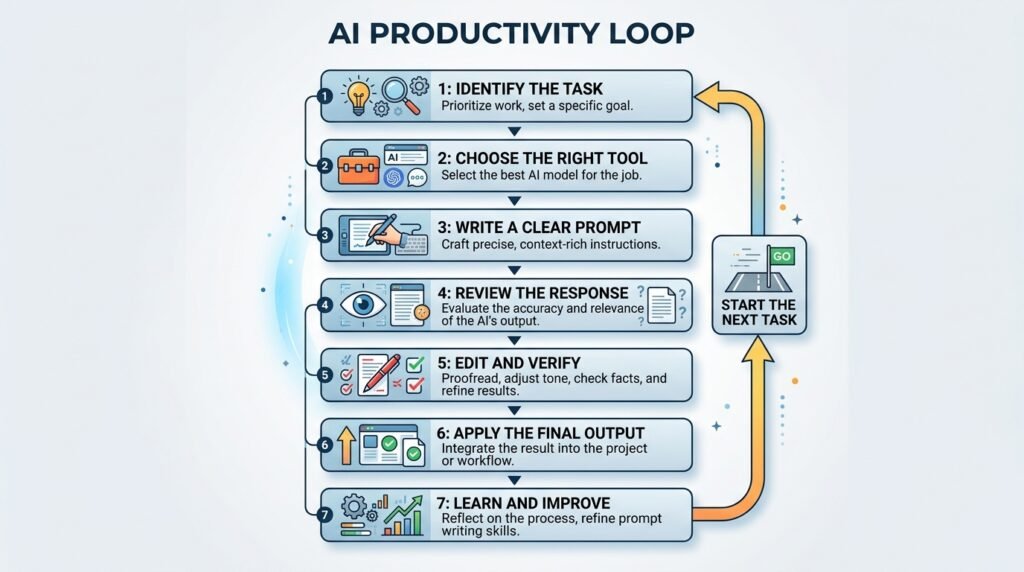
The AI Productivity Cycle
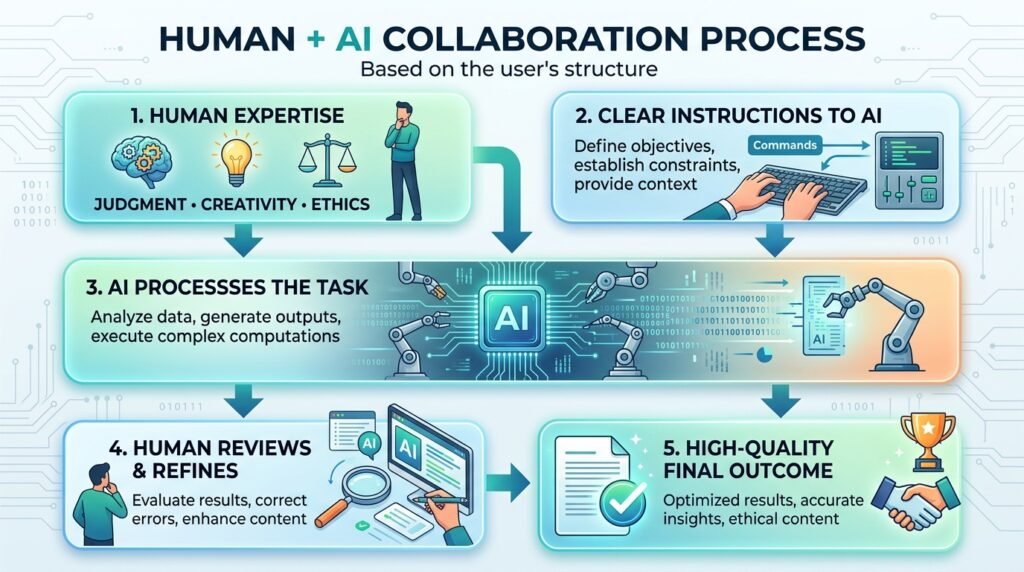
Rather than using AI randomly whenever a task appears, successful users often follow a simple workflow:
Identify the Task
↓
Define the Goal
↓
Choose the Right AI Tool
↓
Write a Clear Prompt
↓
Review the Response
↓
Edit and Improve
↓
Apply Human Judgment
↓
Complete the Task
This cycle encourages thoughtful use of AI and helps ensure that the final output meets your objectives.
Essential AI Skills Everyone Should Develop
Learning to use AI effectively isn’t about memorizing dozens of tools or keeping up with every new model release. The most valuable skills are transferable—they apply regardless of which AI platform you use.
Below are the core competencies that can help you make better use of AI in both personal and professional settings.
1. Asking Better Questions
AI responds to the information you provide. Learning how to communicate your goals clearly is one of the most valuable AI skills. Our guide on What Is Prompt Engineering? explores practical techniques for writing more effective prompts.
For example, instead of asking:
“Help me prepare for an interview.”
Try:
“I’m interviewing for a junior software developer role. Create ten technical interview questions, explain what each question is testing, and provide sample answers suitable for a beginner.”
The second prompt provides purpose, context, and expectations, leading to a more useful response.
If you’re new to writing effective prompts, our guide on What Is Prompt Engineering? explains the techniques in greater detail.
2. Critical Thinking
One of the most common misconceptions about AI is that its responses should always be accepted at face value.
Modern AI systems can produce convincing but inaccurate or incomplete information. Developing the habit of questioning, verifying, and refining AI-generated content is just as important as generating it.
Ask yourself:
- Does this answer make sense?
- Is there evidence supporting these claims?
- Should I verify this information from a trusted source?
- Does this recommendation fit my specific situation?
AI can accelerate your work, but critical thinking ensures that speed doesn’t come at the expense of accuracy.
3. Information Evaluation
Not every AI-generated response is equally reliable.
For example, if you’re using AI to summarize research or explain a legal concept, you should compare the output with authoritative sources such as official documentation, academic publications, or recognized institutions.
This habit helps reduce the risk of relying on outdated or incorrect information.
4. Digital Communication
Working effectively with AI also means communicating in a structured way.
Useful prompts often include:
- A clear objective.
- Relevant background information.
- The intended audience.
- Desired tone.
- Preferred output format.
These principles apply whether you’re asking AI to write an email, generate code, summarize a report, or create study materials.
5. Workflow Design
Rather than using AI as a one-off tool, experienced users build repeatable workflows that combine AI with their own expertise.
For example:
Research → AI Summary → Human Review → Editing → Final Output
This approach improves consistency while keeping the human in control of important decisions.
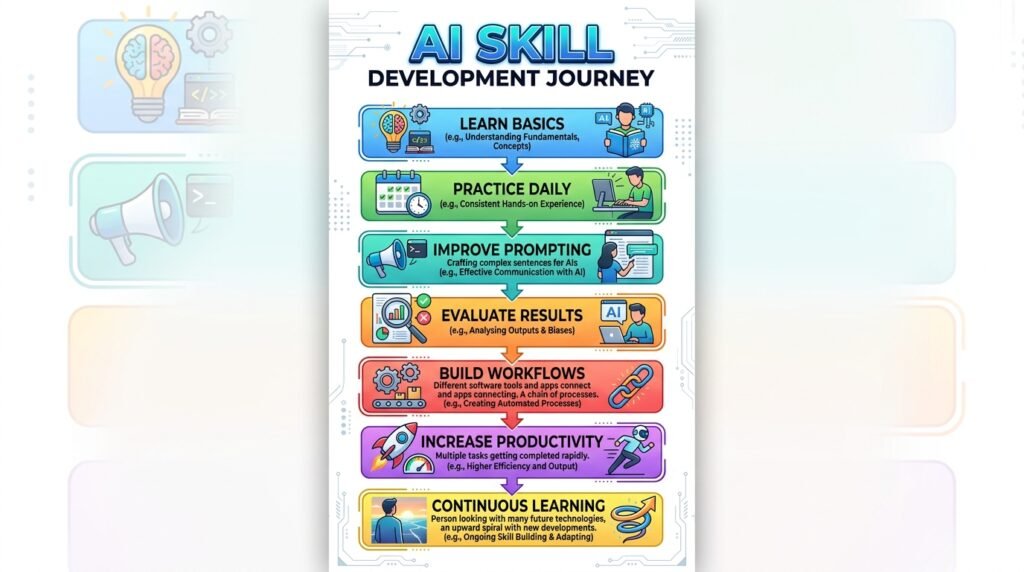
A Practical Framework for Developing AI Skills
Like learning any new skill, becoming proficient with AI requires consistent practice rather than occasional experimentation.
The following framework can help you develop AI skills progressively.
Stage 1: Learn the Fundamentals
Before exploring advanced techniques, build a strong understanding of:
- Artificial Intelligence
- Generative AI
- Large Language Models (LLMs)
- Prompt Engineering
- AI limitations
- Responsible AI use
A solid foundation makes it easier to understand new tools and concepts as they emerge.
Stage 2: Practice Everyday Tasks
Instead of searching for complicated AI projects, start with activities you already perform regularly.
Examples include:
- Drafting emails
- Summarizing articles
- Creating study notes
- Brainstorming ideas
- Planning projects
- Organizing information
Regular practice builds confidence over time.
Stage 3: Experiment and Refine
No prompt is perfect on the first attempt.
Experiment with different approaches by changing:
- Context
- Tone
- Audience
- Output format
- Level of detail
Notice how each adjustment changes the AI’s response.
This process develops intuition that can’t be learned from theory alone.
Stage 4: Build Repeatable Workflows
Once you’ve identified successful prompting techniques, save them.
For example:
- Meeting summary template
- Weekly planning prompt
- Blog outline prompt
- Resume review prompt
- Study guide prompt
Creating reusable templates saves time and improves consistency.
Stage 5: Continue Learning
AI evolves rapidly.
Instead of trying to master every new tool, focus on strengthening your understanding of core concepts that remain valuable over time.
This approach helps you adapt more easily as new AI technologies become available.
Original Framework: The AI Learning Pyramid
Not every AI skill contributes equally to long-term success. The following framework illustrates how foundational knowledge supports more advanced capabilities.
Innovation
(Create New AI Workflows)
▲
Optimization
(Improve Quality and Efficiency)
▲
Practical Application
(Daily Work, Study, Creativity)
▲
AI Communication Skills
(Prompting, Context, Evaluation)
▲
AI Fundamentals
(Concepts, Capabilities, Limitations)
How to use this framework:
- Start with the fundamentals before exploring advanced automation.
- Build communication skills to improve the quality of AI interactions.
- Apply AI to real-world tasks to reinforce learning.
- Optimize your workflows as your confidence grows.
- Innovate by combining AI with your domain expertise to solve unique problems.
Strategies to Improve Efficiency with AI
Learning AI isn’t just about understanding technology—it’s about improving how you work.
Here are practical strategies that can help increase efficiency while maintaining quality.
Automate Repetitive Tasks
AI is particularly effective at reducing time spent on routine work.
Examples include:
- Formatting documents
- Creating meeting summaries
- Drafting emails
- Generating first drafts
- Organizing notes
- Brainstorming ideas
Automating repetitive tasks frees more time for creative thinking and decision-making.
Focus on High-Value Work
Use AI to handle routine activities while you focus on tasks requiring:
- Strategic thinking
- Creativity
- Relationship building
- Decision-making
- Leadership
The goal isn’t to replace human expertise but to make better use of it.
Learn One Tool at a Time
Many beginners feel overwhelmed by the growing number of AI platforms.
If you’re unsure where to begin, explore our curated list of the Best AI Tools for Beginners, which compares popular AI tools for writing, research, coding, productivity, and creativity.
A strong understanding of one AI assistant often transfers well to others.
Document What Works
Whenever you discover an effective workflow or prompt, save it.
Building your own collection of prompts and processes reduces repetitive work and helps maintain consistent quality across similar tasks.
Human vs AI: Understanding Their Strengths
The most effective workflows combine the strengths of both humans and AI.
| Human Strengths | AI Strengths |
| Critical thinking | Processing large amounts of text |
| Creativity and originality | Generating first drafts quickly |
| Ethical judgment | Identifying patterns |
| Emotional intelligence | Summarizing information |
| Strategic decision-making | Organizing and formatting content |
| Real-world experience | Automating repetitive tasks |
Rather than viewing AI as a replacement for human expertise, it’s more productive to think of it as a tool that complements human strengths.
Common Mistakes That Limit AI Effectiveness
Learning to use AI is a gradual process, and most beginners encounter similar challenges. Recognizing these mistakes early can help you avoid frustration and achieve better results.
Treating AI as an Answer Machine
AI is a powerful assistant, but it shouldn’t replace independent thinking.
Instead of accepting every response as correct, use AI to:
- Explore ideas
- Generate first drafts
- Organize information
- Explain unfamiliar concepts
Then apply your own knowledge and judgment before using the results.
Using Vague Instructions
General requests often produce general answers.
For example:
“Help me write a report.”
A more effective prompt would be:
“Write a 500-word project status report for senior managers. Use a professional tone, include completed milestones, current challenges, and next steps.”
The more clearly you define your objective, the more relevant the AI’s response is likely to be.
Depending on AI for High-Stakes Decisions
AI can assist with research and information gathering, but decisions involving health, finance, legal matters, or safety should always involve qualified professionals and trusted sources.
Think of AI as an assistant that helps you prepare—not as the final authority.
Ignoring Privacy and Confidentiality
Many AI platforms process user inputs to improve services or provide functionality. Avoid sharing:
- Passwords
- Financial account details
- Confidential business information
- Personal identification numbers
- Sensitive customer data
If you’re working with confidential information, follow your organization’s policies and use AI tools that meet your security requirements.
Chasing Every New AI Tool
New AI applications appear almost every week.
Trying to learn them all often leads to information overload.
Instead, focus on mastering a few reliable tools that support your everyday work. Strong AI fundamentals make it much easier to adapt to new platforms later.
Responsible AI Use
Using AI effectively also means using it responsibly.
Whether you’re creating content, analyzing information, or automating tasks, responsible practices help maintain accuracy, fairness, and trust.
Verify Important Information
AI can occasionally produce inaccurate or outdated information. When working on important tasks, verify key facts using reputable sources.
Respect Intellectual Property
Use AI to support your creative process rather than copying someone else’s work or presenting AI-generated content as entirely your own without review.
Be Transparent When Appropriate
In professional or academic settings, follow any policies regarding AI-assisted work and disclose AI use if required.
Keep Learning
AI technology continues to evolve. Staying informed about new capabilities and limitations will help you use AI more effectively over time.
Real-World Applications of AI Skills
The value of AI becomes clearer when it’s applied to everyday situations.
Education
Students can use AI to:
- Generate practice quizzes.
- Simplify complex concepts.
- Organize study notes.
- Brainstorm project ideas.
AI should complement active learning, not replace reading, practice, or critical thinking.
Workplace Productivity
Professionals often use AI to:
- Draft emails.
- Summarize meetings.
- Create presentation outlines.
- Analyze documents.
- Plan projects.
Reviewing and refining AI-generated work remains an essential part of the process.
Content Creation
Writers, marketers, and designers can use AI to:
- Generate ideas.
- Create outlines.
- Improve grammar.
- Suggest headlines.
- Repurpose existing content.
Human creativity and editorial judgment remain essential for producing original, high-quality work.
Small Businesses
Business owners can use AI to:
- Draft customer communications.
- Create product descriptions.
- Generate marketing ideas.
- Organize business plans.
- Research competitors.
When combined with industry knowledge and customer insights, AI can become a valuable productivity tool.
Recommended AI Tools for Building AI Skills
The best way to develop AI skills is through hands-on practice. We’ve curated a list of beginner-friendly AI tools—including ChatGPT, Claude, Gemini, Perplexity, and Midjourney—to help you learn faster.
Do’s and Don’ts of Using AI
| Do | Don’t |
| Use AI to save time on repetitive tasks. | Assume every AI response is correct. |
| Provide clear instructions and context. | Use vague prompts and expect perfect results. |
| Verify important facts before acting on them. | Rely on AI alone for critical decisions. |
| Protect sensitive information. | Share confidential or personal data unnecessarily. |
| Continue learning and experimenting. | Stop improving after learning one tool. |
The Future of AI Skills
As AI becomes more integrated into education, business, and everyday life, technical knowledge alone won’t be enough. The ability to communicate effectively with AI, evaluate its outputs, and combine automation with human expertise is becoming an increasingly valuable skill.
Rather than replacing human abilities, AI is changing how we approach work and learning. Tasks that once required significant time can now be completed more efficiently, allowing people to focus on creativity, strategy, collaboration, and problem-solving.
The specific AI tools we use today will continue to evolve, but the underlying skills—clear communication, critical thinking, ethical decision-making, and adaptability—are likely to remain relevant for years to come.
Investing time in developing these skills today can help you stay prepared for the opportunities and challenges of an AI-enabled future.
Frequently Asked Questions
Do I need technical knowledge to start learning AI?
No. Many modern AI tools are designed for beginners and can be used without programming experience. Starting with everyday tasks is often the best way to build confidence.
Which AI tool should beginners learn first?
Choose one tool that matches your goals. For many people, a conversational AI assistant is a good starting point because it can support writing, learning, brainstorming, and research.
Can AI improve workplace productivity?
Yes. AI can automate repetitive tasks, summarize information, assist with communication, and support decision-making. However, human review remains important to ensure quality and accuracy.
How long does it take to develop AI skills?
The basics can be learned in a relatively short time through regular practice. Like any skill, proficiency improves with consistent use and experimentation.
Will AI replace all jobs?
AI is changing how many jobs are performed, but it is more likely to automate specific tasks than replace entire professions. Skills such as creativity, leadership, communication, and critical thinking continue to be valuable alongside AI.
Continue Your AI Learning Journey
Ready to build on these skills? Explore these beginner-friendly guides next:
AI Fundamentals
- What Is Artificial Intelligence? Ultimate Beginner’s Guide
- What Is Generative AI? The Complete Beginner’s Guide
- AI vs Machine Learning vs Deep Learning
- Types of Artificial Intelligence
Master Prompting
- What Is Prompt Engineering?
- How to Write Better AI Prompts
- Prompt Engineering Techniques
- Prompt Templates
- Zero-Shot vs Few-Shot Prompting
- Common Prompt Engineering Mistakes
Explore AI Tools
- What Is ChatGPT?
- Claude: Complete Beginner’s Guide
- What Is Gemini?
- Perplexity AI Explained
- What Is Midjourney?
- 25 Best AI Tools for Beginners
Conclusion
Artificial intelligence is becoming an increasingly important part of how people learn, work, and solve problems. Yet the greatest advantage doesn’t come from simply having access to AI—it comes from knowing how to use it thoughtfully and effectively.
Developing AI skills is a journey that combines technical understanding with human strengths such as curiosity, critical thinking, communication, and ethical judgment. By learning how to ask better questions, evaluate AI-generated information, and integrate AI into your daily workflows, you can improve productivity without sacrificing quality or independent thinking.
The most successful AI users are not those who rely on AI for every answer, but those who understand when to use it, how to guide it, and when human expertise is essential.
As AI technology continues to evolve, these foundational skills will remain valuable regardless of which tools become popular in the future. If you’re continuing your AI learning journey, we recommend exploring our beginner guides on Artificial Intelligence, Generative AI, Prompt Engineering, and How ChatGPT Works to strengthen your understanding of the technologies shaping modern AI.
Your AI Learning Journey Starts Here
Learning AI isn’t about mastering every technology overnight. Start by understanding the fundamentals, experiment with beginner-friendly AI tools, and practice writing effective prompts. As your confidence grows, you can explore more advanced topics such as AI agents, automation, and specialized AI applications.
Every skill you build today will make it easier to adapt to the rapidly evolving AI landscape.
Editor’s Note: AI tools and best practices evolve rapidly. This guide is reviewed regularly to keep recommendations accurate and relevant.
Leave a Reply