🕒 15 min read • Updated: July 2026
Table of Contents
Introduction
Creating high-quality digital artwork once required years of artistic practice or expensive design software. Today, artificial intelligence has made visual creation much more accessible. With just a short text description, you can generate illustrations, concept art, product mockups, fantasy scenes, logos, and much more within minutes.
One of the most popular tools driving this transformation is Midjourney.
Whether you’re a designer looking for inspiration, a marketer creating social media visuals, a business owner exploring branding ideas, or simply curious about AI-generated art, Midjourney offers a powerful and creative way to bring ideas to life.
In this beginner-friendly guide, you’ll learn:
- What Midjourney is
- How it works
- What makes it different from other AI image generators
- How to write effective prompts
- Practical use cases
- Its strengths and limitations
- Tips for getting better results
By the end of this article, you’ll have a solid understanding of Midjourney and know how to begin creating your own AI-generated images.
Key Takeaways
- Midjourney is an AI-powered image generation platform that creates images from text prompts.
- It excels at producing artistic, cinematic, and highly detailed visuals.
- Good prompts significantly improve image quality.
- Midjourney is widely used by artists, designers, marketers, and content creators.
- Learning prompt writing is one of the most valuable skills for achieving consistent results.
What Is Midjourney?
Midjourney is an artificial intelligence image generation platform that transforms written descriptions—known as prompts—into original digital images.
Instead of drawing an image manually, you simply describe what you want in natural language. Midjourney interprets your prompt and generates one or more images that match your description as closely as possible.
For example, you could enter a prompt like:
“A cozy mountain cabin during snowfall at sunrise with warm lights, realistic photography.”
Within moments, Midjourney generates multiple unique interpretations of that description.
The generated images may include different lighting, camera angles, compositions, colors, and artistic styles while staying true to your original idea.
This makes Midjourney feel less like a traditional design tool and more like a creative collaborator.
A Simple Analogy
Imagine working with an artist.
Instead of handing them a sketch, you describe your idea in words.
You might say:
“Paint a futuristic city floating above the clouds during sunset.”
The artist interprets your description and creates several different versions.
Midjourney works in a similar way—except it does so using artificial intelligence instead of a human painter.
What Can Midjourney Create?
Midjourney can generate a wide variety of visual styles, including:
- Digital paintings
- Fantasy artwork
- Character concepts
- Product mockups
- Book covers
- Social media graphics
- Architecture concepts
- Fashion designs
- Landscapes
- Interior design ideas
- Story illustrations
- Concept art
- Game environments
- Poster concepts
Its flexibility makes it valuable across creative industries.
Why Midjourney Matters
Artificial intelligence is changing how visual content is created.
Traditionally, creating professional-quality artwork required significant time, technical skill, and expensive software.
Midjourney lowers many of those barriers by allowing users to generate impressive visuals using simple text descriptions.
This doesn’t replace human creativity. Instead, it expands what’s possible by helping users explore ideas more quickly, experiment with different styles, and iterate on concepts in minutes rather than hours.
For many creators, Midjourney serves as a creative assistant rather than a replacement for traditional design skills.
Benefits of Midjourney
Faster Ideation
Instead of sketching dozens of concepts manually, users can generate multiple visual directions within minutes.
For example, a game designer can explore different character styles before creating the final artwork.
Accessible to Beginners
You don’t need advanced drawing skills to start creating images.
If you can clearly describe an idea, you can begin experimenting with Midjourney.
Creative Exploration
Midjourney often produces unexpected variations that can inspire entirely new ideas.
Many designers use it during brainstorming rather than only for final artwork.
Professional Visual Quality
One reason Midjourney has become so popular is its distinctive visual style.
Its outputs often feature:
- rich lighting
- detailed textures
- cinematic compositions
- painterly aesthetics
- imaginative interpretations
These characteristics make it especially popular for concept art and storytelling.
How Does Midjourney Work?
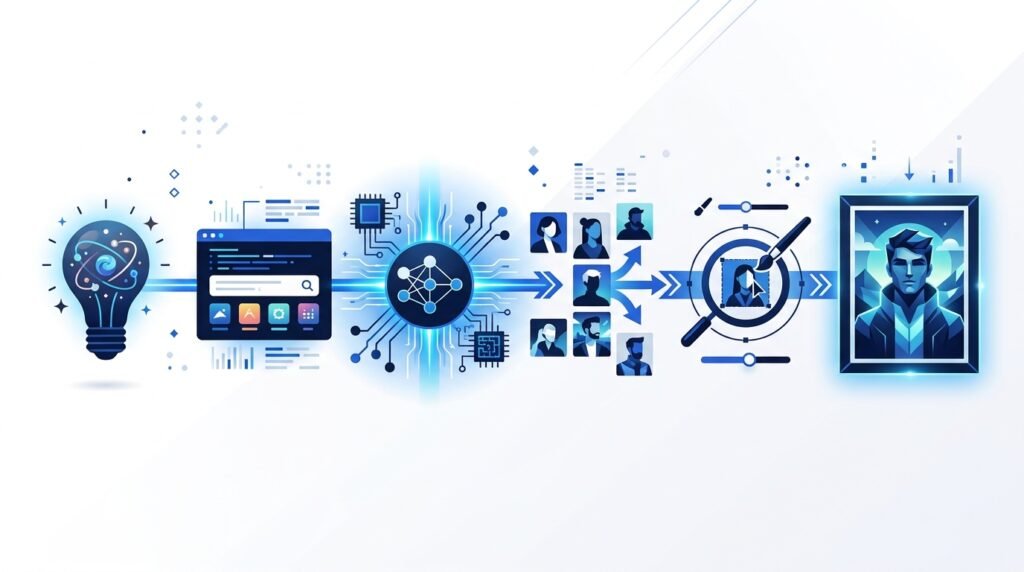
Although the technology behind Midjourney is complex, the basic workflow is surprisingly simple.
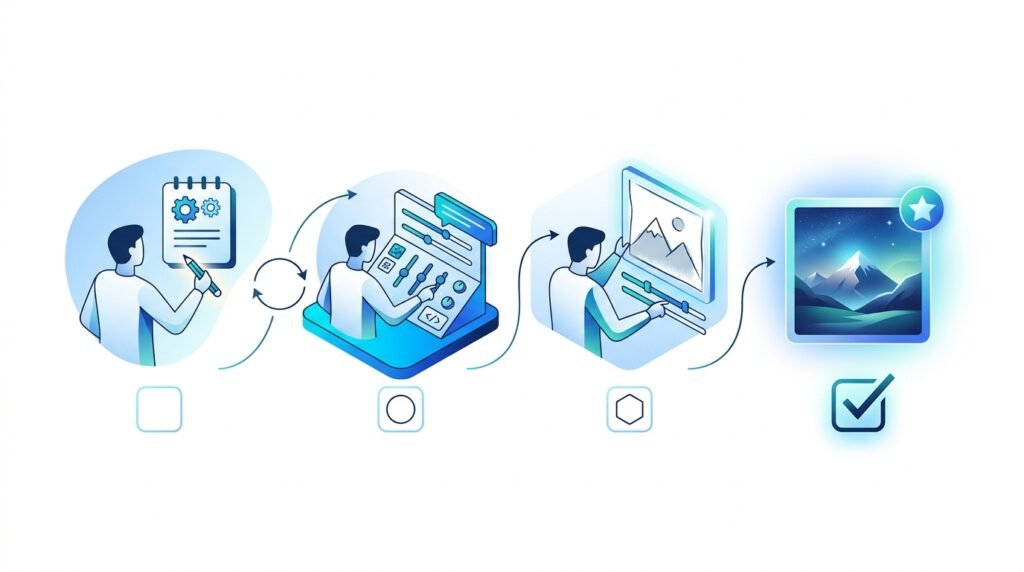
The process typically follows these steps:
Idea
↓
Write Prompt
↓
AI Interprets Prompt
↓
Generates Multiple Images
↓
Choose Favorite Version
↓
Upscale or Create Variations
↓
Final Image
Step 1: Describe Your Idea
Everything begins with a prompt.
A prompt is simply a written description of the image you want to create.
For example:
“A futuristic Tokyo street at night, neon lights reflecting on wet pavement, cinematic photography.”
The more descriptive your prompt is, the better the AI understands your vision.
Step 2: AI Processes the Prompt
Midjourney analyzes your prompt and identifies important elements such as:
- subjects
- objects
- environment
- lighting
- mood
- artistic style
- perspective
- colors
- composition
It then combines these concepts using its trained AI model to create entirely new images.
Step 3: Image Generation
Rather than producing a single image, Midjourney usually generates several variations.
Each version interprets the prompt slightly differently, giving you multiple creative directions to choose from.
For example, if your prompt describes a forest, one image might emphasize warm golden sunlight while another focuses on misty, mysterious lighting.
Step 4: Refinement
Once the initial images are generated, you can continue refining them by:
- creating variations
- increasing resolution (upscaling)
- modifying your prompt
- changing artistic styles
- adjusting aspect ratios
- adding or removing details
This iterative process helps you gradually move closer to your desired result.
Key Features of Midjourney
1. High-Quality Artistic Images
Midjourney is known for producing visually striking artwork with impressive detail and composition.
Many users prefer it for projects where aesthetics and creativity are especially important.
2. Natural Language Prompts
You don’t need to learn a programming language or complex commands.
Simply describe your idea in everyday language.
For example:
“A peaceful Japanese garden in autumn, soft morning fog, realistic photography.”
3. Multiple Variations
Every prompt typically generates several unique interpretations.
This allows users to compare different compositions and choose the strongest result.
4. Style Flexibility
Midjourney supports a wide range of artistic styles, including:
- Realistic photography
- Watercolor
- Oil painting
- Anime
- Minimalism
- Fantasy
- Sci-fi
- Pixel art
- Sketches
- Concept art
- Vintage illustrations
This versatility makes it suitable for many creative projects.
5. Iterative Creativity
Rather than expecting a perfect image on the first attempt, Midjourney encourages experimentation.
Small adjustments to your prompt can produce dramatically different outcomes, making prompt refinement a core part of the creative process.
Understanding Prompts
A prompt is the instruction you give Midjourney.
Think of it as a creative brief.
The AI relies entirely on the information you provide, so the clarity and detail of your prompt directly influence the quality of the generated image.
Weak Prompt
“A dog.”
While Midjourney can generate an image from this prompt, the result may be too generic because it lacks detail.
Better Prompt
“A golden retriever sitting beside a calm mountain lake at sunrise, surrounded by pine trees, realistic photography, warm golden lighting.”
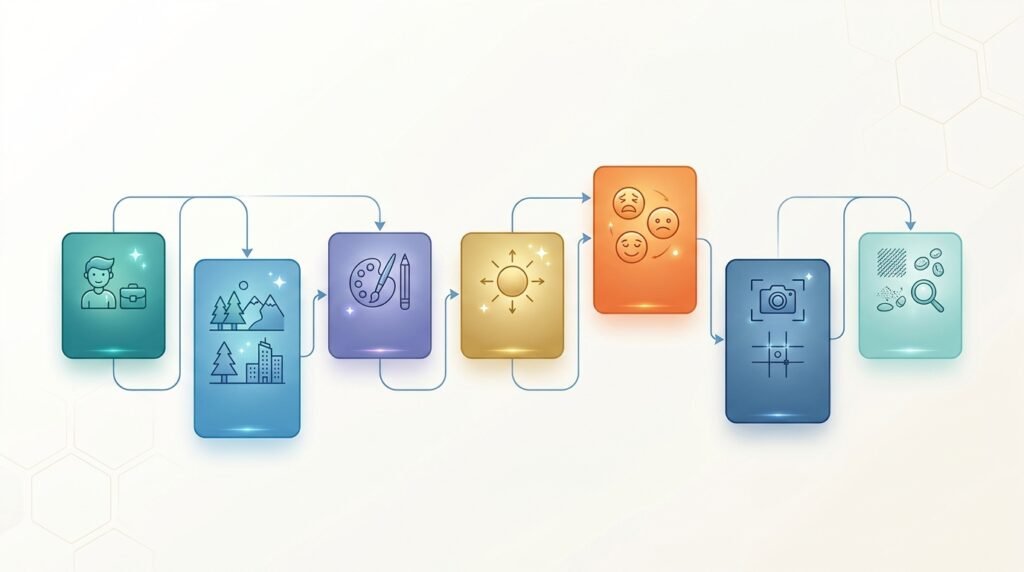
The second prompt provides:
- Subject
- Environment
- Time of day
- Lighting
- Style
- Mood
As a result, the AI has much more context to generate an image that closely matches your vision.
Beginner Prompt Formula
A simple way to write effective prompts is:
Subject + Setting + Style + Lighting + Mood + Details
For example:
“A futuristic electric car driving through a rainy cyberpunk city at night, cinematic lighting, ultra-detailed, realistic photography.”
This structure helps beginners create more specific and visually compelling results.
Example: Creating Your First Image
Imagine you want to create a fantasy book cover.
Instead of writing:
“Castle”
You could write:
“A majestic stone castle on top of a snowy mountain during sunrise, dramatic clouds, fantasy illustration, highly detailed, warm golden lighting, epic atmosphere.”
The second prompt gives Midjourney a much richer creative direction, leading to more compelling results.
Who Should Use Midjourney?
Midjourney is suitable for a wide range of users, including:
| User | How Midjourney Helps |
| Designers | Generate concepts and creative inspiration |
| Content Creators | Create unique visuals for blogs and social media |
| Marketers | Produce campaign ideas and promotional graphics |
| Business Owners | Explore branding and product concepts |
| Authors | Design book cover concepts and story illustrations |
| Game Developers | Create characters, environments, and concept art |
| Students | Learn AI-assisted creative workflows |
| Hobbyists | Experiment with digital art without advanced design skills |
Getting Started with Midjourney
Once you understand how prompts work, the next step is learning how people use Midjourney in real projects.
Unlike traditional graphic design software, Midjourney is designed for rapid idea generation. Many professionals use it during the early stages of a project to explore creative directions before refining the final design in other tools.
Common Use Cases for Midjourney
1. Concept Art
Concept artists use Midjourney to quickly visualize ideas for:
- Video games
- Films
- Animations
- Graphic novels
- World-building
Example
A game studio designing a fantasy kingdom can generate dozens of castle designs, landscapes, and character concepts in a single brainstorming session.
2. Marketing and Advertising
Marketing teams often use Midjourney to create:
- Campaign concepts
- Social media visuals
- Presentation graphics
- Mood boards
- Creative inspiration
Example
A travel company could generate visuals of a tropical island at sunset to inspire a future advertising campaign.
3. Book and Story Illustration
Authors can use Midjourney to visualize:
- Characters
- Fictional locations
- Book cover concepts
- Story scenes
Example
An author writing a science fiction novel can create concept images of futuristic cities to help communicate the story’s atmosphere.
4. Product Design Inspiration
Product designers frequently explore:
- Furniture concepts
- Packaging ideas
- Consumer electronics
- Fashion designs
- Industrial products
It’s important to note that AI-generated concepts typically require further refinement before becoming production-ready.
5. Interior and Architecture Inspiration
Architects and interior designers can use Midjourney to visualize:
- Living rooms
- Office spaces
- Cafés
- Hotels
- Building exteriors
- Landscape concepts
These images can serve as inspiration during the early design process rather than as final construction plans.
6. Educational Content
Teachers, bloggers, and course creators use Midjourney to create original illustrations for:
- Articles
- Presentations
- Infographics
- Learning materials
- Explainer videos
Custom visuals can make educational content more engaging than generic stock images.
Midjourney Pricing Overview
Midjourney is a subscription-based service. Different plans typically provide varying amounts of image generation time and features. Pricing and plan details can change over time, so it’s best to check the official website before subscribing.
When choosing a plan, consider:
- How often you’ll generate images
- Whether you need commercial usage rights
- The amount of image generation included
- Additional features such as privacy or faster generation modes
If you’re just getting started, a lower-tier plan may be sufficient while you learn prompting and experiment with different styles.
Midjourney vs Other AI Image Generators
Choosing the right AI image generator depends on your goals. Each platform has strengths and trade-offs.
| Feature | Midjourney | DALL·E | Stable Diffusion | Adobe Firefly |
|---|---|---|---|---|
| Best for | Artistic and cinematic images | General-purpose image generation | Customization and open-source workflows | Commercial design integration |
| Ease of use | Beginner-friendly | Beginner-friendly | Intermediate to advanced | Beginner-friendly |
| Image quality | Excellent artistic detail | Strong realism and versatility | Depends on model and setup | High-quality commercial graphics |
| Customization | Moderate | Moderate | Extensive | Moderate |
| Local installation | No | No | Yes (optional) | No |
| Ideal users | Artists, creators, designers | General users, educators | Developers, researchers, advanced users | Marketing teams and designers |
Which Should You Choose?
- Choose Midjourney if you want visually stunning artistic images with minimal setup.
- Choose DALL·E if you need versatile image generation integrated with conversational AI.
- Choose Stable Diffusion if you want maximum control, customization, or the ability to run models locally.
- Choose Adobe Firefly if you work within Adobe’s creative ecosystem and need commercially oriented design features.
Benefits of Midjourney
Produces High-Quality Visuals
Midjourney is widely recognized for creating detailed, imaginative, and visually appealing images.
Encourages Creativity
Rather than replacing creativity, Midjourney can help users explore multiple visual directions and refine ideas more quickly.
Saves Time During Brainstorming
Generating several concepts in minutes can significantly reduce the time spent on early-stage ideation.
Accessible to Non-Artists
People without formal art training can create impressive visuals by learning how to write clear prompts.
Supports Diverse Creative Projects
From blog illustrations to product concepts, Midjourney can assist with a broad range of visual tasks.
Limitations of Midjourney
Like any AI tool, Midjourney has limitations that users should understand.
Results Can Be Unpredictable
Even detailed prompts may produce unexpected or inconsistent images. Refinement is often part of the creative process.
Learning Better Prompting Takes Practice
Although beginners can start quickly, writing prompts that consistently produce high-quality results requires experimentation and experience.
Not a Replacement for Professional Design Skills
AI can generate concepts and visuals, but human judgment remains essential for branding, usability, accessibility, and production-ready design.
Copyright and Usage Considerations
Copyright laws and licensing around AI-generated content continue to evolve in many regions. If you’re creating images for commercial use, review Midjourney’s current terms of service and consider any legal requirements that apply in your jurisdiction.
Best Practices for Using Midjourney
Start with a Clear Idea
Before writing a prompt, think about the subject, style, mood, and purpose of the image.
Add Meaningful Details
Include information such as:
- Subject
- Environment
- Lighting
- Camera angle
- Artistic style
- Color palette
- Mood
Specific prompts often produce more relevant results than vague descriptions.
Experiment with Variations
Treat your first generation as a starting point. Generate variations and refine your prompts to improve the outcome.
Study Prompt Examples
Looking at successful prompts from experienced users can help you understand how different descriptions influence the generated image.
Combine AI with Human Creativity
Use Midjourney as a creative partner. Review, edit, and refine AI-generated images to better match your goals rather than relying on the first result.
Common Mistakes Beginners Make
Writing Extremely Short Prompts
A prompt like “cat” provides little context.
Instead, describe the setting, style, lighting, and mood.
Expecting Perfect Results Immediately
Creating high-quality AI images is an iterative process. Small prompt changes can lead to significantly different outputs.
Ignoring Image Composition
Consider perspective, framing, and focal points when describing your image. Composition can greatly affect the final result.
Overloading the Prompt
Adding too many unrelated details can confuse the AI and produce cluttered images. Aim for clarity rather than excessive complexity.
Forgetting the Intended Purpose
A prompt for a social media illustration may differ from one for concept art or a book cover. Tailor your prompts to the project’s goal.
Frequently Asked Questions
1. Is Midjourney free to use?
Midjourney primarily operates on a paid subscription model. Availability of free trials or promotional access may change over time, so check the official website for the latest information.
2. Do I need artistic skills to use Midjourney?
No. While artistic knowledge can help you write more descriptive prompts, beginners can create impressive images by learning prompt-writing fundamentals.
3. Can Midjourney create realistic images?
Yes. Midjourney can generate realistic, stylized, and artistic images depending on the prompt and settings you use.
4. Is Midjourney suitable for commercial projects?
Many users create images for commercial purposes. However, always review Midjourney’s licensing terms and ensure your usage complies with applicable laws and platform policies.
5. What makes Midjourney different from traditional graphic design software?
Traditional design tools require users to create visuals manually. Midjourney generates original images from text descriptions, making it useful for rapid ideation and creative exploration.
6. Can Midjourney replace graphic designers?
Not entirely. Professional designers contribute strategic thinking, branding expertise, user experience knowledge, and creative judgment that AI cannot fully replicate.
7. How can I improve my Midjourney prompts?
Practice writing clear, descriptive prompts that include the subject, environment, lighting, style, mood, and other relevant details. Reviewing successful examples and refining your prompts over time will also improve your results.
8. Is Midjourney the best AI image generator?
There is no single “best” tool for every use case. Midjourney excels at artistic and cinematic visuals, while other platforms may be better suited for photorealism, customization, or integration with existing creative workflows.
Conclusion
Midjourney has made AI-powered image generation accessible to creators of all skill levels. By transforming simple text prompts into detailed visuals, it enables artists, designers, educators, marketers, and hobbyists to explore ideas faster and experiment with new creative possibilities.
While the tool is powerful, achieving consistently strong results takes practice. Learning to write effective prompts, refining generated images, and understanding the platform’s strengths and limitations are all part of the creative process.
As AI image generation continues to evolve, Midjourney is likely to remain an important tool for visual ideation and artistic exploration. Whether you’re creating concept art, educational illustrations, marketing assets, or personal projects, developing prompt-writing skills today can help you make better use of AI-assisted creativity in the future.
Leave a Reply