
🕒 12-14 min read • Updated: July 2026
Table of Contents
Introduction
Running a business means wearing many hats. One moment you’re responding to customer emails, the next you’re creating invoices, scheduling meetings, managing social media, or analyzing sales reports. As your business grows, these repetitive tasks can quickly consume valuable time that could be spent serving customers, improving products, or planning for the future.
This is where AI business automation comes in.
Instead of spending hours on repetitive work, businesses can now use artificial intelligence to automate everyday tasks, improve accuracy, and increase productivity. From answering customer questions and writing emails to organizing documents and generating reports, AI has become a practical tool that helps businesses work smarter—not harder.
The best part? You don’t need to be a large enterprise or have technical expertise to benefit from AI automation. Many modern AI tools are affordable, beginner-friendly, and offer free plans that make it easy to get started.
In this guide, you’ll learn:
- What AI business automation is
- How it works
- Its benefits and limitations
- Real-world business examples
- The best AI automation tools
- How to implement AI in your business step by step
Whether you’re a freelancer, entrepreneur, small business owner, or simply curious about AI, this guide will help you understand how AI business automation can save time and support business growth.
Quick Answer
AI business automation is the use of artificial intelligence to automate repetitive business tasks such as customer support, email management, scheduling, document processing, marketing, reporting, and data analysis. Unlike traditional automation, AI can understand language, recognize patterns, and make context-aware decisions, helping businesses become more efficient while allowing employees to focus on higher-value work.
Key Takeaways
- AI business automation reduces repetitive manual work.
- Businesses of all sizes can automate everyday workflows using affordable AI tools.
- AI improves productivity, accuracy, and decision-making without replacing human expertise.
- The most successful implementations start with one simple workflow before expanding.
- Human oversight remains essential for quality, security, and ethical decision-making.
What Is AI Business Automation?
AI business automation is the process of using artificial intelligence to perform tasks that would otherwise require manual effort. These tasks often involve handling information, making routine decisions, generating content, or organizing business processes.
Unlike traditional automation, which follows fixed rules, AI can analyze data, understand natural language, identify patterns, and adapt to different situations.
For example, a traditional automation system might send an invoice every Friday at 5 PM because it follows a predefined schedule. An AI-powered system, however, can identify overdue invoices, draft personalized payment reminders, prioritize high-value customers, and recommend the best time to follow up based on previous interactions.
This ability to interpret information and respond intelligently makes AI automation far more flexible than conventional workflow automation.
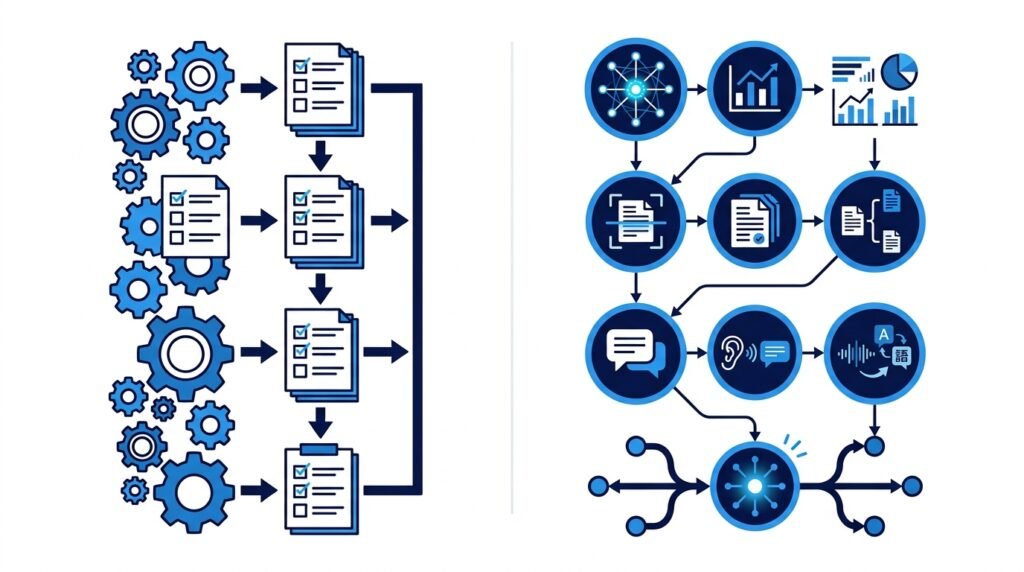
AI Automation vs Traditional Automation
| Traditional Automation | AI Business Automation |
| Rule-based workflows | Learns from patterns and data |
| Performs repetitive tasks | Handles repetitive and cognitive tasks |
| Requires predefined conditions | Can adapt to different inputs |
| Limited decision-making | Context-aware recommendations |
| Static workflows | Continuously improves with better prompts and data |
Think of traditional automation as following a checklist. AI automation is more like working with a capable assistant that can understand instructions, summarize information, and help make routine decisions.
Why Businesses Are Adopting AI Automation
Businesses today generate more emails, documents, customer inquiries, and operational data than ever before. Managing all of this manually is time-consuming and often leads to delays or errors.
AI automation helps organizations:
- Reduce repetitive administrative work.
- Respond to customers more quickly.
- Improve consistency across business processes.
- Analyze data faster.
- Support employees instead of replacing them.
Rather than eliminating jobs, AI often shifts employees away from repetitive tasks so they can focus on creativity, problem-solving, customer relationships, and strategic planning.
For small businesses with limited teams, this productivity boost can have a significant impact.

How AI Business Automation Works
At a high level, AI business automation follows a simple workflow:
- Input: Information enters the system, such as an email, customer message, invoice, or form submission.
- Analysis: AI processes the information using machine learning or natural language processing to understand the context.
- Decision: Based on predefined rules and AI recommendations, the system determines the appropriate action.
- Automation: The task is completed automatically, such as sending a response, updating a CRM, creating a report, or scheduling a meeting.
- Human Review (When Needed): Employees can review, edit, or approve important actions before they’re finalized.
For example, imagine a customer sends an email asking about pricing. Instead of waiting for a manual response, an AI assistant can identify the inquiry, draft a personalized reply, attach relevant pricing information, and notify a sales representative if additional assistance is needed.
This combination of automation and human oversight helps businesses work more efficiently while maintaining quality and customer trust.
Benefits of AI Business Automation
AI business automation isn’t just about reducing workload—it’s about helping businesses operate more efficiently, make better decisions, and create a better experience for both employees and customers.
Whether you’re a freelancer, startup founder, or managing an established company, AI can automate repetitive tasks and allow your team to focus on work that requires creativity, strategy, and human judgment.
Here are the biggest benefits of AI business automation.
1. Saves Time by Automating Repetitive Tasks
Many business activities follow the same pattern every day:
- Responding to common emails
- Scheduling meetings
- Creating invoices
- Updating spreadsheets
- Organizing documents
- Preparing reports
Although each task may only take a few minutes, together they can consume several hours every week.
AI can automate these repetitive activities, allowing employees to spend more time solving customer problems, developing new ideas, or growing the business.
Example
Instead of manually replying to every customer inquiry, an AI assistant can:
- Understand the question
- Draft a personalized response
- Recommend relevant products or services
- Escalate complex requests to a human agent
This significantly reduces response time while maintaining quality.
2. Increases Employee Productivity
Employees often switch between multiple applications throughout the day.
For example, a salesperson might:
- Read customer emails
- Update the CRM
- Schedule follow-up meetings
- Create proposals
- Prepare reports
AI can automate much of this workflow by collecting information, summarizing conversations, updating records, and generating first drafts.
Instead of replacing employees, AI acts like a digital assistant that helps them complete tasks faster.
3. Reduces Human Errors
Manual work increases the likelihood of mistakes, especially when handling repetitive tasks.
Common examples include:
- Incorrect invoice amounts
- Data entry errors
- Missing customer information
- Duplicate records
- Sending emails to the wrong recipients
AI can automatically validate information, identify inconsistencies, and reduce these avoidable errors.
This improves data quality and helps businesses maintain professional standards.
4. Improves Customer Experience
Modern customers expect fast responses and personalized interactions.
AI business automation can help by:
- Providing instant answers to common questions
- Routing inquiries to the right department
- Personalizing email communication
- Sending proactive updates
- Following up automatically after purchases
For example, instead of waiting until the next business day for a reply, customers can receive immediate assistance from an AI-powered chatbot while more complex issues are forwarded to a support representative.
Faster communication often leads to higher customer satisfaction.
5. Supports Better Decision-Making
Businesses generate large amounts of information every day, including:
- Sales reports
- Customer feedback
- Marketing performance
- Website analytics
- Financial data
Reviewing all this information manually is difficult and time-consuming.
AI can quickly summarize reports, identify trends, highlight unusual activity, and generate insights that help business owners make more informed decisions.
Instead of spending hours searching through spreadsheets, managers can focus on interpreting insights and taking action.
6. Lowers Operating Costs
Hiring additional employees isn’t always the only way to handle growing workloads.
By automating repetitive administrative tasks, businesses can:
- Process more work with existing teams
- Reduce overtime
- Minimize repetitive manual effort
- Improve operational efficiency
This doesn’t necessarily reduce headcount. Instead, it allows employees to spend more time on higher-value work that contributes directly to business growth.
7. Makes Businesses More Scalable
As businesses grow, the number of customer inquiries, documents, and daily tasks also increases.
Without automation, growth often means hiring more staff simply to keep up with routine work.
AI allows businesses to scale more efficiently by handling increasing workloads without proportionally increasing manual effort.
For example:
A small online store receiving 20 customer inquiries per day can usually answer them manually.
But when that number grows to 300 inquiries daily, AI can handle common questions while customer support teams focus on complex cases.
8. Helps Teams Focus on High-Value Work
The greatest value of AI isn’t replacing people—it’s freeing them to do work that AI cannot.
Instead of spending hours on repetitive administration, employees can focus on:
- Building customer relationships
- Strategic planning
- Product innovation
- Creative problem-solving
- Business development
Businesses that use AI effectively combine automation with human expertise to achieve better results than either could accomplish alone.
Benefits at a Glance
| Benefit | Business Impact |
| Saves time | Automates repetitive tasks and reduces manual effort |
| Improves productivity | Helps employees complete work more efficiently |
| Reduces errors | Improves accuracy in data entry and routine processes |
| Enhances customer service | Faster responses and more consistent support |
| Better decision-making | Generates insights from business data |
| Reduces costs | Improves operational efficiency without sacrificing quality |
| Supports business growth | Handles increasing workloads as the business expands |
| Frees employees for strategic work | Allows teams to focus on creativity and innovation |
Key Insight
AI business automation delivers the greatest value when it complements human expertise rather than replacing it. Businesses that automate repetitive, time-consuming tasks can respond faster, work more efficiently, and scale with greater confidence while keeping people at the center of decision-making.
15 Real-World Examples of AI Business Automation
AI business automation is already transforming the way organizations operate. From small startups to global enterprises, businesses are using AI to automate repetitive tasks, improve customer experiences, and make faster decisions.
Here are some of the most practical ways AI is being used across different business functions.
1. Customer Support Automation
One of the most common uses of AI is handling customer inquiries.
AI-powered chatbots and virtual assistants can:
- Answer frequently asked questions
- Track orders
- Process returns
- Book appointments
- Escalate complex issues to human agents
Example
An online clothing store receives hundreds of questions every day about shipping, returns, and product availability.
Instead of waiting for a support representative, customers receive instant responses from an AI chatbot, while more complex requests are forwarded to the support team.
Business Benefit
- Faster response times
- Reduced support workload
- Improved customer satisfaction
2. Email Management
Reading and replying to emails can consume several hours each week.
AI assistants can:
- Summarize long email threads
- Draft professional replies
- Prioritize important messages
- Categorize emails automatically
- Schedule follow-ups
Example
A sales manager receives 150 emails daily.
Instead of reading every message individually, AI highlights urgent emails, summarizes conversations, and drafts responses that only require review before sending.
3. Marketing Content Creation
Marketing teams constantly create:
- Blog posts
- Product descriptions
- Social media posts
- Email campaigns
- Advertisement copy
AI can generate first drafts, brainstorm ideas, improve grammar, and adapt content for different platforms.
Example
Instead of writing five different social media captions manually, a marketer uses AI to generate multiple variations and then edits the best one.
AI speeds up the process, while human creativity ensures the content reflects the brand’s voice.
4. Lead Qualification
Sales teams often spend valuable time contacting prospects who may not be ready to buy.
AI can analyze:
- Website behavior
- Form submissions
- Previous interactions
- Purchase history
- Engagement levels
It then prioritizes leads that are more likely to convert.
Example
A software company receives 300 demo requests each month.
AI automatically scores leads based on their behavior and sends the most promising prospects directly to the sales team.
5. Meeting Notes and Summaries
Business meetings often generate pages of notes.
AI can:
- Transcribe conversations
- Identify action items
- Summarize key decisions
- Assign follow-up tasks
This eliminates manual note-taking and helps teams stay aligned.
6. Invoice and Document Processing
Finance departments spend considerable time processing invoices and receipts.
AI can automatically:
- Extract important information
- Match invoices with purchase orders
- Detect duplicate payments
- Flag unusual transactions
Example
Instead of manually reviewing hundreds of invoices each month, an accounting team uses AI to organize and verify financial documents before approval.
7. Social Media Scheduling
Managing multiple social media accounts involves planning, writing, and publishing content consistently.
AI can help by:
- Suggesting post ideas
- Writing captions
- Recommending hashtags
- Scheduling posts
- Analyzing engagement
Marketing teams still review the content, but AI significantly reduces preparation time.
8. Human Resources and Recruitment
Hiring involves reviewing resumes, scheduling interviews, and answering candidate questions.
AI can assist by:
- Screening resumes
- Matching candidates to job descriptions
- Scheduling interviews
- Answering common recruitment questions
Human recruiters continue making hiring decisions, but AI reduces repetitive administrative work.
9. Sales Forecasting
Predicting future sales using spreadsheets alone can be difficult.
AI analyzes:
- Historical sales
- Seasonal trends
- Customer behavior
- Market conditions
This helps businesses estimate future demand more accurately.
Example
A retailer uses AI to predict increased demand before the holiday season, allowing inventory to be restocked in advance.
10. Inventory Management
Businesses often struggle with having too much or too little inventory.
AI can monitor:
- Product demand
- Sales trends
- Supplier performance
- Seasonal buying patterns
It then recommends when to reorder products and how much stock to maintain.
11. Employee Onboarding
New employees often receive the same documents, policies, and training materials.
AI can automate:
- Welcome emails
- Training schedules
- Frequently asked questions
- Document distribution
- Progress tracking
This creates a more consistent onboarding experience while reducing HR workload.
12. Business Reporting
Instead of spending hours building reports manually, AI can automatically generate summaries from:
- Sales data
- Marketing campaigns
- Financial reports
- Website analytics
Managers receive concise reports highlighting important trends and recommendations.
13. Fraud Detection
Banks, payment providers, and e-commerce businesses use AI to detect unusual behavior.
AI continuously monitors transactions and flags suspicious activity that may require further investigation.
This helps reduce financial losses while improving customer security.
14. Workflow Automation Across Departments
Many business processes involve multiple teams.
For example:
Customer submits a form
↓
Sales receives a notification
↓
CRM updates automatically
↓
Invoice is generated
↓
Welcome email is sent
↓
Support team receives customer details
Instead of employees completing each step manually, AI and automation platforms keep information moving between systems automatically.
15. Knowledge Management
Businesses store valuable information across emails, documents, policies, presentations, and internal databases.
AI-powered knowledge assistants can:
- Search company documents
- Answer employee questions
- Summarize policies
- Find relevant information in seconds
Instead of searching through dozens of folders, employees simply ask a question and receive a concise answer with references.
Common Business Functions That Can Be Automated
| Department | AI Automation Examples |
| Customer Support | Chatbots, ticket routing, FAQs |
| Marketing | Content creation, email campaigns, SEO assistance |
| Sales | Lead scoring, CRM updates, proposal drafting |
| Finance | Invoice processing, expense categorization, forecasting |
| Human Resources | Resume screening, onboarding, training |
| Operations | Workflow automation, scheduling, reporting |
| IT | Help desk responses, documentation, monitoring |
| Management | Dashboards, meeting summaries, business insights |
Key Insight
You don’t need to automate your entire business overnight. Most successful companies begin with one repetitive task—such as email management or customer support—and gradually expand AI automation as they become more comfortable with the technology.
Starting small reduces complexity, helps teams build confidence, and delivers measurable results before larger investments are made.

Best AI Tools for Business Automation (2026)
Choosing the right AI tool can significantly improve how your business operates. However, with hundreds of AI platforms available, it’s easy to feel overwhelmed.
The good news is that you don’t need dozens of tools to automate your business effectively. In most cases, a combination of two or three well-chosen AI tools is enough to streamline daily operations and improve productivity.
Below are some of the best AI tools for business automation, selected based on ease of use, practical value, integration capabilities, and suitability for beginners and small businesses.
Quick Comparison
| Tool | Best For | Free Plan | Beginner Friendly |
| ChatGPT | Content creation, brainstorming, customer support | ✅ | ⭐⭐⭐⭐⭐ |
| Microsoft Copilot | Microsoft 365 productivity | Limited | ⭐⭐⭐⭐⭐ |
| Google Gemini | Google Workspace automation | ✅ | ⭐⭐⭐⭐☆ |
| Notion AI | Documentation & knowledge management | Limited | ⭐⭐⭐⭐⭐ |
| Zapier | Workflow automation between apps | ✅ | ⭐⭐⭐⭐☆ |
| Make | Advanced visual automation | ✅ | ⭐⭐⭐⭐☆ |
| Grammarly | Writing & communication | ✅ | ⭐⭐⭐⭐⭐ |
| Canva AI | Marketing & design | ✅ | ⭐⭐⭐⭐⭐ |
| HubSpot AI | CRM & sales automation | Limited | ⭐⭐⭐⭐☆ |
| Perplexity AI | Business research & analysis | ✅ | ⭐⭐⭐⭐⭐ |
1. ChatGPT
Best For
- Writing emails
- Creating reports
- Brainstorming ideas
- Customer support drafts
- Document summarization
- SOP creation
ChatGPT has become one of the most versatile AI assistants for businesses. It can help draft proposals, summarize meetings, create marketing content, generate spreadsheets, write policies, and answer customer questions.
For many businesses, ChatGPT serves as an everyday productivity assistant rather than a replacement for employees.
Ideal For
- Entrepreneurs
- Freelancers
- Small businesses
- Marketing teams
- Customer support teams
2. Microsoft Copilot
Best For
Businesses already using Microsoft 365.
Copilot integrates directly with:
- Word
- Excel
- Outlook
- PowerPoint
- Teams
Examples include:
- Summarizing meetings
- Writing emails
- Creating presentations
- Analyzing spreadsheets
- Drafting business documents
If your business relies heavily on Microsoft Office, Copilot can automate many everyday tasks without requiring additional software.
3. Google Gemini
Best For
Businesses using:
- Gmail
- Google Docs
- Sheets
- Drive
- Calendar
Gemini helps automate document creation, email writing, research, and collaboration within Google’s ecosystem.
It’s particularly useful for startups and small businesses already using Google Workspace.
4. Notion AI
Best For
Knowledge management and documentation.
Notion AI can:
- Summarize meeting notes
- Generate documentation
- Organize company knowledge
- Create project plans
- Improve writing
For growing businesses, keeping information organized becomes increasingly important, making Notion AI a valuable productivity tool.
5. Zapier
Best For
Connecting different business applications.
Zapier automates workflows such as:
Customer submits a form
↓
Create CRM contact
↓
Send welcome email
↓
Notify Slack
↓
Create task
↓
Schedule follow-up
Thousands of business apps integrate with Zapier, making it one of the easiest automation platforms for non-technical users.
6. Make
Best For
Advanced workflow automation.
Compared with Zapier, Make provides:
- Visual workflow builder
- More customization
- Advanced logic
- Better scalability
It’s well suited for businesses with more complex automation needs.
7. Grammarly
Best For
Professional communication.
Businesses use Grammarly to improve:
- Emails
- Reports
- Marketing copy
- Documentation
- Internal communication
Beyond grammar correction, Grammarly helps maintain clarity and consistency across business writing.
8. Canva AI
Best For
Marketing teams and small businesses.
Canva AI helps create:
- Social media graphics
- Presentations
- Marketing materials
- Videos
- Product mockups
Instead of hiring a designer for every visual asset, businesses can quickly produce professional-looking graphics while maintaining brand consistency.
9. HubSpot AI
Best For
Sales and customer relationship management.
HubSpot AI assists with:
- Lead management
- Email generation
- CRM updates
- Customer insights
- Marketing campaigns
Businesses already using HubSpot can automate many repetitive sales and marketing tasks.
10. Perplexity AI
Best For
Research and decision-making.
Unlike traditional search engines, Perplexity provides summarized answers with cited sources, making it useful for:
- Market research
- Competitor analysis
- Industry trends
- Business planning
- Learning new topics
For entrepreneurs and managers, it can significantly reduce the time spent gathering reliable information.
Which Tool Should You Choose?
The best AI tool depends on your business goals rather than simply choosing the most popular platform.
| If You Want To… | Recommended Tool |
| Write content and emails | ChatGPT |
| Automate Microsoft Office tasks | Microsoft Copilot |
| Work inside Google Workspace | Gemini |
| Build workflows between apps | Zapier |
| Create advanced automations | Make |
| Organize company knowledge | Notion AI |
| Improve writing quality | Grammarly |
| Design marketing materials | Canva AI |
| Manage sales and CRM | HubSpot AI |
| Research faster | Perplexity AI |
How We Selected These Tools
To keep this guide useful for beginners and small businesses, every recommendation was evaluated using the same criteria:
- Ease of use for beginners
- Free plan or affordable entry point
- Practical business value
- Reliability and industry adoption
- Integration with popular business software
- Ability to automate real business workflows
Rather than including every AI tool on the market, we focused on solutions that businesses can start using with minimal technical expertise.
💡 Expert Tip
Avoid installing multiple AI tools at once. Start with one general-purpose AI assistant (such as ChatGPT or Gemini) and one automation platform (such as Zapier or Make). Once your team becomes comfortable using them, you can gradually introduce more specialized tools based on your business needs.

How to Get Started with AI Business Automation
Getting started with AI business automation doesn’t require a large budget or a dedicated IT team. In fact, the most successful businesses begin with a single repetitive task, test a simple workflow, and expand gradually as they gain confidence.
Follow these six practical steps to introduce AI into your business effectively.
Step 1: Identify Repetitive Tasks
Before choosing an AI tool, identify the activities that consume the most time each day.
Ask yourself:
- Which tasks do we repeat every day?
- What work feels repetitive or administrative?
- Where do employees spend time copying, organizing, or searching for information?
- Which processes often lead to delays or mistakes?
Common candidates include:
- Responding to routine emails
- Scheduling meetings
- Updating CRM records
- Creating reports
- Organizing documents
- Answering customer questions
- Social media scheduling
- Data entry
Tip: Keep a simple time log for one week. You may discover that several hours are spent on tasks that AI can assist with.
Step 2: Prioritize One High-Impact Workflow
Resist the temptation to automate everything at once.
Instead, choose one workflow that is:
- Repetitive
- Time-consuming
- Low risk
- Easy to measure
For example:
| Business Type | Good First Automation |
| Freelancer | Email replies and meeting scheduling |
| E-commerce Store | Customer support FAQs |
| Marketing Agency | Content drafting and social media planning |
| Consulting Firm | Meeting summaries and proposal creation |
| HR Team | Resume screening and interview scheduling |
Starting with one workflow reduces complexity and allows your team to learn without disrupting day-to-day operations.
Step 3: Choose the Right AI Tool
Different tools solve different problems.
Instead of selecting the most popular platform, choose one that matches your workflow.
| Goal | Suggested Tool |
| Writing and brainstorming | ChatGPT |
| Workflow automation | Zapier or Make |
| Business documentation | Notion AI |
| Professional communication | Grammarly |
| Marketing design | Canva AI |
| Google Workspace productivity | Gemini |
| Microsoft Office productivity | Microsoft Copilot |
Don’t worry about having the “perfect” setup. A small collection of well-integrated tools is usually more effective than a large number of disconnected apps.
Step 4: Test Before Automating at Scale
AI should support your business—not create new problems.
Start with a small pilot project.
For example:
- Let AI draft customer emails before a team member reviews them.
- Use AI to summarize meetings while employees verify the notes.
- Generate reports automatically and compare them with manually created reports.
Testing helps you understand the strengths and limitations of each tool before integrating it into critical business processes.
Step 5: Measure the Results
Automation should produce measurable improvements.
Track simple metrics such as:
- Time saved each week
- Response times
- Customer satisfaction
- Number of repetitive tasks eliminated
- Error rates
- Employee productivity
Example
Before AI:
- Customer emails answered in 8 hours.
After AI:
- Initial response provided within 5 minutes.
- Complex cases routed to a human representative.
Even small improvements can create significant long-term efficiency gains.
Step 6: Expand Gradually
Once your first automation is working reliably, identify the next repetitive task.
Over time, you can build a connected automation system across multiple departments.
A typical progression might look like this:
Stage 1
- Email assistance
- Meeting summaries
⬇
Stage 2
- Customer support
- CRM updates
⬇
Stage 3
- Marketing workflows
- Reporting
⬇
Stage 4
- Finance automation
- HR processes
- Cross-department workflows
Expanding gradually helps employees adapt to new technology while maintaining operational stability.
Common Mistakes to Avoid
Many businesses expect AI to solve every operational challenge immediately. In reality, successful automation requires thoughtful planning and ongoing oversight.
Here are some of the most common mistakes.
Trying to Automate Everything at Once
Automating multiple processes simultaneously often creates confusion and makes it difficult to identify what is actually working.
Better approach: Focus on one workflow, measure the results, then expand.
Choosing Tools Before Identifying Problems
Businesses sometimes purchase AI software simply because it’s popular.
Instead, begin by identifying a real operational challenge and then select the tool that addresses that specific need.
Ignoring Human Review
AI can generate impressive results, but it can also make mistakes.
Important communications, financial documents, and customer-facing content should always be reviewed by a person before publication or approval.
Underestimating Data Privacy
AI tools may process sensitive business information.
Before uploading confidential documents, review:
- Privacy policies
- Security settings
- Data retention practices
- Team permissions
Protecting customer and company data should always remain a priority.
Failing to Train Employees
AI delivers the best results when employees understand how to use it effectively.
Provide simple training on:
- Writing effective prompts
- Reviewing AI-generated content
- Recognizing AI limitations
- Maintaining quality standards
AI should enhance human expertise—not replace critical thinking.
Best Practices for Successful AI Business Automation
Businesses that see the greatest return on AI investment typically follow a few consistent principles.
- Start with repetitive, low-risk tasks.
- Keep humans involved in important decisions.
- Monitor AI-generated outputs regularly.
- Measure improvements using clear business metrics.
- Review workflows periodically and refine them as your business grows.
- Focus on solving real business problems instead of chasing the latest AI trends.
Think of AI as a long-term productivity partner. The goal isn’t to automate everything—it’s to automate the right things.
AI Adoption Checklist
Before implementing AI business automation, ask yourself:
- ✅ Have we identified our most repetitive tasks?
- ✅ Are we solving a real business problem?
- ✅ Have we selected the right AI tool for the job?
- ✅ Will a human review important outputs?
- ✅ Have we considered data privacy and security?
- ✅ Do we have a way to measure success?
- ✅ Can this workflow scale if it proves effective?
If you can answer “yes” to most of these questions, you’re well positioned to begin your AI automation journey.
💡 Editor’s Insight
The biggest mistake businesses make isn’t choosing the wrong AI tool—it’s expecting AI to fix inefficient processes. Automation works best when the underlying workflow is already clear and organized. Before introducing AI, simplify your existing process. Then use automation to make it faster, more consistent, and easier to scale.
Frequently Asked Questions (FAQs)
What is AI business automation?
AI business automation is the use of artificial intelligence to automate repetitive business tasks such as email management, customer support, scheduling, document processing, reporting, and data analysis. Unlike traditional automation, AI can understand context, recognize patterns, and assist with decision-making.
How is AI business automation different from traditional automation?
Traditional automation follows predefined rules and only performs specific tasks. AI business automation goes a step further by analyzing information, understanding natural language, generating content, and adapting to different situations. This makes it more flexible and capable of handling complex workflows.
Can small businesses use AI business automation?
Yes. Many AI tools are designed specifically for small businesses and offer free plans or affordable pricing. Tasks like email drafting, meeting summaries, customer support, and social media scheduling can often be automated without hiring technical specialists.
Will AI replace employees?
In most cases, no. AI is designed to assist employees by automating repetitive work, allowing them to focus on strategic thinking, creativity, customer relationships, and problem-solving. Businesses typically achieve the best results when AI complements human expertise rather than replacing it.
What are the best AI tools for business automation?
The best tool depends on your needs. Some popular options include:
- ChatGPT for writing and business assistance
- Microsoft Copilot for Microsoft 365 users
- Google Gemini for Google Workspace
- Zapier and Make for workflow automation
- Notion AI for documentation
- Grammarly for professional writing
- Canva AI for marketing design
- HubSpot AI for sales and CRM
Is AI business automation expensive?
Not necessarily. Many AI platforms offer free plans or low-cost subscriptions suitable for individuals and small businesses. Starting with one or two tools is often enough to see measurable productivity improvements.
What tasks should I automate first?
A good starting point is repetitive, low-risk work, such as:
- Email responses
- Meeting summaries
- Customer FAQs
- Social media scheduling
- Document organization
- Report generation
Once these workflows are running smoothly, you can gradually automate more complex processes.
Is AI business automation secure?
Most reputable AI providers include security features and privacy controls. However, businesses should always review data privacy policies, avoid uploading highly sensitive information unless appropriate safeguards are in place, and keep humans involved in critical decisions.
Conclusion
AI business automation is no longer limited to large enterprises with dedicated technology teams. Today, businesses of every size can use AI to automate repetitive work, improve productivity, and deliver better customer experiences without making significant upfront investments.
The key to success is not adopting every new AI tool that becomes available. Instead, focus on solving real business problems one step at a time. Start by identifying repetitive tasks that consume valuable time, choose the right AI tool for that workflow, measure the results, and expand gradually as your confidence grows.
Remember that AI works best as a collaborative partner. While it can automate routine tasks, generate insights, and improve efficiency, human creativity, judgment, and relationship-building remain essential to long-term business success.
Businesses that embrace AI thoughtfully today will be better positioned to adapt, compete, and grow in the years ahead.
Continue Your AI Journey
Keep building your AI knowledge with these beginner-friendly guides.
-

AI Interview Preparation: How to Use AI Tools to Land Your Next Job
Learn more : AI Interview Preparation: How to Use AI Tools to Land Your Next Job🕒 14-16 min read • Updated: July 2026 AI Interview Preparation: How to Use AI Tools to Ace…
-

7 Ways to Use AI for Research: Faster & Smarter Workflows (2026)
Learn more : 7 Ways to Use AI for Research: Faster & Smarter Workflows (2026)🕒 15 min read • Updated: July 2026 Introduction Research has always been about discovering new information, asking…
-

AI for Teachers: 15 Practical Workflows to Streamline Your Classroom
Learn more : AI for Teachers: 15 Practical Workflows to Streamline Your Classroom🕒 15 min read • Updated: July 2026 Introduction Teaching is one of the most rewarding professions, but…
-

AI for Productivity: 15 Practical Workflows to Work Smarter in 2026
Learn more : AI for Productivity: 15 Practical Workflows to Work Smarter in 2026🕒 12-14 min read • Updated: July 2026 Introduction Imagine completing your daily work in less time while…
-

The 2026 Guide to AI in Sales: Tools & Workflows to Close Deals Faster
Learn more : The 2026 Guide to AI in Sales: Tools & Workflows to Close Deals Faster🕒 12-14 min read • Updated: July 2026 Introduction Artificial intelligence (AI) is transforming the way businesses find…
-

AI for Project Management: 15 Time-Saving Workflows & Prompt Templates
Learn more : AI for Project Management: 15 Time-Saving Workflows & Prompt Templates🕒 12-14 min read • Updated: July 2026 Quick Answer AI for project management uses artificial intelligence to…
Related Articles
Explore more guides and resources related to this topic.
-

ChatGPT Complete Guide for Beginners (2026): Master AI Step-by-Step
Learn more : ChatGPT Complete Guide for Beginners (2026): Master AI Step-by-Step🕒 20-25 min read • Updated: Aug 2026 Introduction Introduction Artificial intelligence is changing how people learn, work,…
-

Master Prompt Engineering in 2026: A Step-by-Step Beginner’s Guide
Learn more : Master Prompt Engineering in 2026: A Step-by-Step Beginner’s Guide🕒 18-20 min read • Updated: Aug 2026 Introduction Artificial intelligence (AI) tools like ChatGPT, Claude, Gemini, and…
-
Large Language Models (LLMs) Explained: The Complete 2026 Beginner’s Guide
Learn more : Large Language Models (LLMs) Explained: The Complete 2026 Beginner’s Guide🕒 14-16 min read • Updated: Aug 2026 Introduction Artificial Intelligence has become part of everyday life. Whether…
-

Best AI Image Generators in 2026: 10 Free & Paid Tools Tested
Learn more : Best AI Image Generators in 2026: 10 Free & Paid Tools Tested🕒 15 min read • Updated: July 2026 introduction Creating stunning images no longer requires years of design…
-
10 Best AI Chatbots in 2026: Tested & Ranked for Every Use Case
Learn more : 10 Best AI Chatbots in 2026: Tested & Ranked for Every Use Case🕒 10-12 min read • Updated: July 2026 introduction Artificial intelligence has made chatbots far more capable than…
-
ChatGPT vs Microsoft Copilot (2026): Tested, Pricing & Workflow Comparison
Learn more : ChatGPT vs Microsoft Copilot (2026): Tested, Pricing & Workflow Comparison🕒 10-12 min read • Updated: July 2026 Introduction Choosing between ChatGPT and Microsoft Copilot can be challenging,…
Recommended AI Tools
If you’re ready to start automating your business, consider exploring these beginner-friendly AI tools:
| Tool | Best For |
| ChatGPT | Writing, brainstorming, business assistance |
| Microsoft Copilot | Microsoft 365 productivity |
| Google Gemini | Google Workspace automation |
| Notion AI | Documentation and knowledge management |
| Zapier | Workflow automation |
| Make | Advanced workflow automation |
| Canva AI | Marketing and design |
| Grammarly | Business communication |
| HubSpot AI | Sales and CRM |
| Perplexity AI | Research and market analysis |
References
- OpenAI – ChatGPT
https://openai.com/chatgpt - Google Gemini
https://gemini.google.com/ - Microsoft Copilot
https://www.microsoft.com/copilot - Zapier Learning Center
https://zapier.com/blog/ - Make Documentation
https://www.make.com/en/help - Notion AI
https://www.notion.so/product/ai - Grammarly
https://www.grammarly.com/ - Canva AI
https://www.canva.com/ai-image-generator/ - HubSpot AI
https://www.hubspot.com/artificial-intelligence - IBM – What Is Business Process Automation?
https://www.ibm.com/think/topics/business-process-automation - IBM – Artificial Intelligence
https://www.ibm.com/think/topics/artificial-intelligence - McKinsey & Company – The State of AI
https://www.mckinsey.com/capabilities/quantumblack/our-insights/the-state-of-ai - Microsoft Work Trend Index
https://www.microsoft.com/worklab/work-trend-index - NIST AI Risk Management Framework
https://www.nist.gov/itl/ai-risk-management-framework - OECD AI Policy Observatory
https://oecd.ai/
Leave a Reply