
🕒 15 min read • Updated: July 2026
Table of Contents
Introduction
Teaching is one of the most rewarding professions, but it’s also one of the most demanding. Beyond classroom instruction, teachers spend countless hours creating lesson plans, grading assignments, preparing presentations, answering emails, writing reports, and supporting students with different learning needs. These responsibilities often extend well beyond the school day.
Artificial Intelligence (AI) is helping change that.
Instead of replacing teachers, AI acts as a practical assistant that can automate repetitive tasks, generate teaching materials, personalize learning activities, and help educators work more efficiently. From drafting lesson plans in minutes to creating quizzes, summarizing complex topics, and generating classroom resources, AI gives teachers more time to focus on what matters most—helping students learn and succeed.
Whether you’re a primary school teacher, college professor, tutor, or homeschooling parent, AI tools can support your teaching without requiring advanced technical skills. Many of the best AI tools are free to start and can be integrated into your existing workflow with minimal effort.
In this comprehensive guide, you’ll learn what AI for teachers is, how it works, its benefits and limitations, practical classroom applications, the best AI tools for educators, and best practices for using AI responsibly in education.
Quick Answer: AI for teachers refers to artificial intelligence tools that help educators create lesson plans, design assessments, generate classroom activities, personalize learning, provide feedback, and automate repetitive administrative tasks. Used responsibly, AI can improve productivity while allowing teachers to spend more time engaging with students.
Key Takeaways
- AI helps teachers save time by automating repetitive tasks such as lesson planning, quiz creation, grading assistance, and administrative work.
- AI supports personalized learning by generating activities for different learning levels and teaching styles.
- Teachers remain responsible for reviewing and adapting AI-generated content before using it in the classroom.
- Many beginner-friendly AI tools offer free plans, making it easy to experiment without significant costs.
- AI works best as a teaching assistant that enhances—not replaces—the expertise, creativity, and judgment of educators.
What Is AI for Teachers?
Artificial Intelligence (AI) for teachers refers to software and digital tools that use machine learning and natural language processing to assist educators with planning, teaching, organizing, and communicating.
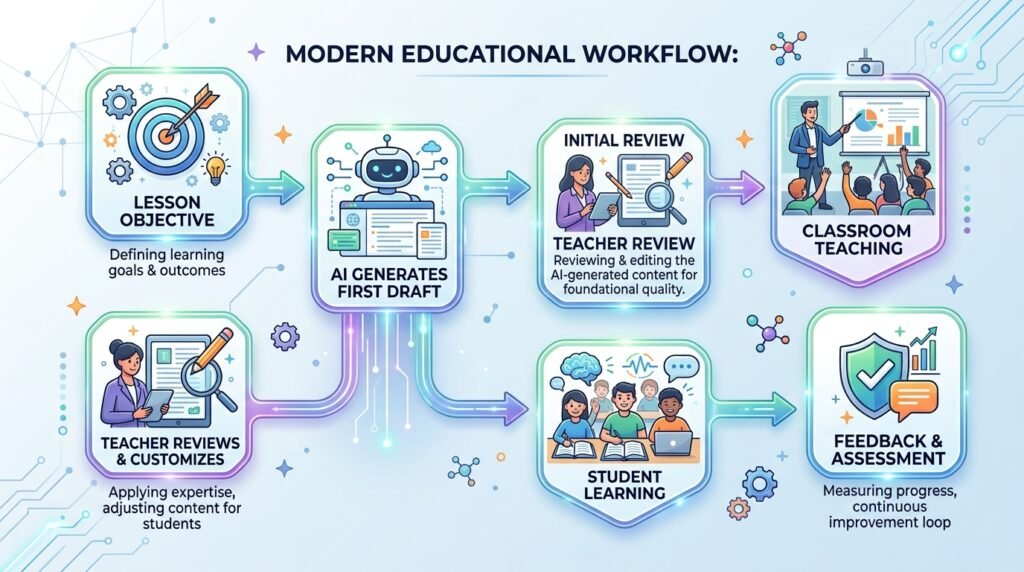
Instead of spending hours creating materials from scratch, teachers can use AI to generate first drafts, brainstorm ideas, summarize information, or produce customized learning resources in minutes.
For example:
- A history teacher can ask AI to generate discussion questions about the Industrial Revolution.
- A mathematics teacher can create differentiated worksheets for students at different skill levels.
- An English teacher can generate writing prompts, grammar exercises, or reading comprehension questions.
- A science teacher can simplify complex concepts into age-appropriate explanations.
The teacher reviews, edits, and adapts the content before sharing it with students, ensuring it aligns with curriculum requirements and classroom goals.
Unlike traditional educational software, modern AI tools can understand natural language instructions, making them accessible even for educators with little technical experience.
Why Are Teachers Using AI?
Artificial Intelligence is no longer just a technology for software developers or large organizations. It has become a practical classroom assistant that helps teachers reduce repetitive work, improve lesson quality, and create more engaging learning experiences.
As classrooms become more diverse and administrative responsibilities continue to grow, educators are looking for ways to work smarter without compromising the quality of instruction. AI offers exactly that opportunity.
Rather than replacing teachers, AI supports them by handling routine tasks so they can spend more time teaching, mentoring, and connecting with students.
Benefits of AI for Teachers
1. Save Hours on Lesson Planning
Creating engaging lesson plans every week can be time-consuming, especially when teaching multiple classes or subjects.
AI tools can generate:
- Lesson outlines
- Learning objectives
- Classroom activities
- Discussion questions
- Homework assignments
- Exit tickets
For example, instead of starting with a blank page, a teacher can ask:
“Create a 45-minute lesson plan on photosynthesis for Grade 7 students that includes learning objectives, a hands-on activity, and an assessment quiz.”
Within seconds, AI produces a structured draft that the teacher can review and customize.
Result: Less time planning and more time focusing on students.

2. Create Quizzes and Assessments Faster
Designing assessments often takes considerable effort.
AI can generate:
- Multiple-choice questions
- Short-answer questions
- True or false exercises
- Vocabulary tests
- Reading comprehension activities
- Answer keys
Instead of writing twenty questions manually, teachers can generate a complete first draft in minutes and modify it according to their curriculum.
3. Personalize Learning for Different Students
Every classroom includes students who learn at different speeds and in different ways.
AI helps teachers quickly create:
- Beginner worksheets
- Intermediate activities
- Advanced challenges
- Simplified explanations
- Extension assignments
For example, if one student needs additional support while another requires more challenging work, AI can generate separate versions of the same lesson without requiring teachers to create everything from scratch.
This makes differentiated instruction more practical, even in larger classrooms.
4. Simplify Complex Topics
Some subjects can be difficult for students to understand.
Teachers can ask AI to explain concepts using:
- Simple language
- Everyday examples
- Stories
- Analogies
- Visual descriptions
For example:
Instead of presenting Newton’s Laws using technical terminology, AI can explain them through examples like riding a bicycle, playing football, or pushing a shopping cart.
Teachers can then adapt these explanations to match their students’ age and learning level.
5. Generate Creative Classroom Activities
Keeping students engaged requires creativity.
AI can suggest:
- Icebreakers
- Group discussions
- Debate topics
- Classroom games
- Role-playing activities
- Project ideas
- STEM challenges
When teachers need fresh ideas, AI can serve as a brainstorming partner rather than replacing their creativity.
6. Improve Classroom Communication
Teachers spend significant time communicating with:
- Parents
- Students
- School administrators
AI can help draft:
- Parent emails
- Classroom announcements
- Weekly newsletters
- Assignment instructions
- Feedback reports
Teachers remain responsible for reviewing and personalizing these messages before sending them.
7. Support Inclusive Education
Inclusive classrooms require teaching materials that accommodate diverse learning needs.
AI can assist by creating:
- Simplified reading passages
- Step-by-step instructions
- Alternative examples
- Vocabulary support
- Learning summaries
This helps teachers provide more accessible educational materials while maintaining the same learning objectives.
8. Reduce Administrative Work
Teaching involves far more than classroom instruction.
Administrative responsibilities often include:
- Attendance tracking
- Documentation
- Progress reports
- Meeting notes
- Curriculum planning
While AI cannot replace school management systems, it can help organize information, summarize documents, and draft reports, allowing teachers to complete administrative tasks more efficiently.
Real-World Examples of AI in the Classroom
Understanding practical use cases makes it easier to see how AI fits into everyday teaching.
Example 1: Planning Tomorrow’s Lesson
A middle school science teacher needs a lesson on ecosystems but has limited preparation time.
Instead of starting from scratch, the teacher asks AI to create:
- Learning objectives
- A lesson outline
- Discussion questions
- A classroom activity
- A short quiz
Within minutes, the teacher reviews the content, adjusts it for the curriculum, and prepares the lesson.
Preparation time drops from over an hour to around 15–20 minutes.
Example 2: Differentiated Learning
An English teacher has students with different reading abilities.
Using AI, the teacher creates:
- A simplified reading passage
- A standard version
- An advanced extension activity
Each student works at an appropriate level while covering the same topic.
Example 3: Instant Feedback
A teacher wants students to improve their writing before submitting final essays.
Students use AI to identify:
- Grammar mistakes
- Sentence clarity
- Word choice
- Organization suggestions
The teacher then focuses on higher-level feedback such as critical thinking, creativity, and argument development instead of correcting basic writing errors.
Can AI Replace Teachers?
The short answer is no.
AI can generate lesson ideas, summarize information, create worksheets, and assist with routine tasks, but it cannot replace the human qualities that define effective teaching.
Teachers provide:
- Emotional support
- Classroom management
- Critical thinking guidance
- Ethical decision-making
- Mentorship
- Motivation
- Personal encouragement
AI cannot understand classroom dynamics, build meaningful relationships, or adapt to students’ emotions in the way experienced educators can.
The most effective approach is to view AI as a teaching assistant rather than a substitute. It handles repetitive tasks, while teachers continue to lead learning, inspire curiosity, and make professional judgments based on their students’ unique needs.
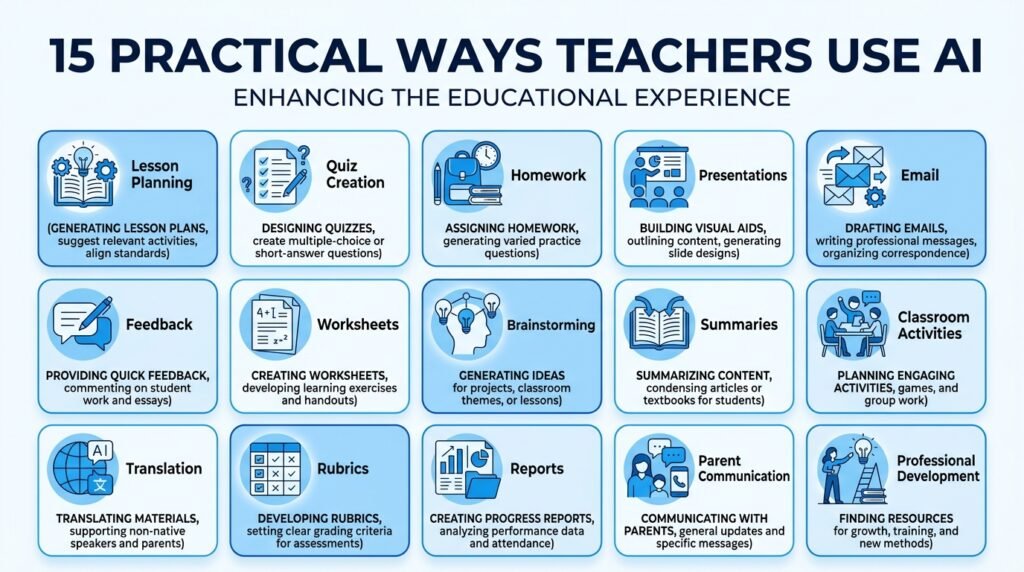
15 Practical Ways Teachers Can Use AI Every Day
One of the biggest misconceptions about AI is that teachers need to completely change the way they work. In reality, AI delivers the most value when it supports the tasks teachers already do every day.
Whether you’re preparing tomorrow’s lesson, grading assignments, communicating with parents, or designing engaging classroom activities, AI can reduce repetitive work while giving you more time to focus on your students.
Here are some of the most practical ways teachers can use AI in the classroom.
1. Create Lesson Plans in Minutes
Planning lessons is one of the most time-consuming parts of teaching. AI can generate structured lesson plans based on your subject, grade level, learning objectives, and available class time.
For example, instead of spending an hour creating a lesson from scratch, you can ask:
Prompt: Create a 45-minute Grade 8 science lesson on ecosystems with learning objectives, classroom activities, discussion questions, and a short assessment.
AI provides a strong first draft that you can customize to suit your teaching style and curriculum.
Best Tools:
- ChatGPT
- Claude
- Gemini
2. Generate Quizzes and Worksheets
Creating assessments becomes much easier with AI.
Teachers can quickly generate:
- Multiple-choice questions
- Fill-in-the-blanks
- Short-answer questions
- Matching exercises
- True or false questions
- Answer keys
Instead of creating every question manually, AI gives you a starting point that you can review and refine.
3. Differentiate Learning for Every Student
Every classroom includes students with different abilities, learning styles, and levels of understanding.
AI can generate multiple versions of the same activity for:
- Advanced learners
- Average learners
- Students needing additional support
- English language learners
This makes differentiated instruction more manageable without dramatically increasing preparation time.
4. Create Classroom Presentations
Need slides for tomorrow’s lesson?
AI can help organize content into clear presentation outlines, suggest visuals, generate speaker notes, and even recommend interactive classroom activities.
Instead of starting from a blank slide deck, teachers begin with a structured draft and customize it for their students.
5. Explain Difficult Concepts Simply
Some topics can be challenging for students to understand the first time.
AI can rewrite complex explanations using:
- Simple language
- Everyday examples
- Analogies
- Stories
- Visual descriptions
For example, instead of explaining artificial intelligence using technical terminology, AI can compare it to teaching a child to recognize different types of animals through repeated examples.
These simplified explanations can make lessons more accessible, especially for younger learners.
6. Generate Homework and Practice Activities
Teachers often need additional exercises to reinforce classroom learning.
AI can create:
- Homework assignments
- Revision worksheets
- Practice questions
- Reflection activities
- Project ideas
You can even request different difficulty levels to better support diverse classrooms.
7. Create Rubrics and Assessment Criteria
Clear grading criteria help students understand expectations while making assessments more consistent.
AI can draft rubrics for:
- Essays
- Presentations
- Group projects
- Research assignments
- Creative writing
- STEM projects
Teachers can then modify these rubrics to align with school policies and learning objectives.
8. Draft Parent Emails and Classroom Announcements
Writing thoughtful communication for parents and guardians can take significant time.
AI can help draft:
- Parent newsletters
- Progress updates
- Event reminders
- Assignment explanations
- Permission letters
Remember to review and personalize every message before sending it.
9. Provide Writing Feedback
Instead of correcting every grammar mistake manually, teachers can use AI to identify:
- Grammar issues
- Spelling mistakes
- Sentence clarity
- Writing structure
- Vocabulary suggestions
This allows teachers to spend more time giving meaningful feedback on ideas, creativity, and critical thinking rather than basic editing.
10. Create Classroom Discussion Questions
Good discussions encourage curiosity and deeper thinking.
AI can generate:
- Open-ended questions
- Debate topics
- Think-Pair-Share activities
- Reflection prompts
- Case study questions
Teachers can adjust these questions based on students’ age and learning goals.
11. Support Students with Different Learning Needs
Inclusive classrooms require flexible teaching strategies.
AI can help create:
- Simplified reading materials
- Step-by-step instructions
- Visual learning suggestions
- Vocabulary lists
- Reading summaries
These resources can support students while maintaining the same learning objectives for the class.
12. Summarize Long Articles and Research Papers
Teachers often review lengthy educational resources before preparing lessons.
AI can summarize:
- Academic articles
- Research papers
- Reports
- Educational policies
- Curriculum documents
This helps teachers identify key ideas more quickly while still reviewing important details themselves.
13. Brainstorm Creative Classroom Activities
Even experienced teachers occasionally run out of fresh ideas.
AI can suggest:
- Icebreakers
- Educational games
- STEM challenges
- Group projects
- Role-playing exercises
- Problem-solving activities
These ideas can be adapted to suit different age groups and subjects.
14. Assist with Professional Development
Teachers are lifelong learners.
AI can help by:
- Explaining new teaching strategies
- Summarizing educational research
- Recommending books
- Creating study plans
- Suggesting classroom improvement ideas
It serves as a useful learning companion for educators looking to develop new skills.
15. Save Time on Everyday Administrative Tasks
Although AI cannot replace school management systems, it can simplify routine work such as:
- Organizing meeting notes
- Drafting reports
- Creating schedules
- Summarizing observations
- Preparing checklists
- Brainstorming school event ideas
Saving even 20–30 minutes each day can free up valuable time for lesson preparation and student support.
Best AI Tools for Teachers
Different AI tools excel at different tasks. The best choice depends on your teaching style, subject, and classroom needs.
| AI Tool | Best For | Free Plan | Beginner Friendly |
| ChatGPT | Lesson planning, quizzes, explanations | ✅ | ⭐⭐⭐⭐⭐ |
| Claude | Writing feedback, educational content, summaries | ✅ | ⭐⭐⭐⭐⭐ |
| Google Gemini | Google Workspace integration, lesson ideas | ✅ | ⭐⭐⭐⭐☆ |
| Canva Magic Studio | Presentations, worksheets, classroom visuals | ✅ | ⭐⭐⭐⭐⭐ |
| Grammarly | Writing support and proofreading | ✅ | ⭐⭐⭐⭐☆ |
| Notion AI | Organizing lesson plans and teaching resources | ✅ | ⭐⭐⭐⭐☆ |
| Microsoft Copilot | Productivity and Microsoft 365 tasks | ✅ | ⭐⭐⭐⭐☆ |
| Perplexity AI | Research and fact-finding | ✅ | ⭐⭐⭐⭐⭐ |
Tip: If you’re just getting started, begin with one or two tools instead of trying everything at once. Mastering a few reliable AI tools is more effective than using many tools without a clear purpose.
Teacher’s Tip 💡
Think of AI as your teaching assistant, not your replacement.
The most effective teachers use AI to save time on repetitive tasks, then invest that extra time in meaningful classroom discussions, personalized feedback, and building stronger relationships with students—things AI cannot replicate.
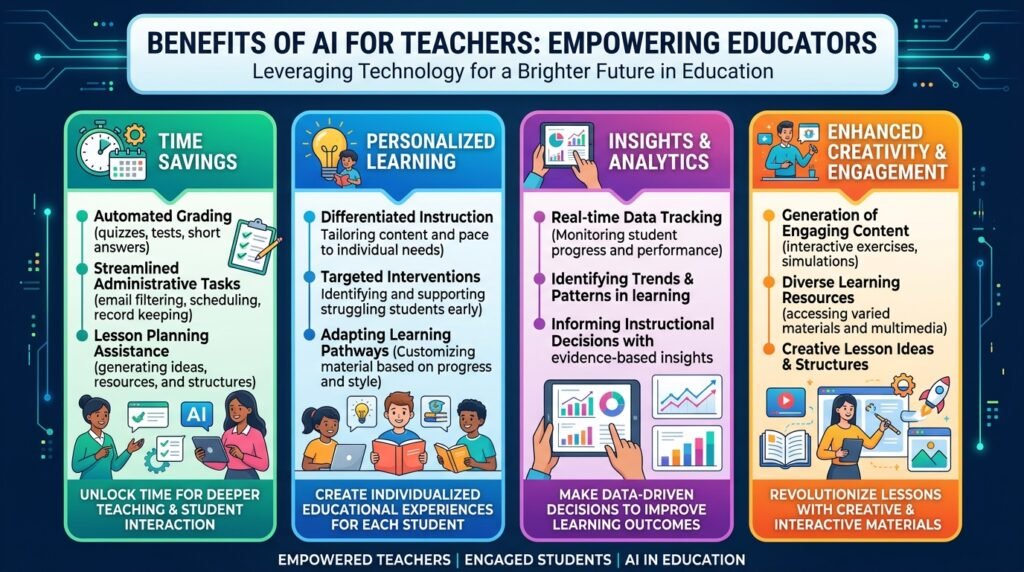
Benefits of AI for Teachers
Artificial Intelligence is transforming education by helping teachers spend less time on repetitive tasks and more time on meaningful teaching. While AI cannot replace the expertise, empathy, or judgment of an educator, it can significantly improve productivity and enhance the overall teaching experience.
Here are some of the biggest benefits AI offers teachers.
1. Saves Valuable Time
One of the greatest advantages of AI is the amount of time it can save.
Teachers often spend hours each week on tasks such as:
- Lesson planning
- Creating worksheets
- Writing quizzes
- Preparing presentations
- Drafting emails
- Organizing classroom resources
AI can generate first drafts for many of these tasks in minutes, allowing teachers to focus their energy on delivering engaging lessons and supporting students.
2. Reduces Administrative Work
Administrative responsibilities are an unavoidable part of teaching.
AI can help simplify routine tasks by:
- Drafting reports
- Organizing meeting notes
- Summarizing documents
- Creating classroom schedules
- Generating templates for common communications
Reducing administrative workload gives teachers more time for planning and student interaction.
3. Supports Personalized Learning
Every student learns differently.
Some students need additional explanations, while others benefit from more advanced challenges.
AI makes it easier to create learning materials tailored to different skill levels by generating:
- Simplified reading passages
- Extension activities
- Practice exercises
- Individualized feedback
- Alternative explanations
This allows teachers to better support diverse classrooms without creating every resource from scratch.
4. Encourages Creative Teaching
Even experienced educators occasionally run out of fresh ideas.
AI can act as a brainstorming partner by suggesting:
- Interactive classroom activities
- Project-based learning ideas
- Debate topics
- Educational games
- Storytelling prompts
- Hands-on experiments
Teachers remain in control while AI helps spark creativity.
5. Improves Student Engagement
Students are often more engaged when lessons are interactive and varied.
AI helps teachers create:
- Real-world scenarios
- Gamified learning activities
- Visual learning resources
- Discussion questions
- Collaborative projects
These activities can make learning more enjoyable while supporting different learning styles.
6. Provides Faster Feedback
Timely feedback is essential for learning, but reviewing every assignment can be time-consuming.
AI can assist by identifying:
- Grammar mistakes
- Writing clarity
- Basic formatting issues
- Repeated errors
Teachers can then focus on evaluating critical thinking, creativity, and subject understanding rather than spending time correcting routine mistakes.
7. Supports Continuous Professional Development
Education evolves constantly, and teachers must continue learning throughout their careers.
AI can help educators:
- Summarize educational research
- Explain new teaching strategies
- Recommend learning resources
- Generate study plans
- Explore emerging technologies
It serves as a practical learning companion for professional growth.
Challenges and Limitations of AI for Teachers
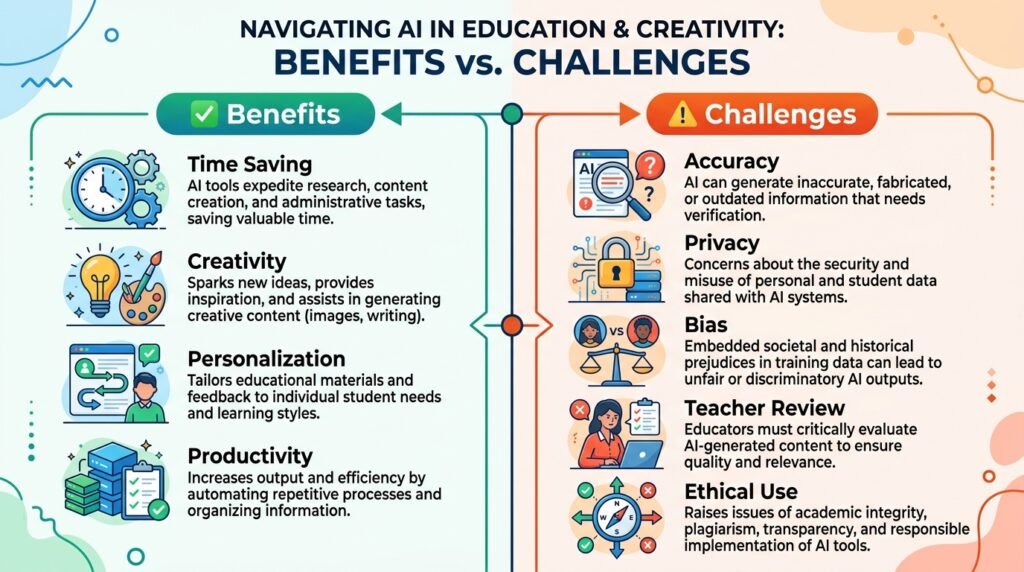
Although AI offers many benefits, it also has important limitations. Understanding these challenges helps teachers use AI responsibly and effectively.
1. AI Can Make Mistakes
AI-generated information isn’t always accurate.
Sometimes it may:
- Present outdated information
- Misinterpret prompts
- Generate incorrect facts
- Oversimplify complex concepts
Teachers should always verify AI-generated content before using it in the classroom.
Best Practice: Treat AI as a first draft, not the final answer.
2. Privacy and Student Data
Many AI tools process user inputs through cloud-based systems.
Teachers should never enter confidential information such as:
- Student names
- Grades
- Medical information
- Personal records
- Sensitive school documents
Always follow your school’s privacy policies and use approved tools when handling student-related information.
3. AI Cannot Replace Human Judgment
Effective teaching requires far more than delivering information.
Teachers understand:
- Classroom dynamics
- Student emotions
- Individual learning needs
- Cultural context
- Motivation
- Ethical considerations
These are areas where human experience and professional judgment remain essential.
4. Bias in AI Responses
AI models learn from large datasets, which may contain biases or incomplete information.
As a result, AI-generated content may occasionally:
- Present one-sided viewpoints
- Reinforce stereotypes
- Omit important perspectives
Teachers should review content critically and ensure it aligns with educational goals and inclusive teaching practices.
5. Overdependence on AI
While AI can improve efficiency, relying on it for every task may reduce opportunities for creativity, critical thinking, and professional growth.
The most effective educators use AI selectively—allowing it to automate repetitive work while continuing to design meaningful learning experiences.
Best Practices for Using AI in the Classroom
To get the most value from AI while maintaining educational quality, consider these best practices.
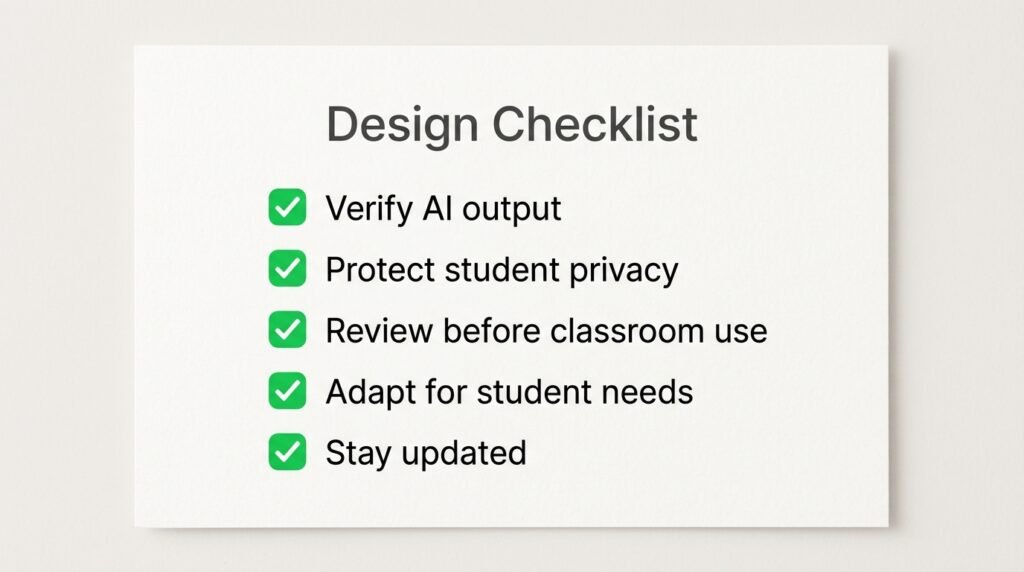
✅ Review Everything Before Sharing
Always check AI-generated lesson plans, worksheets, quizzes, and explanations for accuracy and relevance.
✅ Protect Student Privacy
Never upload confidential student information to public AI platforms.
Follow your institution’s privacy policies and use approved educational tools whenever possible.
✅ Write Clear Prompts
The quality of AI responses depends heavily on the instructions you provide.
Instead of asking:
“Create a lesson plan.”
Try:
“Create a 45-minute Grade 6 science lesson on the water cycle with learning objectives, group activities, discussion questions, and a short quiz.”
Specific prompts produce more useful results.
✅ Adapt AI Content to Your Students
Every classroom is unique.
Modify AI-generated content to match:
- Student age
- Learning objectives
- Curriculum requirements
- Cultural context
- Classroom resources
✅ Stay Updated
AI technology evolves rapidly.
Explore new features, attend professional development sessions, and experiment with new educational tools to continue improving your teaching workflow.
Common Mistakes Teachers Should Avoid
Even experienced educators can make mistakes when first using AI.
Avoid these common pitfalls:
- Copying AI-generated content without reviewing it.
- Sharing confidential student information with AI tools.
- Depending entirely on AI for lesson planning.
- Assuming AI responses are always correct.
- Ignoring school or district AI policies.
- Using too many AI tools instead of mastering a few reliable ones.
Remember, AI should enhance your expertise—not replace it.
Frequently Asked Questions (FAQs)
Is AI replacing teachers?
No. AI is designed to assist teachers by automating repetitive tasks such as lesson planning, quiz creation, and administrative work. Teachers remain essential for instruction, classroom management, mentorship, and student support.
What is the best AI tool for teachers?
There isn’t a single best tool for every educator.
Popular choices include:
- ChatGPT for lesson planning and explanations
- Claude for writing and educational content
- Google Gemini for Google Workspace users
- Canva Magic Studio for presentations and classroom visuals
- Perplexity AI for research and fact-checking
The best choice depends on your teaching style and classroom needs.
Is AI safe to use in schools?
Yes, when used responsibly. Teachers should protect student privacy, verify AI-generated information, and follow school or district guidelines regarding approved AI tools.
Can AI create lesson plans?
Yes. AI can quickly generate lesson plans, learning objectives, classroom activities, worksheets, and quizzes. However, teachers should review and adapt the content to ensure it aligns with curriculum standards and student needs.
Do teachers need technical skills to use AI?
No. Most modern AI tools are designed for beginners and use simple, conversational prompts. Educators can start with basic tasks like generating discussion questions or summarizing articles before exploring more advanced features.
Conclusion
Artificial Intelligence is reshaping education by helping teachers work more efficiently, reduce administrative burdens, and create richer learning experiences. From lesson planning and assessment design to personalized learning and classroom communication, AI offers practical support that can save valuable time without replacing the expertise and human connection that great teaching requires.
The most successful educators won’t be those who use every AI tool available—they’ll be the ones who understand when, why, and how to use AI thoughtfully. By combining professional judgment with AI-powered assistance, teachers can spend less time on repetitive tasks and more time inspiring curiosity, supporting students, and fostering meaningful learning.
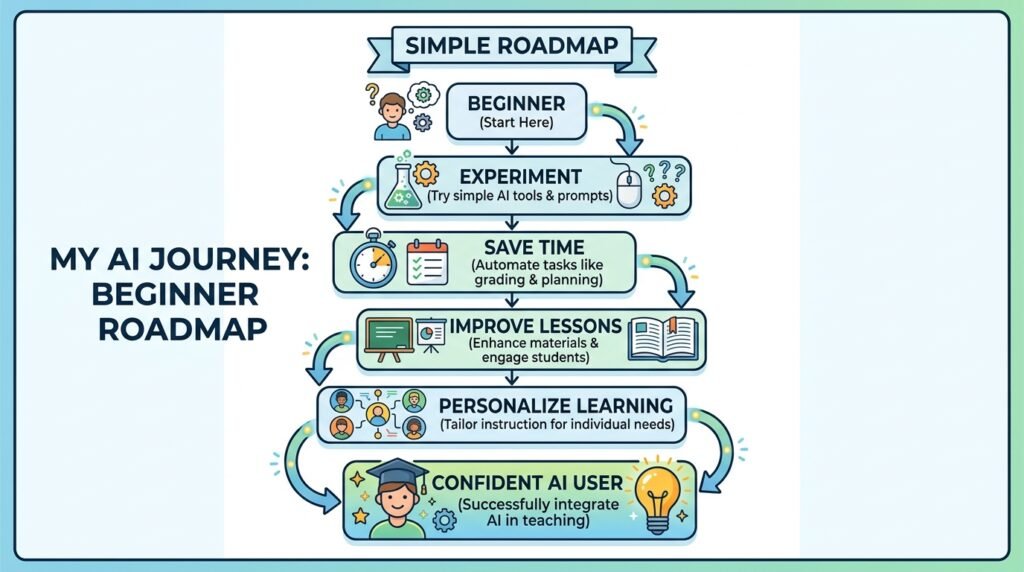
If you’re new to AI, start small. Choose one reliable tool, use it for a simple task like creating a lesson plan or generating a quiz, review the results carefully, and gradually integrate AI into your teaching workflow. Over time, these small improvements can make a meaningful difference in both your productivity and your classroom experience.
Continue Your AI Journey
Keep building your AI knowledge with these beginner-friendly guides.
-

AI Interview Preparation: How to Use AI Tools to Land Your Next Job
Learn more : AI Interview Preparation: How to Use AI Tools to Land Your Next Job🕒 14-16 min read • Updated: July 2026 AI Interview Preparation: How to Use AI Tools to Ace…
-

7 Ways to Use AI for Research: Faster & Smarter Workflows (2026)
Learn more : 7 Ways to Use AI for Research: Faster & Smarter Workflows (2026)🕒 15 min read • Updated: July 2026 Introduction Research has always been about discovering new information, asking…
-

AI for Teachers: 15 Practical Workflows to Streamline Your Classroom
Learn more : AI for Teachers: 15 Practical Workflows to Streamline Your Classroom🕒 15 min read • Updated: July 2026 Introduction Teaching is one of the most rewarding professions, but…
-

AI for Productivity: 15 Practical Workflows to Work Smarter in 2026
Learn more : AI for Productivity: 15 Practical Workflows to Work Smarter in 2026🕒 12-14 min read • Updated: July 2026 Introduction Imagine completing your daily work in less time while…
-

The 2026 Guide to AI in Sales: Tools & Workflows to Close Deals Faster
Learn more : The 2026 Guide to AI in Sales: Tools & Workflows to Close Deals Faster🕒 12-14 min read • Updated: July 2026 Introduction Artificial intelligence (AI) is transforming the way businesses find…
-

AI for Project Management: 15 Time-Saving Workflows & Prompt Templates
Learn more : AI for Project Management: 15 Time-Saving Workflows & Prompt Templates🕒 12-14 min read • Updated: July 2026 Quick Answer AI for project management uses artificial intelligence to…
Related Articles
Explore more guides and resources related to this topic.
-

ChatGPT Complete Guide for Beginners (2026): Master AI Step-by-Step
Learn more : ChatGPT Complete Guide for Beginners (2026): Master AI Step-by-Step🕒 20-25 min read • Updated: Aug 2026 Introduction Introduction Artificial intelligence is changing how people learn, work,…
-

Master Prompt Engineering in 2026: A Step-by-Step Beginner’s Guide
Learn more : Master Prompt Engineering in 2026: A Step-by-Step Beginner’s Guide🕒 18-20 min read • Updated: Aug 2026 Introduction Artificial intelligence (AI) tools like ChatGPT, Claude, Gemini, and…
-
Large Language Models (LLMs) Explained: The Complete 2026 Beginner’s Guide
Learn more : Large Language Models (LLMs) Explained: The Complete 2026 Beginner’s Guide🕒 14-16 min read • Updated: Aug 2026 Introduction Artificial Intelligence has become part of everyday life. Whether…
-

Best AI Image Generators in 2026: 10 Free & Paid Tools Tested
Learn more : Best AI Image Generators in 2026: 10 Free & Paid Tools Tested🕒 15 min read • Updated: July 2026 introduction Creating stunning images no longer requires years of design…
-
10 Best AI Chatbots in 2026: Tested & Ranked for Every Use Case
Learn more : 10 Best AI Chatbots in 2026: Tested & Ranked for Every Use Case🕒 10-12 min read • Updated: July 2026 introduction Artificial intelligence has made chatbots far more capable than…
-
ChatGPT vs Microsoft Copilot (2026): Tested, Pricing & Workflow Comparison
Learn more : ChatGPT vs Microsoft Copilot (2026): Tested, Pricing & Workflow Comparison🕒 10-12 min read • Updated: July 2026 Introduction Choosing between ChatGPT and Microsoft Copilot can be challenging,…
References
UNESCO. (2023). Guidance for Generative AI in Education and Research
https://www.unesco.org/en/articles/guidance-generative-ai-education-and-research
UNESCO. AI and Education
https://www.unesco.org/en/digital-education/artificial-intelligence
OECD. Artificial Intelligence and the Future of Skills
https://www.oecd.org/en/topics/artificial-intelligence
Leave a Reply