
🕒 15 min read • Updated: July 2026
Table of Contents
Introduction
Creating a successful blog is about much more than writing articles. From researching ideas and finding the right keywords to optimizing content for search engines and promoting it across multiple platforms, blogging involves many time-consuming tasks.
This is where Artificial Intelligence (AI) can make a meaningful difference.
Rather than replacing bloggers, AI acts as a powerful assistant that helps streamline repetitive work, improve productivity, and overcome common challenges like writer’s block or content planning. Whether you’re launching your first blog or managing an established website, the right AI tools can help you create higher-quality content while saving valuable time.
However, using AI effectively requires more than copying and pasting AI-generated text. Search engines—and readers—value original insights, accurate information, and genuine expertise. The best results come from combining AI’s speed with human creativity, editing, and experience.
In this comprehensive guide, you’ll learn what AI for blogging is, how it works, where it adds the most value, its limitations, and the best AI tools and workflows that can help you become a more efficient and effective blogger.
Quick Answer: AI for blogging helps with topic research, content planning, outlining, writing first drafts, editing, SEO optimization, image creation, and content promotion. When combined with human editing and expertise, AI becomes a productivity tool that supports high-quality blogging rather than replacing it.
Key Takeaways
- What Is AI for Blogging?
- Why Bloggers Are Using AI
- What AI Can and Cannot Do
- Benefits of Using AI for Blogging
- A Complete AI Blogging Workflow
- Best AI Tools for Bloggers
- Best Practices for Using AI Responsibly
- Common Mistakes to Avoid
- Frequently Asked Questions
- Conclusion
What Is AI for Blogging?
AI for blogging refers to using artificial intelligence tools to assist with different stages of the content creation process. Instead of handling every task manually, bloggers can use AI to generate ideas, organize information, improve writing quality, optimize articles for SEO, and automate repetitive tasks.
It’s important to understand that AI is an assistant, not an author.
The most successful bloggers don’t rely on AI to publish complete articles without review. Instead, they use AI to speed up research, brainstorm ideas, create structured outlines, rewrite awkward sentences, and improve productivity while maintaining full editorial control.
Think of AI as a collaborative writing partner that helps you spend less time on repetitive tasks and more time creating valuable content for your audience.
Why Bloggers Are Using AI
The blogging landscape has become increasingly competitive. Publishing consistently while maintaining quality can be difficult, especially for solo creators and small teams.
AI helps solve several common challenges, including:
- Finding fresh content ideas.
- Overcoming writer’s block.
- Organizing complex topics into logical outlines.
- Improving grammar and readability.
- Speeding up editing.
- Optimizing articles for search engines.
- Repurposing blog posts into social media content.
Rather than replacing creativity, AI allows bloggers to focus on strategy, storytelling, and providing unique insights that machines cannot replicate.
What AI Can—and Cannot—Do
Understanding AI’s strengths and limitations is essential for creating trustworthy content.
| AI Can Help With | AI Cannot Replace |
| Topic research | Personal experience |
| Brainstorming ideas | Original expertise |
| Creating outlines | Critical thinking |
| Improving grammar | Fact verification |
| SEO suggestions | Human judgment |
| Content summaries | Building trust with readers |
The most effective blogging strategy combines AI efficiency with human knowledge and editorial oversight.
Why AI Matters for Modern Bloggers
Imagine writing a complete blog post manually.
You begin by researching the topic, analyzing competitors, collecting keywords, creating an outline, writing the first draft, editing every paragraph, optimizing SEO, designing images, publishing the article, and finally promoting it across multiple platforms.
This process can easily take several hours—or even days—for a single article.
Now imagine completing many of those repetitive tasks with AI assistance while still making the final editorial decisions yourself.
Instead of spending hours staring at a blank page, you can begin with a structured outline. Instead of manually checking grammar and readability, AI can highlight improvements in seconds. Instead of rewriting social media posts from scratch, AI can generate multiple promotional versions based on your article.
The result isn’t lower-quality content—it’s a more efficient workflow that gives you more time to focus on creating genuinely helpful information.
Benefits of Using AI for Blogging
Artificial intelligence isn’t about replacing bloggers—it’s about making the entire blogging process faster, more organized, and more efficient. Whether you’re publishing one article a month or running a large content website, AI can reduce repetitive work while helping you focus on creating valuable content.
Here are some of the biggest benefits of using AI for blogging.
1. Generate Blog Ideas Faster
One of the biggest challenges bloggers face is deciding what to write next.
AI can quickly brainstorm topic ideas based on your niche, audience, and goals. Instead of spending hours researching trending questions, you can generate dozens of content ideas in minutes.
For example, if your blog is about artificial intelligence, AI might suggest topics like:
- AI for Students
- AI for Small Businesses
- AI Productivity Tips
- AI for Content Creators
- AI in Healthcare
These suggestions can help you build a consistent content calendar while uncovering new opportunities that match your audience’s interests.
2. Create Structured Outlines in Minutes
Starting with a blank page can feel overwhelming.
AI can generate a well-organized outline that includes logical headings, subheadings, and key discussion points. Instead of figuring out the structure yourself, you can begin with a solid framework and refine it based on your expertise.
A clear outline also improves readability and helps ensure your article covers the topic comprehensively.
3. Speed Up Content Creation
Writing high-quality blog posts takes time.
AI can assist by creating first drafts, expanding ideas, rewriting paragraphs, summarizing complex concepts, or suggesting better wording. This significantly reduces the time spent on repetitive writing tasks.
However, AI-generated drafts should always be reviewed, edited, and enriched with original insights before publishing.
Think of AI as your first-draft assistant—not your final editor.
4. Improve Writing Quality
Even experienced writers overlook grammar mistakes, awkward phrasing, or repetitive sentences.
AI writing assistants can help you:
- Improve readability
- Correct grammar and spelling
- Simplify complex explanations
- Adjust tone for your audience
- Make content more engaging
These improvements create a better reading experience without changing your unique writing style.
5. Optimize Content for SEO
Creating great content is only part of successful blogging. Readers also need to discover your articles through search engines.
AI can help identify:
- Relevant keywords
- Frequently asked questions
- Semantic terms
- Content gaps
- Meta descriptions
- SEO titles
- Internal linking opportunities
While AI can provide suggestions, always review recommendations carefully to ensure they match your article’s purpose and audience.
6. Save Time on Repetitive Tasks
Blogging involves many repetitive activities beyond writing.
AI can help with tasks such as:
- Creating social media captions
- Writing email newsletter summaries
- Generating image ideas
- Repurposing blog posts into short-form content
- Summarizing long research articles
- Brainstorming headline variations
Automating these smaller tasks allows you to spend more time improving your content and connecting with your audience.
7. Improve Productivity Without Sacrificing Quality
Many bloggers assume AI is only useful for publishing more content.
In reality, its biggest advantage is helping you publish better content more efficiently.
Instead of rushing to meet publishing schedules, AI gives you extra time to:
- Research thoroughly
- Add personal experiences
- Verify facts
- Create original visuals
- Improve readability
- Strengthen internal linking
Quality remains your responsibility—AI simply helps you reach it faster.
Benefits at a Glance
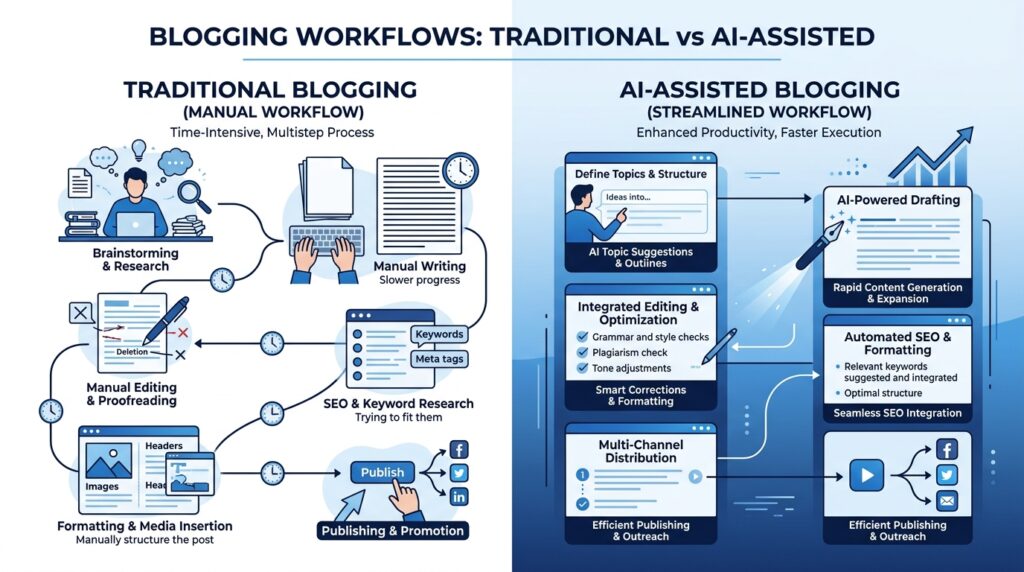
| Traditional Blogging | AI-Assisted Blogging |
| Manual topic research | Faster idea generation |
| Blank-page writing | Structured outlines |
| Time-consuming editing | AI-assisted proofreading |
| Manual SEO optimization | Keyword and metadata suggestions |
| Separate content creation for each platform | Easy content repurposing |
| Long production time | More efficient workflow |
Key Takeaway: AI doesn’t make great bloggers obsolete—it helps great bloggers work more efficiently. The combination of AI-powered assistance and human expertise leads to content that is both helpful and scalable.
What AI Can and Cannot Do for Bloggers
Artificial intelligence is a powerful assistant, but it’s not a substitute for human creativity, expertise, or critical thinking. Understanding where AI excels—and where it falls short—will help you use it more effectively while maintaining the quality and credibility of your blog.
The goal isn’t to let AI write everything for you. Instead, it’s to use AI strategically for tasks where it saves time, while relying on your own knowledge and judgment to create content that readers genuinely trust.
What AI Can Do Well
AI is particularly effective at speeding up repetitive and structured tasks that would otherwise consume valuable time.
Brainstorm Content Ideas
Running out of ideas is a common challenge for bloggers. AI can generate dozens of topic suggestions, content angles, and headline ideas based on your niche.
For example, instead of searching manually for hours, you can ask an AI assistant to suggest beginner-friendly blog topics or identify questions your audience might have.
Create Detailed Outlines
A strong outline provides structure before you start writing.
AI can organize your ideas into logical sections, helping you cover the topic comprehensively and avoid missing important information.
Instead of starting with a blank page, you begin with a clear roadmap.
Write First Drafts
AI can generate introductory paragraphs, explain basic concepts, rewrite awkward sentences, summarize lengthy information, or expand bullet points into readable content.
This can significantly reduce writing time.
However, the first draft should always be treated as a starting point—not the finished article.
Improve Grammar and Readability
AI writing assistants can help you:
- Correct spelling and grammar
- Improve sentence flow
- Simplify complex language
- Remove repetition
- Adjust tone for different audiences
These improvements enhance readability without changing your unique voice.
Assist with SEO
Many AI tools can suggest:
- SEO-friendly titles
- Meta descriptions
- Frequently asked questions
- Related keywords
- Internal linking opportunities
- Content improvements
These suggestions can save time, but they should always support your content strategy rather than dictate it.
Repurpose Existing Content
One blog post can become many different pieces of content.
AI can help transform an article into:
- LinkedIn posts
- X (Twitter) threads
- Facebook posts
- Pinterest descriptions
- Email newsletters
- Video scripts
- YouTube descriptions
This allows you to reach a wider audience without starting from scratch every time.
What AI Cannot Do Well
Despite rapid improvements, AI still has important limitations.
Understanding these limitations is essential for producing trustworthy content.
Replace Personal Experience
AI has no real-world experiences.
It cannot share lessons learned from building a business, testing software over several months, or solving unique challenges.
Readers often value personal insights because they add authenticity and practical context that AI cannot generate.
Guarantee Accuracy
AI systems sometimes generate incorrect, outdated, or fabricated information—a phenomenon often called “hallucination.”
For this reason, you should always:
- Verify statistics
- Check dates
- Confirm product features
- Review pricing
- Cross-reference reliable sources
Publishing inaccurate information can damage both your credibility and your search performance.
Understand Your Audience Like You Do
AI can generate content based on patterns in its training data, but it doesn’t truly understand your readers’ goals, frustrations, or level of knowledge.
As the blog owner, you’re responsible for adapting content to your audience’s needs.
That human perspective is what makes educational content genuinely helpful.
Build Trust
Readers trust websites that demonstrate expertise, transparency, and consistency.
Trust comes from:
- Accurate information
- Honest recommendations
- Original insights
- Real examples
- Clear explanations
- Helpful guidance
AI can assist with writing, but it cannot establish your reputation.
That responsibility remains with you.
AI vs Human: Who Should Do What?
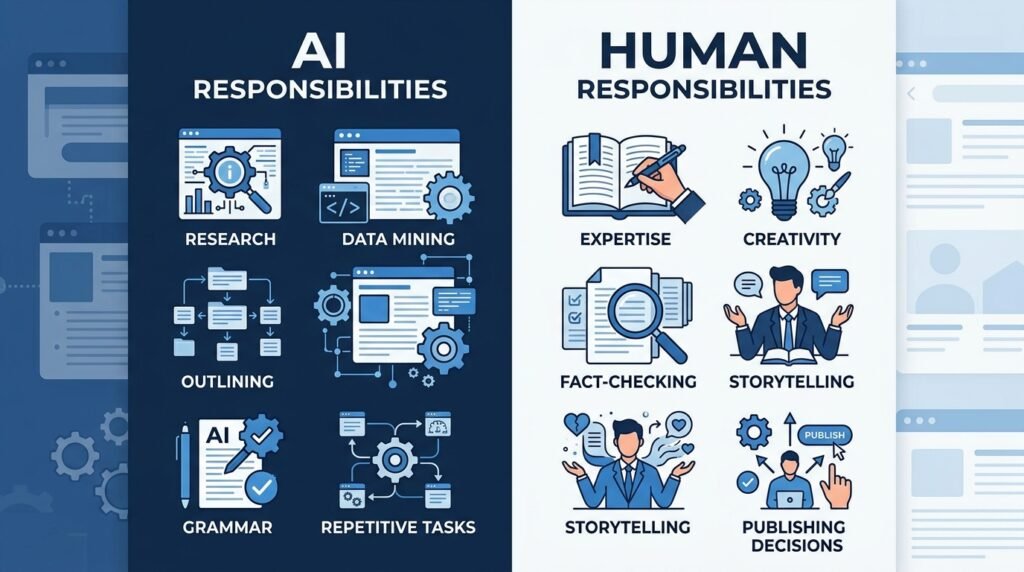
| Task | AI | Human |
| Brainstorm ideas | ✅ | ✓ Review |
| Research assistance | ✅ | ✓ Verify |
| Create outlines | ✅ | ✓ Improve |
| First draft | ✅ | ✓ Edit |
| Grammar and readability | ✅ | ✓ Final review |
| Fact-checking | ❌ | ✅ |
| Personal experience | ❌ | ✅ |
| Strategic decisions | ❌ | ✅ |
| Final publishing approval | ❌ | ✅ |
The most successful blogs combine the strengths of both AI and human expertise rather than relying entirely on one or the other.
Best Practice: Think of AI as Your Assistant
A helpful way to approach AI is to imagine hiring a talented research assistant.
Your assistant can:
- Collect information
- Organize ideas
- Suggest improvements
- Speed up repetitive work
But you still make the important decisions.
You decide:
- What to publish
- What information is accurate
- Which recommendations to trust
- How to present your expertise
- What serves your audience best
That balance leads to content that is both efficient to produce and genuinely valuable to readers.
Key Takeaway: AI works best when it handles repetitive tasks while you focus on what only humans can provide—expertise, critical thinking, creativity, and trust. The combination of AI efficiency and human judgment is what creates high-quality, sustainable blogging.
A Complete AI Blogging Workflow (Step-by-Step)
Using AI effectively isn’t about asking it to write an entire blog post in one prompt. The best bloggers integrate AI into every stage of the content creation process while maintaining editorial control.
Below is a practical workflow you can use to create high-quality, SEO-friendly blog posts more efficiently.
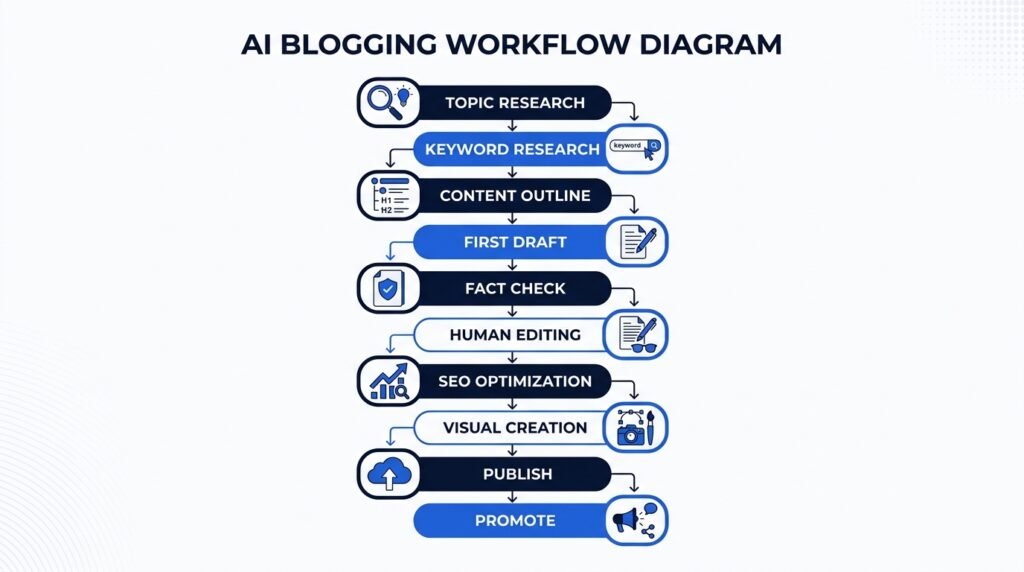
| Step | Task | How AI Helps |
| 1 | Topic Research | Generate blog ideas and identify audience questions |
| 2 | Keyword Research | Discover relevant keywords and search intent |
| 3 | Content Outline | Create a structured article outline |
| 4 | First Draft | Write a draft to overcome the blank page |
| 5 | Fact Checking | Verify information with trusted sources |
| 6 | Editing | Improve clarity, grammar, and readability |
| 7 | SEO Optimization | Optimize titles, headings, and metadata |
| 8 | Visual Creation | Design featured images and infographics |
| 9 | Publishing | Format and publish the article |
| 10 | Promotion | Repurpose content for social media and email |
Let’s look at each step in more detail.
Step 1: Research Topics Your Audience Actually Wants
Every successful blog starts with a topic people are searching for.
Instead of guessing, use AI to brainstorm ideas based on your niche and audience.
For example, if you run a personal finance blog, you could ask AI:
“Suggest 20 beginner-friendly blog topics about budgeting that people frequently search for.”
AI can also help you:
- Expand broad ideas into specific article topics.
- Identify frequently asked questions.
- Discover related subtopics.
- Brainstorm seasonal content.
Remember to validate these ideas using keyword research tools before you start writing.
Step 2: Find the Right Keywords
Once you’ve chosen a topic, identify the keywords your audience is using.
AI can help organize keyword ideas into categories, understand search intent, and suggest related phrases.
For example, if your topic is AI for Blogging, related keywords might include:
- AI blogging tools
- AI content creation
- AI writing assistant
- AI SEO tools
- Best AI tools for bloggers
Your goal is to target one primary keyword while naturally incorporating closely related terms throughout the article.
Step 3: Build a Strong Content Outline
A well-structured outline keeps your article focused and easy to read.
Ask AI to generate an outline based on the target keyword and search intent.
For example:
- Introduction
- What Is AI for Blogging?
- Benefits
- Best Tools
- Workflow
- Common Mistakes
- FAQs
- Conclusion
Review the outline carefully and adjust it to include your own expertise and unique perspective.
Step 4: Create the First Draft
With your outline ready, AI can help generate an initial draft for each section.
Instead of asking AI to write the entire article in one prompt, work section by section.
This approach gives you greater control over:
- Accuracy
- Tone
- Structure
- Readability
Think of AI as helping you overcome the blank page—not replacing your writing process.
Step 5: Verify Every Important Claim
Before publishing, review the draft carefully.
Check:
- Statistics
- Dates
- Product features
- Pricing
- Technical explanations
- External references
If you’re recommending AI tools, visit their official websites to confirm the latest features and pricing.
Accurate information builds trust with readers and supports long-term credibility.
Step 6: Edit Like a Human
Editing is where average content becomes exceptional.
Review every section to ensure it:
- Answers the reader’s question clearly.
- Uses simple, natural language.
- Includes practical examples.
- Removes repetitive phrases.
- Reflects your own voice and experience.
Never publish AI-generated text without careful human review.
Step 7: Optimize for SEO
Once the content is finalized, optimize it for search engines without sacrificing readability.
Review:
- SEO title
- Meta description
- Heading hierarchy
- Internal links
- Image ALT text
- FAQ section
- URL slug
Remember, SEO should improve the reader’s experience—not distract from it.
Step 8: Create Supporting Visuals
Visual content makes articles more engaging and easier to understand.
Use AI-assisted design tools to create:
- Featured images
- Workflow diagrams
- Comparison tables
- Infographics
- Simple illustrations
Keep the design clean, professional, and consistent with your brand identity.
Step 9: Publish and Format Carefully
Before hitting Publish, complete a final review.
Check:
- Mobile readability
- Paragraph spacing
- Formatting consistency
- Broken links
- Image quality
- Calls-to-action
Small improvements can significantly improve the overall reading experience.
Step 10: Promote Your Content
Publishing is only the beginning.
Repurpose your article into different formats, such as:
- LinkedIn posts
- X (Twitter) threads
- Facebook updates
- Pinterest Pins
- Email newsletters
- Short videos
- YouTube Community posts
This helps you reach more people while maximizing the value of each article you create.
Workflow Summary
The most successful bloggers don’t use AI to replace their expertise—they use it to streamline repetitive tasks, allowing more time for research, creativity, editing, and delivering genuine value to readers.

Best AI Tools for Blogging
The best AI tool for blogging depends on what you’re trying to accomplish. Some tools excel at writing and brainstorming, while others are better for research, SEO, image creation, or project management.
Rather than relying on a single platform, many successful bloggers combine several AI tools to build an efficient content creation workflow.
Below are some of the best AI tools for bloggers in 2026.
Quick Comparison
| AI Tool | Best For | Free Plan | Beginner Friendly |
| ChatGPT | Writing, brainstorming & learning | ✅ | ⭐⭐⭐⭐⭐ |
| Claude | Long-form writing & editing | ✅ | ⭐⭐⭐⭐⭐ |
| Gemini | Research & Google Workspace | ✅ | ⭐⭐⭐⭐☆ |
| Perplexity AI | Research & fact discovery | ✅ | ⭐⭐⭐⭐⭐ |
| Grammarly | Grammar & clarity | ✅ | ⭐⭐⭐⭐⭐ |
| Canva AI | Graphics & blog visuals | ✅ | ⭐⭐⭐⭐⭐ |
| Notion AI | Content planning | ✅ | ⭐⭐⭐⭐☆ |
| Surfer SEO | On-page SEO optimization | ❌ | ⭐⭐⭐⭐☆ |
1. ChatGPT
Best for: Brainstorming, drafting, rewriting, and explaining complex topics.
ChatGPT is one of the most versatile AI tools available. It can help generate blog ideas, create outlines, draft sections, simplify technical concepts, and improve your writing style.
Ideal for
- New bloggers
- Content marketers
- Freelance writers
- Students
- Small business owners
Strengths
- Excellent for brainstorming
- Produces well-structured outlines
- Easy to refine content through conversation
- Supports a wide variety of writing tasks
Limitations
- Can occasionally produce inaccurate information
- Requires human editing and fact-checking
Recommended Use: Use ChatGPT to create outlines and first drafts, then edit the content with your own expertise before publishing.
2. Claude
Best for: Editing long-form articles and improving readability.
Claude is known for handling long documents exceptionally well. Many bloggers use it to refine articles, improve flow, reduce repetition, and make explanations clearer.
Ideal for
- Long-form content
- Guides
- Tutorials
- Educational blogs
Strengths
- Excellent readability improvements
- Strong at summarizing information
- Handles long content effectively
Limitations
- Less suitable for image generation
- May require multiple prompts for highly technical topics
Recommended Use: Use Claude after completing your first draft to polish and improve the final article.
3. Google Gemini
Best for: Research and productivity within Google’s ecosystem.
Gemini integrates well with Google Workspace, making it useful for bloggers who frequently use Docs, Gmail, Sheets, or Drive.
Strengths
- Helpful for research
- Works well with Google services
- Strong multimodal capabilities
Best For
- Students
- Professionals
- Google Workspace users
4. Perplexity AI
Best for: Research and finding reliable sources.
Unlike many chatbots, Perplexity AI cites the sources it uses, making it especially useful when researching factual information.
Strengths
- Source citations
- Quick summaries
- Research assistance
- Up-to-date information
Recommended Use
Start your research with Perplexity before drafting your article.
5. Grammarly
Best for: Grammar, clarity, and proofreading.
Even experienced writers make mistakes.
Grammarly helps improve grammar, punctuation, tone, and sentence clarity before publication.
Strengths
- Grammar correction
- Tone suggestions
- Readability improvements
- Browser integration
6. Canva AI
Best for: Creating blog graphics and featured images.
Visuals improve engagement and make blog posts easier to understand.
Canva AI helps bloggers create:
- Featured images
- Infographics
- Social media graphics
- Pinterest Pins
- Presentation slides
Its beginner-friendly interface makes professional-looking designs accessible without advanced design skills.
7. Notion AI
Best for: Organizing your blogging workflow.
Notion AI combines note-taking, project management, and AI assistance, making it useful for planning content calendars, storing research, drafting ideas, and managing editorial workflows.
Great for
- Editorial planning
- Content calendars
- Research notes
- Team collaboration
8. Surfer SEO
Best for: On-page SEO optimization.
Surfer SEO analyzes top-ranking pages and provides recommendations to improve content structure, keyword usage, and topical coverage.
It works best after you’ve finished writing your article.
Helps optimize
- Headings
- Keyword placement
- Content coverage
- Internal linking
- Readability
Which AI Tool Should You Choose?
If you’re just starting, you don’t need every AI tool on the market.
A simple combination can handle nearly every stage of blogging.
| Goal | Recommended Tool |
| Generate ideas | ChatGPT |
| Research information | Perplexity AI |
| Write first drafts | ChatGPT or Claude |
| Edit articles | Claude + Grammarly |
| Design graphics | Canva AI |
| Plan content | Notion AI |
| Optimize SEO | Surfer SEO |
For most beginners, ChatGPT + Perplexity AI + Grammarly + Canva AI provide an excellent foundation without creating an overly complex workflow.
Recommended AI Blogging Stack (Beginner-Friendly)
If you’re building a blog from scratch, here’s a practical toolkit:
| Task | Tool |
| Topic Ideas | ChatGPT |
| Research | Perplexity AI |
| Outline & Draft | ChatGPT |
| Editing | Claude |
| Grammar Check | Grammarly |
| Featured Images | Canva AI |
| Planning | Notion AI |
| SEO Review | Surfer SEO |
This combination covers every stage of the blogging process while remaining easy to learn and scale as your blog grows.
Key Takeaway: There isn’t a single “best” AI tool for blogging. The most effective approach is to choose the right tool for each task and combine them into a workflow that saves time while maintaining high-quality, trustworthy content.
Best Practices for Using AI in Blogging
Artificial intelligence can significantly improve your blogging workflow, but using it effectively requires more than generating content with a single prompt. The highest-quality blogs combine AI’s efficiency with human expertise, creativity, and editorial judgment.
Here are some best practices to help you use AI responsibly while creating content that readers—and search engines—can trust.
1. Use AI as an Assistant, Not a Replacement
One of the biggest misconceptions about AI is that it can completely replace human writers.
In reality, AI works best as a productivity assistant. It can help you research topics, generate ideas, create outlines, improve grammar, and draft content—but your expertise is what transforms that draft into a valuable resource.
The most successful bloggers use AI to handle repetitive tasks while focusing their own time on adding original insights, practical examples, and thoughtful editing.
Best Practice: Let AI speed up the process, but let your knowledge shape the final article.
2. Always Fact-Check AI-Generated Information
AI models can occasionally provide outdated or incorrect information. They may also misrepresent product features, pricing, statistics, or technical details.
Before publishing any article, verify:
- Statistics and research
- Product features
- Software pricing
- Dates and timelines
- Quotes and references
- Technical explanations
Whenever possible, confirm information using official websites or other reliable sources.
Accuracy is one of the foundations of trust.
3. Add Your Own Experience and Insights
AI can explain concepts, but it cannot replace personal experience.
Readers appreciate articles that include:
- Lessons learned
- Practical tips
- Real-world examples
- Honest opinions
- Successes and failures
- Unique perspectives
These elements make your content more authentic and help distinguish it from generic AI-generated articles.
For example, instead of simply recommending ChatGPT, explain how you use it in your own blogging workflow and where you find it most useful.
4. Write for People First, Search Engines Second
It’s tempting to optimize every sentence around keywords, but that approach rarely produces content people enjoy reading.
Instead, focus on answering the reader’s question as clearly and completely as possible.
A helpful article naturally includes relevant keywords because it covers the topic thoroughly—not because they’re forced into every paragraph.
When readers find your content useful, search engines are more likely to reward it over time.
5. Keep Your Brand Voice Consistent
One challenge with AI-generated text is that it can sound generic or inconsistent.
After generating a draft:
- Rewrite sections in your own style.
- Simplify overly technical explanations.
- Remove repetitive phrases.
- Match the tone of your existing content.
Consistency helps readers recognize your brand and builds familiarity over time.
6. Update Your Content Regularly
Artificial intelligence evolves rapidly. New tools, features, and pricing change frequently.
Review your AI-related articles every few months to:
- Add newly released tools.
- Remove outdated recommendations.
- Update screenshots.
- Verify links.
- Refresh examples.
Regular updates improve user experience and demonstrate that your content remains relevant.
7. Be Transparent About AI Usage
If AI played a role in your content creation process, consider explaining how it was used.
For example:
This article was researched and written with AI-assisted workflows before being reviewed, edited, and fact-checked by the Naeveor editorial team.
Transparency helps build trust while reinforcing that human oversight remains part of your publishing process.
Best Practices Checklist
Before publishing your next blog post, ask yourself:
- ✅ Is every important claim fact-checked?
- ✅ Did I add original insights or examples?
- ✅ Does the article answer the reader’s question completely?
- ✅ Is the writing clear and easy to understand?
- ✅ Are SEO titles and meta descriptions optimized?
- ✅ Did I include relevant internal links?
- ✅ Have I reviewed the article for accuracy and readability?
If you can answer “yes” to each question, you’re much more likely to publish content that is valuable, trustworthy, and aligned with Google’s quality guidelines.
Common Mistakes to Avoid
Even experienced bloggers can misuse AI. Avoiding these common mistakes will help you create content that stands out for the right reasons.
Publishing AI Content Without Editing
AI-generated drafts often contain repetitive wording, generic advice, or factual inaccuracies.
Always review and improve the content before publishing.
Trusting AI Without Verification
Never assume AI-generated information is automatically correct.
Verify facts, statistics, and product information using reliable sources.
Keyword Stuffing
Adding the same keyword repeatedly won’t improve your rankings.
Instead, write naturally and use related terms where they genuinely improve the article.
Ignoring Search Intent
A well-written article can still perform poorly if it doesn’t answer what readers are actually searching for.
Before writing, ask yourself:
What problem is the reader trying to solve?
Then make sure every section contributes to solving that problem.
Depending on One AI Tool
No single AI platform excels at everything.
For example:
- Use ChatGPT for brainstorming.
- Use Perplexity AI for research.
- Use Claude for editing.
- Use Grammarly for proofreading.
- Use Canva AI for visuals.
Choosing the right tool for each task often produces better results than relying on one platform alone.
Skipping Human Creativity
The blogs people remember aren’t the ones with the most AI-generated text—they’re the ones that teach something useful, share unique perspectives, and solve real problems.
AI can accelerate your workflow, but your expertise is what creates lasting value.
Key Takeaway: AI is most effective when it supports your blogging process rather than replacing it. By combining AI with careful editing, fact-checking, and original insights, you can create content that serves readers well and remains valuable over the long term.
Frequently Asked Questions (FAQs)
Can AI write an entire blog post?
Yes, AI can generate a complete blog post, but it shouldn’t be published without human review.
AI is excellent at creating first drafts, organizing ideas, and improving productivity. However, it may produce inaccurate information, repetitive wording, or generic advice. Reviewing, fact-checking, and adding your own expertise helps ensure the final article is accurate, engaging, and genuinely helpful.
Is AI-generated content good for SEO?
AI-generated content can perform well in search results if it provides original value, answers the user’s search intent, and is reviewed by a human editor.
Google focuses on the quality and usefulness of content rather than whether AI assisted in its creation. Articles that demonstrate expertise, accuracy, and trustworthiness are more likely to perform well than low-quality, mass-produced AI content.
Which AI tool is best for blogging?
There isn’t a single “best” AI tool for every blogger.
The right choice depends on your workflow and goals.
- ChatGPT – Brainstorming, outlining, and writing.
- Claude – Editing and long-form content.
- Perplexity AI – Research and source discovery.
- Grammarly – Grammar and proofreading.
- Canva AI – Blog graphics and social media visuals.
- Notion AI – Content planning and organization.
Many bloggers combine several tools to create an efficient blogging workflow.
Can beginners use AI for blogging?
Absolutely.
Most modern AI tools are designed with beginners in mind and require little technical knowledge. They can help you generate ideas, improve writing, organize content, and learn new skills while reducing the time spent on repetitive tasks.
The key is to view AI as a learning companion rather than a shortcut to publishing.
Is AI blogging free?
Many popular AI tools offer free plans or free trials.
For example:
- ChatGPT offers a free version.
- Claude includes a free plan.
- Gemini provides free access to many features.
- Perplexity AI has a generous free tier.
- Canva AI includes limited AI features on its free plan.
As your blog grows, you may choose paid plans for advanced features, higher usage limits, or team collaboration.
Can AI help me rank higher on Google?
AI itself won’t improve your rankings.
What improves rankings is creating content that is accurate, comprehensive, easy to understand, and genuinely useful for readers.
AI can help with research, outlining, editing, and SEO optimization, but long-term success still depends on your content quality, user experience, and consistency.
Should I disclose that I use AI to write blog posts?
In most cases, there’s no requirement to disclose AI assistance. However, being transparent about your editorial process can help build trust with readers.
If AI played a significant role in your workflow, you might explain that the content was AI-assisted but reviewed, edited, and fact-checked by your editorial team.
Final Thoughts
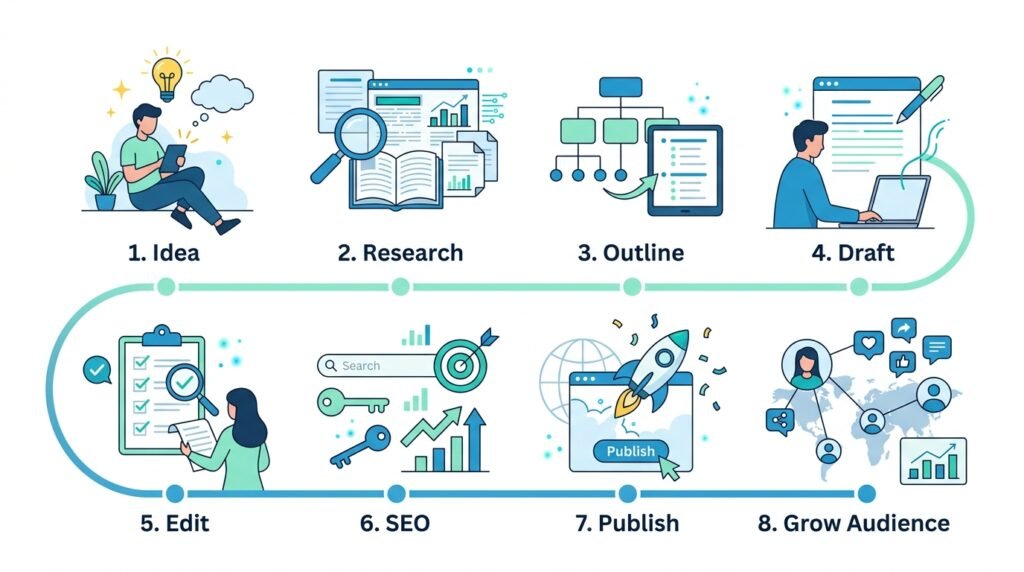
Artificial intelligence is changing the way bloggers research, write, edit, and publish content—but it hasn’t changed what makes a blog successful.
Readers still want content that answers their questions, solves real problems, and reflects genuine expertise.
The most successful bloggers don’t rely on AI to replace their creativity. They use it to eliminate repetitive tasks, speed up their workflow, and create more time for the work that matters most: researching thoroughly, sharing original insights, and building trust with their audience.
Whether you’re starting your first blog or managing an established content website, AI can become one of your most valuable productivity tools when used responsibly.
Start small. Experiment with a few beginner-friendly AI tools. Develop a workflow that fits your needs. Most importantly, continue refining your skills as a writer and educator. AI will continue to evolve, but helpful, trustworthy content will always remain the foundation of successful blogging.
Key Takeaways
- AI helps bloggers save time by assisting with research, outlining, drafting, editing, and SEO.
- The best results come from combining AI with human expertise and editorial review.
- Always fact-check AI-generated information before publishing.
- Different AI tools excel at different tasks, so choose the right tool for each stage of your workflow.
- High-quality, people-first content remains the most important factor for long-term blogging success.
Continue Your AI Journey
Keep building your AI knowledge with these beginner-friendly guides.
-

AI Interview Preparation: How to Use AI Tools to Land Your Next Job
Learn more : AI Interview Preparation: How to Use AI Tools to Land Your Next Job🕒 14-16 min read • Updated: July 2026 AI Interview Preparation: How to Use AI Tools to Ace…
-

7 Ways to Use AI for Research: Faster & Smarter Workflows (2026)
Learn more : 7 Ways to Use AI for Research: Faster & Smarter Workflows (2026)🕒 15 min read • Updated: July 2026 Introduction Research has always been about discovering new information, asking…
-

AI for Teachers: 15 Practical Workflows to Streamline Your Classroom
Learn more : AI for Teachers: 15 Practical Workflows to Streamline Your Classroom🕒 15 min read • Updated: July 2026 Introduction Teaching is one of the most rewarding professions, but…
-

AI for Productivity: 15 Practical Workflows to Work Smarter in 2026
Learn more : AI for Productivity: 15 Practical Workflows to Work Smarter in 2026🕒 12-14 min read • Updated: July 2026 Introduction Imagine completing your daily work in less time while…
-

The 2026 Guide to AI in Sales: Tools & Workflows to Close Deals Faster
Learn more : The 2026 Guide to AI in Sales: Tools & Workflows to Close Deals Faster🕒 12-14 min read • Updated: July 2026 Introduction Artificial intelligence (AI) is transforming the way businesses find…
-

AI for Project Management: 15 Time-Saving Workflows & Prompt Templates
Learn more : AI for Project Management: 15 Time-Saving Workflows & Prompt Templates🕒 12-14 min read • Updated: July 2026 Quick Answer AI for project management uses artificial intelligence to…
Related Articles
Explore more guides and resources related to this topic.
-

ChatGPT Complete Guide for Beginners (2026): Master AI Step-by-Step
Learn more : ChatGPT Complete Guide for Beginners (2026): Master AI Step-by-Step🕒 20-25 min read • Updated: Aug 2026 Introduction Introduction Artificial intelligence is changing how people learn, work,…
-

Master Prompt Engineering in 2026: A Step-by-Step Beginner’s Guide
Learn more : Master Prompt Engineering in 2026: A Step-by-Step Beginner’s Guide🕒 18-20 min read • Updated: Aug 2026 Introduction Artificial intelligence (AI) tools like ChatGPT, Claude, Gemini, and…
-

Large Language Models (LLMs) Explained: The Complete 2026 Beginner’s Guide
Learn more : Large Language Models (LLMs) Explained: The Complete 2026 Beginner’s Guide🕒 14-16 min read • Updated: Aug 2026 Introduction Artificial Intelligence has become part of everyday life. Whether…
-

Best AI Image Generators in 2026: 10 Free & Paid Tools Tested
Learn more : Best AI Image Generators in 2026: 10 Free & Paid Tools Tested🕒 15 min read • Updated: July 2026 introduction Creating stunning images no longer requires years of design…
-

10 Best AI Chatbots in 2026: Tested & Ranked for Every Use Case
Learn more : 10 Best AI Chatbots in 2026: Tested & Ranked for Every Use Case🕒 10-12 min read • Updated: July 2026 introduction Artificial intelligence has made chatbots far more capable than…
-

ChatGPT vs Microsoft Copilot (2026): Tested, Pricing & Workflow Comparison
Learn more : ChatGPT vs Microsoft Copilot (2026): Tested, Pricing & Workflow Comparison🕒 10-12 min read • Updated: July 2026 Introduction Choosing between ChatGPT and Microsoft Copilot can be challenging,…

Recommended AI Tools
If you’re building a blogging workflow, these tools are excellent starting points:
| Tool | Best For |
| ChatGPT | Brainstorming, drafting, and learning |
| Claude | Editing and improving long-form articles |
| Perplexity AI | Research and finding reliable sources |
| Grammarly | Grammar and readability improvements |
| Canva AI | Creating blog graphics and featured images |
| Notion AI | Content planning and editorial organization |
Ready to start? Begin with ChatGPT, Perplexity AI, and Canva AI. These three tools cover idea generation, research, writing, and visual creation—everything most beginner bloggers need to publish high-quality content efficiently.
References
- Google Search Central. Creating Helpful, Reliable, People-First Content. Available at: https://developers.google.com/search/docs/fundamentals/creating-helpful-content
- Google Search Central. Using AI-Generated Content in Google Search. Available at: https://developers.google.com/search/docs/fundamentals/using-gen-ai-content
- OpenAI. ChatGPT. Available at: https://openai.com/chatgpt
- Anthropic. Claude. Available at: https://www.anthropic.com/claude
- Google. Gemini. Available at: https://gemini.google.com/
- Perplexity AI. Perplexity AI. Available at: https://www.perplexity.ai/
- Grammarly. Grammarly AI Writing Assistant. Available at: https://www.grammarly.com/
- Canva. Canva AI. Available at: https://www.canva.com/
- Notion. Notion AI. Available at: https://www.notion.so/product/ai
- Surfer SEO. Surfer. Available at: https://surferseo.com/
Leave a Reply