
🕒 12-14 min read • Updated: July 2026
Table of Contents
Introduction
Imagine completing your daily work in less time while producing better results.
Whether you’re answering emails, creating presentations, managing projects, studying for exams, or running a business, many repetitive tasks consume valuable hours every week. Artificial Intelligence (AI) is changing that by helping people automate routine work, organize information, generate ideas, and make better decisions faster.
The best part? You don’t need to be a programmer or AI expert to benefit from it.
Today’s AI tools are designed for everyone—from students and professionals to freelancers, entrepreneurs, and content creators. Many of the most useful tools offer free plans, making it easier than ever to start using AI in your everyday workflow.
In this guide, you’ll learn what AI for productivity means, why it’s becoming an essential skill, 15 practical ways to use AI more effectively, the best AI productivity tools for beginners, common mistakes to avoid, and best practices to help you save time without sacrificing quality.
Quick Answer: AI for productivity refers to using artificial intelligence to automate repetitive tasks, organize information, generate ideas, analyze data, and improve everyday workflows. Popular AI tools like ChatGPT, Claude, Gemini, Notion AI, and Perplexity AI can help you write faster, summarize documents, manage projects, conduct research, and make better decisions while saving valuable time.
Key Takeaways
- AI can automate repetitive tasks and reduce manual work.
- Beginners can start with free AI tools for writing, research, productivity, and organization.
- AI works best as an assistant that enhances human decision-making rather than replacing it.
- Using a few well-chosen AI tools consistently is more effective than trying dozens of applications.
- Understanding prompt engineering significantly improves AI-generated results.
What Is AI for Productivity?
AI for productivity means using artificial intelligence to complete tasks more efficiently, reduce repetitive work, and improve the quality of your output.
Instead of spending hours searching for information, drafting documents, organizing notes, or summarizing meetings, AI can complete much of the initial work in seconds. You remain in control by reviewing, refining, and applying your expertise to the final result.
Think of AI as a highly capable digital assistant that helps you focus on meaningful work while handling many time-consuming tasks.
For example:
- A student can summarize lengthy research papers before studying.
- A marketing professional can generate campaign ideas in minutes.
- A business owner can draft emails, reports, and proposals more efficiently.
- A software developer can receive coding suggestions and explanations.
- A content creator can brainstorm ideas, write outlines, and repurpose content across multiple platforms.
The goal isn’t to work harder—it’s to work smarter.
Why AI Is Transforming Productivity
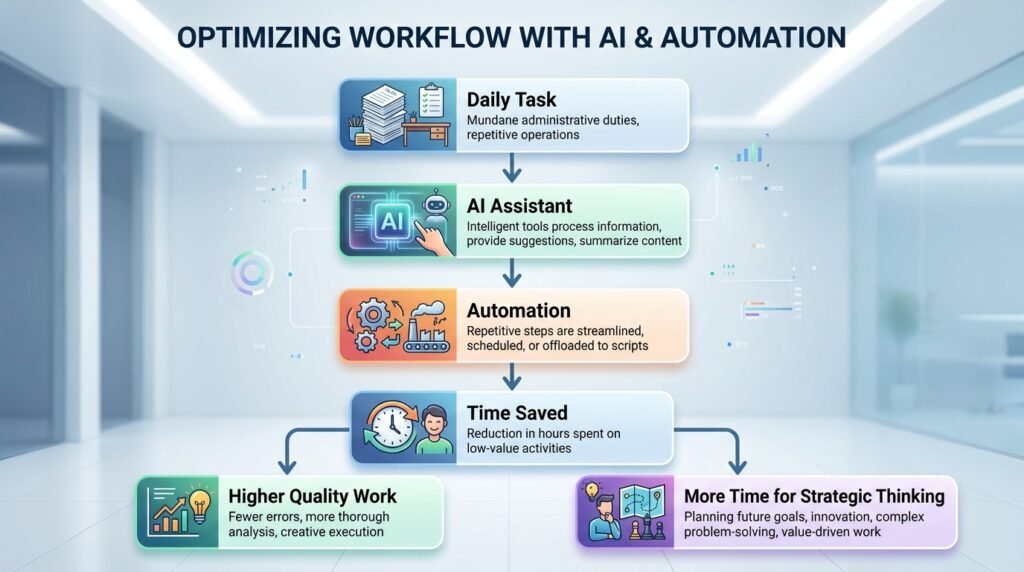
Artificial intelligence doesn’t simply make tasks faster. It changes how work gets done.
Many daily activities follow predictable patterns, making them ideal candidates for AI assistance. Instead of starting every task from scratch, AI provides a strong first draft that you can review, personalize, and improve.
Some of the biggest productivity benefits include:
Save Time
AI can summarize lengthy documents, draft emails, create reports, and organize information within seconds.
Reduce Repetitive Work
Routine tasks like formatting documents, rewriting text, organizing notes, or categorizing information can often be automated.
Improve Creativity
AI can help overcome creative blocks by generating ideas, suggesting alternatives, and exploring different approaches to a problem.
Enhance Decision-Making
Modern AI tools can quickly analyze large amounts of information, helping you compare options and identify patterns more efficiently.
Learn Faster
Instead of spending hours searching through multiple websites, AI can explain complex topics in simple language, making learning more accessible for beginners.
Who Can Benefit from AI for Productivity?
One of the biggest misconceptions about AI is that it’s only useful for technology professionals.
In reality, almost anyone can use AI to improve their workflow.
| User | How AI Helps |
| Students | Study notes, research summaries, essay outlines, practice questions |
| Professionals | Emails, reports, meeting summaries, presentations |
| Small Business Owners | Marketing, customer support, planning, documentation |
| Content Creators | Content ideas, scripts, outlines, social media posts |
| Freelancers | Client proposals, project planning, research, editing |
| Developers | Code generation, debugging, documentation, explanations |
| Job Seekers | Resume improvement, interview preparation, cover letters |
Regardless of your profession, AI can help eliminate repetitive tasks so you can focus on higher-value work.
15 Practical Ways to Use AI for Productivity
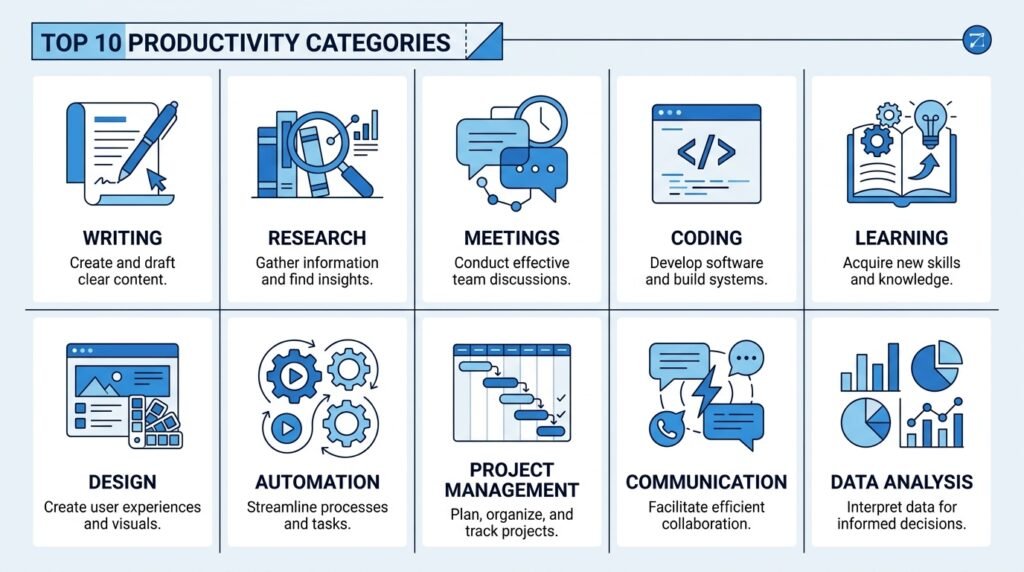
Artificial intelligence isn’t just about writing text or answering questions. It can simplify dozens of everyday tasks, helping you save time, stay organized, and focus on more meaningful work.
Here are some of the most practical ways beginners can use AI to become more productive.
1. Write Emails Faster
Writing professional emails can take more time than expected, especially when you’re responding to multiple people every day.
AI can generate a polished first draft in seconds. Whether you’re writing a client proposal, replying to a customer, requesting information, or following up after a meeting, AI helps you start with a strong draft instead of a blank page.
Example
Instead of spending 15 minutes writing a follow-up email, ask AI:
“Write a friendly follow-up email after a project meeting, thanking the client and summarizing the next steps.”
You’ll receive a draft that you can quickly personalize before sending.
Recommended Tools
- ChatGPT
- Claude
- Gemini
2. Summarize Long Documents
Reading reports, research papers, meeting notes, or lengthy articles can consume hours of your day.
AI can extract the key ideas, summarize important points, and explain complex information in simple language.
This is especially helpful for:
- Students reviewing academic papers
- Professionals reading reports
- Researchers gathering information
- Managers preparing meeting summaries
Example
Upload a 30-page report and ask:
“Summarize this document into five key takeaways suitable for a beginner.”
Instead of reading every page, you’ll immediately understand the main points.
Recommended Tools
- ChatGPT
- Claude
- Perplexity AI
3. Brainstorm Ideas Faster
Creative blocks happen to everyone.
Whether you’re writing an article, planning a marketing campaign, designing a product, or preparing a presentation, AI can generate fresh ideas within seconds.
Rather than replacing creativity, AI acts as a brainstorming partner that helps you explore different perspectives.
Example
Ask:
“Suggest 20 YouTube video ideas for beginners learning artificial intelligence.”
or
“Generate marketing campaign ideas for a local coffee shop.”
Even if you don’t use every suggestion, AI often sparks better ideas of your own.
Recommended Tools
- ChatGPT
- Claude
- Gemini
4. Create Better Presentations
Building presentations usually involves researching topics, organizing information, writing slide content, and designing visuals.
AI can assist with each step by:
- Creating presentation outlines
- Suggesting slide titles
- Writing concise bullet points
- Generating speaker notes
- Designing visuals
Example
Instead of starting from scratch, ask AI:
“Create a 10-slide presentation explaining artificial intelligence to beginners.”
You’ll receive a structured outline that you can refine and personalize.
Recommended Tools
- Canva AI
- Gamma
- Microsoft Copilot
5. Improve Your Writing
Whether you’re writing blog posts, reports, resumes, essays, or business documents, AI can help improve clarity, grammar, readability, and tone.
Instead of simply correcting mistakes, modern AI tools explain why changes improve your writing.
AI can help you:
- Rewrite awkward sentences
- Simplify technical language
- Improve grammar
- Adjust tone
- Remove repetition
- Make writing more concise
Example
Ask:
“Rewrite this paragraph to sound more professional while keeping it easy to understand.”
Recommended Tools
- Grammarly
- ChatGPT
- Claude
Productivity Tip
Don’t rely on AI to produce final work without review. The best results come from combining AI’s speed with your judgment, expertise, and personal style. Think of AI as a collaborative assistant—not a replacement for critical thinking.
6. Organize Notes and Knowledge
Important information is often scattered across notebooks, documents, emails, chat messages, and meeting notes. Finding the right information later can become frustrating and time-consuming.
AI-powered note-taking tools can organize information automatically, summarize long notes, generate action items, and even answer questions based on your saved content.
Instead of searching through dozens of documents, you can simply ask:
“What were the key decisions from last month’s marketing meetings?”
The AI searches your notes and provides a concise answer.
Common Use Cases
- Organize meeting notes
- Summarize research
- Create knowledge bases
- Find information quickly
- Generate action items
Recommended Tools
- Notion AI
- Microsoft Copilot
- ChatGPT
7. Research Information More Efficiently
Research often involves opening multiple browser tabs, comparing sources, and filtering irrelevant information.
AI research assistants can dramatically reduce this process by gathering information from multiple sources, summarizing findings, and helping you explore topics faster.
However, it’s important to verify important facts using reliable sources, especially for academic, medical, financial, or legal information.
Example
Instead of searching:
“Best project management methods”
Ask:
“Compare Agile, Scrum, and Kanban for a beginner managing a small software team.”
Within seconds, you’ll receive a structured comparison that’s much easier to understand.
Recommended Tools
- Perplexity AI
- ChatGPT
- Gemini
8. Manage Projects More Effectively
Project management involves planning, scheduling, assigning tasks, tracking progress, and communicating with team members.
AI can simplify many of these responsibilities by helping you:
- Break large projects into smaller tasks
- Estimate timelines
- Prioritize work
- Generate project plans
- Create meeting agendas
- Track action items
Example
Prompt:
“Create a four-week project plan for launching a company blog, including milestones and weekly tasks.”
Instead of starting with a blank document, you’ll receive a structured roadmap that can be customized for your project.
Recommended Tools
- Notion AI
- ClickUp AI
- Microsoft Copilot
9. Automate Repetitive Tasks
Many daily activities follow predictable patterns.
Examples include:
- Renaming files
- Categorizing emails
- Copying information between applications
- Sending reminders
- Updating spreadsheets
- Creating recurring reports
AI combined with automation tools can perform these tasks automatically, reducing manual work and minimizing errors.
Example
When a customer submits a form:
- AI summarizes the request.
- Creates a task in your project management tool.
- Drafts a response email.
- Notifies your team.
What previously required several manual steps can happen automatically.
Recommended Tools
- Zapier AI
- Make
- Microsoft Power Automate
10. Learn New Skills Faster
Learning something new often means reading books, watching videos, and searching multiple websites.
AI acts like a personal tutor by explaining complex topics, generating quizzes, answering questions, and adapting explanations to your current knowledge level.
Example
Instead of asking:
“Explain machine learning.”
Ask:
“Explain machine learning as if I’m a complete beginner and include a real-world example.”
You’ll receive a personalized explanation that’s much easier to understand than many technical resources.
Recommended Tools
- ChatGPT
- Claude
- Gemini
11. Analyze Data More Quickly
Working with spreadsheets and datasets can be intimidating, especially if you don’t have a technical background.
AI can help identify trends, explain charts, summarize data, and even generate formulas.
Instead of manually reviewing hundreds of rows of information, AI can highlight the most important insights.
Example
Upload a spreadsheet and ask:
“Identify the three biggest sales trends and explain what they mean.”
Within moments, you’ll receive a clear summary instead of spending hours analyzing the data manually.
Recommended Tools
- ChatGPT
- Microsoft Copilot
- Gemini
12. Improve Meeting Productivity
Meetings often generate pages of notes, action items, and follow-up tasks.
AI meeting assistants can:
- Record conversations
- Generate summaries
- Identify key decisions
- Create action items
- Draft follow-up emails
This allows participants to focus on the discussion instead of taking detailed notes.
Example
After a meeting, AI can automatically produce:
- Meeting summary
- Decisions made
- Assigned tasks
- Deadlines
- Follow-up email draft
Recommended Tools
- Microsoft Copilot
- Notion AI
- ChatGPT
13. Create Content More Efficiently
Content creation involves much more than writing.
AI can assist with:
- Brainstorming topics
- Creating outlines
- Drafting articles
- Writing social media posts
- Repurposing content
- Generating headlines
- Improving readability
Rather than replacing creativity, AI helps reduce the time spent on repetitive writing tasks so you can focus on originality and strategy.
Example
Turn one blog post into:
- LinkedIn post
- X (Twitter) thread
- Email newsletter
- Video script
- Instagram carousel outline
—all with AI assistance.
Recommended Tools
- ChatGPT
- Claude
- Canva AI
14. Plan Your Day More Effectively
Productivity isn’t just about working faster—it’s about working on the right tasks.
AI can help prioritize your workload by organizing tasks based on urgency, deadlines, and estimated effort.
Example
Prompt:
“Here’s my task list for today. Organize it using the Eisenhower Matrix and suggest a realistic schedule.”
Instead of guessing what to work on next, you’ll have a structured daily plan.
Recommended Tools
- ChatGPT
- Notion AI
- Microsoft Copilot
15. Make Better Decisions
One of AI’s most valuable strengths is helping people evaluate options.
Whether you’re comparing software, planning a project, choosing a marketing strategy, or evaluating business ideas, AI can organize information into clear comparisons.
Remember, AI should support—not replace—your judgment.
Example
Ask:
“Compare three email marketing platforms for a small business based on pricing, ease of use, automation features, and scalability.”
AI can summarize the information in a structured format, helping you make faster and more informed decisions.
Recommended Tools
- ChatGPT
- Claude
- Perplexity AI
Quick Recap: 15 Practical Ways AI Improves Productivity
| Productivity Task | How AI Helps | Recommended Tools |
| Write Emails | Draft and refine emails | ChatGPT, Claude |
| Summarize Documents | Extract key points | Claude, Perplexity |
| Brainstorm Ideas | Generate creative suggestions | ChatGPT, Gemini |
| Create Presentations | Build outlines and slides | Canva AI, Gamma |
| Improve Writing | Grammar, clarity, tone | Grammarly, Claude |
| Organize Notes | Summaries and knowledge management | Notion AI |
| Research Faster | Compare and summarize information | Perplexity AI |
| Manage Projects | Plans, timelines, task breakdowns | ClickUp AI |
| Automate Tasks | Connect workflows | Zapier AI |
| Learn Faster | Personalized explanations | ChatGPT |
| Analyze Data | Identify trends and insights | Microsoft Copilot |
| Improve Meetings | Summaries and action items | Notion AI |
| Create Content | Draft and repurpose content | ChatGPT |
| Plan Your Day | Prioritize tasks | Notion AI |
| Make Better Decisions | Compare options objectively | Claude, Perplexity |
Best AI Productivity Tools in 2026
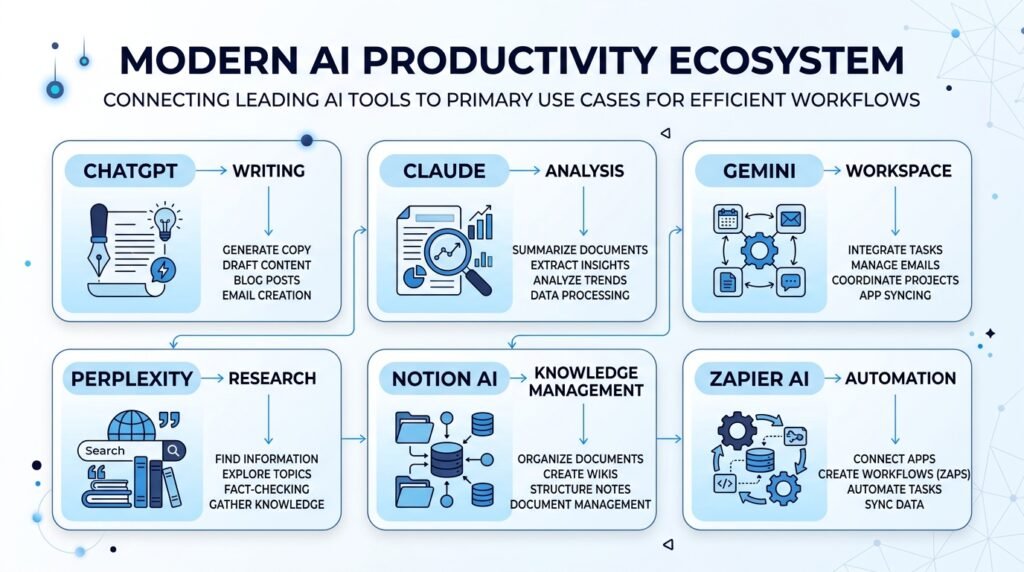
With hundreds of AI tools available today, choosing the right one can feel overwhelming. Fortunately, you don’t need dozens of applications to become more productive.
For most beginners, a small toolkit of reliable AI apps is enough to handle writing, research, project management, design, and automation.
The tools below were selected based on:
- Ease of use
- Free plan availability
- Productivity benefits
- Reliability
- Beginner-friendly interface
- Overall value
Comparison Table
| AI Tool | Best For | Free Plan | Beginner Friendly | Best Choice For |
| ChatGPT | Writing, brainstorming, learning | ✅ Yes | ⭐⭐⭐⭐⭐ | Everyday productivity |
| Claude | Long-form writing & analysis | ✅ Yes | ⭐⭐⭐⭐⭐ | Reports & documents |
| Gemini | Google Workspace | ✅ Yes | ⭐⭐⭐⭐☆ | Gmail, Docs & Sheets |
| Perplexity AI | Research & fact-finding | ✅ Yes | ⭐⭐⭐⭐⭐ | Students & researchers |
| Notion AI | Notes & project management | ✅ Yes | ⭐⭐⭐⭐☆ | Teams & knowledge management |
| Microsoft Copilot | Office productivity | Limited | ⭐⭐⭐⭐☆ | Excel, Word & PowerPoint |
| Canva AI | Design & presentations | ✅ Yes | ⭐⭐⭐⭐⭐ | Content creators |
| Grammarly | Writing improvement | ✅ Yes | ⭐⭐⭐⭐⭐ | Professionals & students |
| Zapier AI | Workflow automation | Limited | ⭐⭐⭐⭐☆ | Business automation |
ChatGPT
ChatGPT is one of the most versatile AI assistants available today. It can help write emails, generate ideas, summarize information, explain complex concepts, and even assist with coding.
For beginners, it’s often the best starting point because it supports a wide variety of everyday tasks without requiring technical knowledge.
Best For
- Writing
- Brainstorming
- Learning
- Planning
- Coding assistance
Claude
Claude excels at understanding long documents and producing thoughtful, well-structured responses.
It’s particularly useful for professionals who frequently work with reports, research papers, proposals, or lengthy documents.
Best For
- Long-form writing
- Research
- Document analysis
- Professional communication
Gemini
If you already use Google’s ecosystem, Gemini integrates naturally with Gmail, Google Docs, Sheets, and Drive.
It helps automate routine tasks without requiring additional software.
Best For
- Google Workspace
- Productivity
- Students
- Everyday office work
Perplexity AI
Perplexity AI combines conversational AI with web search, making it an excellent research assistant.
Unlike many chatbots, it cites sources, helping users verify information more easily.
Best For
- Research
- Learning
- Comparing information
- Fact-checking
Notion AI
Notion AI transforms your notes into an intelligent knowledge base.
It can summarize documents, organize information, generate action items, and answer questions using your own workspace.
Best For
- Knowledge management
- Team collaboration
- Meeting notes
- Documentation
Canva AI
Creating presentations, social media graphics, and marketing materials becomes much easier with Canva AI.
Its AI-powered design features help beginners create professional visuals without graphic design experience.
Best For
- Presentations
- Social media
- Marketing
- Content creation
Grammarly
Grammarly uses AI to improve grammar, clarity, tone, and readability.
Whether you’re writing emails, reports, resumes, or blog posts, it helps communicate more effectively.
Best For
- Editing
- Professional writing
- Students
- Business communication
Zapier AI
Zapier AI connects your favorite applications and automates repetitive workflows.
Instead of manually transferring information between apps, you can automate the process and save hours every week.
Best For
- Workflow automation
- Small businesses
- Repetitive tasks
- Productivity systems
Real-World Examples of AI for Productivity
Understanding the technology is helpful, but seeing it in action makes it easier to apply.
Here are a few examples of how different people can use AI to save time and improve their daily workflow.
Student
Instead of spending hours reading multiple research papers, a student can use AI to summarize key concepts, create study notes, generate practice questions, and explain difficult topics in simple language.
Result: More effective study sessions and better understanding of complex subjects.
Office Professional
A project manager can use AI to draft emails, summarize meetings, create project timelines, organize tasks, and prepare presentations.
Result: Less administrative work and more time for strategic decision-making.
Small Business Owner
A business owner can use AI to write marketing content, respond to customer inquiries, generate product descriptions, analyze customer feedback, and automate repetitive tasks.
Result: Improved efficiency without increasing operational costs.
Content Creator
A creator can brainstorm video ideas, write outlines, repurpose blog posts into social media content, create presentation slides, and improve writing quality.
Result: Faster content production while maintaining creativity.
Software Developer
Developers can use AI to explain code, generate functions, identify bugs, write documentation, and learn new programming concepts.
Result: Faster development and improved problem-solving.
Common Mistakes to Avoid
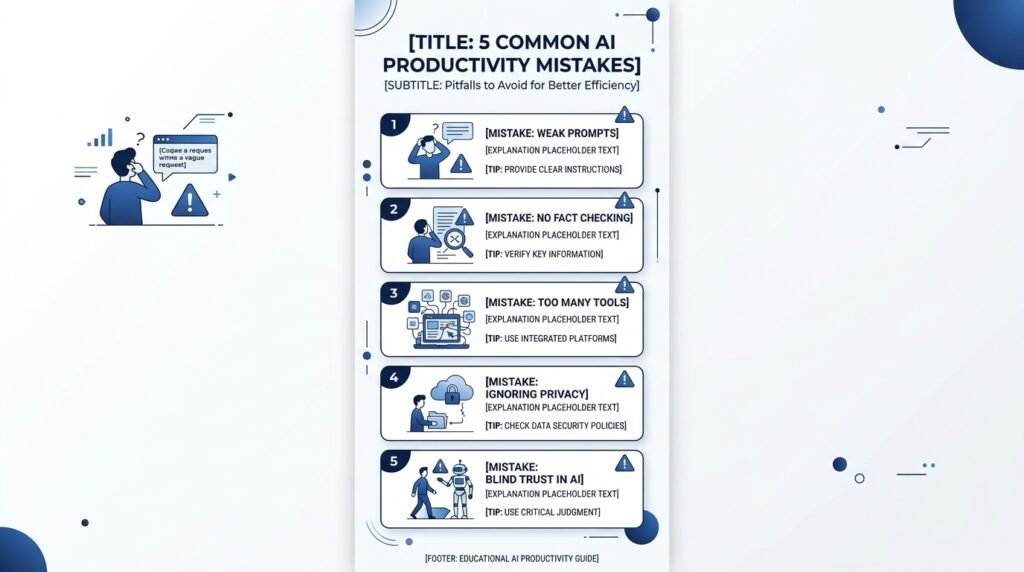
While AI can significantly improve productivity, using it incorrectly may reduce the quality of your work.
Here are some common mistakes beginners should avoid.
Trying Too Many AI Tools
Installing every trending AI app often leads to confusion.
Start with two or three reliable tools and learn them well before expanding your toolkit.
Accepting AI Output Without Reviewing It
AI can make mistakes, misunderstand context, or generate outdated information.
Always review and verify important work before publishing or sharing it.
Writing Weak Prompts
The quality of AI responses depends heavily on the instructions you provide.
Clear, specific prompts almost always produce better results than vague requests.
Ignoring Privacy
Avoid uploading confidential business documents, personal information, or sensitive data into AI tools unless you’re confident about the platform’s privacy policies.
Depending Entirely on AI
AI should enhance your thinking—not replace it.
Critical thinking, creativity, and human judgment remain essential for producing trustworthy work.
Best Practices for Using AI Productively
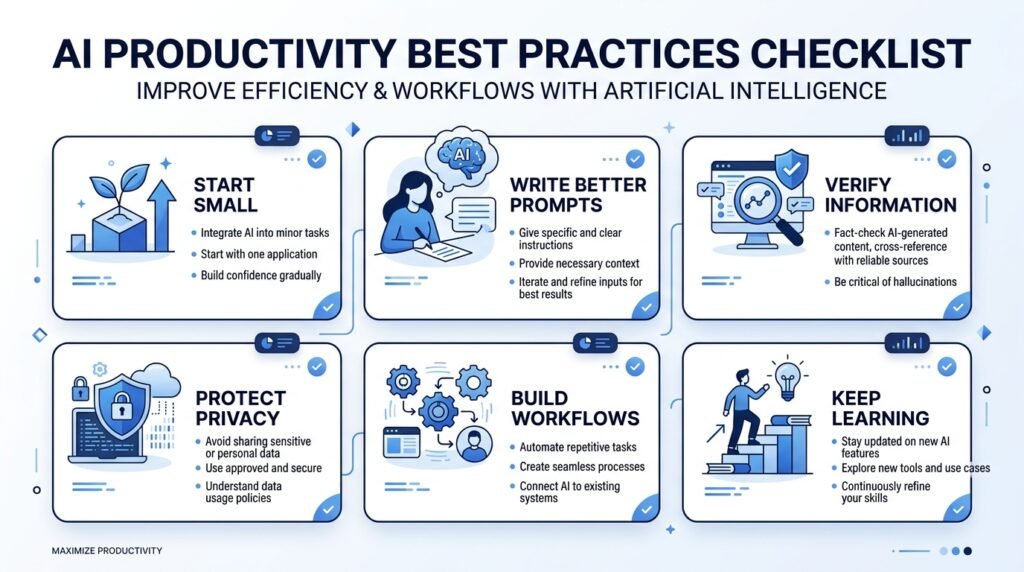
Artificial intelligence is most effective when it complements your skills rather than replacing them. Following a few simple best practices can help you get more accurate results, save time, and avoid common mistakes.
Start with One or Two AI Tools
You don’t need to use every AI application available.
Instead, begin with one general-purpose AI assistant like ChatGPT or Claude and one specialized tool such as Notion AI or Canva AI. Once you’re comfortable, expand your toolkit based on your needs.
Write Clear and Specific Prompts
The quality of AI responses depends heavily on your instructions.
Instead of asking:
“Write an article.”
Try:
“Write a beginner-friendly 800-word article explaining how AI improves workplace productivity with practical examples.”
The more context you provide, the better the output.
Always Review AI-Generated Content
AI can make mistakes, misunderstand context, or provide outdated information.
Before using AI-generated content:
- Verify important facts.
- Check statistics and references.
- Adjust the tone to match your audience.
- Add your own expertise and insights.
Human judgment remains essential.
Protect Sensitive Information
Avoid sharing confidential business documents, financial records, passwords, or personal information with AI tools unless you’re confident about the platform’s privacy and security policies.
When working with sensitive data, follow your organization’s AI usage guidelines.
Build Repeatable Workflows
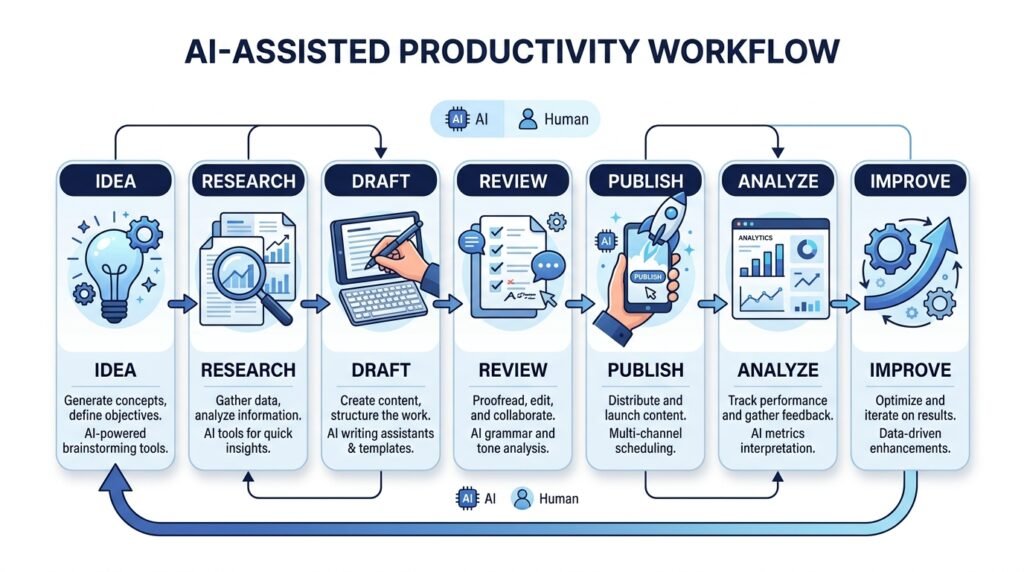
Rather than using AI randomly, create simple workflows you can repeat.
For example:
Research → AI Summary → First Draft → Human Review → Final Version
Repeatable processes save more time than isolated AI interactions.

Frequently Asked Questions
What is AI for productivity?
AI for productivity refers to using artificial intelligence to automate repetitive tasks, organize information, generate ideas, improve writing, analyze data, and help people complete work more efficiently.
Can beginners use AI for productivity?
Yes. Most modern AI tools are designed for beginners and require little to no technical knowledge. Tools like ChatGPT, Claude, Gemini, and Canva AI offer intuitive interfaces and free plans, making it easy to get started.
What are the best AI productivity tools?
Some of the best AI productivity tools include:
- ChatGPT
- Claude
- Gemini
- Perplexity AI
- Notion AI
- Canva AI
- Grammarly
- Microsoft Copilot
The right choice depends on your goals and workflow.
Is AI free to use?
Many AI tools offer free plans with generous usage limits. Premium subscriptions often provide faster performance, higher limits, advanced features, and access to the latest AI models.
Will AI replace human workers?
AI is more likely to change how people work than replace most jobs entirely.
It excels at automating repetitive tasks, while humans continue to provide creativity, critical thinking, empathy, and strategic decision-making. People who learn to work effectively with AI are likely to gain a competitive advantage.
Can AI improve workplace productivity?
Yes. AI can help employees draft documents, summarize meetings, automate repetitive tasks, organize information, conduct research, analyze data, and improve communication. When used responsibly, it can significantly reduce time spent on routine work.
Which industries benefit most from AI productivity tools?
AI productivity tools are useful across many industries, including education, healthcare, finance, marketing, software development, customer support, human resources, and small business operations. Almost any profession that involves writing, research, planning, or repetitive digital tasks can benefit.
Conclusion
Artificial intelligence is changing the way we work—not by replacing human expertise, but by helping us spend less time on repetitive tasks and more time on meaningful work.
Whether you’re a student organizing study notes, a professional managing projects, a business owner streamlining operations, or a creator producing content, AI can become a valuable productivity partner when used thoughtfully.
The key isn’t finding every AI tool available. It’s choosing a few reliable tools, learning how to write effective prompts, and building simple workflows that fit your daily routine.
As AI continues to evolve, the people who understand how to work alongside it will be better equipped to learn faster, make informed decisions, and stay productive in an increasingly digital world.
Start small, experiment consistently, and let AI handle the repetitive work so you can focus on what matters most.

Continue Your AI Journey
Keep building your AI knowledge with these beginner-friendly guides.
-

AI Interview Preparation: How to Use AI Tools to Land Your Next Job
Learn more : AI Interview Preparation: How to Use AI Tools to Land Your Next Job🕒 14-16 min read • Updated: July 2026 AI Interview Preparation: How to Use AI Tools to Ace…
-

7 Ways to Use AI for Research: Faster & Smarter Workflows (2026)
Learn more : 7 Ways to Use AI for Research: Faster & Smarter Workflows (2026)🕒 15 min read • Updated: July 2026 Introduction Research has always been about discovering new information, asking…
-

AI for Teachers: 15 Practical Workflows to Streamline Your Classroom
Learn more : AI for Teachers: 15 Practical Workflows to Streamline Your Classroom🕒 15 min read • Updated: July 2026 Introduction Teaching is one of the most rewarding professions, but…
-

AI for Productivity: 15 Practical Workflows to Work Smarter in 2026
Learn more : AI for Productivity: 15 Practical Workflows to Work Smarter in 2026🕒 12-14 min read • Updated: July 2026 Introduction Imagine completing your daily work in less time while…
-

The 2026 Guide to AI in Sales: Tools & Workflows to Close Deals Faster
Learn more : The 2026 Guide to AI in Sales: Tools & Workflows to Close Deals Faster🕒 12-14 min read • Updated: July 2026 Introduction Artificial intelligence (AI) is transforming the way businesses find…
-

AI for Project Management: 15 Time-Saving Workflows & Prompt Templates
Learn more : AI for Project Management: 15 Time-Saving Workflows & Prompt Templates🕒 12-14 min read • Updated: July 2026 Quick Answer AI for project management uses artificial intelligence to…
Related Articles
Explore more guides and resources related to this topic.
-

ChatGPT Complete Guide for Beginners (2026): Master AI Step-by-Step
Learn more : ChatGPT Complete Guide for Beginners (2026): Master AI Step-by-Step🕒 20-25 min read • Updated: Aug 2026 Introduction Introduction Artificial intelligence is changing how people learn, work,…
-

Master Prompt Engineering in 2026: A Step-by-Step Beginner’s Guide
Learn more : Master Prompt Engineering in 2026: A Step-by-Step Beginner’s Guide🕒 18-20 min read • Updated: Aug 2026 Introduction Artificial intelligence (AI) tools like ChatGPT, Claude, Gemini, and…
-

Large Language Models (LLMs) Explained: The Complete 2026 Beginner’s Guide
Learn more : Large Language Models (LLMs) Explained: The Complete 2026 Beginner’s Guide🕒 14-16 min read • Updated: Aug 2026 Introduction Artificial Intelligence has become part of everyday life. Whether…
-

Best AI Image Generators in 2026: 10 Free & Paid Tools Tested
Learn more : Best AI Image Generators in 2026: 10 Free & Paid Tools Tested🕒 15 min read • Updated: July 2026 introduction Creating stunning images no longer requires years of design…
-
10 Best AI Chatbots in 2026: Tested & Ranked for Every Use Case
Learn more : 10 Best AI Chatbots in 2026: Tested & Ranked for Every Use Case🕒 10-12 min read • Updated: July 2026 introduction Artificial intelligence has made chatbots far more capable than…
-
ChatGPT vs Microsoft Copilot (2026): Tested, Pricing & Workflow Comparison
Learn more : ChatGPT vs Microsoft Copilot (2026): Tested, Pricing & Workflow Comparison🕒 10-12 min read • Updated: July 2026 Introduction Choosing between ChatGPT and Microsoft Copilot can be challenging,…
Recommended AI Tools
If you’re just getting started, these four tools provide an excellent foundation for most productivity tasks:
| Tool | Best For |
| ChatGPT | Writing, brainstorming, learning, and everyday assistance |
| Claude | Long-form writing, document analysis, and research |
| Perplexity AI | Fast research with source citations |
| Notion AI | Notes, project management, and knowledge organization |
You don’t need dozens of AI apps. Mastering a small set of reliable tools will often have a greater impact on your productivity than constantly switching between new platforms.
References
- https://openai.com/chatgpt
- https://www.anthropic.com/claude
- https://gemini.google.com
- https://www.microsoft.com/copilot
- https://www.notion.so/product/ai
- https://www.perplexity.ai
- https://www.microsoft.com/worklab
- https://www.mckinsey.com/capabilities/quantumblack/our-insights/the-economic-potential-of-generative-ai-the-next-productivity-frontier
Leave a Reply