
🕒 15 min read • Updated: July 2026
Table of Contents
Introduction
School, college, and university life often means juggling assignments, research, exams, presentations, and tight deadlines. While studying has always required time and effort, today’s students have access to a powerful new learning companion: Artificial Intelligence (AI).
From explaining difficult concepts and summarizing lengthy notes to improving writing and creating personalized study plans, AI can help students learn more efficiently and stay organized. Instead of replacing learning, AI works best as a study assistant that supports critical thinking, creativity, and productivity.
The challenge is knowing which AI tools are genuinely helpful and how to use them responsibly. With hundreds of AI-powered applications available, choosing the right ones can feel overwhelming.
In this guide, you’ll learn what AI for students is, how it works, its benefits and limitations, the best AI tools to use, practical study tips, and real-world examples to help you learn smarter in 2026.
Quick Answer
AI for students refers to using artificial intelligence tools to support learning, research, writing, revision, organization, coding, and productivity. Popular AI tools such as ChatGPT, Gemini, Claude, Perplexity AI, Grammarly, and Canva AI can help students study more effectively when used responsibly and alongside independent learning.
What Is AI for Students?
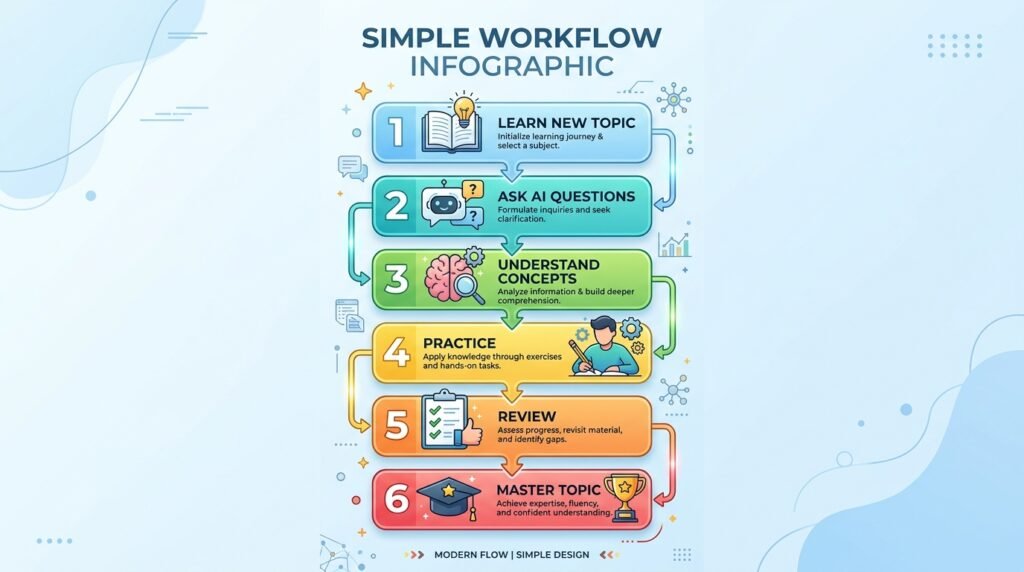
AI for students is the use of artificial intelligence technologies to make learning easier, faster, and more personalized. Rather than simply providing answers, modern AI tools can explain concepts, organize information, generate practice questions, improve writing, and assist with problem-solving.
Think of AI as a personal study assistant that’s available whenever you need help. It doesn’t replace teachers or textbooks, but it can make studying more interactive and efficient.
For example, a student preparing for a biology exam can ask an AI assistant to explain photosynthesis in simple language, generate multiple-choice practice questions, or summarize a long chapter into concise revision notes.
The real value of AI lies in helping students understand concepts, save time on repetitive tasks, and develop stronger learning habits.
Why AI Is Becoming Essential for Students
Education is changing rapidly, and digital skills are becoming just as important as traditional academic knowledge. AI is now being integrated into classrooms, universities, workplaces, and online learning platforms around the world.
Students who learn how to use AI responsibly today are developing skills that will be valuable throughout their education and future careers.
Some of the reasons AI has become popular among students include:
- Faster access to information
- Personalized explanations for difficult topics
- Better organization and productivity
- Support for writing and communication
- Interactive learning experiences
- Assistance with coding and technical subjects
- Improved research efficiency
When combined with critical thinking and reliable learning resources, AI can make studying both more effective and more enjoyable.
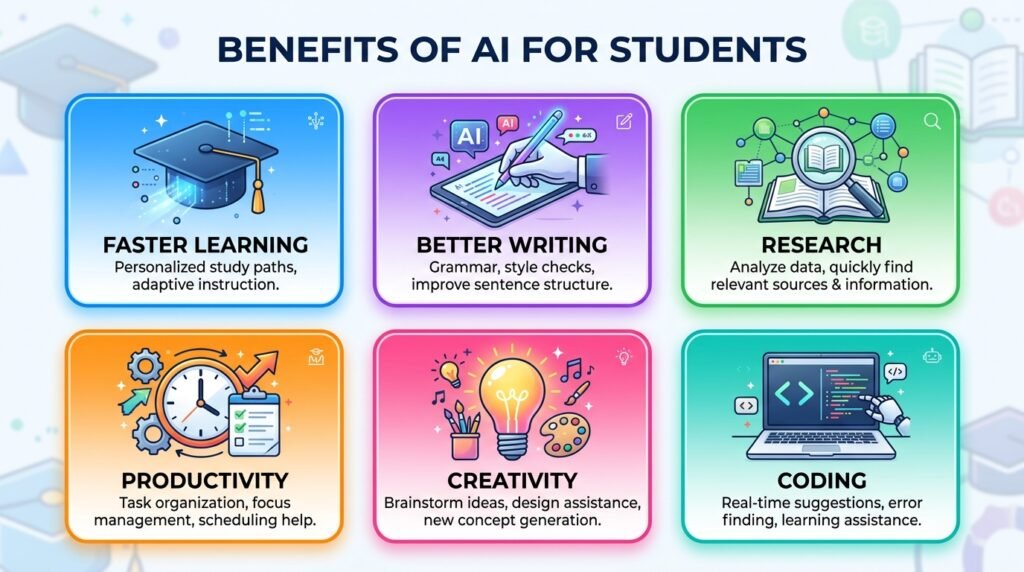
Benefits of AI for Students
| Benefit | How AI Helps |
| Faster Learning | Explains complex concepts in simple language |
| Better Writing | Improves grammar, clarity, and structure |
| Research Support | Summarizes articles and identifies key points |
| Productivity | Creates study schedules and task lists |
| Personalized Learning | Adapts explanations to your level |
| Coding Assistance | Explains code and helps debug errors |
| Creativity | Generates ideas for essays and projects |
| Language Learning | Assists with translation and conversation practice |
| Exam Preparation | Creates quizzes and revision notes |
Instead of spending hours searching through multiple websites, students can use AI to organize information quickly while still verifying important facts using trusted sources.
How Students Can Use AI Effectively
Artificial intelligence isn’t just useful for one type of assignment. It can support almost every stage of the learning process.
1. Understand Difficult Concepts
One of AI’s greatest strengths is explaining complex ideas in simpler terms.
Whether you’re learning calculus, chemistry, economics, or history, AI can break complicated topics into smaller, easier-to-understand explanations.
For example, instead of reading several textbook pages about machine learning, you can ask an AI assistant to explain it using real-life examples or analogies.
This makes learning more approachable, especially when you’re encountering a topic for the first time.
2. Summarize Long Study Material
Reading hundreds of pages before an exam can be overwhelming.
AI can help summarize:
- Chapters
- Research papers
- Lecture notes
- PDFs
- Articles
These summaries should be used as revision aids rather than replacements for reading the original material.
3. Create Personalized Study Plans
Every student has different strengths, weaknesses, and schedules.
AI can generate customized study timetables based on:
- Exam dates
- Available study hours
- Difficult subjects
- Learning goals
A structured study plan helps students remain consistent instead of cramming at the last minute.
4. Improve Essay Writing
Writing assignments become easier when AI is used as an editor rather than a writer.
AI can help:
- Improve grammar
- Rewrite awkward sentences
- Suggest stronger vocabulary
- Organize ideas
- Improve clarity
Students should always review and personalize AI suggestions to ensure the final work reflects their own understanding and meets academic integrity guidelines.
5. Generate Practice Questions and Quizzes
Preparing for exams isn’t just about reading notes—it’s about testing your understanding. AI can quickly create practice questions based on your study material, helping you identify knowledge gaps before the actual exam.
For example, after studying a chapter on World War II, you can ask an AI assistant to generate multiple-choice questions, true-or-false statements, or short-answer quizzes. This active recall technique is often more effective than simply rereading notes.
You can also request explanations for incorrect answers, making AI a valuable revision partner rather than just a question generator.
6. Research More Efficiently
Research projects often require students to read multiple articles, books, and reports. AI can speed up the early stages of research by helping you:
- Find key topics to explore
- Summarize lengthy articles
- Explain unfamiliar terminology
- Compare different viewpoints
- Organize research notes
However, AI should never replace reliable academic sources. Always verify facts using textbooks, peer-reviewed journals, official websites, or your institution’s recommended references before including information in assignments.
7. Learn Programming and Debug Code
For students studying computer science or learning to code, AI can act like a patient programming tutor.
It can help:
- Explain programming concepts
- Identify coding errors
- Suggest improvements
- Explain algorithms
- Walk through code step by step
Instead of simply copying AI-generated code, try asking why a solution works. Understanding the logic behind the code will improve your problem-solving skills far more than memorizing answers.
8. Create Presentations Faster
Creating presentations can take hours, especially when you’re organizing ideas and designing slides.
AI can assist by:
- Generating presentation outlines
- Suggesting slide titles
- Creating speaker notes
- Improving content structure
- Recommending visuals
While AI can help with the initial draft, students should personalize the presentation with their own research, examples, and insights to ensure accuracy and originality.
9. Brainstorm Ideas for Assignments and Projects
Sometimes the hardest part of an assignment is getting started.
AI can help students overcome creative blocks by suggesting:
- Essay topics
- Project ideas
- Research questions
- Debate arguments
- Case study examples
Instead of giving you the final answer, AI provides a starting point that you can develop with your own analysis and critical thinking.
10. Learn New Languages
AI-powered language tools make learning a new language more interactive.
Students can use AI to:
- Translate difficult sentences
- Practice conversations
- Improve pronunciation
- Learn vocabulary
- Correct grammar mistakes
These tools provide immediate feedback, making language practice more accessible outside the classroom.
11. Improve Time Management
Balancing classes, assignments, extracurricular activities, and personal commitments can be challenging.
AI can help students stay organized by creating:
- Daily study schedules
- Weekly planners
- Assignment checklists
- Revision timetables
- Productivity reminders
By automating routine planning, students can spend more time focusing on meaningful learning.
12. Organize Notes More Effectively
Instead of keeping scattered notes across multiple notebooks and devices, AI can help organize information into structured summaries.
Students can use AI to:
- Categorize notes by subject
- Create revision summaries
- Highlight key concepts
- Generate flashcards
- Build knowledge maps
Well-organized notes make revision faster and reduce the stress of preparing for exams.
13. Practice Interview and Communication Skills
Students preparing for internships, college admissions, or job interviews can use AI to practice answering common interview questions.
AI can simulate interview scenarios, provide feedback on responses, and suggest improvements in communication, helping students build confidence before real interviews.
14. Support Group Projects
Group assignments often involve coordinating tasks, brainstorming ideas, and organizing information.
AI can help teams by:
- Creating meeting agendas
- Summarizing discussions
- Drafting project timelines
- Brainstorming solutions
- Organizing shared notes
It should support collaboration rather than replace individual contributions.
15. Build Better Learning Habits
Perhaps the greatest benefit of AI isn’t saving time—it’s helping students develop more effective learning habits.
AI encourages students to:
- Ask more questions
- Learn through conversation
- Review concepts regularly
- Practice active recall
- Receive immediate explanations
When combined with curiosity and consistent effort, these habits lead to deeper understanding and long-term academic success.
Best AI Tools for Students
Not all AI tools are designed for the same purpose. Some excel at research, while others are better for writing, presentations, coding, or organization. The table below highlights some of the most useful AI tools for students in 2026.
| AI Tool | Best For | Free Plan | Ideal For |
| ChatGPT | Explaining concepts, brainstorming, writing | ✅ | Everyday learning |
| Claude | Summarizing long documents, academic writing | ✅ | Research & essays |
| Gemini | Google Workspace integration, research | ✅ | Students using Google Docs |
| Perplexity AI | Fact-based research with citations | ✅ | Research projects |
| Grammarly | Grammar and writing improvement | ✅ | Essays & reports |
| Canva AI | Presentations, posters, visual projects | ✅ | Design assignments |
| Notion AI | Note-taking and organization | Limited | Productivity |
| Microsoft Copilot | Office productivity | Limited | Word, Excel & PowerPoint |
Tip: If you’re just starting with AI, begin with ChatGPT, Perplexity AI, and Grammarly. Together, these three tools cover learning, research, and writing—without overwhelming you with too many options.
AI Study Workflow: A Smarter Way to Learn with AI
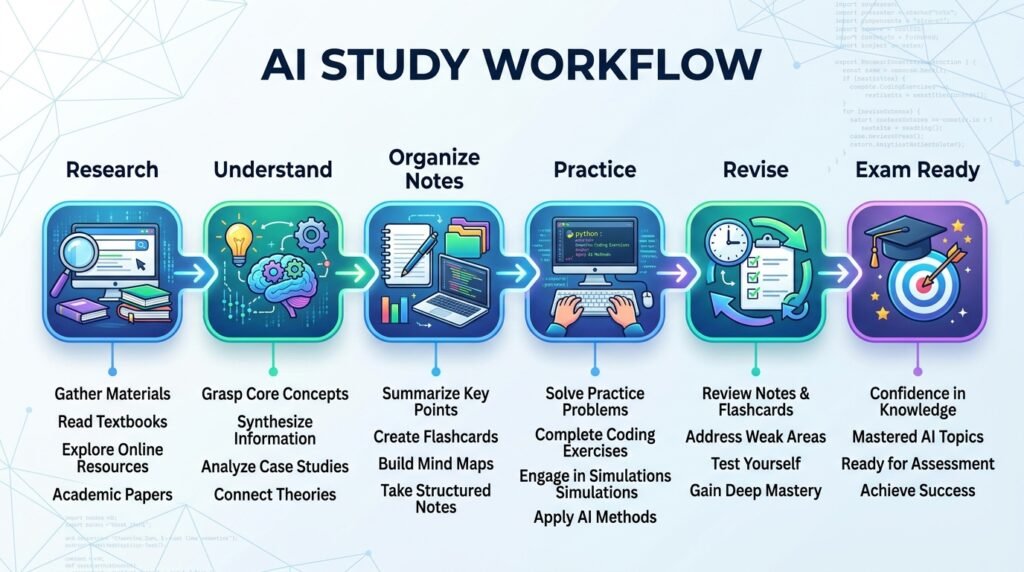
AI is most effective when it complements your learning process rather than replacing it. Here’s a simple workflow that students can follow to study more efficiently while still developing critical thinking skills.
| Step | Action | Recommended AI Tool |
| 1 | Understand new concepts | ChatGPT, Gemini |
| 2 | Research reliable information | Perplexity AI |
| 3 | Organize notes | Notion AI |
| 4 | Improve writing | Grammarly |
| 5 | Create presentations | Canva AI |
| 6 | Generate practice quizzes | ChatGPT, Claude |
| 7 | Review and revise | ChatGPT, Gemini |
Following a structured workflow like this helps students save time while ensuring they remain actively involved in the learning process.
Best Practices for Using AI as a Student
AI is most valuable when it supports learning rather than replacing it. Following a few best practices will help you use these tools responsibly and effectively.
Use AI to Understand, Not Copy
Ask AI to explain difficult concepts in simple language instead of generating complete assignments that you submit without understanding.
Verify Important Information
Although AI tools have improved significantly, they can occasionally produce inaccurate or outdated information. Always cross-check important facts using textbooks, academic journals, or trusted educational websites.
Edit AI-Generated Content
If you use AI to improve your writing, review every suggestion carefully. Your assignments should reflect your own understanding, ideas, and voice.
Protect Your Privacy
Avoid sharing personal information, confidential documents, or sensitive academic data with AI tools.
Follow Your Institution’s Guidelines
Many schools and universities now have policies regarding AI use. Make sure you understand what’s allowed before using AI for coursework or assessments.
Common Mistakes Students Should Avoid
While AI can be a powerful learning assistant, relying on it incorrectly can limit your progress.
Copying AI Responses Directly
Submitting AI-generated work without reviewing or understanding it may violate academic integrity policies and prevent genuine learning.
Depending on AI for Every Answer
AI should support independent thinking—not replace it. Try solving problems yourself before asking AI for help.
Accepting Every Response as Correct
AI can make mistakes. Verify important facts, especially for research papers, technical subjects, and academic assignments.
Ignoring Critical Thinking
Use AI to explore ideas, compare viewpoints, and deepen understanding instead of accepting the first answer you receive.
Using Too Many AI Tools
You don’t need ten different AI apps. Starting with two or three reliable tools is usually enough for most students.
Responsible AI Use in Education
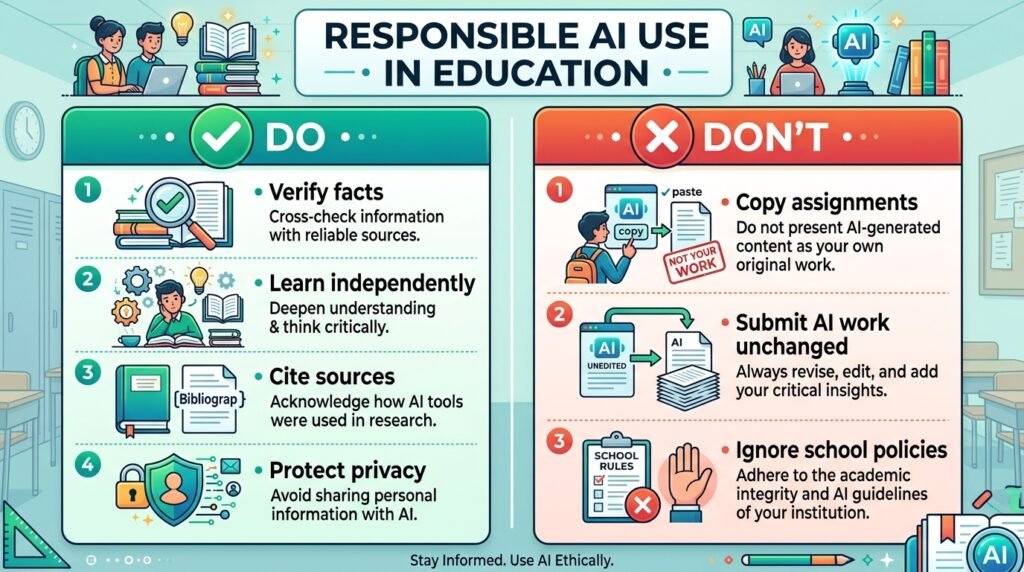
As AI becomes more common in schools and universities, using it responsibly is just as important as learning how to use it effectively.
Responsible AI use means:
- Being honest about AI assistance when required.
- Respecting academic integrity policies.
- Verifying AI-generated information.
- Protecting your privacy.
- Developing your own critical thinking and problem-solving skills.
The goal of AI isn’t to replace education—it’s to make learning more accessible, personalized, and efficient.
Students who use AI ethically will gain both technical skills and stronger learning habits that will benefit them throughout their education and careers.
Frequently Asked Questions (FAQs)
Is AI good for students?
Yes. AI can help students understand complex topics, improve writing, organize study schedules, prepare for exams, and conduct research more efficiently. However, it should be used to support learning rather than replace independent study.
Which AI tool is best for students?
There isn’t a single “best” AI tool for every student. ChatGPT is excellent for explanations and brainstorming, Perplexity AI is helpful for research, Grammarly improves writing, and Canva AI simplifies presentations. The right choice depends on your learning needs.
Can AI help with homework?
Yes. AI can explain concepts, provide examples, create practice questions, and review your work. It should not be used to complete assignments without understanding the material.
Is using AI for school considered cheating?
It depends on your school’s policies and how AI is used. Using AI for brainstorming, studying, or improving your writing is often acceptable, while submitting AI-generated work as your own may violate academic integrity rules.
Can AI improve exam preparation?
Absolutely. AI can summarize notes, generate quizzes, explain difficult topics, and create personalized revision schedules, helping students prepare more effectively for exams.
What are the limitations of AI for students?
AI may provide inaccurate information, lack subject-specific context, or misunderstand complex questions. Students should always verify important information and continue developing their own analytical and critical thinking skills.
Conclusion
Artificial intelligence is transforming the way students learn, making education more personalized, interactive, and efficient. Whether you’re researching a project, preparing for exams, improving your writing, or learning a new skill, AI can help you study smarter and manage your time more effectively.
However, the greatest value of AI comes from using it as a learning companion—not a shortcut. The students who benefit most are those who ask thoughtful questions, verify information, and use AI to deepen their understanding rather than avoid the learning process.
By combining AI with curiosity, critical thinking, and consistent study habits, you’ll be better prepared for both academic success and the AI-powered workplace of the future.
Continue Your AI Journey
Keep building your AI knowledge with these beginner-friendly guides.
-

AI Interview Preparation: How to Use AI Tools to Land Your Next Job
Learn more : AI Interview Preparation: How to Use AI Tools to Land Your Next Job🕒 14-16 min read • Updated: July 2026 AI Interview Preparation: How to Use AI Tools to Ace…
-

7 Ways to Use AI for Research: Faster & Smarter Workflows (2026)
Learn more : 7 Ways to Use AI for Research: Faster & Smarter Workflows (2026)🕒 15 min read • Updated: July 2026 Introduction Research has always been about discovering new information, asking…
-

AI for Teachers: 15 Practical Workflows to Streamline Your Classroom
Learn more : AI for Teachers: 15 Practical Workflows to Streamline Your Classroom🕒 15 min read • Updated: July 2026 Introduction Teaching is one of the most rewarding professions, but…
-

AI for Productivity: 15 Practical Workflows to Work Smarter in 2026
Learn more : AI for Productivity: 15 Practical Workflows to Work Smarter in 2026🕒 12-14 min read • Updated: July 2026 Introduction Imagine completing your daily work in less time while…
-

The 2026 Guide to AI in Sales: Tools & Workflows to Close Deals Faster
Learn more : The 2026 Guide to AI in Sales: Tools & Workflows to Close Deals Faster🕒 12-14 min read • Updated: July 2026 Introduction Artificial intelligence (AI) is transforming the way businesses find…
-

AI for Project Management: 15 Time-Saving Workflows & Prompt Templates
Learn more : AI for Project Management: 15 Time-Saving Workflows & Prompt Templates🕒 12-14 min read • Updated: July 2026 Quick Answer AI for project management uses artificial intelligence to…
Related Articles
Explore more guides and resources related to this topic.
-

ChatGPT Complete Guide for Beginners (2026): Master AI Step-by-Step
Learn more : ChatGPT Complete Guide for Beginners (2026): Master AI Step-by-Step🕒 20-25 min read • Updated: Aug 2026 Introduction Introduction Artificial intelligence is changing how people learn, work,…
-

Master Prompt Engineering in 2026: A Step-by-Step Beginner’s Guide
Learn more : Master Prompt Engineering in 2026: A Step-by-Step Beginner’s Guide🕒 18-20 min read • Updated: Aug 2026 Introduction Artificial intelligence (AI) tools like ChatGPT, Claude, Gemini, and…
-
Large Language Models (LLMs) Explained: The Complete 2026 Beginner’s Guide
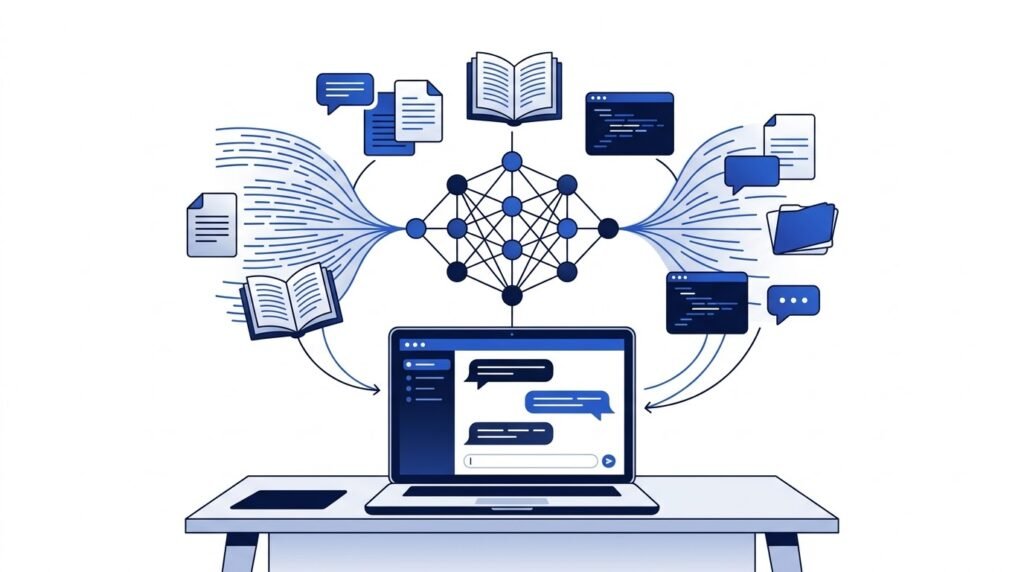
Learn more : Large Language Models (LLMs) Explained: The Complete 2026 Beginner’s Guide🕒 14-16 min read • Updated: Aug 2026 Introduction Artificial Intelligence has become part of everyday life. Whether…
-

Best AI Image Generators in 2026: 10 Free & Paid Tools Tested
Learn more : Best AI Image Generators in 2026: 10 Free & Paid Tools Tested🕒 15 min read • Updated: July 2026 introduction Creating stunning images no longer requires years of design…
-
10 Best AI Chatbots in 2026: Tested & Ranked for Every Use Case
Learn more : 10 Best AI Chatbots in 2026: Tested & Ranked for Every Use Case🕒 10-12 min read • Updated: July 2026 introduction Artificial intelligence has made chatbots far more capable than…
-

ChatGPT vs Microsoft Copilot (2026): Tested, Pricing & Workflow Comparison
Learn more : ChatGPT vs Microsoft Copilot (2026): Tested, Pricing & Workflow Comparison🕒 10-12 min read • Updated: July 2026 Introduction Choosing between ChatGPT and Microsoft Copilot can be challenging,…
Recommended AI Tools
If you’re new to AI, start with these beginner-friendly tools:
- ChatGPT – Everyday learning, brainstorming, and explanations.
- Perplexity AI – Research with cited sources.
- Grammarly – Improve grammar, clarity, and writing quality.
- Canva AI – Create presentations and visual projects.
- Claude – Analyze long documents and improve academic writing.
References
- UNESCO. Artificial Intelligence and Education. https://www.unesco.org/en/artificial-intelligence/education
- OECD. Artificial Intelligence. https://www.oecd.org/en/topics/artificial-intelligence.html
- Microsoft Education. https://www.microsoft.com/education
- Google for Education. https://edu.google.com/
- Khan Academy. https://www.khanacademy.org/
- Common Sense Education. https://www.commonsense.org/education
- IBM SkillsBuild. https://skillsbuild.org/
- World Economic Forum. Artificial Intelligence. https://www.weforum.org/topics/artificial-intelligence/
Leave a Reply