🕒 12-15 min read • Updated: July 2026
Table of Contents
Introduction
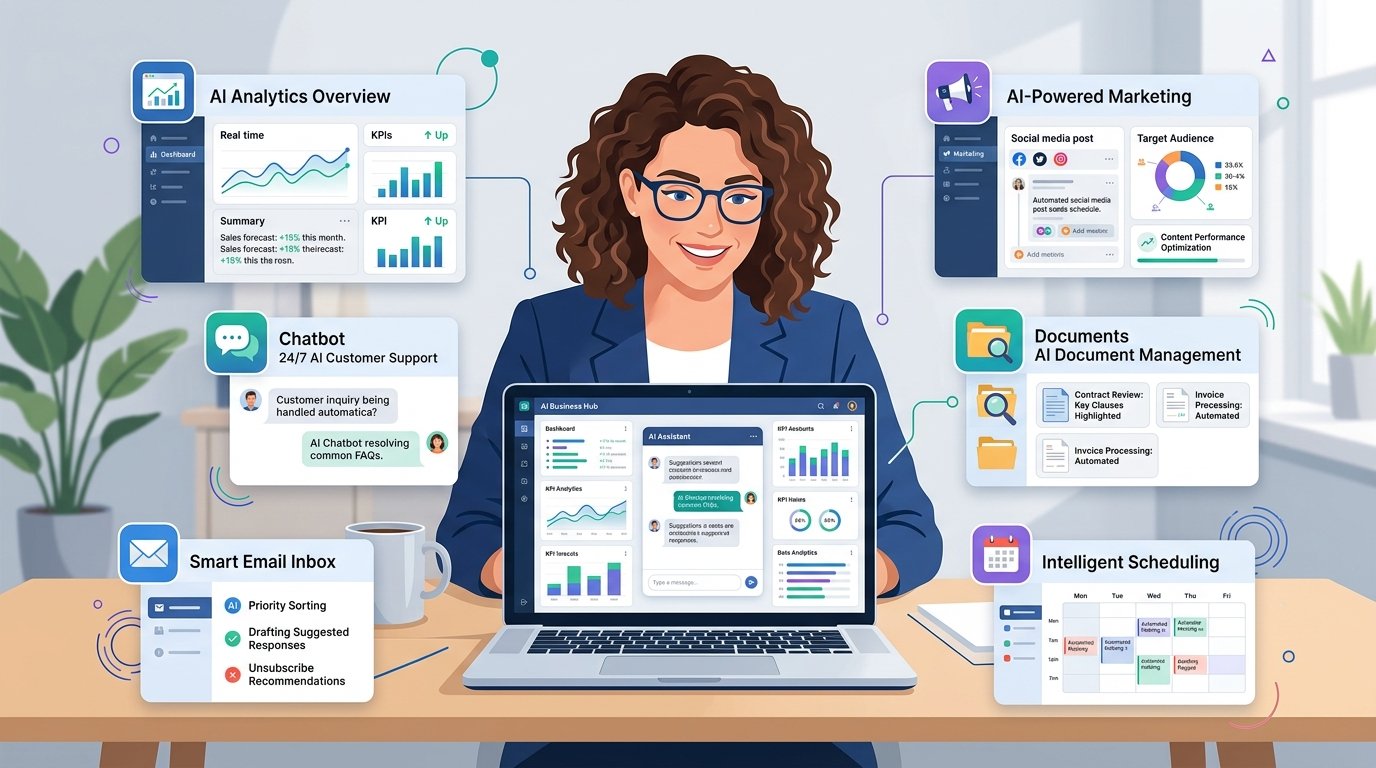
Running a small business often means wearing multiple hats. On any given day, you might be responding to customers, managing inventory, creating marketing campaigns, handling invoices, updating your website, and planning for future growth—all while trying to keep costs under control.
This is where artificial intelligence (AI) can make a real difference.
AI is no longer a technology reserved for large corporations with dedicated IT teams and million-dollar budgets. Today, affordable and beginner-friendly AI tools help small businesses automate repetitive tasks, improve customer service, create content faster, analyze data, and make better business decisions. Many of these tools even offer free plans, making it easier than ever to get started.
Whether you own a local shop, manage an online store, run a marketing agency, or work as a freelancer, AI can help you save time and focus on growing your business instead of getting stuck in repetitive work.
In this guide, you’ll learn what AI for small businesses is, how it works, its biggest benefits and challenges, practical use cases, and the best AI tools to help your business become more efficient in 2026.
Quick Answer
AI for small businesses refers to using artificial intelligence tools to automate everyday tasks, improve productivity, reduce operational costs, and support better decision-making. Small businesses commonly use AI for content creation, customer support, email management, marketing, bookkeeping assistance, research, scheduling, and data analysis. Many AI tools are affordable, easy to learn, and offer free plans, making them accessible even for businesses with limited resources.
Key Takeaways
- AI helps small businesses automate repetitive tasks and improve efficiency.
- Many beginner-friendly AI tools are available with free or affordable plans.
- AI can support marketing, customer service, productivity, research, and business operations.
- Human oversight remains essential to ensure accuracy and maintain customer trust.
- Starting with one or two AI tools is often the most effective approach.
What Is AI for Small Businesses?
Artificial intelligence for small businesses is the use of AI-powered software to perform tasks that would normally require significant time or manual effort.
Unlike traditional software that follows fixed rules, AI tools can analyze information, recognize patterns, generate content, answer questions, summarize documents, and even assist with decision-making.
For example, instead of spending an hour writing a customer newsletter, an AI writing assistant can generate a first draft in minutes. Instead of manually researching competitors, an AI research tool can summarize key insights much faster.
The goal of AI is not to replace business owners or employees—it is to help them work more efficiently by reducing repetitive work and allowing them to focus on higher-value activities.
Why Small Businesses Should Consider AI
Small businesses often face unique challenges:
- Limited budgets
- Small teams
- Time constraints
- Increasing customer expectations
- Growing competition
AI helps address many of these challenges by acting as a productivity assistant rather than an additional employee.
Some of the biggest advantages include:
- Completing routine tasks more quickly
- Creating marketing content faster
- Responding to customer inquiries more efficiently
- Organizing information and documents
- Supporting better business decisions through data analysis
By saving time on everyday tasks, business owners can focus more on strategy, customer relationships, and growth.
How AI Works in Everyday Business Operations
You don’t need technical expertise to use AI.
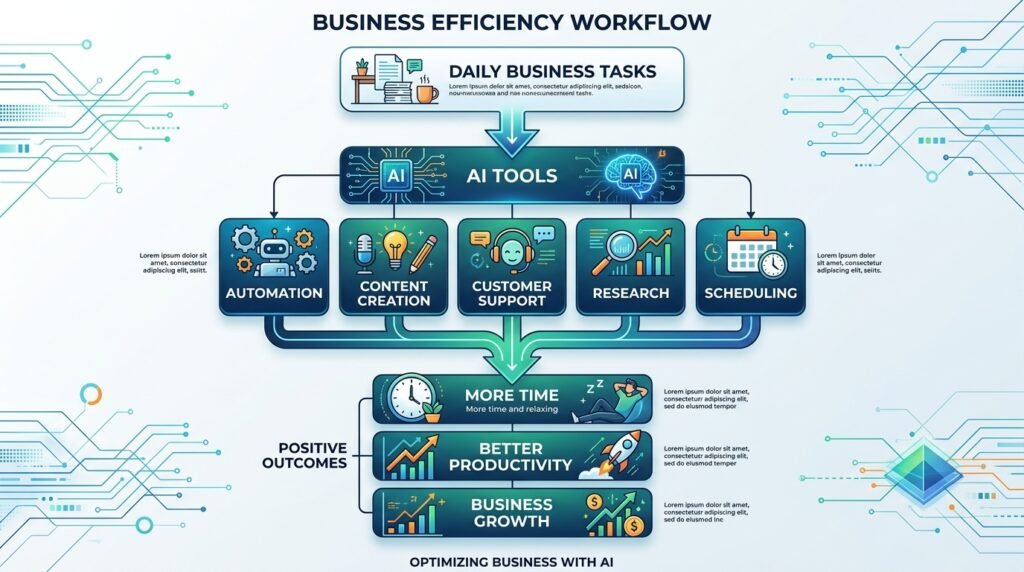
Most modern AI tools work through a simple process:
- You provide a request or upload information.
- The AI processes the input using trained machine learning models.
- It generates a response, recommendation, or completed task.
- You review the output and make any necessary adjustments before using it.
For example:
A bakery owner might ask an AI assistant:
“Write an Instagram post promoting our weekend cake sale.”
Within seconds, the AI generates a draft that the owner can review, personalize, and publish.
This combination of AI assistance and human judgment often produces the best results.
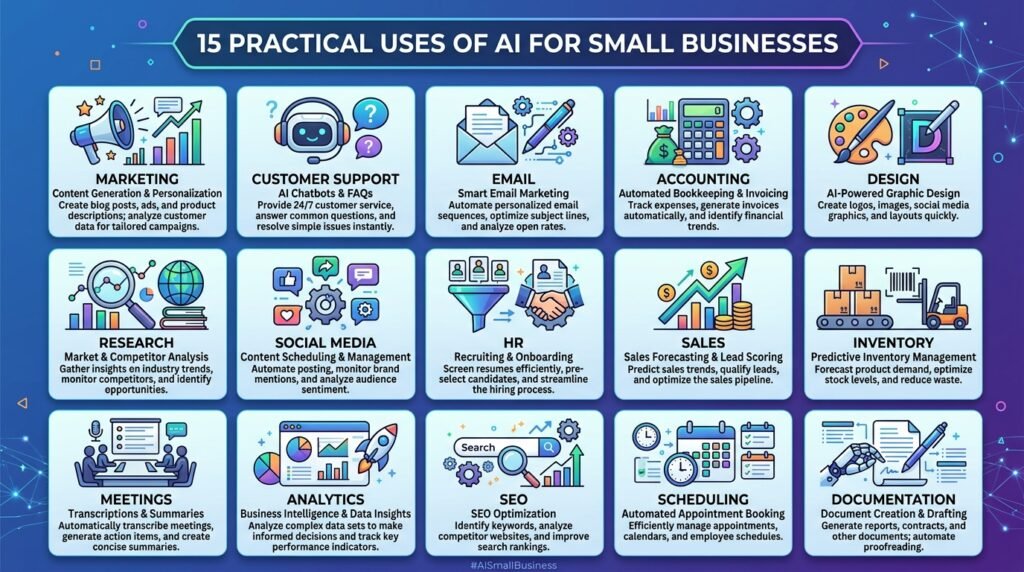
15 Practical Ways Small Businesses Can Use AI
1. Create Marketing Content
AI can help generate:
- Blog posts
- Product descriptions
- Social media captions
- Email newsletters
- Advertising copy
This reduces the time spent creating content while helping maintain consistency across marketing channels.
2. Respond to Customer Questions
AI-powered chatbots can answer frequently asked questions, provide business hours, explain return policies, and assist customers outside normal business hours.
This improves customer experience while reducing support workload.
3. Write Professional Emails
AI can draft:
- Sales emails
- Customer follow-ups
- Appointment reminders
- Partnership proposals
Business owners can then review and personalize these drafts before sending them.
4. Improve Customer Support
AI can summarize support conversations, suggest responses, categorize support tickets, and help teams respond more consistently.
5. Generate Product Descriptions
For online stores, AI can quickly create clear and engaging product descriptions that highlight features and benefits.
This is especially useful for businesses with large product catalogs.
6. Design Marketing Graphics
AI-powered design tools simplify the creation of:
- Social media graphics
- Flyers
- Presentations
- Business banners
- Promotional materials
Even users with no design experience can produce professional-looking visuals.
Best AI Tools for Small Businesses
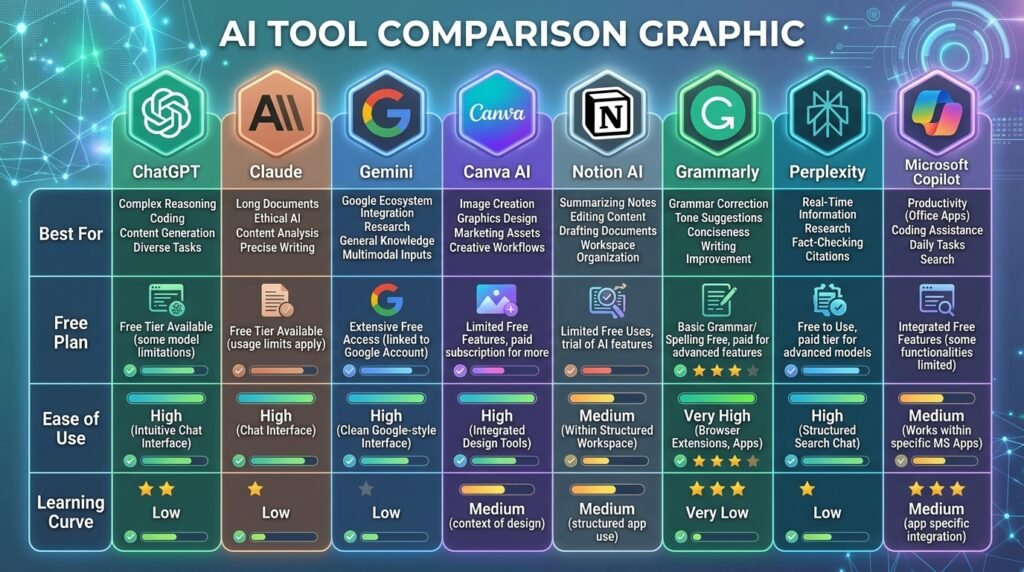
The right AI tool depends on your business goals. Some tools help you create content, while others improve customer support, automate repetitive tasks, or simplify project management.
The table below highlights some of the most useful AI tools for small businesses in 2026.
| AI Tool | Best For | Free Plan | Ideal For |
| ChatGPT | Writing, brainstorming, customer support | ✅ | All businesses |
| Claude | Long documents, reports, research | ✅ | Consultants, agencies |
| Gemini | Google Workspace productivity | ✅ | Google Workspace users |
| Canva AI | Graphic design and marketing | ✅ | Retail, social media |
| Grammarly | Writing and editing | ✅ | Professionals, teams |
| Notion AI | Documentation and project management | ✅ | Startups, agencies |
| Microsoft Copilot | Microsoft 365 productivity | Limited | Office-based businesses |
| Perplexity AI | Research and market analysis | ✅ | Entrepreneurs |
Tip: If you’re just getting started, begin with one or two tools instead of trying to adopt several at once. This helps your team learn gradually and identify which tools deliver the most value.
15 Practical Ways AI Can Help Small Businesses
1. Create Marketing Content Faster
Creating consistent marketing content is one of the biggest challenges for small businesses.
AI can help generate:
- Blog articles
- Product descriptions
- Email newsletters
- Social media posts
- Advertising copy
- Video scripts
Instead of starting from a blank page, AI gives you a solid first draft that you can review and personalize.
Example
A local bakery can generate a week’s worth of Instagram captions in less than 15 minutes, saving valuable time for baking and customer service.
2. Improve Customer Support
Customers expect quick responses, even outside business hours.
AI-powered chatbots and assistants can:
- Answer frequently asked questions
- Provide business hours
- Explain return policies
- Track orders
- Route complex requests to human staff
This improves response times while reducing the workload on small teams.
3. Write Professional Emails
Whether you’re contacting suppliers, following up with customers, or responding to enquiries, AI can help draft professional emails in seconds.
Use AI to create:
- Sales emails
- Customer follow-ups
- Appointment confirmations
- Thank-you messages
- Business proposals
Always review AI-generated emails before sending them to ensure accuracy and maintain your brand voice.
4. Manage Social Media More Efficiently
Maintaining an active social media presence takes time.
AI tools can assist with:
- Content ideas
- Captions
- Hashtags
- Content calendars
- Image suggestions
Instead of spending hours planning posts, you can prepare weeks of content in a single session.
5. Design Marketing Materials
Professional design is no longer limited to graphic designers.
AI-powered design tools make it easy to create:
- Flyers
- Posters
- Brochures
- Social media graphics
- Business presentations
- Promotional banners
This allows small businesses to produce polished visuals without hiring a designer for every project.
6. Analyze Business Data
Business owners collect valuable information every day, but turning that data into useful insights can be difficult.
AI can help analyze:
- Sales trends
- Customer behaviour
- Website traffic
- Marketing performance
- Inventory patterns
Instead of manually reviewing spreadsheets, AI highlights important trends and opportunities that support better decision-making.
7. Automate Routine Administrative Tasks
Many daily business activities are repetitive.
Examples include:
- Scheduling meetings
- Organizing documents
- Creating summaries
- Transcribing meetings
- Managing task lists
Automating these activities frees up time for strategic work and customer relationships.
8. Improve Online Research
Research often takes longer than expected.
AI can quickly summarize:
- Industry reports
- Competitor websites
- Market trends
- Customer feedback
- Product comparisons
This helps business owners gather information faster without reading dozens of lengthy documents.
9. Generate Better Product Descriptions
For eCommerce businesses, writing unique product descriptions for every item can be time-consuming.
AI can produce descriptions that highlight:
- Key features
- Benefits
- Use cases
- Technical specifications
A quick review ensures the content reflects your brand and accurately describes the product.
10. Support Better Decision-Making
AI doesn’t replace business judgment, but it can provide useful recommendations.
Examples include:
- Identifying slow-selling products
- Forecasting demand
- Suggesting pricing strategies
- Prioritizing customer enquiries
- Highlighting business trends
Used thoughtfully, AI becomes a decision-support tool rather than a decision-maker.
Best Practices for Using AI in Small Businesses
To get the most value from AI, follow these practical guidelines:
- Start with one or two AI tools before expanding.
- Define clear business goals for each tool.
- Review AI-generated content before publishing or sending it.
- Avoid sharing confidential or sensitive customer information with public AI tools.
- Train your team to use AI responsibly and consistently.
- Measure the time saved and business outcomes to evaluate return on investment.
By introducing AI gradually and keeping humans involved in important decisions, small businesses can improve efficiency while maintaining quality and trust.
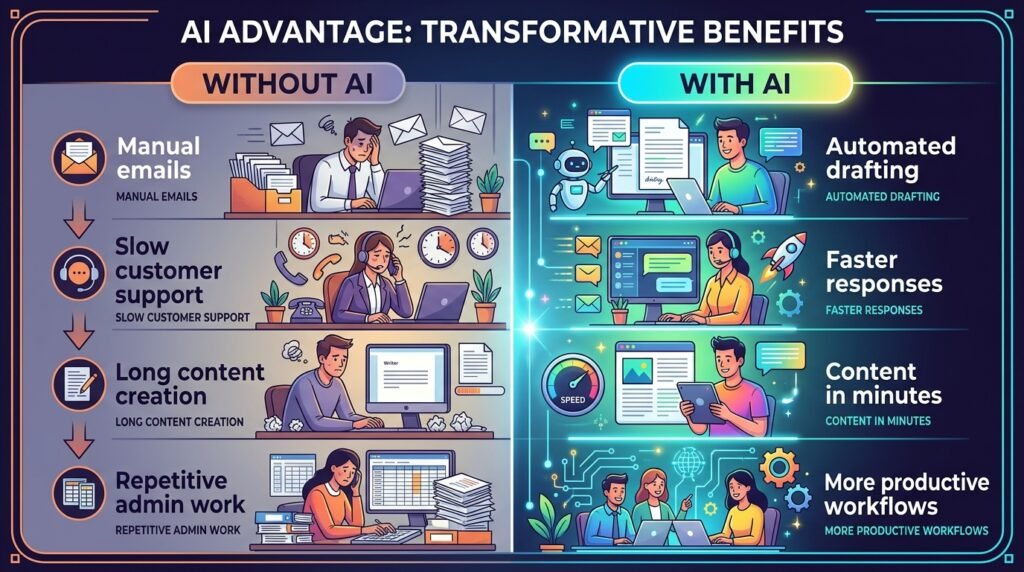
Benefits of Using AI for Small Businesses
When implemented thoughtfully, AI can help small businesses become more efficient, productive, and competitive. Rather than replacing people, AI complements human expertise by handling repetitive tasks and providing faster access to information.
| Benefit | How It Helps |
| Saves Time | Automates repetitive tasks such as email drafting, scheduling, and content creation. |
| Reduces Costs | Minimizes manual work and helps small teams accomplish more with existing resources. |
| Improves Productivity | Frees employees to focus on strategic and customer-facing activities. |
| Better Customer Experience | Enables faster responses through AI-powered chatbots and support assistants. |
| Smarter Decision-Making | Analyzes data and identifies trends to support business planning. |
| Faster Marketing | Helps create blog posts, social media content, email campaigns, and advertising copy. |
| Scalable Growth | Allows businesses to manage increasing workloads without proportionally increasing staffing costs. |
For many small businesses, the greatest advantage isn’t automation itself—it’s gaining more time to focus on customers, innovation, and long-term growth.
Challenges of Using AI
While AI offers significant advantages, it also has limitations. Understanding these challenges helps businesses use AI responsibly and effectively.
AI Can Make Mistakes
AI-generated content isn’t always accurate. It may produce outdated, incomplete, or incorrect information.
Best Practice: Always review important outputs before using them.
Data Privacy
Many AI tools process user inputs through cloud-based systems.
Avoid sharing:
- Customer personal information
- Financial records
- Legal documents
- Confidential business information
Always review the privacy policy of any AI tool before uploading sensitive data.
Learning Curve
Although modern AI tools are easier to use than ever, employees may still need time to learn effective prompting and workflows.
Providing basic AI training can significantly improve results.
Human Creativity Still Matters
AI is excellent at generating ideas and first drafts, but it doesn’t replace human judgment, creativity, or relationship-building.
The best results usually come from combining AI assistance with human expertise.
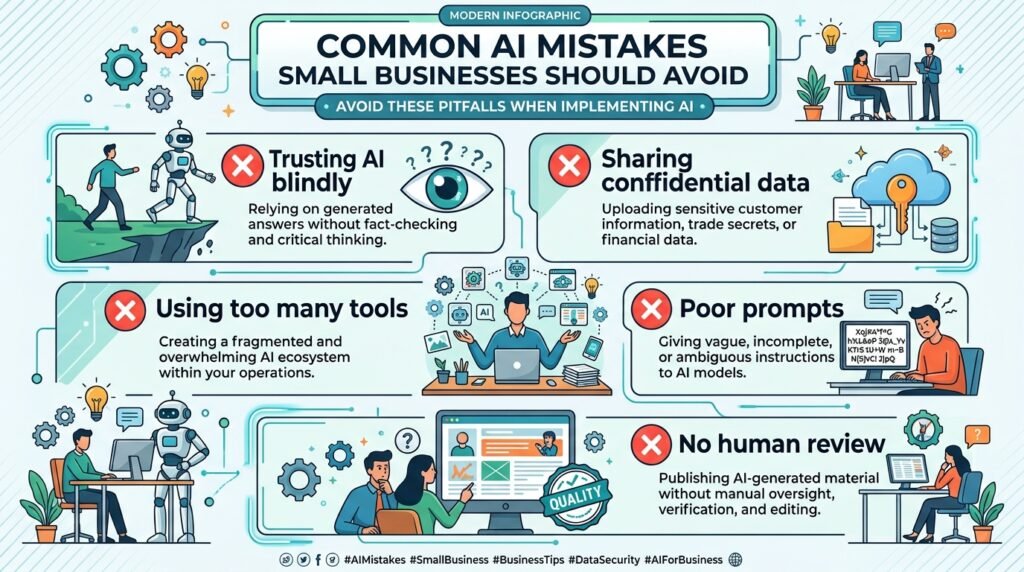
Common Mistakes to Avoid
Many businesses adopt AI quickly but fail to achieve meaningful results because they make avoidable mistakes.
Trying Too Many AI Tools at Once
New users often sign up for multiple AI platforms without learning how to use any of them effectively.
Instead: Start with one or two tools that solve your biggest business challenge.
Trusting AI Without Verification
AI can occasionally generate inaccurate information.
Always verify:
- Facts
- Statistics
- Financial calculations
- Legal advice
- Customer communications
Ignoring Data Security
Never upload confidential customer information into public AI systems unless you understand how that data is handled.
Using Generic Prompts
The quality of AI output depends heavily on the quality of your instructions.
Clear, detailed prompts produce much better results than vague requests.
Expecting Instant Results
AI is a productivity tool, not a magic solution.
Businesses see the greatest benefits when AI becomes part of consistent daily workflows.
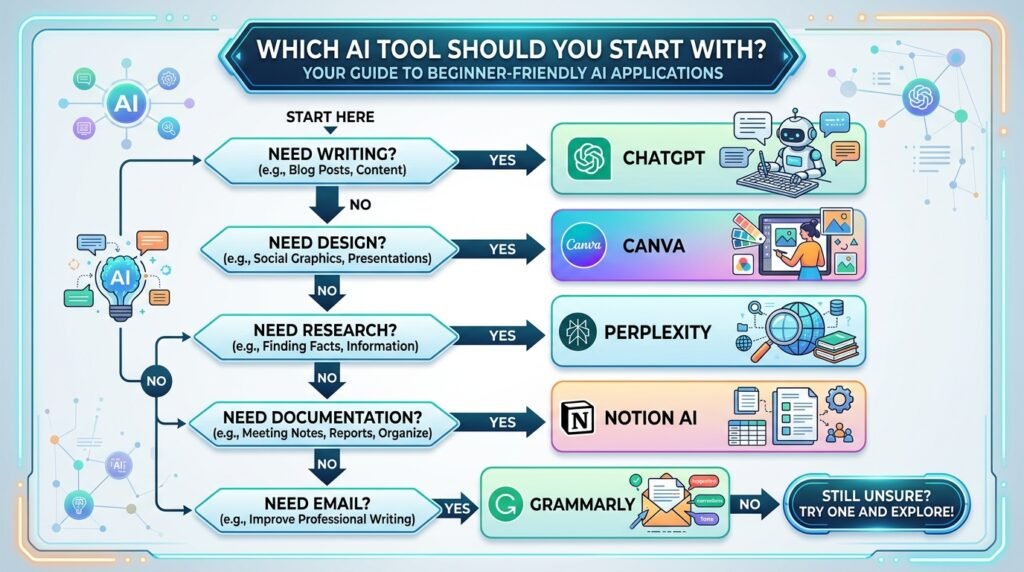
Frequently Asked Questions
Is AI expensive for small businesses?
No. Many AI tools offer generous free plans, while paid plans are often affordable for growing businesses. Starting with free versions allows you to explore AI without a significant investment.
Which AI tool is best for beginners?
There isn’t a single “best” tool for every business.
Some excellent starting options include:
- ChatGPT for writing and brainstorming
- Canva AI for design
- Grammarly for editing
- Gemini for Google Workspace users
- Claude for document analysis
- Perplexity AI for research
The right choice depends on your business goals.
Can AI replace employees?
AI is designed to assist people, not replace them entirely.
It excels at repetitive and time-consuming tasks, allowing employees to focus on creative work, customer relationships, and strategic decision-making.
Is AI safe to use in business?
Yes, when used responsibly.
Choose reputable AI providers, avoid sharing sensitive information unnecessarily, and always review AI-generated content before publishing or sending it.
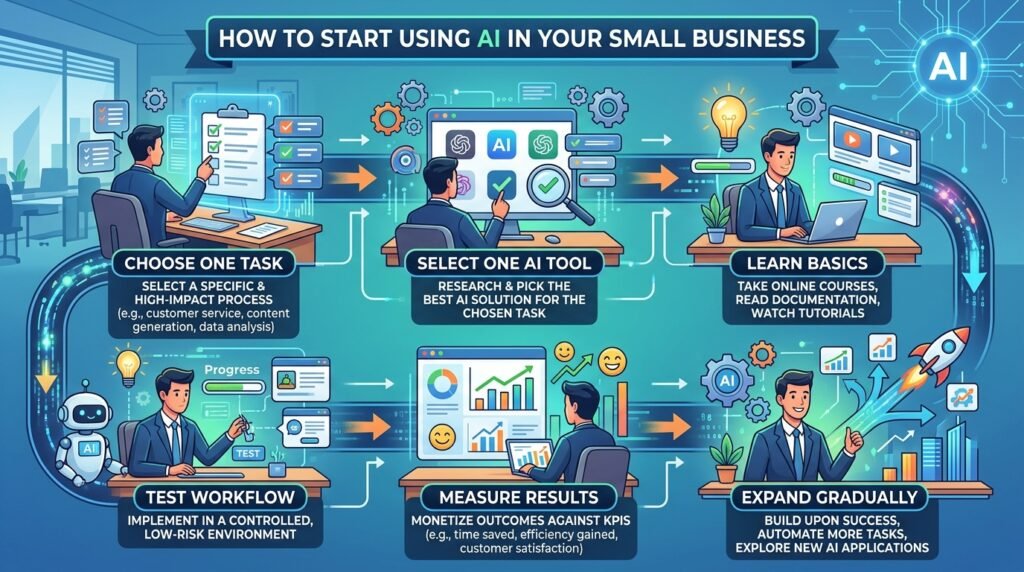
How can a small business start using AI?
Start with one business challenge.
For example:
- Need help writing content? Use an AI writing assistant.
- Struggling with design? Try an AI design tool.
- Spending too much time answering common customer questions? Consider an AI chatbot.
Begin small, measure the results, and expand gradually.
Conclusion
Artificial intelligence is no longer a technology reserved for large enterprises. Today, small businesses of every size can use AI to streamline daily operations, improve productivity, and deliver better customer experiences—often without large budgets or technical expertise.
The key is to focus on solving real business problems rather than adopting AI simply because it’s popular. By starting with one or two practical tools, setting clear goals, and keeping humans involved in important decisions, small businesses can unlock meaningful benefits while maintaining quality and trust.
As AI continues to evolve, businesses that learn how to use it effectively will be better positioned to adapt, compete, and grow. The journey doesn’t require a complete transformation overnight—it starts with taking one practical step today.
Continue Your AI Journey
Keep building your AI knowledge with these beginner-friendly guides.
-

AI Interview Preparation: How to Use AI Tools to Land Your Next Job
Learn more : AI Interview Preparation: How to Use AI Tools to Land Your Next Job🕒 14-16 min read • Updated: July 2026 AI Interview Preparation: How to Use AI Tools to Ace…
-

7 Ways to Use AI for Research: Faster & Smarter Workflows (2026)
Learn more : 7 Ways to Use AI for Research: Faster & Smarter Workflows (2026)🕒 15 min read • Updated: July 2026 Introduction Research has always been about discovering new information, asking…
-

AI for Teachers: 15 Practical Workflows to Streamline Your Classroom
Learn more : AI for Teachers: 15 Practical Workflows to Streamline Your Classroom🕒 15 min read • Updated: July 2026 Introduction Teaching is one of the most rewarding professions, but…
-

AI for Productivity: 15 Practical Workflows to Work Smarter in 2026
Learn more : AI for Productivity: 15 Practical Workflows to Work Smarter in 2026🕒 12-14 min read • Updated: July 2026 Introduction Imagine completing your daily work in less time while…
-

The 2026 Guide to AI in Sales: Tools & Workflows to Close Deals Faster
Learn more : The 2026 Guide to AI in Sales: Tools & Workflows to Close Deals Faster🕒 12-14 min read • Updated: July 2026 Introduction Artificial intelligence (AI) is transforming the way businesses find…
-

AI for Project Management: 15 Time-Saving Workflows & Prompt Templates
Learn more : AI for Project Management: 15 Time-Saving Workflows & Prompt Templates🕒 12-14 min read • Updated: July 2026 Quick Answer AI for project management uses artificial intelligence to…
Related Articles
Explore more guides and resources related to this topic.
-

ChatGPT Complete Guide for Beginners (2026): Master AI Step-by-Step
Learn more : ChatGPT Complete Guide for Beginners (2026): Master AI Step-by-Step🕒 20-25 min read • Updated: Aug 2026 Introduction Introduction Artificial intelligence is changing how people learn, work,…
-
Master Prompt Engineering in 2026: A Step-by-Step Beginner’s Guide
Learn more : Master Prompt Engineering in 2026: A Step-by-Step Beginner’s Guide🕒 18-20 min read • Updated: Aug 2026 Introduction Artificial intelligence (AI) tools like ChatGPT, Claude, Gemini, and…
-
Large Language Models (LLMs) Explained: The Complete 2026 Beginner’s Guide
Learn more : Large Language Models (LLMs) Explained: The Complete 2026 Beginner’s Guide🕒 14-16 min read • Updated: Aug 2026 Introduction Artificial Intelligence has become part of everyday life. Whether…
-

Best AI Image Generators in 2026: 10 Free & Paid Tools Tested
Learn more : Best AI Image Generators in 2026: 10 Free & Paid Tools Tested🕒 15 min read • Updated: July 2026 introduction Creating stunning images no longer requires years of design…
-
10 Best AI Chatbots in 2026: Tested & Ranked for Every Use Case
Learn more : 10 Best AI Chatbots in 2026: Tested & Ranked for Every Use Case🕒 10-12 min read • Updated: July 2026 introduction Artificial intelligence has made chatbots far more capable than…
-
ChatGPT vs Microsoft Copilot (2026): Tested, Pricing & Workflow Comparison
Learn more : ChatGPT vs Microsoft Copilot (2026): Tested, Pricing & Workflow Comparison🕒 10-12 min read • Updated: July 2026 Introduction Choosing between ChatGPT and Microsoft Copilot can be challenging,…
Recommended AI Tools
If you’re ready to start using AI in your business, consider exploring:
- ChatGPT – Content creation and brainstorming
- Claude – Long-form writing and document analysis
- Gemini – Productivity within Google Workspace
- Canva AI – Graphic design and presentations
- Grammarly – Writing and editing assistance
- Notion AI – Knowledge management and documentation
- Perplexity AI – Research and information discovery
References
- National Institute of Standards and Technology (NIST) – Artificial Intelligence Resource Center
- OECD AI Policy Observatory
- World Economic Forum – Artificial Intelligence
- IBM – What is Artificial Intelligence?
- Microsoft AI
- Google AI
- OpenAI
- U.S. Small Business Administration (SBA) – Business Guides
Leave a Reply