
🕒 15-18 min read • Updated: July 2026
Table of Contents
Introduction
Have you ever asked an AI a question and received an answer that felt incomplete, inaccurate, or completely off-topic? In many cases, the problem isn’t the AI—it’s the prompt.
Learning how to write better AI prompts is one of the most valuable skills for using tools like ChatGPT, Claude, Gemini, and Perplexity effectively. A clear prompt helps the AI understand your intent, resulting in more accurate, relevant, and useful responses.
Artificial intelligence tools like ChatGPT, Claude, Gemini, and other AI assistants can help you write, learn, brainstorm ideas, summarize information, and solve problems. However, the quality of their responses often depends on one important factor: the prompt you provide.
In this guide, you’ll discover 15 practical prompt-writing tips, real-world examples, and common mistakes to avoid so you can consistently get better results from today’s leading AI tools.
Key Takeaways
Before diving into the details, here are the most important lessons from this guide:
- Better AI responses start with better prompts—not necessarily better AI models.
- Be clear and specific about what you want the AI to do.
- Provide enough context so the AI understands your goal.
- Define the desired format, tone, or audience whenever possible.
- Break complex requests into smaller, manageable tasks.
- Refine your prompts based on the AI’s responses instead of expecting perfect results on the first try.
- Consistent practice is the fastest way to improve your prompt-writing skills.
Whether you’re using AI for writing, studying, coding, research, or business tasks, these principles can help you get more accurate, relevant, and useful responses.
New to prompt engineering? Start with our complete Prompt Engineering Guide before exploring advanced techniques and templates.
What Is an AI Prompt?
An AI prompt is the instruction, question, or request you give an AI system to guide its response. It acts as the starting point for the conversation, telling the AI what you want it to do.
A prompt can be as simple as:
“Explain photosynthesis in simple words.”
Or it can be much more detailed:
“Explain photosynthesis to a 12-year-old using simple language, include a real-world example, and summarize the process in five bullet points.”
Both are valid prompts, but the second provides more guidance. As a result, the AI has a clearer understanding of your expectations and is more likely to produce a response that matches your needs.
Think of an AI prompt like giving directions to a person. If you simply say, “Take me somewhere nice,” the destination could be almost anywhere. But if you say, “Take me to a quiet coffee shop within 10 minutes that’s suitable for working,” the instructions are much clearer, making it easier to achieve the desired outcome.
The same principle applies when interacting with AI. The more effectively you communicate your objective, the more likely the AI is to generate a helpful and relevant response.
Want to understand the concept in more depth? Read our guide on What Is Prompt Engineering?, where we explain how prompts influence AI-generated responses and why prompt design has become an important AI skill.
Why Prompt Quality Matters
Many people assume that if an AI gives an incorrect or unhelpful response, the AI isn’t capable enough. While AI models do have limitations, the quality of the prompt often plays an equally important role in determining the outcome.
Think of AI as a highly knowledgeable assistant that relies on your instructions. It doesn’t automatically know your goals, preferences, or the level of detail you expect. Instead, it interprets the information you provide and generates a response based on that context.
For example, imagine asking a colleague:
“Write an email.”
They would probably have several questions:
- Who is the email for?
- What’s the purpose?
- Should it be formal or casual?
- How long should it be?
- Is there a deadline?
Without those details, they can only guess.
AI works in a similar way. If your prompt lacks important information, the response may be too broad, incomplete, or different from what you had in mind. By providing clear instructions and relevant context, you help the AI understand your expectations more accurately.
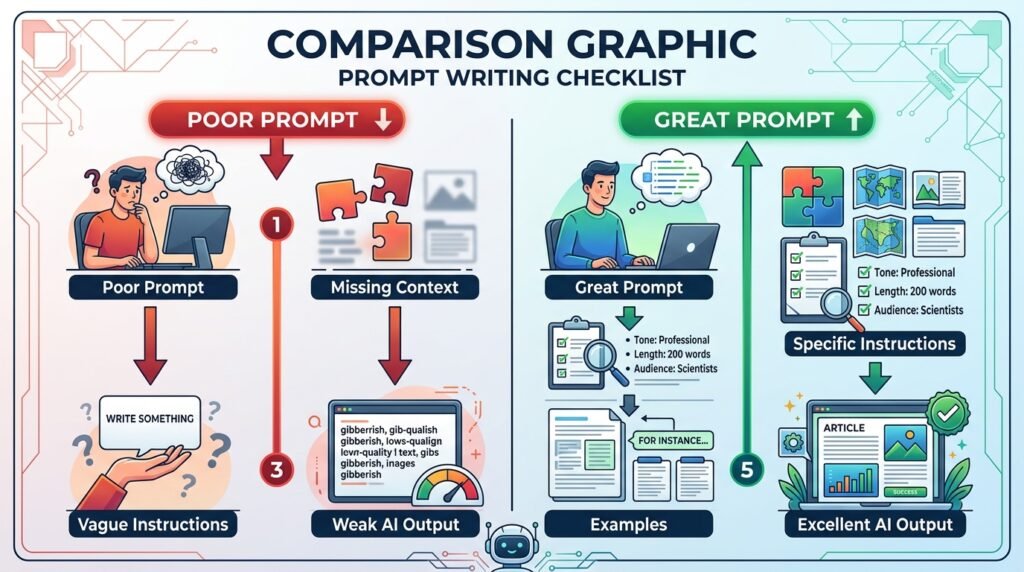
A Simple Comparison
| Poor Prompt | Better Prompt |
|---|---|
| Write an email. | Write a professional follow-up email thanking a client after a product demo. Keep it under 150 words with a friendly tone. |
| Explain AI. | Explain artificial intelligence to a 12-year-old using simple examples. |
| Write code. | Write a Python function that sorts a list of dictionaries by the “price” key. |
The second prompt gives the AI much more direction. It explains:
- The topic (artificial intelligence)
- The audience (beginners)
- The length (800 words)
- The writing style (simple language)
- The required structure (examples and FAQ)
Because the expectations are clear, the AI is more likely to produce a response that closely matches what you need.
Better Prompts Lead to Better Results
Improving your prompts can help you:
- Receive more relevant and accurate responses.
- Reduce the need for multiple revisions.
- Save time on repetitive tasks.
- Generate content in your preferred format.
- Get ideas that are better aligned with your goals.
It’s important to remember that no prompt can guarantee a perfect answer every time. AI can still make mistakes, misunderstand context, or provide outdated information. However, writing clear and thoughtful prompts significantly increases the chances of receiving useful, high-quality responses.
The good news is that prompt writing is a practical skill. Like learning to search the web effectively or write clear emails, it improves with practice. Once you understand a few core principles, you’ll be able to communicate with AI tools more confidently and consistently.
15 Practical Tips to Write Better AI Prompts
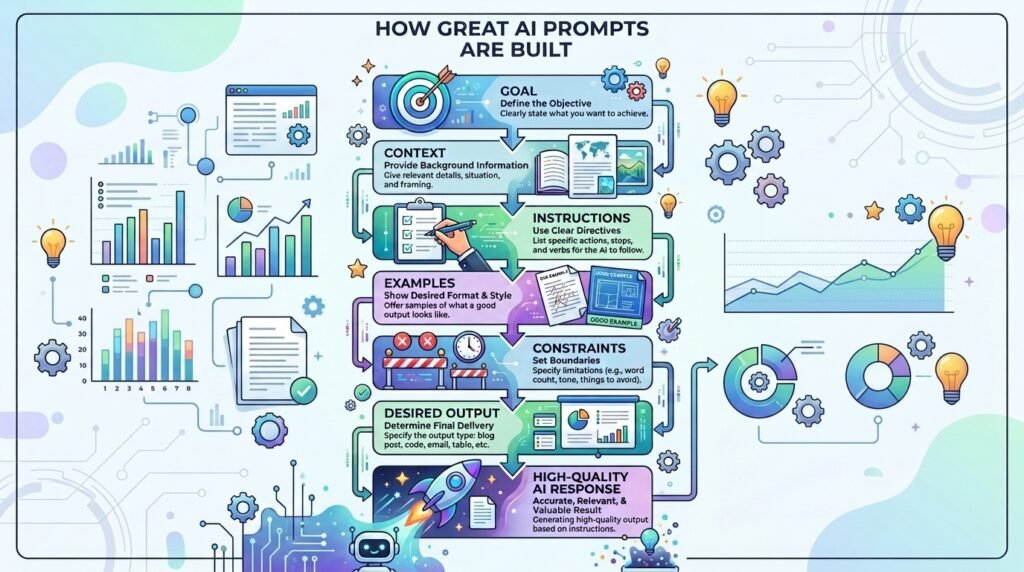
Learning to write effective AI prompts isn’t about memorizing complicated rules. It’s about communicating your goal as clearly as possible. The following tips will help you get more accurate, relevant, and useful responses from most modern AI tools.
1. Be Specific About What You Want
One of the most common reasons people receive poor AI responses is that their prompts are too broad. When your request lacks detail, the AI has to make assumptions, which may not match what you had in mind.
Instead of asking a general question, clearly describe the task you want the AI to complete.
Weak Prompt
Write about renewable energy.
Improved Prompt
Write a 700-word beginner-friendly article explaining renewable energy. Cover solar, wind, and hydro power, include their advantages and disadvantages, and end with a short conclusion.
The improved prompt defines the topic, length, audience, and structure, making it much easier for the AI to produce a useful response.
Key takeaway: The clearer your request, the more likely the AI is to understand your expectations.
2. Provide Relevant Context
AI doesn’t know your situation unless you tell it. Adding background information helps the AI generate responses that are more relevant to your specific needs.
Think about the information a helpful colleague would need before completing the same task.
Weak Prompt
Help me prepare for an interview.
Improved Prompt
I’m preparing for a junior software developer interview at a startup. The interview is in three days and will focus on JavaScript and problem-solving. Create a study plan for the next three days.
The additional context allows the AI to tailor its response instead of giving generic interview advice.
Key takeaway: Context helps AI understand not just what you want, but why you want it.
3. Clearly Define the Desired Output
Even if the AI understands your topic, it may present the information in a format you don’t need. Whenever possible, specify how you want the response to be organized.
For example, you can request:
- Bullet points
- Numbered steps
- Tables
- Checklists
- Emails
- Blog posts
- Summaries
- JSON
- Markdown
- Lesson plans
Weak Prompt
Explain cybersecurity.
Improved Prompt
Explain cybersecurity for beginners using simple language. Organize the answer into five numbered sections, include three real-world examples, and finish with a short summary.
By describing the preferred format, you reduce the need to rewrite or reorganize the AI’s response later.
Key takeaway: Tell the AI not only what you want, but also how you want it presented.
4. Assign a Role When It Adds Value
Sometimes, asking the AI to respond from a specific perspective can produce more focused and relevant results. This technique, often called role prompting, encourages the AI to adapt its language, tone, and approach to match the role you specify.
However, assigning a role should support your goal—not replace a clear prompt.
Weak Prompt
Explain investing.
Improved Prompt
Act as a financial educator teaching complete beginners. Explain the basics of investing using simple language, define important terms, and include a practical example of long-term investing.
Notice that the improved prompt still describes the audience, topic, and expectations. The role simply provides additional context.
Key takeaway: Use role prompting to add perspective, but always pair it with clear instructions.
5. Specify Your Target Audience
The same topic can be explained in many different ways depending on who will read it. By telling the AI who the content is for, you can receive responses that better match your readers’ knowledge and expectations.
For example, an explanation written for a child should differ from one written for a software engineer.
Weak Prompt
Explain blockchain.
Improved Prompt
Explain blockchain to a high school student who has no technical background. Use simple language, avoid jargon, and include an everyday analogy.
Defining the audience helps the AI choose the appropriate vocabulary, examples, and level of detail.
Key takeaway: Always consider who the final reader or listener will be.
6. Break Large Tasks into Smaller Steps
Complex prompts that combine multiple unrelated requests can lead to confusing or incomplete responses. Instead of asking the AI to do everything at once, divide larger projects into smaller, manageable tasks.
For example, if you’re writing a blog post, you could ask the AI to:
- Generate an outline.
- Expand each section.
- Suggest examples.
- Review the final draft.
- Recommend improvements.
Working step by step often produces more accurate and thoughtful results than requesting the entire project in a single prompt.
Weak Prompt
Write my entire business plan, marketing strategy, website copy, and financial projections.
Improved Prompt
Help me create a business plan for a small online clothing store. Let’s begin by developing a detailed business outline before moving to the next section.
Breaking the task into stages also gives you more opportunities to review and guide the AI along the way.
Key takeaway: Treat AI as a collaborative assistant rather than expecting it to complete every complex task in one response.
7. Include Examples Whenever Possible
Examples help reduce ambiguity. If you already know the style, format, or quality you’re looking for, sharing a sample can make it easier for the AI to understand your expectations.
This is especially useful for writing, coding, design briefs, customer support responses, and educational content.
Weak Prompt
Write a product description.
Improved Prompt
Write a product description for a reusable stainless steel water bottle. Use a friendly and informative tone similar to this example:
“Stay hydrated throughout the day with a durable bottle designed for everyday use. Its lightweight design makes it easy to carry, while the insulated construction helps maintain your drink’s temperature.”
The example acts as a reference point, helping the AI produce content that better matches your preferred style.
Key takeaway: When words alone aren’t enough, examples can communicate your expectations more clearly.
8. Set Clear Constraints
Sometimes, the best way to improve an AI response is by defining what it should not do. Constraints help narrow the AI’s focus and make the output more relevant to your needs.
You can set constraints such as:
- Word count
- Tone of voice
- Reading level
- Number of examples
- Topics to include or avoid
- Output language
- Time period or location
Weak Prompt
Tell me about climate change.
Improved Prompt
Explain climate change in less than 300 words for a beginner. Use simple language, include three major causes, and avoid technical terminology.
These boundaries help the AI deliver a response that better fits your requirements.
Key takeaway: Clear constraints reduce unnecessary information and improve the relevance of the response.
9. Ask One Question at a Time
It’s tempting to combine several requests into a single prompt, especially when working on a large project. However, asking too many unrelated questions at once can result in responses that are incomplete or difficult to follow.
Whenever possible, focus on one objective per prompt.
Weak Prompt
Explain machine learning, compare it with deep learning, recommend online courses, suggest books, and help me create a study plan.
Improved Prompt
Explain machine learning to a beginner using simple language and real-world examples.
Once you understand the concept, you can ask follow-up questions such as:
- How is machine learning different from deep learning?
- Which beginner-friendly courses should I take?
- Can you create a four-week learning plan?
Breaking your requests into smaller conversations often produces more detailed and accurate answers.
Key takeaway: One clear objective usually leads to one clear response.
10. Refine Your Prompt Instead of Starting Over
Receiving an imperfect answer doesn’t mean you need to write a completely new prompt. In many cases, you can improve the conversation by building on the existing response.
Think of AI as a collaborative assistant rather than a one-time search engine.
For example, after receiving an initial response, you might ask:
- “Can you explain this in simpler language?”
- “Add two real-world examples.”
- “Turn this into a checklist.”
- “Make the tone more professional.”
- “Summarize the key points in a table.”
Each follow-up prompt provides additional guidance, allowing the AI to improve its response without starting from scratch.
Key takeaway: Prompt writing is often an iterative process. Small refinements can lead to significantly better results.
11. Verify Important Information
AI can generate convincing responses, but it can still make mistakes, misunderstand questions, or present outdated information. For that reason, it’s important to review AI-generated content before relying on it for important decisions.
This is especially true for topics such as:
- Health
- Finance
- Law
- Academic research
- Scientific information
- Statistics
- Breaking news
Whenever accuracy matters, compare the information with reliable and up-to-date sources.
AI should support your research—not replace critical thinking or independent verification.
Key takeaway: Treat AI as a helpful assistant, not an infallible source of truth.
12. Request Multiple Options or Perspectives
AI can generate more than one solution to the same problem. Instead of accepting the first response, ask for alternative ideas, approaches, or viewpoints. This can help you compare options and choose the one that best fits your needs.
Weak Prompt
Suggest a title for my blog post.
Improved Prompt
Suggest 10 SEO-friendly titles for a beginner’s guide to artificial intelligence. Make each title unique and explain why it would appeal to readers.
Requesting multiple options is especially useful for:
- Headlines
- Business names
- Marketing ideas
- Product descriptions
- Social media captions
- Creative writing
Key takeaway: Don’t settle for the first answer. Exploring multiple options often leads to stronger results.
13. Tell the AI What Success Looks Like
Instead of simply describing the task, explain the outcome you’re trying to achieve. This gives the AI a clearer understanding of your objective and helps it generate responses that are better aligned with your goals.
Weak Prompt
Write a LinkedIn post.
Improved Prompt
Write a professional LinkedIn post announcing the launch of my AI education website. The goal is to build credibility, encourage discussion, and keep the tone informative rather than promotional.
By describing the desired outcome, you’re helping the AI focus on the purpose of the content—not just the format.
Key takeaway: Explain the result you want, not just the task you want completed.
14. Experiment and Learn from Every Conversation
There isn’t a single “perfect” prompt that works for every situation. Different AI models, tasks, and contexts may require different approaches.
Don’t hesitate to experiment by changing:
- The wording
- The amount of context
- The requested format
- The level of detail
- The examples you provide
Pay attention to which prompts consistently produce useful responses. Over time, you’ll develop your own prompt-writing style that works well for your specific tasks.
Many experienced AI users improve not because they know secret techniques, but because they continuously test, refine, and learn from each interaction.
Key takeaway: Treat every conversation with AI as an opportunity to improve your prompt-writing skills.
15. Save Prompts That Work Well
If you regularly use AI for similar tasks, you don’t need to start from scratch every time. Save prompts that consistently produce high-quality results and adapt them when needed.
Consider creating a personal prompt library organized by category, such as:
- Writing
- Research
- Learning
- Programming
- Marketing
- Business
- Productivity
As your collection grows, you’ll spend less time rewriting prompts and more time completing meaningful work.
Remember that even your best prompts may need occasional updates as AI models evolve and your own requirements change.
Key takeaway: Reusable prompts can save time, improve consistency, and make AI a more effective part of your workflow.
Recommended AI Tools for Practicing Prompts
Prompt writing is a skill best learned through practice.
Explore our curated Recommended AI Tools page to discover beginner-friendly AI assistants—including ChatGPT, Claude, Gemini, and Perplexity—that you can use to apply the techniques covered in this guide.
The Naeveor CLEAR Prompt Framework
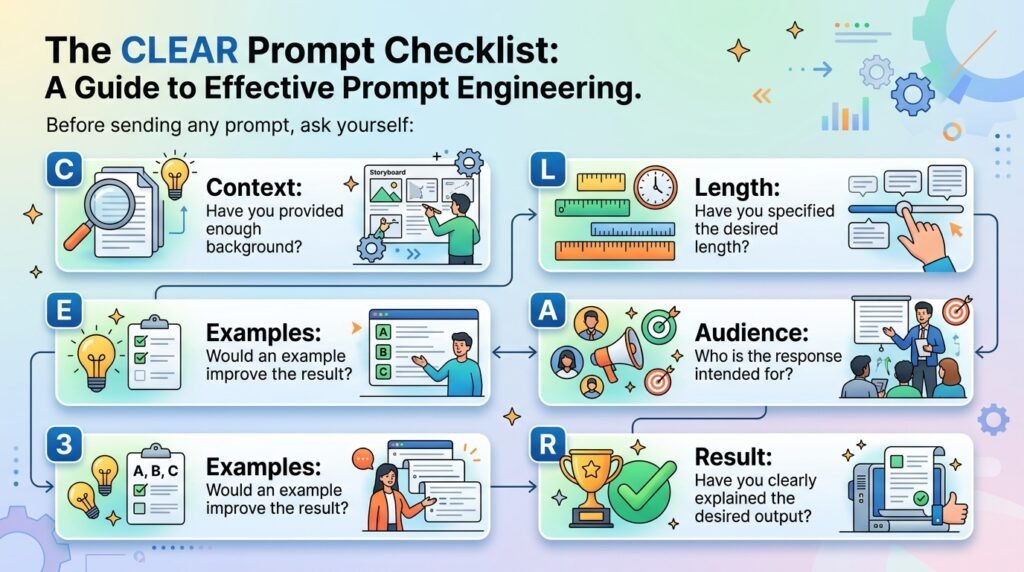
Remembering dozens of prompt-writing tips can feel overwhelming. To make the process simpler, here’s a practical framework developed by Naeveor that beginners can use before submitting any prompt.
C — Context
Start by explaining the background or situation.
Ask yourself:
- What does the AI need to know before answering?
- Is there any important information that provides context?
Example
I’m writing an article for beginners who have never used AI before.
L — Limitations
Define any boundaries or requirements.
Examples include:
- Word count
- Tone
- Reading level
- Topics to avoid
- Deadline
- Output length
Example
Keep the explanation under 500 words and avoid technical jargon.
E — Expected Outcome
Describe exactly what you want the AI to produce.
Be specific about the task.
Example
Create a step-by-step beginner’s guide with practical examples.
A — Audience
Tell the AI who the content is intended for.
Examples:
- Students
- Small business owners
- Software developers
- Parents
- Content creators
- Marketing professionals
Example
Write for college students who are new to artificial intelligence.
R — Refine
Treat the first response as a starting point rather than the final answer.
Ask follow-up questions such as:
- Can you simplify this?
- Add more examples.
- Turn this into a table.
- Rewrite it in a friendlier tone.
- Expand the third section.
Each refinement helps move the response closer to your ideal result.
Putting It All Together
Instead of writing:
Explain artificial intelligence.
You could write:
I’m creating a beginner’s learning resource about artificial intelligence for high school students. Explain AI using simple language, include three everyday examples, keep the response under 600 words, organize it with headings and bullet points, and end with a short summary.
This prompt naturally includes Context, Limitations, Expected Outcome, Audience, and Refinement opportunities, making it far more likely to produce a useful response.
Common Mistakes to Avoid When Writing AI Prompts
Even experienced AI users occasionally receive responses that miss the mark. In many cases, the problem isn’t the AI—it’s the way the prompt is written. Avoiding these common mistakes can help you achieve better results more consistently.
Being Too Vague
General prompts often lead to general responses.
Instead of writing:
“Tell me about marketing.”
Try:
“Explain five digital marketing strategies suitable for a small online clothing business with a limited budget.”
The more clearly you define your request, the easier it is for the AI to understand your objective.
Leaving Out Important Context
AI doesn’t know your goals unless you explain them.
If you’re writing content for beginners, preparing for an interview, or creating material for a specific audience, include that information in your prompt.
A little context can make a significant difference in the quality of the response.
Asking Too Many Things at Once
Trying to solve multiple unrelated problems in one prompt often produces scattered or incomplete answers.
Instead of requesting everything in a single message, divide larger tasks into smaller conversations. This makes it easier to review the AI’s responses and guide the discussion step by step.
Expecting Perfect Answers Immediately
AI responses rarely need to be accepted exactly as they are.
Professional AI users frequently refine prompts, ask follow-up questions, request revisions, and experiment with different approaches before arriving at the desired result.
Think of prompt writing as an ongoing conversation rather than a one-time request.
Trusting AI Without Verification
Although AI tools have become increasingly capable, they can still generate inaccurate, outdated, or misleading information.
Always verify important facts, especially when the information relates to:
- Health
- Finance
- Legal matters
- Academic work
- Scientific research
- Current events
Using AI responsibly means combining its speed with your own judgment and critical thinking.
Frequently Asked Questions
Do I need technical knowledge to write good AI prompts?
No. Most people can improve their AI results by learning a few simple communication techniques. Clear instructions, relevant context, and specific goals are often more important than technical expertise.
Do longer prompts always produce better responses?
Not necessarily. A prompt should include enough information to explain your request without adding unnecessary details. A concise, well-structured prompt is usually more effective than a long but unfocused one.
Can I use the same prompt with different AI tools?
Yes, but the results may vary. Different AI models have unique strengths, training data, and response styles. You may need to make small adjustments to achieve the best results on each platform.
Why does the AI sometimes misunderstand my request?
AI interprets your prompt based on the information you provide. If the request is vague or lacks context, the response may not match your expectations. Adding more detail or refining the prompt often improves the outcome.
Is prompt writing a skill that improves with practice?
Absolutely. Like writing emails, searching the web, or learning a new language, prompt writing becomes easier with experience. The more you experiment and refine your prompts, the more consistently you’ll receive useful responses.
Will prompt writing still be important as AI improves?
Modern AI systems are becoming better at understanding natural language, but clear communication remains valuable. Knowing how to express your goals, provide context, and refine responses will continue to help you work more effectively with AI tools.
Try It Yourself: Improve an AI Prompt
The best way to learn prompt writing is by practicing. Let’s try a simple exercise.
Step 1: Start with a Basic Prompt
Write a blog post about AI.This prompt is very broad, so the AI has to make many assumptions. As a result, the response may be generic or not match what you actually want.
Step 2: Improve the Prompt
Now make the prompt more specific by including:
- Context: What is the purpose of the blog post?
- Audience: Who is it written for?
- Tone: Professional, friendly, casual, or persuasive?
- Length: Approximately how many words?
- Format: Should it include headings, bullet points, or examples?
Example of an Improved Prompt
Write a 700-word beginner-friendly blog post explaining what artificial intelligence is for small business owners. Use a professional yet conversational tone, organize the article with clear H2 headings, include three real-world examples, and finish with a short summary and practical next steps.
Step 3: Compare the Results
Copy both prompts into one or more AI assistants, such as:
- ChatGPT
- Claude
- Gemini
- Perplexity
Compare the responses by asking yourself:
- Which response is more accurate?
- Which is better organized?
- Which one best matches your intended audience?
- Which provides the most useful examples?
- What changed after adding more context?
What You’ll Learn
This exercise demonstrates one of the most important principles of prompt engineering:
The quality of an AI’s response often depends on the quality of your prompt.
By providing clear instructions, context, and expectations, you’ll consistently receive more relevant, accurate, and useful results from AI tools.
💡 Pro Tip
Repeat this exercise with different tasks, such as writing emails, summarizing articles, generating code, or creating marketing copy. Over time, you’ll develop an intuition for writing effective prompts that work across different AI models.
Continue Learning
If you’d like to improve your AI skills even further, explore these beginner-friendly guides:
- What Is Prompt Engineering?
- Prompt Engineering Techniques: 10 Methods
- Prompt Templates for Beginners
- Zero-Shot vs Few-Shot Prompting
- 12 Common Prompt Engineering Mistakes
- What Is ChatGPT?
- What Is Claude?
- What Is Gemini?
Conclusion
Writing better AI prompts isn’t about learning secret commands or memorizing complex formulas. It’s about communicating your goals clearly, providing the right context, and refining your requests based on the results you receive.
By applying the techniques covered in this guide—such as being specific, defining your audience, setting clear constraints, breaking complex tasks into smaller steps, and using the Naeveor CLEAR Prompt Framework—you can consistently receive more relevant and useful responses from AI tools.
Remember that prompt writing is a practical skill that develops over time. Every conversation with AI is an opportunity to learn what works, improve your communication, and build confidence in using these tools effectively.
If you’re new to prompt engineering, continue exploring the topic by reading our guide on What Is Prompt Engineering? You can also learn how AI systems work in our beginner-friendly articles on What Is Artificial Intelligence? and How Does ChatGPT Work? Together, these resources will help you build a stronger foundation for using AI with confidence.
Note: AI-generated responses may contain inaccuracies or outdated information. Review important outputs carefully, especially when using AI for legal, financial, medical, or professional decisions.
Leave a Reply