🕒 15 min read • Updated: July 2026
Table of Contents
Introduction
Choosing the right AI assistant can significantly improve how you write, research, learn, code, and stay productive. Two of the most popular options available today are Claude, developed by Anthropic, and Gemini, developed by Google. Both are powerful AI assistants, but they take different approaches to solving problems and supporting users.
Claude is widely recognized for its thoughtful writing, strong reasoning, and ability to work with long documents. Gemini, on the other hand, stands out for its deep integration with Google Workspace, multimodal capabilities, and seamless connection to Google’s ecosystem.
So, which AI assistant is the better choice?
The answer depends on how you plan to use it.
In this guide, we’ll compare Claude and Gemini across the factors that matter most—including writing quality, coding, research, pricing, ease of use, privacy, and real-world use cases—to help you decide which AI assistant best fits your needs.
Quick Answer
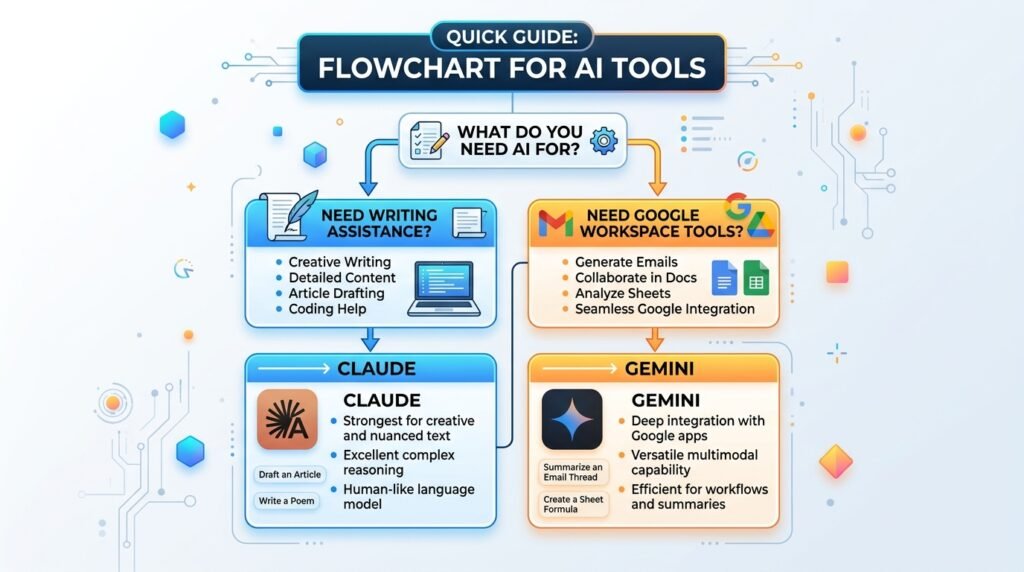
Claude is the better choice if you want high-quality writing, thoughtful reasoning, and strong coding assistance. Gemini is ideal for users who rely on Google Workspace, need multimodal capabilities, or want an AI assistant deeply integrated with Gmail, Docs, and other Google services.
Neither AI assistant is objectively “better” for everyone. The right choice depends on your workflow, priorities, and preferred ecosystem.
Key Takeaways
- Claude excels at long-form writing, reasoning, and coding support.
- Gemini integrates seamlessly with Google’s ecosystem, including Gmail, Docs, Drive, and Search.
- Both offer free plans alongside premium subscriptions with advanced capabilities.
- Claude is often preferred for structured writing and detailed explanations.
- Gemini is an excellent choice for users already invested in Google products.
- Your best option depends on how and where you use AI.
Claude vs Gemini: At a Glance
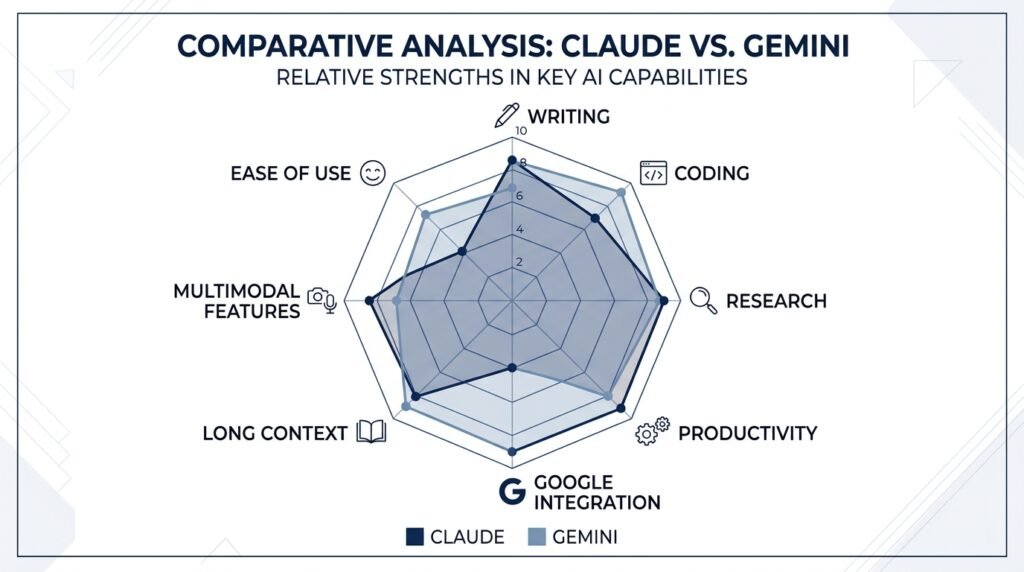
| Feature | Claude | Gemini |
| Best For | Writing, reasoning, coding | Google Workspace, productivity |
| Free Plan | ✅ Yes | ✅ Yes |
| Writing Quality | ⭐⭐⭐⭐⭐ | ⭐⭐⭐⭐☆ |
| Coding Assistance | ⭐⭐⭐⭐⭐ | ⭐⭐⭐⭐☆ |
| Research | ⭐⭐⭐⭐☆ | ⭐⭐⭐⭐☆ |
| Image Understanding | ⭐⭐⭐⭐☆ | ⭐⭐⭐⭐⭐ |
| Google Workspace Integration | ❌ Limited | ⭐⭐⭐⭐⭐ |
| Long Context Handling | ⭐⭐⭐⭐⭐ | ⭐⭐⭐⭐☆ |
| Ease of Use | ⭐⭐⭐⭐⭐ | ⭐⭐⭐⭐☆ |
Overall Recommendation
- Choose Claude if your work revolves around writing, coding, or detailed analysis.
- Choose Gemini if you frequently use Google’s ecosystem and want seamless productivity features.
How We Evaluated Claude and Gemini
To provide a fair comparison, we evaluated both AI assistants using criteria that matter most to everyday users:
- Writing quality
- Accuracy and reasoning
- Coding assistance
- Research capabilities
- Productivity features
- Ease of use
- Pricing and free plans
- Privacy considerations
- Real-world usefulness
Rather than focusing only on feature lists, this comparison emphasizes how each AI performs in practical situations that students, professionals, creators, and businesses commonly encounter.
What Is Claude?
Claude is a conversational AI assistant developed by Anthropic, an AI research company founded by former OpenAI researchers. It is designed to help users write, analyze information, solve problems, generate code, summarize documents, and answer questions in a natural, conversational way.
Claude is particularly known for producing thoughtful, well-structured responses and handling long documents with ease. Many writers, researchers, developers, and professionals use it for tasks that require detailed explanations, careful reasoning, and high-quality writing.
Unlike many AI assistants that focus primarily on speed, Claude emphasizes clarity, helpfulness, and reducing harmful or misleading outputs.
Claude’s Key Strengths
- Produces natural, well-organized writing
- Strong reasoning and analytical capabilities
- Excellent at summarizing long documents
- Handles complex coding tasks effectively
- Large context window for processing extensive information
- Clean and distraction-free interface
Potential Limitations
- Fewer native integrations compared to Google’s ecosystem
- Some advanced capabilities require a paid plan
- Real-time information may depend on the available web access features
Claude Is Best For
✅ Writers and bloggers
✅ Students and researchers
✅ Software developers
✅ Business professionals
✅ Anyone working with long documents
Related Guide: Learn more in our complete Claude AI guide.
What Is Gemini?
Gemini is Google’s AI assistant, developed by Google DeepMind. It combines Google’s expertise in search, machine learning, and productivity software to help users write, research, brainstorm ideas, analyze images, generate code, and complete everyday tasks.
One of Gemini’s biggest advantages is its deep integration with the Google ecosystem. Users can interact with Gemini across products like Gmail, Google Docs, Google Drive, Google Sheets, and other Workspace applications, making it especially useful for people already using Google’s services.
Gemini also supports multimodal interactions, allowing it to understand and work with text, images, and other types of information in a single conversation.
Gemini’s Key Strengths
- Excellent integration with Google Workspace
- Strong multimodal capabilities
- Access to Google’s ecosystem
- Helpful for productivity and everyday tasks
- User-friendly interface
- Available across multiple Google products
Potential Limitations
- Writing quality may sometimes feel less nuanced than Claude for long-form content
- Some advanced features require a premium subscription
- Performance can vary depending on the task
Gemini Is Best For
✅ Google Workspace users
✅ Students
✅ Professionals
✅ Productivity-focused users
✅ Everyday AI assistance
Related Guide: Explore our complete Gemini AI guide.
Claude vs Gemini: Feature-by-Feature Comparison
Both Claude and Gemini are capable AI assistants, but they excel in different areas. Instead of focusing on marketing claims, let’s compare them across the features that matter most to everyday users.
In the following sections, we’ll evaluate:
- Writing quality
- Reasoning and problem-solving
- Coding assistance
- Research capabilities
- Accuracy
- Google Workspace integration
- Multimodal features
- Pricing
- Ease of use
- Privacy considerations
Each category includes a short verdict to help you quickly identify which AI assistant performs better for that specific use case.
Writing Quality
For many users, writing is the primary reason to use an AI assistant. Whether you’re drafting emails, writing blog posts, creating reports, or brainstorming ideas, the quality of the generated text matters.
Claude is widely regarded as one of the strongest AI assistants for long-form writing. Its responses tend to be clear, coherent, and well-structured, making it particularly useful for articles, reports, creative writing, and detailed explanations. Claude also does a good job of maintaining context throughout longer conversations, which helps produce more consistent results.
Gemini also generates high-quality content and performs well for everyday writing tasks. It excels at creating concise summaries, emails, marketing copy, and collaborative documents, especially for users already working within Google Docs or Gmail. While its writing is generally polished, it may occasionally feel more concise or less nuanced than Claude when tackling complex or lengthy content.
Verdict
🏆 Winner: Claude
If your primary goal is producing thoughtful, detailed, and natural-sounding writing, Claude has a slight advantage. Gemini remains an excellent option for general productivity and collaborative writing, particularly within Google’s ecosystem.
Reasoning & Problem-Solving
One of the biggest differences between Claude and Gemini lies in how they approach complex questions, analyze information, and solve multi-step problems.
Claude is widely appreciated for its structured reasoning and ability to explain concepts in a logical, step-by-step manner. Whether you’re analyzing a business case, breaking down a research paper, or working through a programming challenge, Claude often provides detailed explanations that are easy to follow. This makes it particularly valuable for users who want to understand why an answer is correct rather than simply receiving one.
Gemini also performs well on reasoning tasks, especially when the question involves current information or connects with Google’s broader ecosystem. It can summarize information, compare ideas, and assist with planning or brainstorming effectively. For many everyday tasks, its reasoning capabilities are more than sufficient.
Verdict
🏆 Winner: Claude
For detailed reasoning, complex analysis, and step-by-step explanations, Claude generally provides more structured and comprehensive responses. Gemini remains a strong option for everyday decision-making and productivity tasks.
Coding Assistance
AI coding assistants have become valuable tools for developers, students, and anyone learning to program. Both Claude and Gemini can explain code, generate functions, debug errors, and help you understand programming concepts.
Claude has earned a strong reputation among developers for producing clean, well-documented code and providing detailed explanations. Rather than simply generating code, it often explains the reasoning behind its suggestions, making it useful for learning as well as development. Claude also performs well when reviewing larger code snippets or discussing software architecture.
Gemini supports many programming languages and integrates well with Google’s development ecosystem. It can generate code, explain programming concepts, and assist with debugging. Developers who already use Google Cloud or other Google services may find Gemini particularly convenient.
Verdict
🏆 Winner: Claude
Both assistants are capable coding partners, but Claude often stands out for code quality, explanations, and handling more complex development tasks. Gemini is still an excellent choice, especially for developers working within Google’s ecosystem.
Research & Information Gathering
Many users rely on AI assistants to summarize articles, explain unfamiliar topics, compare products, and organize research. While both Claude and Gemini can help with these tasks, they approach research differently.
Claude is particularly effective at analyzing documents, identifying key ideas, and producing thoughtful summaries. It performs well when working with reports, PDFs, meeting notes, or academic material, helping users understand complex information without losing important context.
Gemini benefits from Google’s long-standing expertise in organizing information. It is especially useful for users who frequently work with Google Search or Google Workspace, making it convenient for gathering information and organizing research within existing workflows.
Verdict
🤝 Winner: Tie
If you’re analyzing lengthy documents or need deeper summaries, Claude has an advantage. If your workflow depends heavily on Google’s ecosystem and connected productivity tools, Gemini offers a more integrated experience.
Google Workspace & Productivity
This is one area where Gemini has a clear advantage.
If your daily work involves Gmail, Google Docs, Google Sheets, Google Drive, or Google Calendar, Gemini fits naturally into that environment. Instead of switching between multiple applications, users can draft emails, summarize documents, organize spreadsheets, and brainstorm ideas directly within familiar Google products.
Claude, while highly capable as a standalone AI assistant, doesn’t currently offer the same level of native integration across Google’s productivity ecosystem. Users typically interact with Claude through its own interface or supported platforms rather than directly inside Workspace applications.
Verdict
🏆 Winner: Gemini
For users deeply invested in Google’s ecosystem, Gemini offers a more seamless productivity experience through its native integrations.
Multimodal Capabilities
Modern AI assistants are no longer limited to text. They can increasingly understand images, documents, screenshots, and other forms of content.
Gemini was designed with multimodal capabilities as a core strength. It can interpret images, analyze visual information, answer questions about uploaded content, and work across multiple input types, making it useful for educational, creative, and productivity tasks.
Claude also supports document and image understanding in many scenarios, allowing users to analyze files, charts, and visual information. However, Gemini’s close integration with Google’s AI ecosystem gives it broader multimodal capabilities for many everyday workflows.
Verdict
🏆 Winner: Gemini
If working with images, visual documents, and multimodal content is a priority, Gemini currently provides a stronger overall experience.
Pricing & Free Plans
Both Claude and Gemini offer free versions, making them accessible to users who want to explore AI without an upfront cost. They also provide paid plans that unlock more advanced models, higher usage limits, and additional features.
For many beginners, the free plans are sufficient for everyday writing, learning, brainstorming, and productivity tasks. As your needs grow, upgrading to a premium subscription may provide faster responses, access to newer models, and expanded capabilities.
Because pricing, features, and usage limits can change over time, it’s always a good idea to review the official pricing pages before making a decision.
Verdict
🤝 Winner: Tie
Both platforms offer generous entry points with premium options for users who need advanced capabilities. Rather than choosing based on price alone, it’s more useful to compare the features that matter most to your workflow.
Claude vs Gemini: Which AI Assistant Should You Choose?
After comparing Claude and Gemini across writing, coding, research, productivity, and pricing, one thing becomes clear: there isn’t a single winner for everyone. The better AI assistant depends on your goals, workflow, and the tools you already use.
Instead of asking “Which AI is the best?”, ask “Which AI is the best for what I want to accomplish?”
Here’s a quick guide to help you decide.
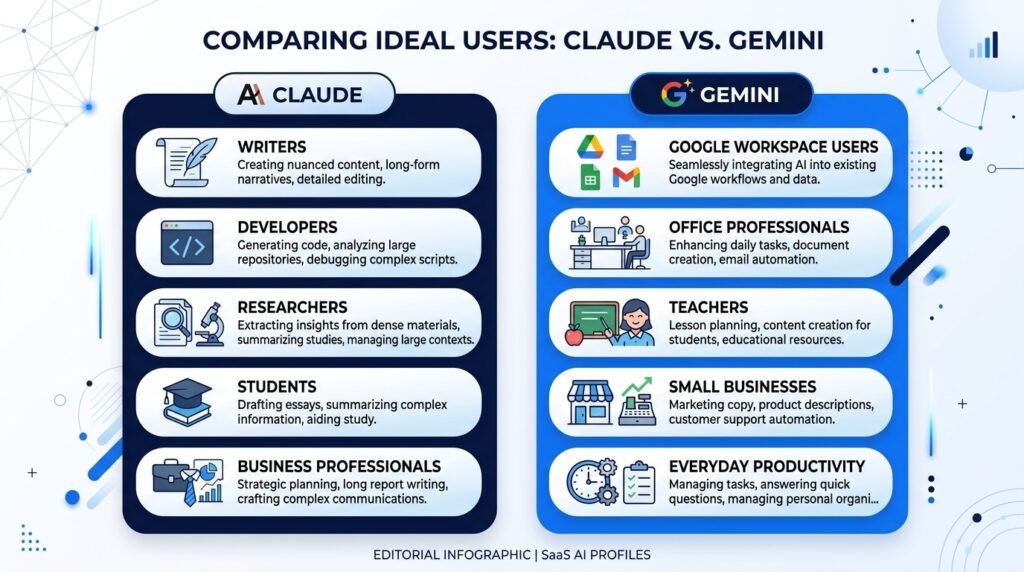
Choose Claude If You…
Claude is an excellent choice if your work involves creating, analyzing, or improving content.
It’s especially well-suited for:
- ✅ Writing articles, reports, or long-form content
- ✅ Brainstorming ideas and outlining projects
- ✅ Summarizing lengthy documents
- ✅ Learning programming or debugging code
- ✅ Analyzing complex information
- ✅ Getting detailed, step-by-step explanations
Ideal Users
- Writers
- Students
- Researchers
- Software developers
- Business professionals
- Content creators
Why choose Claude?
Claude prioritizes clarity, structure, and thoughtful responses, making it a strong companion for tasks that require careful reasoning or high-quality writing.
Choose Gemini If You…
Gemini is a great option if you already use Google’s ecosystem and want an AI assistant that fits naturally into your daily workflow.
It’s particularly useful for:
- ✅ Managing Gmail more efficiently
- ✅ Working in Google Docs and Sheets
- ✅ Organizing information in Google Drive
- ✅ Understanding images and visual content
- ✅ Everyday productivity tasks
- ✅ Quick research and brainstorming
Ideal Users
- Google Workspace users
- Students
- Teachers
- Office professionals
- Small business owners
- Everyday AI users
Why choose Gemini?
Its seamless integration with Google’s services makes it easy to use AI without changing the way you already work.
Claude vs Gemini: Side-by-Side Summary
| Category | Winner |
| Writing Quality | 🏆 Claude |
| Long-Form Content | 🏆 Claude |
| Coding Assistance | 🏆 Claude |
| Reasoning & Analysis | 🏆 Claude |
| Google Workspace Integration | 🏆 Gemini |
| Image Understanding | 🏆 Gemini |
| Productivity | 🏆 Gemini |
| Ease of Use | 🤝 Tie |
| Free Plan | 🤝 Tie |
| Overall Recommendation | Depends on Your Needs |
Our Recommendation
If you’re completely new to AI, both Claude and Gemini are excellent places to start. Each offers a free plan that lets you explore its capabilities before deciding whether a paid subscription is worthwhile.
If your focus is writing, coding, detailed analysis, or learning, Claude is likely the stronger choice.
If your focus is productivity, collaboration, and working within Google’s ecosystem, Gemini is likely the better fit.
Many professionals also use both tools together, choosing the one that best suits the task at hand.
Frequently Asked Questions
Is Claude better than Gemini?
Neither AI assistant is universally better. Claude generally excels at writing, reasoning, and coding, while Gemini offers stronger integration with Google’s ecosystem and productivity tools.
Which AI is better for writing?
Claude is often preferred for long-form writing, editing, brainstorming, and generating detailed explanations because of its structured and natural writing style.
Which AI is better for coding?
Both tools can generate and explain code, but Claude is commonly favored for debugging, code explanations, and handling larger programming tasks.
Is Gemini free to use?
Yes. Gemini offers a free version, with additional features available through paid subscription plans.
Is Claude free?
Yes. Claude also provides a free plan, while premium subscriptions offer access to more advanced models, higher usage limits, and additional capabilities.
Which AI is better for students?
It depends on how you study. Claude is useful for understanding complex topics and summarizing long materials, while Gemini is convenient for students who already use Google Workspace for assignments and collaboration.
Can I use Claude and Gemini together?
Yes. Many users switch between AI assistants depending on the task. For example, you might use Claude for writing and coding, while using Gemini for productivity and Google Workspace tasks.
Final Verdict
Claude and Gemini are both among the most capable AI assistants available today, but they shine in different areas.
Choose Claude if your priority is thoughtful writing, detailed explanations, coding support, or analyzing complex information. Its structured responses and strong reasoning make it an excellent choice for students, writers, developers, and professionals who need depth and clarity.
Choose Gemini if you rely on Google’s ecosystem and want an AI assistant that integrates naturally with Gmail, Google Docs, Drive, Sheets, and other Workspace applications. Its productivity features and multimodal capabilities make it particularly useful for everyday work.
Rather than searching for a single “best” AI assistant, focus on finding the one that best complements your workflow. Since both offer free plans, the easiest way to decide is to try each with the tasks you perform most often.
Continue Your AI Journey
Keep building your AI knowledge with these beginner-friendly guides.
-

10 Best AI Chatbots in 2026: Tested & Ranked for Every Use Case
Learn more : 10 Best AI Chatbots in 2026: Tested & Ranked for Every Use Case🕒 10-12 min read • Updated: July 2026 introduction Artificial intelligence has made chatbots far more capable than…
-

Claude vs ChatGPT for Coding (2026): Tested & Benchmarked for Developers
Learn more : Claude vs ChatGPT for Coding (2026): Tested & Benchmarked for Developers🕒 12-15 min read • Updated: July 2026 Introduction Whether you’re learning your first programming language, debugging a…
-

ChatGPT vs Microsoft Copilot (2026): Tested, Pricing & Workflow Comparison
Learn more : ChatGPT vs Microsoft Copilot (2026): Tested, Pricing & Workflow Comparison🕒 10-12 min read • Updated: July 2026 Introduction Choosing between ChatGPT and Microsoft Copilot can be challenging,…
-

Perplexity AI vs ChatGPT (2026): Features, Pricing & Accuracy Tested
Learn more : Perplexity AI vs ChatGPT (2026): Features, Pricing & Accuracy Tested🕒 15 min read • Updated: July 2026 Introduction Choosing between Perplexity AI and ChatGPT can be surprisingly…
-
Claude vs Gemini (2026): Tested & Compared for Coding, Writing, & Search
Learn more : Claude vs Gemini (2026): Tested & Compared for Coding, Writing, & Search🕒 15 min read • Updated: July 2026 Introduction Choosing the right AI assistant can significantly improve how…
-

ChatGPT vs Claude (2026): Tested Head-to-Head for Coding, Writing & Workflows
Learn more : ChatGPT vs Claude (2026): Tested Head-to-Head for Coding, Writing & Workflows🕒 10-12 min read • Updated: July 2026 Introduction Artificial intelligence assistants have become essential tools for students,…
Related Articles
Explore more guides and resources related to this topic.
-

ChatGPT Complete Guide for Beginners (2026): Master AI Step-by-Step
Learn more : ChatGPT Complete Guide for Beginners (2026): Master AI Step-by-Step🕒 20-25 min read • Updated: Aug 2026 Introduction Introduction Artificial intelligence is changing how people learn, work,…
-

Master Prompt Engineering in 2026: A Step-by-Step Beginner’s Guide
Learn more : Master Prompt Engineering in 2026: A Step-by-Step Beginner’s Guide🕒 18-20 min read • Updated: Aug 2026 Introduction Artificial intelligence (AI) tools like ChatGPT, Claude, Gemini, and…
-

Large Language Models (LLMs) Explained: The Complete 2026 Beginner’s Guide
Learn more : Large Language Models (LLMs) Explained: The Complete 2026 Beginner’s Guide🕒 14-16 min read • Updated: Aug 2026 Introduction Artificial Intelligence has become part of everyday life. Whether…
-

Best AI Image Generators in 2026: 10 Free & Paid Tools Tested
Learn more : Best AI Image Generators in 2026: 10 Free & Paid Tools Tested🕒 15 min read • Updated: July 2026 introduction Creating stunning images no longer requires years of design…
-
10 Best AI Chatbots in 2026: Tested & Ranked for Every Use Case
Learn more : 10 Best AI Chatbots in 2026: Tested & Ranked for Every Use Case🕒 10-12 min read • Updated: July 2026 introduction Artificial intelligence has made chatbots far more capable than…
-
ChatGPT vs Microsoft Copilot (2026): Tested, Pricing & Workflow Comparison
Learn more : ChatGPT vs Microsoft Copilot (2026): Tested, Pricing & Workflow Comparison🕒 10-12 min read • Updated: July 2026 Introduction Choosing between ChatGPT and Microsoft Copilot can be challenging,…
References
Official Sources
- Anthropic. Claude Overview and Documentation.
https://www.anthropic.com/claude - Anthropic Documentation. Claude Documentation.
https://docs.anthropic.com/ - Google. Gemini Overview.
https://gemini.google.com/ - Google AI for Developers. Gemini API Documentation.
https://ai.google.dev/ - Google Workspace. Gemini for Google Workspace.
https://workspace.google.com/gemini/
Industry References
- Google DeepMind. Research and Product Updates.
https://deepmind.google/ - Anthropic. Introducing Claude and Model Updates.
https://www.anthropic.com/news
AI Safety & Research
- NIST AI Risk Management Framework (AI RMF 1.0).
https://www.nist.gov/itl/ai-risk-management-framework - OECD AI Principles.
https://oecd.ai/en/ai-principles
Leave a Reply