
🕒 12-15 min read • Updated: July 2026
Table of Contents
Introduction
Customer expectations have changed dramatically over the past decade. People no longer want to wait hours—or even days—for answers to simple questions. Whether they’re tracking an online order, resetting a password, or asking about a product, customers expect fast, accurate, and personalized support around the clock.
This is where Artificial Intelligence (AI) is transforming customer service.
From AI-powered chatbots that answer common questions instantly to virtual assistants that help human agents resolve complex issues faster, businesses across industries are using AI to improve customer experiences while reducing support costs.
However, AI isn’t about replacing human customer service representatives. Instead, it’s helping them work more efficiently by automating repetitive tasks, providing real-time insights, and ensuring customers receive timely assistance whenever they need it.
In this beginner-friendly guide, you’ll learn what AI in customer service is, how it works, its real-world applications, key benefits and limitations, and best practices for implementing AI successfully. Whether you’re a business owner, student, professional, or simply curious about AI, this guide will help you understand how artificial intelligence is reshaping modern customer support.
Key Takeaways
- AI helps businesses deliver faster, smarter, and more personalized customer support.
- AI-powered chatbots and virtual assistants can answer common questions 24/7.
- Human agents remain essential for handling complex, sensitive, or emotionally charged situations.
- AI works best when combined with skilled customer service teams rather than replacing them.
- Businesses of all sizes are using AI to improve customer satisfaction while reducing operational costs.
What Is AI in Customer Service?
AI in customer service refers to the use of artificial intelligence technologies to automate, enhance, and support customer interactions. Instead of relying solely on human representatives, businesses use AI to answer questions, resolve common issues, recommend solutions, and assist support teams.
Unlike traditional automated systems that follow fixed rules, AI can understand natural language, learn from customer interactions, and provide more relevant responses over time.
For example, when you ask an online retailer, “Where is my order?”, an AI-powered assistant can instantly access your order details, provide shipping updates, and answer follow-up questions—all without requiring a human agent.
Similarly, banks use AI assistants to help customers check account balances, airlines use AI for flight updates and booking changes, and healthcare providers use AI to schedule appointments and answer frequently asked questions.
Think of it this way: A traditional chatbot is like following a printed instruction manual—it only responds to predefined commands. An AI-powered assistant is more like speaking with a knowledgeable employee who understands your question, remembers the conversation, and suggests helpful solutions.
If you’re new to AI, start with our What Is Artificial Intelligence? guide to understand the technology behind these systems. You’ll also find our What Is Generative AI? guide helpful for learning how modern AI creates human-like responses.
How Does AI Work in Customer Service?
Behind every AI-powered customer support system is a combination of advanced technologies working together to understand customer requests and provide useful responses.
Although the process may seem complex, it can be broken down into a few simple steps.
Step 1: Customer Asks a Question
A customer sends a message through a website, mobile app, email, or social media.
For example:
“I’d like to return my order.”
Step 2: AI Understands the Request
Using Natural Language Processing (NLP), AI analyzes the customer’s message to understand its meaning rather than simply matching keywords.
Instead of looking only for the word “return,” AI recognizes that the customer is asking about the product return process.
Step 3: AI Finds the Best Answer
The AI searches knowledge bases, company documentation, FAQs, customer records, or integrated business systems to identify the most relevant information.
Step 4: AI Responds
If the question is straightforward, AI generates a helpful response instantly.
For example:
“You can return your order within 30 days. Here’s your prepaid return label.”
Step 5: Human Escalation (When Needed)
If the issue is too complex—such as billing disputes or complaints requiring empathy—the AI transfers the conversation to a human support representative along with the conversation history.
This creates a smoother customer experience because the customer doesn’t have to repeat their issue.
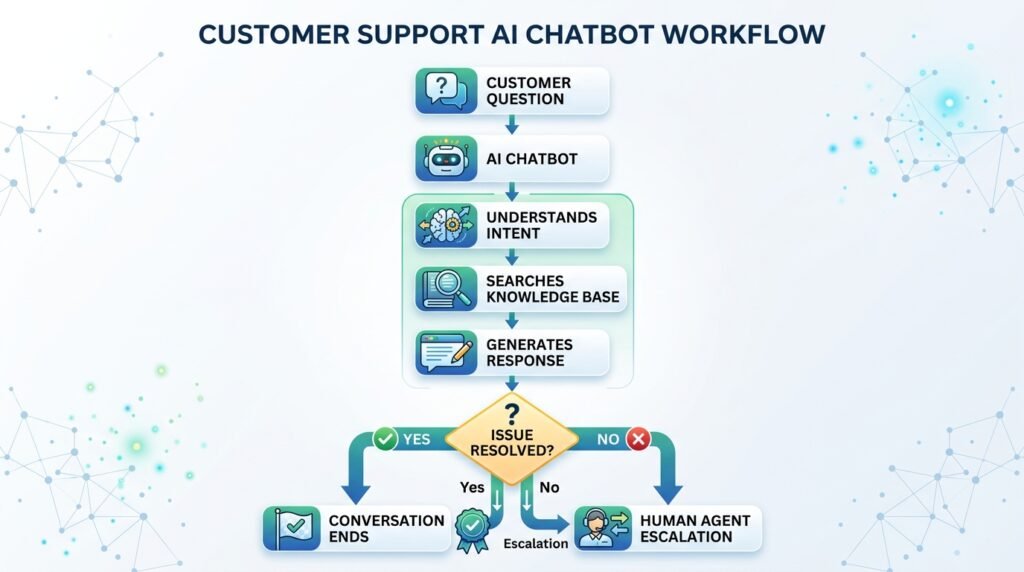
This human-AI collaboration allows businesses to handle routine inquiries efficiently while ensuring customers still receive personalized assistance when needed.
Common Applications of AI in Customer Service
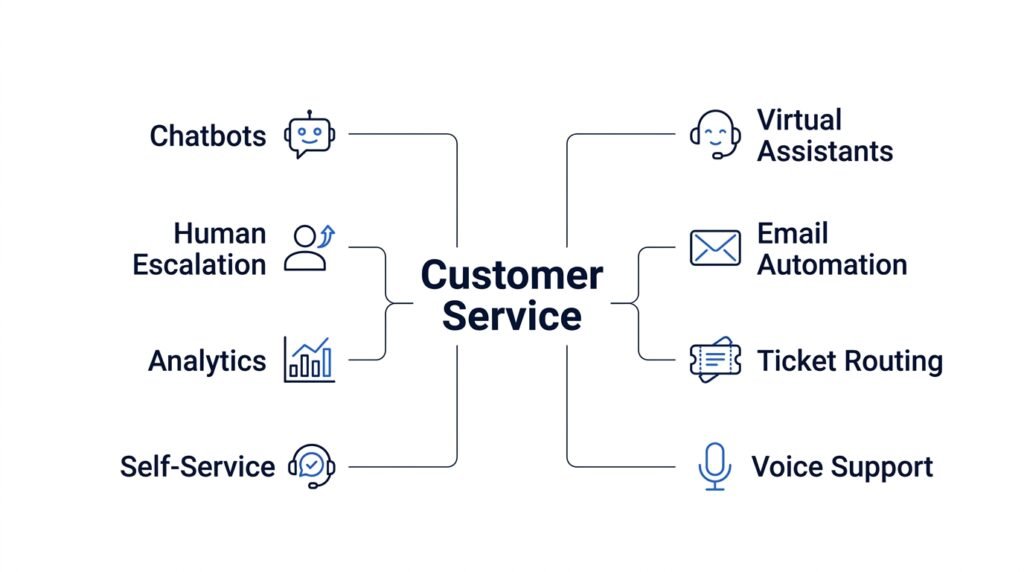
Artificial intelligence is used throughout the customer service journey, from answering simple questions to helping support teams resolve complex issues faster. Instead of replacing human agents, AI takes over repetitive and time-consuming tasks so customer service teams can focus on conversations that require empathy, judgment, and problem-solving.
Here are some of the most common ways businesses use AI in customer service today.
1. AI Chatbots
AI-powered chatbots are one of the most widely used customer service applications. Unlike traditional rule-based chatbots that rely on predefined responses, modern AI chatbots can understand natural language, remember context, and respond more conversationally.
For example, an e-commerce chatbot can help customers:
- Track orders
- Check delivery status
- Process returns
- Recommend products
- Answer frequently asked questions
Because AI chatbots are available 24/7, customers receive instant assistance even outside business hours.
2. Virtual Assistants
Virtual assistants provide a more advanced level of support than chatbots. They can complete tasks, retrieve information from multiple systems, and guide customers through more complex processes.
For example, a banking virtual assistant might help customers:
- Check account balances
- Report a lost debit card
- Schedule appointments
- Explain loan options
- Transfer customers to the appropriate department
Virtual assistants reduce waiting times while delivering a more personalized support experience.
3. Automated Email Responses
Many businesses receive thousands of customer emails every day. AI can automatically analyze incoming messages, identify their purpose, and generate appropriate responses.
Common examples include:
- Order confirmation emails
- Shipping updates
- Password reset instructions
- Subscription renewals
- Refund acknowledgements
This helps support teams respond much faster without manually handling every email.
4. Intelligent Ticket Routing
AI can automatically categorize support requests and send them to the most appropriate department or agent.
For example:
- Technical issues → Technical Support
- Billing questions → Finance Team
- Product returns → Returns Department
By routing tickets intelligently, businesses reduce response times and ensure customers reach the right person more quickly.
5. Self-Service Knowledge Bases
Many customers prefer solving simple problems on their own rather than waiting for an agent.
AI-powered knowledge bases make this easier by recommending relevant articles, FAQs, troubleshooting guides, and tutorials based on the customer’s question.
For example, if someone searches:
“How do I reset my password?”
The AI immediately suggests the most relevant help article instead of requiring the customer to browse dozens of pages.
6. Sentiment Analysis
AI can analyze customer messages to detect emotions such as frustration, satisfaction, urgency, or confusion.
For instance, if a customer writes:
“I’ve contacted support three times and still haven’t received my refund.”
The AI identifies the negative sentiment and prioritizes the conversation for immediate human assistance.
This allows businesses to respond more effectively to dissatisfied customers before issues escalate.
7. Voice Assistants and Call Centers
AI is increasingly being used in customer support call centers to improve phone-based interactions.
Voice AI can:
- Answer common questions
- Verify customer identity
- Route calls to the correct department
- Transcribe conversations
- Suggest responses to live agents
Rather than replacing customer service representatives, these systems help them resolve calls more efficiently.
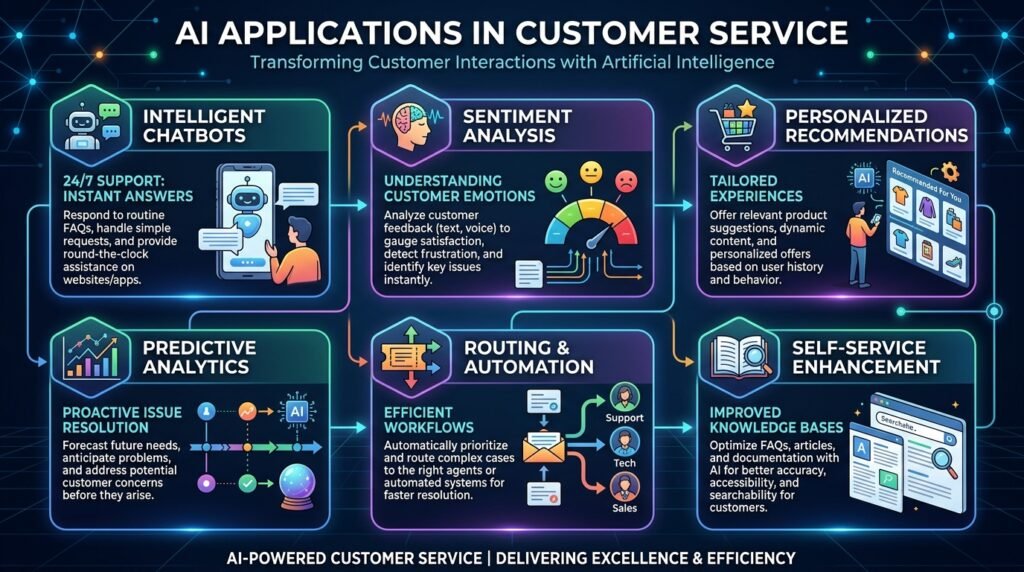
Traditional Customer Support vs AI-Powered Customer Support
| Traditional Customer Support | AI-Powered Customer Support |
| Limited business hours | Available 24/7 |
| Manual responses | Instant automated responses |
| Long waiting times | Faster response and resolution |
| One customer at a time | Supports thousands of customers simultaneously |
| Fixed scripts | Personalized responses based on customer context |
| Manual ticket assignment | Intelligent ticket routing |
| Higher operating costs | Lower cost for repetitive support tasks |
As this comparison shows, AI significantly improves speed, efficiency, and scalability. However, human representatives remain essential for handling sensitive situations, resolving complex problems, and building meaningful customer relationships.
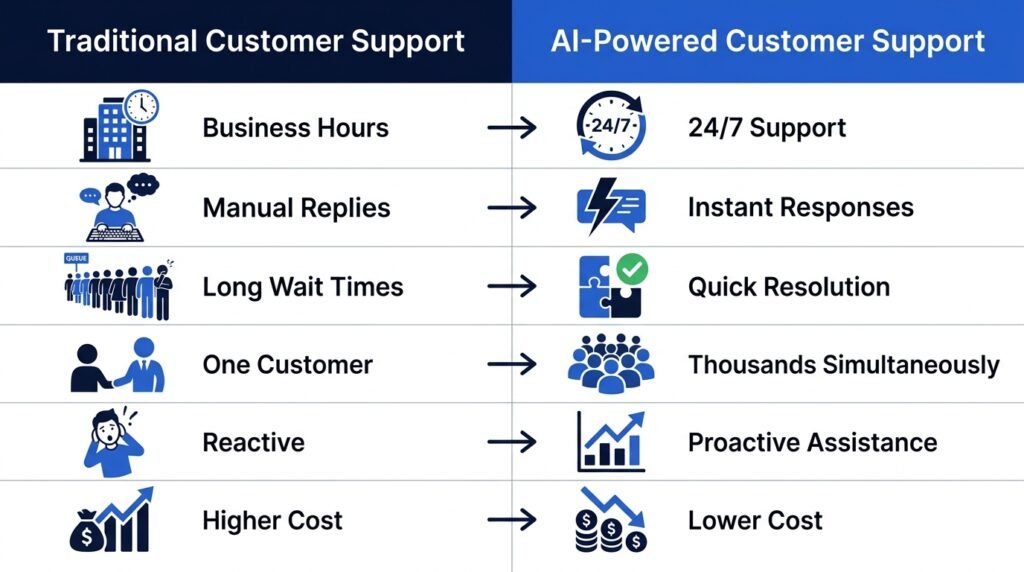
Benefits of AI in Customer Service
Artificial intelligence is transforming customer service by helping businesses deliver faster, more efficient, and more personalized support. From small businesses to global enterprises, organizations are using AI to improve customer experiences while reducing operational costs.
Here are some of the biggest benefits of AI in customer service.
1. Faster Response Times
One of the biggest advantages of AI is its ability to respond instantly. Instead of waiting in long queues, customers can receive immediate answers to common questions such as order status, return policies, or account information.
This reduces frustration and helps businesses meet the growing expectation for quick support.
Example:
An online retailer’s AI chatbot can instantly tell customers where their package is without requiring assistance from a human agent.
2. 24/7 Customer Support
Unlike human support teams, AI doesn’t require breaks, shifts, or business hours. AI-powered chatbots and virtual assistants can assist customers any time of the day, including weekends and holidays.
This ensures customers receive support whenever they need it, regardless of their location or time zone.
Example:
A traveler whose flight is delayed late at night can use an airline’s AI assistant to check flight status or rebook tickets without waiting for a support representative.
3. Reduced Operational Costs
Handling thousands of repetitive customer inquiries manually requires large support teams. AI automates routine tasks, allowing businesses to serve more customers without significantly increasing staffing costs.
Human agents can then focus on resolving complex issues that require empathy, negotiation, or critical thinking.
4. Improved Customer Satisfaction
Customers value quick, accurate, and convenient service. AI helps businesses meet these expectations by providing consistent responses and reducing wait times.
When AI is combined with knowledgeable human agents, customers enjoy a smoother and more satisfying support experience.
5. Personalized Customer Experiences
Modern AI systems can analyze customer history, previous purchases, preferences, and interactions to deliver personalized recommendations and responses.
Instead of giving the same answer to every customer, AI can tailor its suggestions based on individual needs.
Example:
A streaming platform may recommend movies based on a user’s viewing history, while an online store can suggest products that match previous purchases.
6. Increased Productivity for Support Teams
AI doesn’t just help customers—it also helps customer service representatives.
Many AI tools can:
- Suggest responses during live chats
- Summarize customer conversations
- Retrieve relevant knowledge base articles
- Draft emails
- Automatically categorize support tickets
This reduces repetitive work and allows support agents to resolve issues more efficiently.
7. Better Scalability During Peak Demand
Customer inquiries often increase during holiday sales, product launches, or special promotions. Hiring additional support staff for short-term demand can be expensive and time-consuming.
AI systems can handle thousands of conversations simultaneously, helping businesses maintain fast response times even during busy periods.
8. Consistent and Accurate Responses
Human agents may unintentionally provide different answers to similar questions, especially across large support teams.
AI helps maintain consistency by delivering standardized information based on approved company knowledge and policies. This reduces errors and ensures customers receive reliable answers.
Real-World Examples of AI in Customer Service
AI is already being used across many industries to improve customer support and streamline operations.
| Industry | How AI Is Used |
| E-commerce | Order tracking, product recommendations, return requests, FAQs |
| Banking | Account inquiries, fraud alerts, payment assistance, loan information |
| Healthcare | Appointment scheduling, patient support, prescription reminders |
| Travel & Airlines | Flight updates, booking changes, baggage tracking |
| Telecommunications | Troubleshooting internet issues, plan recommendations, billing support |
| Education | Student support, course recommendations, enrollment assistance |
These examples show that AI is no longer limited to technology companies. Businesses across almost every industry are using AI to improve customer experiences and increase operational efficiency.
Key Insight
While AI offers significant benefits, it’s most effective when used to support human customer service teams rather than replace them. By automating repetitive tasks and providing instant assistance, AI allows human agents to focus on solving complex problems, building customer relationships, and delivering the empathy that technology cannot replicate.
Challenges and Limitations of AI in Customer Service
While AI has transformed customer service by making support faster and more efficient, it isn’t a perfect solution. Businesses should understand both its strengths and its limitations before relying on AI for customer interactions.
The most successful organizations use AI to enhance customer service—not replace it entirely.
1. Difficulty Handling Complex Problems
AI performs best when dealing with repetitive and predictable questions. However, it may struggle with situations that require critical thinking, negotiation, or an understanding of unique circumstances.
For example, a customer disputing an incorrect insurance claim or requesting compensation for a delayed flight often needs personalized attention from a human representative.
In these situations, AI should quickly recognize its limitations and transfer the conversation to a human agent.
2. Limited Emotional Intelligence
Although modern AI can understand language remarkably well, it cannot truly understand human emotions.
Customers who are frustrated, disappointed, or upset often expect empathy, reassurance, and thoughtful communication—qualities that only human representatives can genuinely provide.
For example, if a customer has experienced financial loss due to a service outage, an automated response may feel impersonal, even if the information is technically correct.
Human empathy remains an essential part of delivering excellent customer service.
3. Inaccurate or Misleading Responses
AI systems generate responses based on the information they’ve been trained on or have access to. If the underlying knowledge base is outdated or incomplete, the AI may provide incorrect or misleading information.
For this reason, businesses should regularly review and update their AI systems to ensure customers receive accurate and reliable answers.
4. Privacy and Data Security Concerns
Customer service often involves sensitive information such as:
- Personal details
- Payment information
- Account credentials
- Medical records
- Financial transactions
Businesses using AI must implement strong security measures and comply with relevant data protection regulations to safeguard customer information.
Customers should also be informed about how their data is collected, stored, and used.
5. Integration Challenges
Introducing AI into an existing customer service system isn’t always straightforward.
Many organizations need to integrate AI with:
- Customer Relationship Management (CRM) software
- Help desk platforms
- Knowledge bases
- Order management systems
- Billing systems
Poor integration can result in inconsistent customer experiences or incomplete responses.
6. Ongoing Training and Maintenance
AI isn’t a “set it and forget it” technology.
As products, services, policies, and customer expectations evolve, AI systems must be updated regularly to remain effective.
Businesses need to:
- Update knowledge bases
- Monitor AI conversations
- Review customer feedback
- Improve prompts and workflows
- Retrain models when necessary
Continuous improvement ensures AI remains accurate and helpful over time.
AI vs Human Customer Support
Rather than viewing AI and human agents as competitors, it’s more useful to think of them as complementary. Each has unique strengths that contribute to better customer experiences.
| Feature | AI Customer Support | Human Customer Support |
| Availability | 24/7 support | Limited by working hours |
| Response Speed | Instant | Depends on workload |
| Scalability | Can assist thousands of customers simultaneously | Limited by team size |
| Repetitive Tasks | Excellent | Less efficient |
| Complex Problem Solving | Limited | Excellent |
| Empathy & Emotional Understanding | Limited | Strong |
| Creativity & Judgment | Limited | Excellent |
| Consistency | Highly consistent | May vary between agents |
Which Is Better?
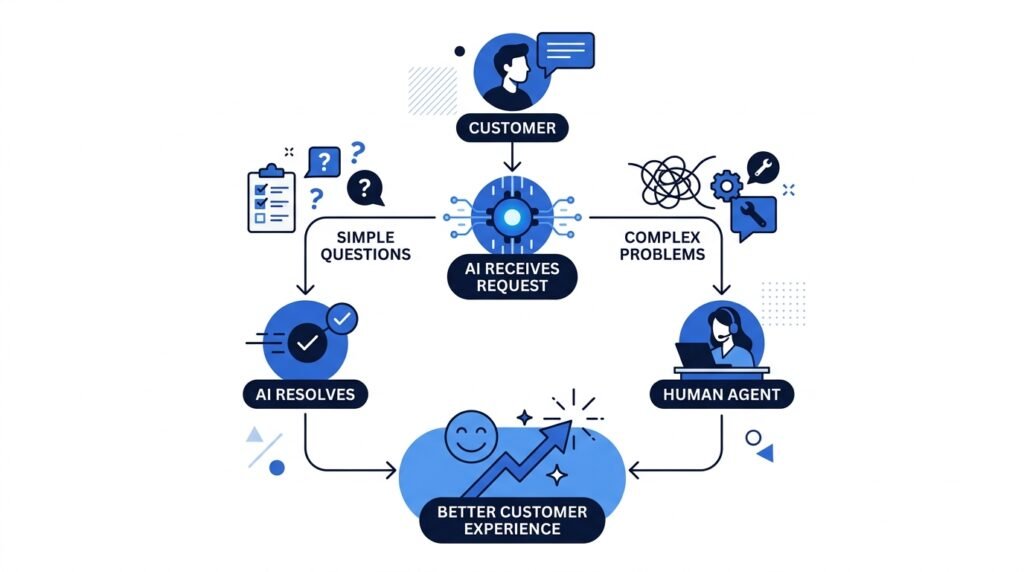
The answer isn’t AI or humans—it’s AI and humans working together.
AI excels at handling repetitive questions, automating workflows, and providing instant responses. Human agents bring empathy, critical thinking, and problem-solving skills that technology cannot fully replicate.
The most effective customer service teams use AI to handle routine tasks while empowering human representatives to focus on conversations that require expertise, understanding, and personal attention.
Best Practices for Using AI in Customer Service
Implementing AI successfully requires more than simply deploying a chatbot. Businesses should focus on creating a balanced approach that combines automation with human expertise.
Here are some best practices:
Start with Repetitive Tasks
Use AI to automate routine customer inquiries such as:
- Order tracking
- Password resets
- Appointment scheduling
- Frequently asked questions
- Account status updates
This allows human agents to dedicate more time to complex customer issues.
Always Offer Human Support
Customers should have an easy way to speak with a human representative whenever AI cannot resolve their issue.
A seamless handoff improves customer satisfaction and prevents frustration.
Keep AI Knowledge Up to Date
Regularly update your AI with the latest:
- Product information
- Company policies
- Pricing
- FAQs
- Support documentation
An AI system is only as reliable as the information it has access to.
Monitor AI Performance
Track key performance metrics such as:
- Resolution rate
- Customer satisfaction (CSAT)
- First response time
- Escalation rate
- Customer feedback
Monitoring these metrics helps businesses identify areas for improvement.
Protect Customer Data
Ensure AI systems follow strong security practices and comply with relevant privacy regulations.
Building customer trust is just as important as improving efficiency.
Continuously Improve
AI should evolve alongside your business.
Review conversations regularly, identify recurring customer issues, and refine your AI workflows to provide better support over time.
Key Takeaway: AI delivers the best results when it’s used to automate repetitive tasks while keeping human agents available for conversations that require empathy, judgment, and personalized assistance.
Best AI Tools for Customer Service
Choosing the right AI tool depends on your business size, customer support needs, and budget. While some tools are designed for small businesses looking to automate FAQs, others offer enterprise-grade features like omnichannel support, advanced analytics, and AI-powered workflow automation.
Here are some of the most popular AI customer service tools available today.
ChatGPT
Best for: General customer support, content generation, and internal support assistants.
ChatGPT can help businesses draft customer responses, answer common questions, summarize conversations, create knowledge base articles, and assist support agents in real time. When integrated with customer service platforms, it can also power AI chatbots that provide natural, conversational responses.
Key Features
- Conversational AI
- Email and chat assistance
- Knowledge base support
- Multilingual capabilities
- Workflow automation
Claude
Best for: Long-form customer conversations and document-based support.
Claude is particularly effective for businesses that need AI to analyze lengthy documents, explain policies, or provide detailed responses while maintaining a natural conversational style.
Key Features
- Excellent document understanding
- Context-aware conversations
- Summarization
- Customer support drafting
Zendesk AI
Best for: Businesses already using Zendesk.
Zendesk AI automates ticket classification, suggests replies for support agents, summarizes customer conversations, and improves ticket routing.
Key Features
- AI ticket routing
- Suggested responses
- Conversation summaries
- Workflow automation
Intercom AI
Best for: SaaS companies and online businesses.
Intercom combines live chat with AI to answer customer questions instantly while seamlessly handing conversations over to human agents when necessary.
Key Features
- AI chatbot
- Live chat
- Help center integration
- Customer messaging automation
Freshdesk AI
Best for: Small and medium-sized businesses.
Freshdesk uses AI to automate repetitive support tasks, prioritize tickets, and improve agent productivity without requiring a large support team.
Key Features
- Ticket automation
- AI-powered recommendations
- Customer self-service
- Intelligent routing
Gemini
Best for: Businesses already using Google Workspace.
Gemini integrates with Gmail, Docs, Meet, and other Google Workspace applications, making it useful for internal customer support documentation and productivity.
Key Features
- Google Workspace integration
- Email assistance
- Document creation
- Productivity enhancement
Which Tool Should You Choose?
There isn’t a single “best” AI customer service tool for every business. The right choice depends on your goals, existing software, budget, and the complexity of your customer support operations.
| Business Need | Recommended Tool |
| General AI assistant | ChatGPT |
| Long-form customer conversations | Claude |
| Enterprise customer support | Zendesk AI |
| Live chat automation | Intercom AI |
| Help desk automation | Freshdesk AI |
| Google Workspace users | Gemini |
Looking for more AI software? Explore our Recommended AI Tools page for detailed reviews, comparisons, and beginner-friendly recommendations to help you choose the right tools for your needs.
Frequently Asked Questions (FAQs)
Can AI completely replace customer service representatives?
No. AI can automate repetitive tasks and answer common questions, but human representatives are still essential for handling complex issues, resolving complaints, and providing empathy during sensitive situations. The most effective customer service teams combine AI with human expertise.
What industries use AI in customer service?
AI is widely used across industries, including e-commerce, banking, healthcare, education, telecommunications, travel, hospitality, insurance, and retail. Any organization that interacts with customers can benefit from AI-powered support.
What’s the difference between a chatbot and an AI assistant?
A traditional chatbot typically follows predefined rules and scripted responses. An AI assistant uses artificial intelligence to understand natural language, remember context, and generate more conversational and personalized responses.
Is AI customer service secure?
AI can be secure when businesses follow strong cybersecurity and data privacy practices. Organizations should encrypt sensitive customer data, comply with relevant privacy regulations, and regularly monitor AI systems to ensure information is handled responsibly.
Is AI expensive for small businesses?
Not necessarily. Many AI customer service tools offer affordable plans or free tiers, making it possible for small businesses to automate routine customer support without a large investment. As businesses grow, they can upgrade to more advanced AI solutions.
Continue Your AI Journey
Keep building your AI knowledge with these beginner-friendly guides.
-
AI Glossary: 100+ Artificial Intelligence Terms Explained
Learn more : AI Glossary: 100+ Artificial Intelligence Terms Explained🕒 25-35 min read • Updated: Aug 2026 Introduction Artificial Intelligence (AI) is changing how we learn, work,…
-
Large Language Models (LLMs) Explained: The Complete 2026 Beginner’s Guide
Learn more : Large Language Models (LLMs) Explained: The Complete 2026 Beginner’s Guide🕒 14-16 min read • Updated: Aug 2026 Introduction Artificial Intelligence has become part of everyday life. Whether…
-

How Artificial Intelligence Works: 5 Core Concepts Explained Simply (2026 Guide)
Learn more : How Artificial Intelligence Works: 5 Core Concepts Explained Simply (2026 Guide)🕒 14-16 min read • Updated: Aug 2026 Introduction What Is Machine Learning? If Artificial Intelligence is the…
-
Artificial Intelligence Explained: The Complete Beginner’s Guide (2026)
Learn more : Artificial Intelligence Explained: The Complete Beginner’s Guide (2026)🕒 14-18 min read • Updated: Aug 2026 introduction Artificial intelligence (AI) has quickly become one of the…
-
How to Use AI in Content Creation: The Complete 2026 Blueprint
Learn more : How to Use AI in Content Creation: The Complete 2026 Blueprint🕒 10-12 min read • Updated: July 2026 Introduction Creating high-quality content consistently can be challenging, whether you’re…
-

7 Ways AI Is Transforming Software Development in 2026 (Real Workflows & Case Studies)
Learn more : 7 Ways AI Is Transforming Software Development in 2026 (Real Workflows & Case Studies)🕒 12-15 min read • Updated: July 2026 Introduction Artificial intelligence (AI) is transforming software development by helping…
Related Articles
Explore more guides and resources related to this topic.
-

ChatGPT Complete Guide for Beginners (2026): Master AI Step-by-Step
Learn more : ChatGPT Complete Guide for Beginners (2026): Master AI Step-by-Step🕒 20-25 min read • Updated: Aug 2026 Introduction Introduction Artificial intelligence is changing how people learn, work,…
-

Master Prompt Engineering in 2026: A Step-by-Step Beginner’s Guide
Learn more : Master Prompt Engineering in 2026: A Step-by-Step Beginner’s Guide🕒 18-20 min read • Updated: Aug 2026 Introduction Artificial intelligence (AI) tools like ChatGPT, Claude, Gemini, and…
-
Large Language Models (LLMs) Explained: The Complete 2026 Beginner’s Guide
Learn more : Large Language Models (LLMs) Explained: The Complete 2026 Beginner’s Guide🕒 14-16 min read • Updated: Aug 2026 Introduction Artificial Intelligence has become part of everyday life. Whether…
-

Best AI Image Generators in 2026: 10 Free & Paid Tools Tested
Learn more : Best AI Image Generators in 2026: 10 Free & Paid Tools Tested🕒 15 min read • Updated: July 2026 introduction Creating stunning images no longer requires years of design…
-
10 Best AI Chatbots in 2026: Tested & Ranked for Every Use Case
Learn more : 10 Best AI Chatbots in 2026: Tested & Ranked for Every Use Case🕒 10-12 min read • Updated: July 2026 introduction Artificial intelligence has made chatbots far more capable than…
-

ChatGPT vs Microsoft Copilot (2026): Tested, Pricing & Workflow Comparison
Learn more : ChatGPT vs Microsoft Copilot (2026): Tested, Pricing & Workflow Comparison🕒 10-12 min read • Updated: July 2026 Introduction Choosing between ChatGPT and Microsoft Copilot can be challenging,…
Conclusion
Artificial intelligence is reshaping customer service by making support faster, more efficient, and available around the clock. From answering frequently asked questions and routing support tickets to assisting human agents with real-time recommendations, AI enables businesses to deliver better customer experiences while improving operational efficiency.
However, AI is most effective when it complements—not replaces—human expertise. While AI excels at automating repetitive tasks and handling high volumes of inquiries, human agents remain essential for resolving complex issues, demonstrating empathy, and building lasting customer relationships.
As AI technology continues to evolve, businesses that combine intelligent automation with skilled customer service teams will be better equipped to meet rising customer expectations and deliver exceptional support.
References
- IBM – What is Artificial Intelligence (AI)?
https://www.ibm.com/think/topics/artificial-intelligence - Microsoft AI – Artificial Intelligence Resources
https://www.microsoft.com/ai - Salesforce – State of Service Report
https://www.salesforce.com/resources/research-reports/state-of-service/ - McKinsey & Company – The State of AI
https://www.mckinsey.com/capabilities/quantumblack/our-insights/the-state-of-ai - NIST AI Risk Management Framework (for trustworthy AI and governance)
https://www.nist.gov/itl/ai-risk-management-framework
Leave a Reply