
🕒 12-15 min read • Updated: July 2026
Table of Contents
Introduction
Artificial intelligence (AI) is transforming software development by helping developers write code faster, automate repetitive tasks, detect bugs earlier, and improve overall software quality. From AI-powered coding assistants like GitHub Copilot and ChatGPT to automated testing and code reviews, AI is becoming an essential part of modern software engineering workflows.
Whether you’re a beginner exploring AI or an experienced developer looking to boost productivity, understanding AI in software development is becoming increasingly important. Businesses are adopting AI-driven tools to accelerate development, reduce costs, and build more reliable applications, making AI skills valuable across the technology industry.
In this beginner-friendly guide, you’ll discover 7 powerful ways AI is transforming software development, explore real-world use cases, learn about the benefits and challenges of AI-assisted development, and compare some of the best AI coding tools available today. By the end, you’ll have a clear understanding of how AI is reshaping the future of software engineering and how you can start using these technologies effectively..
Key Takeaways
- AI assists developers by automating repetitive coding tasks and improving productivity.
- Modern AI tools can help write code, detect bugs, generate documentation, and create test cases.
- AI enhances software development but still requires human oversight and critical thinking.
- Popular AI coding assistants include ChatGPT, GitHub Copilot, Claude, Cursor, and Gemini.
- Learning to work with AI is becoming an important skill for current and future software developers.
What Is AI in Software Development?
Artificial intelligence in software development refers to the use of AI technologies to assist developers throughout the process of designing, building, testing, deploying, and maintaining software applications.
Instead of writing every line of code manually, developers can use AI-powered tools to generate code suggestions, explain programming concepts, identify bugs, automate testing, and improve code quality. These tools analyze large amounts of programming knowledge and learn patterns from existing code to provide helpful recommendations.
Think of AI as a highly knowledgeable coding assistant. It doesn’t replace the developer’s expertise or decision-making, but it can handle repetitive tasks, provide suggestions, and help solve problems more quickly.
For example, imagine you’re building a simple weather application. Instead of searching multiple websites for the correct syntax to make an API request, you can ask an AI assistant to generate the initial code. You can then review, modify, and integrate that code into your project. This saves time while allowing you to focus on understanding the logic and building better software.
It’s important to remember that AI does not truly “understand” software the way humans do. It predicts useful outputs based on patterns learned from large datasets. Because of this, developers should always review AI-generated code for correctness, security, and performance.
Continue Learning: If you’re new to artificial intelligence, start with our What Is Artificial Intelligence? guide to understand the core concepts before exploring AI’s role in software development.
Why AI Is Becoming Important in Software Development
Software has become increasingly complex. Modern applications often involve thousands or even millions of lines of code, multiple programming languages, cloud infrastructure, databases, APIs, and security requirements. Managing this complexity while delivering software quickly is one of the biggest challenges developers face.
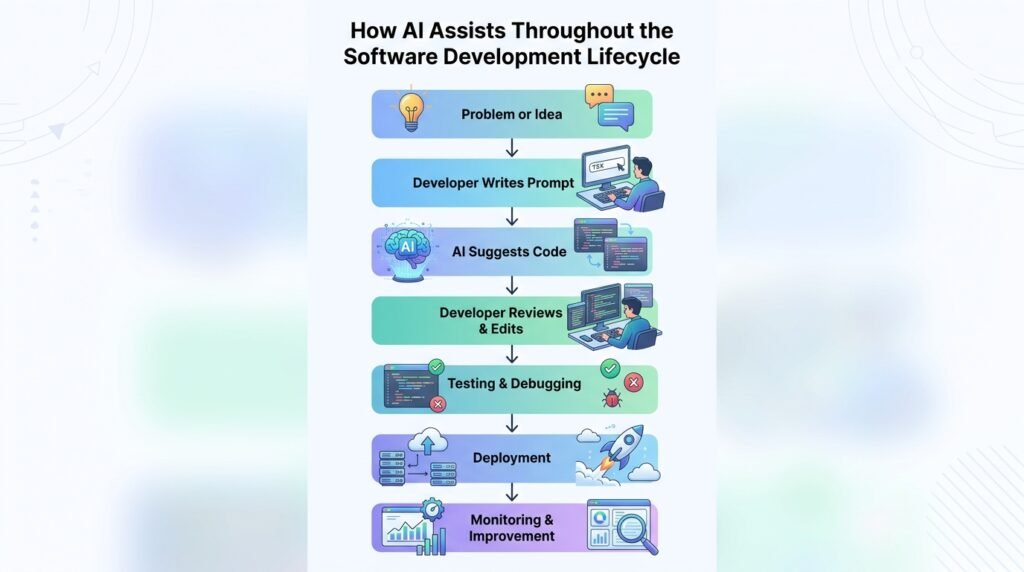
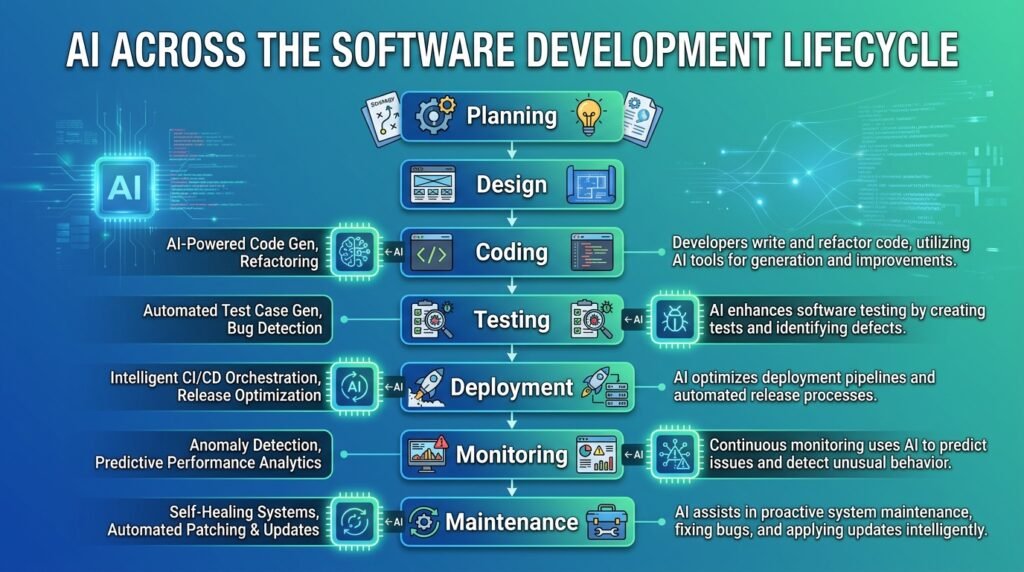
AI helps address these challenges by automating repetitive tasks and providing intelligent assistance throughout the software development lifecycle.
Several factors have contributed to the rapid adoption of AI in software development:
Increasing Demand for Software
Businesses across every industry rely on software to deliver products and services. As demand grows, development teams need ways to build and maintain software more efficiently.
Advances in Generative AI
Recent advances in generative AI have made it possible for tools to generate code, explain programming concepts, summarize documentation, and even assist with debugging using natural language prompts.
Improved Developer Productivity
AI reduces the time spent on repetitive activities such as writing boilerplate code, creating documentation, generating unit tests, and searching for syntax examples. This allows developers to focus on solving business problems and designing better systems.
Better Learning Opportunities
AI has also become a valuable learning companion for students and beginner programmers. Instead of simply providing answers, many AI tools can explain programming concepts, compare approaches, and help users understand why a particular solution works.
Faster Collaboration
AI helps teams work more efficiently by improving documentation, suggesting code improvements, and making large codebases easier to understand. This can reduce onboarding time for new developers and improve overall collaboration.
As AI continues to evolve, it is becoming less of an optional productivity tool and more of a standard part of modern software development workflows.
How AI Is Used in Software Development
Artificial intelligence is no longer limited to research labs or experimental projects. Today, developers use AI throughout the software development lifecycle to improve efficiency, reduce repetitive work, and solve problems more quickly.
Rather than replacing developers, AI acts as a collaborative assistant that supports different stages of software development. From writing code to testing applications, AI-powered tools help teams build software faster while maintaining quality.
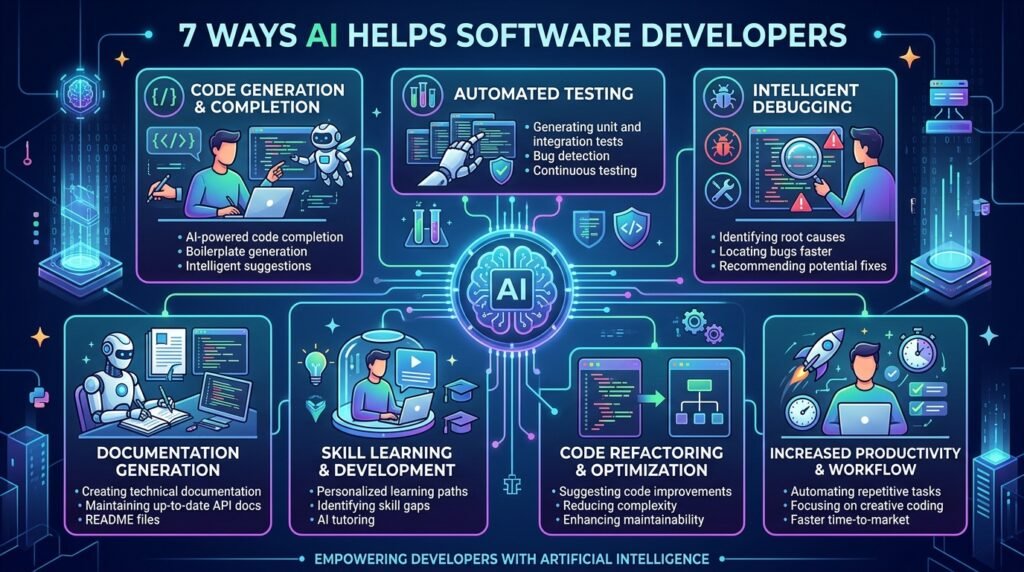
Here are some of the most common ways AI is used in software development.
Code Generation
One of the most popular applications of AI is generating code from natural language instructions.
Instead of writing every function from scratch, developers can describe what they want in plain English, and AI tools can generate an initial version of the code. This helps reduce repetitive coding and speeds up development, especially for common programming tasks.
For example, a developer can ask an AI assistant to create a Python function that sorts a list, builds a REST API endpoint, or connects to a database. The AI provides a starting point that the developer can review and customize.
While this can save significant time, developers should always verify that the generated code is accurate, secure, and appropriate for their project.
Debugging and Error Detection
Finding and fixing bugs is one of the most time-consuming aspects of software development.
AI can analyze code, identify potential errors, explain why a bug occurs, and even suggest possible fixes. Instead of spending hours searching documentation or discussion forums, developers can receive immediate guidance from AI-powered coding assistants.
For beginners, this also creates a valuable learning opportunity because AI often explains the reasoning behind a solution rather than simply providing corrected code.
Code Review and Quality Improvement
Maintaining clean, readable, and efficient code is essential for long-term software projects.
AI tools can review code for common mistakes, identify duplicated logic, suggest refactoring opportunities, and recommend improvements that align with coding best practices.
Although human code reviews remain essential, AI can help developers catch issues earlier and reduce the overall review workload.
Automated Testing
Testing ensures that software behaves as expected before it reaches users.
AI can assist by generating unit tests, identifying missing test cases, and suggesting edge cases that developers might overlook. Some AI tools can even analyze previous bugs to recommend additional testing scenarios.
This helps development teams improve software quality while reducing the manual effort required to create comprehensive test suites.
Documentation Generation
Writing documentation is often overlooked because developers naturally prioritize coding.
AI can automatically generate documentation for functions, classes, APIs, and entire projects. It can also summarize complex code into simple explanations, making it easier for team members to understand and maintain large codebases.
Well-written documentation improves collaboration and helps new developers become productive more quickly.
Learning New Technologies
Software development is constantly evolving, with new programming languages, frameworks, and libraries appearing every year.
AI has become an effective learning companion by explaining programming concepts, comparing technologies, providing code examples, and answering technical questions in simple language.
Instead of switching between multiple websites, developers can ask AI for explanations tailored to their current level of experience.
DevOps and Deployment Assistance
AI is increasingly being used beyond coding to support deployment and operations.
It can help automate deployment scripts, monitor application performance, detect unusual system behavior, analyze logs, and recommend solutions when production issues occur.
Although experienced engineers still oversee deployment decisions, AI can significantly reduce repetitive operational tasks and improve system reliability.
Common Applications of AI in Software Development
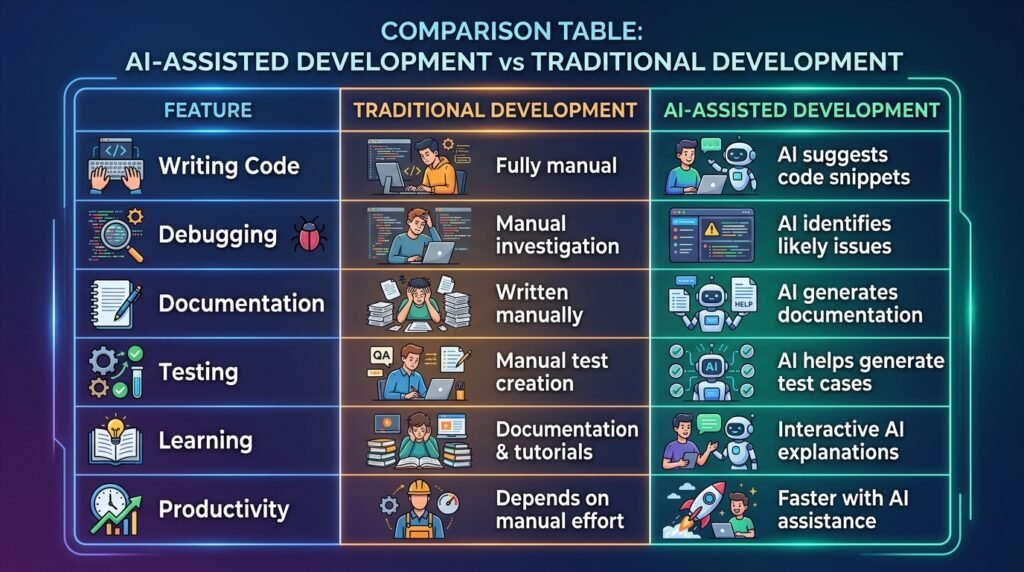
The table below summarizes how AI supports developers throughout the software development process.
| Development Task | How AI Helps | Example |
| Code Generation | Writes code from natural language prompts | Creating functions and APIs |
| Debugging | Identifies bugs and suggests fixes | Explaining error messages |
| Code Review | Detects issues and recommends improvements | Refactoring duplicate code |
| Testing | Generates unit tests and test cases | Increasing test coverage |
| Documentation | Creates comments and technical documentation | API documentation |
| Learning | Explains programming concepts | Understanding algorithms |
| DevOps | Assists with deployment and monitoring | Log analysis and automation |
Tip for Beginners: AI works best as a coding assistant—not as a replacement for learning programming fundamentals. Understanding how your code works will help you evaluate AI-generated suggestions more effectively.
Modern AI coding assistants are powered by generative AI, which can create text, code, and other content from natural language prompts. To learn how this technology works, read our What Is Generative AI? guide.
Benefits of AI in Software Development
Artificial intelligence offers several advantages for software developers, teams, and businesses. While AI cannot replace human creativity, problem-solving, or architectural decision-making, it can significantly improve productivity by handling repetitive and time-consuming tasks.
Here are some of the key benefits of using AI in software development.
Increased Developer Productivity
One of the biggest advantages of AI is its ability to help developers work more efficiently. AI can generate boilerplate code, suggest functions, explain unfamiliar syntax, and automate repetitive tasks that would otherwise consume valuable time.
Instead of spending hours searching documentation or writing repetitive code, developers can focus on designing software, solving complex problems, and improving user experiences.
For example, an AI coding assistant can generate the basic structure of a web application, allowing the developer to concentrate on implementing business logic and refining the final product.
Faster Software Development
Modern software projects often have tight deadlines. AI helps accelerate development by assisting with coding, debugging, documentation, and testing.
Rather than replacing the development process, AI reduces the amount of manual effort required at each stage of the software development lifecycle. This enables teams to deliver features and updates more quickly while maintaining quality.
Improved Code Quality
Writing code quickly is only valuable if the code is reliable and maintainable.
Many AI-powered development tools analyze code for potential bugs, duplicated logic, inefficient implementations, and common programming mistakes. They can also suggest cleaner coding practices that improve readability and long-term maintainability.
However, developers should always review AI-generated suggestions to ensure they align with the project’s requirements and coding standards.
Better Learning Experience
AI has become a valuable educational resource for beginner programmers and experienced developers alike.
Instead of simply providing answers, AI can explain programming concepts, compare different solutions, describe how algorithms work, and help developers understand why a particular approach is recommended.
This interactive learning experience allows developers to gain practical knowledge while working on real projects.
Reduced Repetitive Work
Many software development tasks are repetitive but necessary. Examples include writing documentation, generating unit tests, creating configuration files, formatting code, and producing boilerplate functions.
AI can automate many of these activities, allowing developers to spend more time solving meaningful problems instead of repeating routine tasks.
Improved Collaboration
Software development is rarely an individual effort. Most projects involve teams of developers, designers, testers, and project managers.
AI improves collaboration by generating documentation, explaining unfamiliar code, summarizing changes, and helping new team members understand existing codebases more quickly.
This can reduce onboarding time and improve communication across development teams.
Supports Innovation
By automating routine work, AI gives developers more time to experiment with new ideas, explore different approaches, and build innovative features.
Instead of spending hours on repetitive coding tasks, developers can focus on creating better user experiences, improving software architecture, and solving complex technical challenges.
Benefits at a Glance
| Benefit | How It Helps Developers |
| Increased Productivity | Automates repetitive coding tasks and speeds up development |
| Faster Development | Reduces time spent on coding, testing, and debugging |
| Better Code Quality | Identifies potential errors and suggests improvements |
| Enhanced Learning | Explains programming concepts and best practices |
| Less Repetitive Work | Generates documentation, tests, and boilerplate code |
| Improved Collaboration | Makes code easier to understand and maintain |
| Greater Innovation | Frees developers to focus on creative problem-solving |
Key Insight: The greatest value of AI isn’t that it writes code for developers—it’s that it helps developers spend more time on thinking, designing, and solving problems while reducing repetitive work.
Challenges and Limitations of AI in Software Development
Despite its many advantages, AI is not perfect. AI-generated code can contain errors, security vulnerabilities, or inefficient solutions. Understanding these limitations helps developers use AI responsibly and avoid overreliance.
AI Can Generate Incorrect Code
AI models predict likely solutions based on patterns in their training data. While many suggestions are accurate, they can also produce code that contains logical errors, outdated practices, or syntax issues.
Developers should always review, test, and understand AI-generated code before using it in production.
Security and Privacy Concerns
Developers should avoid sharing confidential information, proprietary source code, API keys, passwords, or sensitive business data with public AI tools unless they fully understand the platform’s privacy policies.
Many organizations establish guidelines for using AI to protect intellectual property and maintain data security.
Lack of Context
AI does not fully understand a project’s business requirements, user needs, or long-term architecture. It may generate technically correct code that doesn’t align with the project’s goals or coding standards.
Human developers remain responsible for making architectural decisions and ensuring software meets real-world requirements.
Risk of Overreliance
Beginners may be tempted to copy AI-generated code without understanding how it works. While this can speed up development in the short term, it may slow long-term learning and make debugging more difficult.
The best approach is to treat AI as a learning partner. Ask it to explain concepts, review solutions, and compare different approaches instead of simply generating answers.
AI Cannot Replace Human Creativity
Developing great software involves more than writing code. It requires understanding user needs, designing intuitive experiences, making strategic decisions, and solving unique problems.
These areas still rely heavily on human creativity, critical thinking, and collaboration—skills that AI cannot fully replicate.
Best Practice
Use AI to accelerate development, not to replace understanding. Developers who combine strong programming fundamentals with AI-assisted workflows are likely to be better prepared for the future than those who rely entirely on automation.
Popular AI Tools for Software Development
AI-powered coding assistants have become an essential part of modern software development. These tools can help developers write code, explain programming concepts, identify bugs, generate documentation, and improve overall productivity.
While each tool has its own strengths, the best choice depends on your workflow, programming language, and development needs.
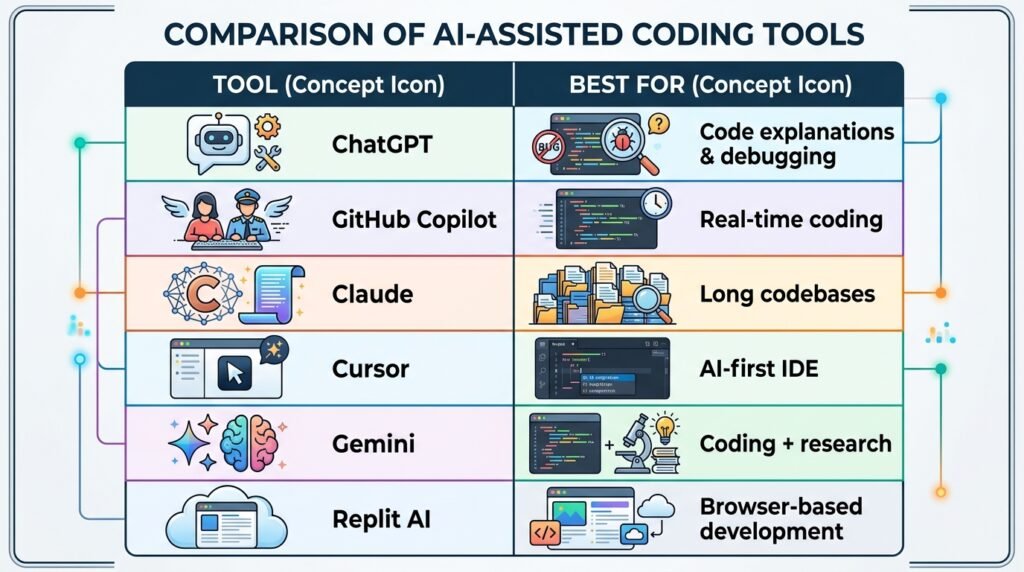
Below are some of the most widely used AI tools for software development.
| AI Tool | Best For | Key Features |
| ChatGPT | Learning, debugging, code explanations | Generates code, explains concepts, fixes errors, answers programming questions |
| GitHub Copilot | Real-time coding assistance | Autocomplete suggestions, function generation, IDE integration |
| Claude | Large codebases and documentation | Long-context understanding, code reviews, technical writing |
| Gemini | Research and development | Code generation, debugging, documentation, Google ecosystem integration |
| Cursor | AI-powered code editing | Built-in AI chat, intelligent code editing, project-wide assistance |
| Replit AI | Beginners and rapid prototyping | Browser-based coding, AI assistance, collaborative development |
Although these tools can significantly improve productivity, they should be viewed as assistants rather than replacements for programming knowledge. Developers still need to understand software design, algorithms, debugging techniques, and security best practices.
Recommended Reading: Explore our 25 Best AI Tools for Beginners guide to compare popular AI tools and discover which ones best fit your learning or development goals.
Can AI Replace Software Developers?
As AI coding tools become more capable, one question continues to appear in discussions about the future of technology:
Will AI replace software developers?
The short answer is no—but it will change how developers work.
AI excels at repetitive, well-defined tasks such as generating code snippets, suggesting improvements, creating documentation, and identifying common programming errors. These capabilities help developers work faster and reduce the time spent on routine activities.
However, building successful software involves much more than writing code.
Software developers must understand business requirements, design scalable systems, communicate with stakeholders, solve complex problems, make architectural decisions, and ensure applications are secure, reliable, and easy to maintain. These responsibilities require critical thinking, creativity, and human judgment—areas where AI still has significant limitations.
Think of AI as a highly capable junior assistant. It can complete many tasks quickly and provide useful suggestions, but it still relies on experienced developers to review its work, make important decisions, and ensure the final software meets user needs.
Rather than replacing software developers, AI is changing the skills that developers need. Professionals who understand both programming fundamentals and AI-assisted development are likely to have a significant advantage in the years ahead.
Best Practices for Using AI in Software Development
AI is most effective when used thoughtfully. Following a few best practices can help you get better results while avoiding common mistakes.
Understand the Code Before Using It
Never copy and paste AI-generated code without reviewing it. Make sure you understand how it works and why it solves the problem.
Verify AI-Generated Suggestions
AI can occasionally generate incorrect, outdated, or inefficient code. Always test the output and ensure it meets your project’s requirements before using it in production.
Protect Sensitive Information
Avoid sharing confidential source code, passwords, API keys, or proprietary business information with public AI tools unless your organization has approved guidelines for doing so.
Continue Learning Programming Fundamentals
AI can accelerate development, but it should not replace learning core programming concepts such as data structures, algorithms, debugging, and software design. Strong fundamentals make it much easier to evaluate AI-generated solutions.
Use AI as a Productivity Partner
The most successful developers use AI to automate repetitive work while focusing their own time on problem-solving, system design, and creating better user experiences.
How Beginners Can Start Using AI for Software Development
If you’re new to programming, AI can make learning more interactive and less intimidating. Instead of simply searching for answers, you can use AI to understand concepts, practice coding, and receive personalized guidance.
Here are a few practical ways to get started:
- Learn the basics of programming first. Build a foundation in one programming language before relying heavily on AI.
- Ask AI to explain concepts. Use AI to simplify topics such as loops, functions, object-oriented programming, and data structures.
- Build small projects. Create calculators, to-do lists, or weather apps while using AI to guide you through unfamiliar steps.
- Review every AI-generated solution. Treat AI as a tutor rather than an answer machine. Understanding why the code works is more valuable than copying it.
- Practice debugging with AI. Instead of asking for the complete solution, ask AI to explain the error and help you identify the problem yourself.
Developers who combine curiosity, consistent practice, and AI-assisted learning often improve their skills more quickly than those who rely on traditional resources alone.
Frequently Asked Questions (FAQs)
Is AI replacing software developers?
No. AI is changing how software developers work, but it is not replacing them. AI excels at automating repetitive tasks such as code generation, debugging, and documentation. However, developers are still needed to design software architectures, solve complex problems, understand business requirements, and make critical decisions.
Which AI tool is best for software development?
The best AI tool depends on your needs.
- ChatGPT is excellent for learning programming concepts, debugging, and explaining code.
- GitHub Copilot provides real-time code suggestions within supported IDEs.
- Claude is well-suited for reviewing large codebases and technical documentation.
- Cursor offers an AI-powered coding environment.
- Gemini combines coding assistance with research capabilities.
Many developers use more than one tool depending on the task.
Can beginners use AI to learn programming?
Yes. AI can be an excellent learning companion for beginners. It can explain programming concepts, generate simple examples, answer coding questions, and help debug errors. However, beginners should focus on understanding the code rather than copying AI-generated solutions without review.
Can AI write complete software applications?
AI can generate parts of an application, including functions, user interfaces, API integrations, and documentation. However, building production-ready software still requires human developers to design the system, review code, test functionality, ensure security, and maintain the application over time.
What are the limitations of AI in software development?
AI can occasionally generate incorrect, inefficient, or insecure code. It also lacks a full understanding of business requirements, project context, and long-term architectural decisions. For these reasons, developers should always review, test, and validate AI-generated code before using it.
Will AI make programmers more productive?
In many cases, yes. AI can automate repetitive tasks such as writing boilerplate code, generating documentation, creating test cases, and identifying common errors. This allows developers to spend more time solving complex problems and building high-quality software.
Continue Your AI Journey
Keep building your AI knowledge with these beginner-friendly guides.
-
AI Glossary: 100+ Artificial Intelligence Terms Explained
Learn more : AI Glossary: 100+ Artificial Intelligence Terms Explained🕒 25-35 min read • Updated: Aug 2026 Introduction Artificial Intelligence (AI) is changing how we learn, work,…
-
Large Language Models (LLMs) Explained: The Complete 2026 Beginner’s Guide
Learn more : Large Language Models (LLMs) Explained: The Complete 2026 Beginner’s Guide🕒 14-16 min read • Updated: Aug 2026 Introduction Artificial Intelligence has become part of everyday life. Whether…
-
How Artificial Intelligence Works: 5 Core Concepts Explained Simply (2026 Guide)
Learn more : How Artificial Intelligence Works: 5 Core Concepts Explained Simply (2026 Guide)🕒 14-16 min read • Updated: Aug 2026 Introduction What Is Machine Learning? If Artificial Intelligence is the…
-
Artificial Intelligence Explained: The Complete Beginner’s Guide (2026)
Learn more : Artificial Intelligence Explained: The Complete Beginner’s Guide (2026)🕒 14-18 min read • Updated: Aug 2026 introduction Artificial intelligence (AI) has quickly become one of the…
-
How to Use AI in Content Creation: The Complete 2026 Blueprint
Learn more : How to Use AI in Content Creation: The Complete 2026 Blueprint🕒 10-12 min read • Updated: July 2026 Introduction Creating high-quality content consistently can be challenging, whether you’re…
-

7 Ways AI Is Transforming Software Development in 2026 (Real Workflows & Case Studies)
Learn more : 7 Ways AI Is Transforming Software Development in 2026 (Real Workflows & Case Studies)🕒 12-15 min read • Updated: July 2026 Introduction Artificial intelligence (AI) is transforming software development by helping…
Related Articles
Explore more guides and resources related to this topic.
-

ChatGPT Complete Guide for Beginners (2026): Master AI Step-by-Step
Learn more : ChatGPT Complete Guide for Beginners (2026): Master AI Step-by-Step🕒 20-25 min read • Updated: Aug 2026 Introduction Introduction Artificial intelligence is changing how people learn, work,…
-

Master Prompt Engineering in 2026: A Step-by-Step Beginner’s Guide
Learn more : Master Prompt Engineering in 2026: A Step-by-Step Beginner’s Guide🕒 18-20 min read • Updated: Aug 2026 Introduction Artificial intelligence (AI) tools like ChatGPT, Claude, Gemini, and…
-
Large Language Models (LLMs) Explained: The Complete 2026 Beginner’s Guide
Learn more : Large Language Models (LLMs) Explained: The Complete 2026 Beginner’s Guide🕒 14-16 min read • Updated: Aug 2026 Introduction Artificial Intelligence has become part of everyday life. Whether…
-

Best AI Image Generators in 2026: 10 Free & Paid Tools Tested
Learn more : Best AI Image Generators in 2026: 10 Free & Paid Tools Tested🕒 15 min read • Updated: July 2026 introduction Creating stunning images no longer requires years of design…
-
10 Best AI Chatbots in 2026: Tested & Ranked for Every Use Case
Learn more : 10 Best AI Chatbots in 2026: Tested & Ranked for Every Use Case🕒 10-12 min read • Updated: July 2026 introduction Artificial intelligence has made chatbots far more capable than…
-
ChatGPT vs Microsoft Copilot (2026): Tested, Pricing & Workflow Comparison
Learn more : ChatGPT vs Microsoft Copilot (2026): Tested, Pricing & Workflow Comparison🕒 10-12 min read • Updated: July 2026 Introduction Choosing between ChatGPT and Microsoft Copilot can be challenging,…
Recommended AI Tools
If you’re ready to experience AI-assisted software development, these tools are worth exploring:
- ChatGPT – Generate code, debug programs, explain concepts, and accelerate learning.
- GitHub Copilot – Receive real-time coding suggestions directly in your editor.
- Claude – Ideal for reviewing large codebases and writing technical documentation.
- Cursor – A modern AI-powered code editor built for developer productivity.
- Gemini – Helpful for coding, technical research, and problem-solving.
👉 Explore our Recommended AI Tools page to compare these tools and choose the best option for your workflow.
Conclusion
Artificial intelligence is reshaping software development by making coding faster, more efficient, and more accessible. From generating code and detecting bugs to creating documentation and automating testing, AI has become an invaluable assistant for developers at every experience level.
However, AI is most effective when paired with strong programming fundamentals and critical thinking. It can automate repetitive tasks and accelerate development, but it cannot replace human creativity, problem-solving, or the ability to design software that meets real-world needs.
As AI continues to evolve, developers who learn how to collaborate with these tools—rather than compete against them—will be well-positioned for the future of software engineering. Whether you’re just starting your coding journey or looking to improve your workflow, understanding how AI fits into software development is an investment that will continue to pay dividends as the technology advances.
References
- IBM – What Is Artificial Intelligence (AI)?
- https://www.ibm.com/think/topics/artificial-intelligence
- Use for: AI fundamentals, business applications, and AI concepts.
- Microsoft Learn – AI for Beginners
- https://learn.microsoft.com/training/browse/?terms=artificial%20intelligence
- Use for: AI learning resources and software development context.
- GitHub Copilot Documentation
- https://docs.github.com/copilot
- Use for: AI-assisted coding, code completion, and developer workflows.
- Google AI
- https://ai.google/
- Use for: Generative AI, AI research, and Google’s AI technologies.
- OpenAI Documentation
- https://platform.openai.com/docs
- Use for: Generative AI, large language models, and AI application development.
- OWASP Top 10
- https://owasp.org/www-project-top-ten/
- Use for: Security best practices when discussing AI-generated code and secure software development.
- NIST AI Risk Management Framework
- https://www.nist.gov/itl/ai-risk-management-framework
- Great for discussions on responsible AI and risk management.
- IEEE Standards Association – Artificial Intelligence
- https://standards.ieee.org/industry-connections/artificial-intelligence/
- Useful for mentioning AI standards and governance.
- GitHub Copilot Research
- https://github.blog/news-insights/research/
- Helpful if you reference productivity improvements or developer adoption.
Leave a Reply