🕒 15 min read • Updated: July 2026
Table of Contents
introduction
Creating stunning images no longer requires years of design experience or expensive software. Thanks to AI image generators, anyone can transform a simple text prompt into artwork, realistic photos, illustrations, marketing graphics, logos, and social media visuals in just a few seconds.
The challenge isn’t finding an AI image generator—it’s choosing the right one.
Some AI tools specialize in photorealistic images, while others excel at concept art, graphic design, product mockups, logos, or illustrations. Features, pricing, ease of use, and commercial licensing can vary significantly, making it difficult for beginners to know where to start.
To help you make the right choice, we’ve carefully evaluated the best AI image generators in 2026 based on image quality, prompt accuracy, ease of use, pricing, creative flexibility, editing features, and overall value.
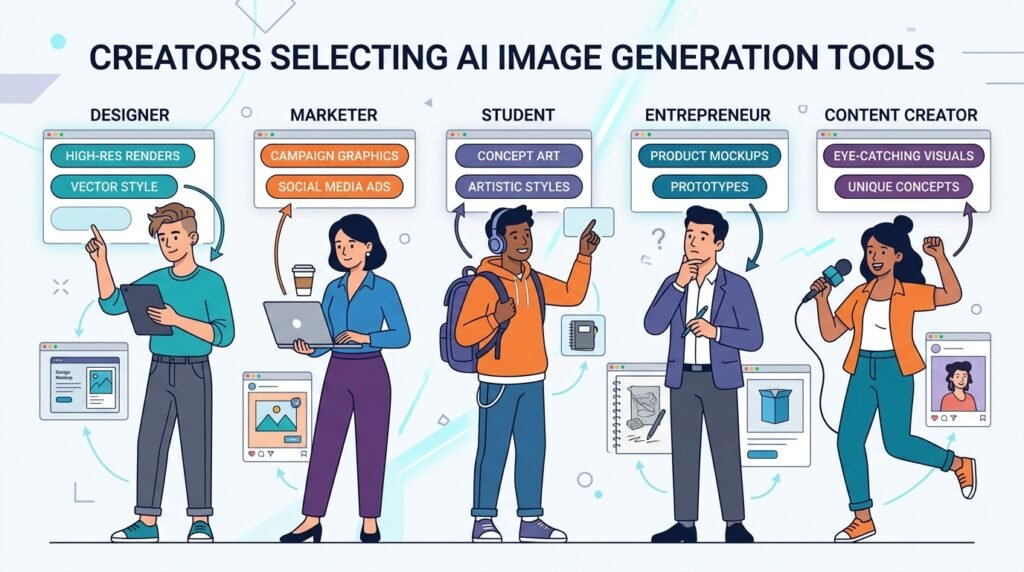
Whether you’re a content creator, marketer, designer, student, entrepreneur, or simply curious about AI, this guide will help you find the image generator that best fits your needs.
Quick Answer
If you’re looking for the best AI image generator in 2026, these tools stand out:
- Midjourney – Best overall image quality and artistic creations
- ChatGPT (GPT Image) – Best all-around AI image generator for beginners
- Adobe Firefly – Best for professional designers and commercial projects
- Ideogram – Best for creating images with accurate text
- Leonardo AI – Best for game assets and creative illustrations
- FLUX – Best open-weight image generation model
- Stable Diffusion – Best for customization and self-hosting
- Canva AI – Best for social media graphics and presentations
- Recraft – Best for logos, icons, and vector-style graphics
- DreamStudio – Best beginner-friendly Stable Diffusion experience
If you’re just starting, ChatGPT, Canva AI, and Adobe Firefly offer the easiest learning curve. If image quality is your highest priority, Midjourney remains one of the strongest choices available.
Key Takeaways
- AI image generators can create artwork, illustrations, realistic photos, logos, product images, and marketing visuals from simple text prompts.
- Midjourney continues to deliver some of the highest-quality artistic images.
- ChatGPT provides one of the most beginner-friendly image generation experiences.
- Adobe Firefly is an excellent choice for designers working with Creative Cloud.
- Canva AI is ideal for quickly creating social media content and presentations.
- Stable Diffusion and FLUX provide greater flexibility for advanced users.
- The best AI image generator depends on your goals, budget, and workflow.
How We Selected the Best AI Image Generators
Rather than simply listing popular tools, we evaluated each platform using the same criteria to help you make an informed decision.
Every recommendation was assessed based on:
- Image quality
- Prompt understanding
- Ease of use
- Editing capabilities
- Creative flexibility
- Speed
- Free plan availability
- Commercial usage rights
- Overall value for beginners
Our goal is to recommend tools that are genuinely useful—not simply the newest or most heavily marketed options.
Comparison Table
| AI Image Generator | Best For | Free Plan | Beginner Friendly | Overall Rating |
| Midjourney | Artistic & photorealistic images | ❌ | ⭐⭐⭐⭐☆ | ⭐⭐⭐⭐⭐ |
| ChatGPT (GPT Image) | Everyday image creation | Limited | ⭐⭐⭐⭐⭐ | ⭐⭐⭐⭐⭐ |
| Adobe Firefly | Professional design | ✅ | ⭐⭐⭐⭐⭐ | ⭐⭐⭐⭐☆ |
| Ideogram | Images with text | ✅ | ⭐⭐⭐⭐⭐ | ⭐⭐⭐⭐☆ |
| Leonardo AI | Gaming & concept art | ✅ | ⭐⭐⭐⭐☆ | ⭐⭐⭐⭐☆ |
| FLUX | Open-weight AI images | Varies | ⭐⭐⭐⭐☆ | ⭐⭐⭐⭐☆ |
| Stable Diffusion | Customization | ✅ | ⭐⭐⭐☆☆ | ⭐⭐⭐⭐☆ |
| Canva AI | Marketing graphics | ✅ | ⭐⭐⭐⭐⭐ | ⭐⭐⭐⭐☆ |
| Recraft | Logos & vector graphics | ✅ | ⭐⭐⭐⭐⭐ | ⭐⭐⭐⭐☆ |
| DreamStudio | Stable Diffusion interface | Limited | ⭐⭐⭐⭐☆ | ⭐⭐⭐⭐☆ |
What Is an AI Image Generator?
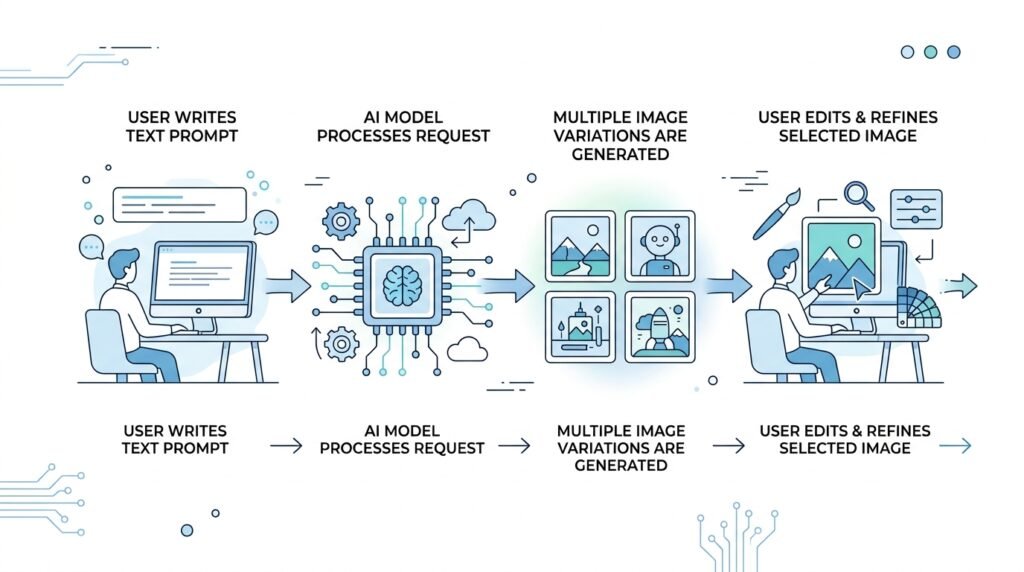
An AI image generator is a tool that creates images from natural language descriptions, often called text prompts. Instead of manually drawing or designing graphics, you simply describe what you want, and the AI generates one or more images based on your instructions.
For example, a prompt like:
“A futuristic city at sunset with flying cars, cinematic lighting, ultra-realistic.”
can produce a detailed image within seconds.
Modern AI image generators can create:
- Digital artwork
- Photorealistic portraits
- Logos
- Product mockups
- Marketing graphics
- Book covers
- Social media posts
- Concept art
- Character designs
- Interior designs
Many tools also allow you to edit existing images, remove backgrounds, expand images, or create multiple variations from a single prompt.
1. Midjourney — Best Overall AI Image Generator
Best For: Artists, designers, concept creators, and professionals seeking exceptional image quality.
Midjourney has earned a reputation for producing some of the most visually impressive AI-generated artwork available today. It consistently delivers detailed compositions, realistic lighting, and creative interpretations that appeal to artists, marketers, and creative professionals.
Pros
- Outstanding image quality
- Exceptional artistic style
- Highly detailed outputs
- Strong community inspiration
Cons
- Paid subscription required
- Learning curve for new users
- Limited built-in editing compared to some competitors
Pricing
Paid plans available.
Beginner Rating
⭐⭐⭐⭐☆
Our Verdict
If your priority is creating beautiful, high-quality artwork, Midjourney remains one of the strongest choices available.
Related Guide: What Is Midjourney? (Internal Link)
2. ChatGPT (GPT Image) — Best AI Image Generator for Beginners
Best For: Everyday image creation, content creators, educators, marketers, and beginners.
OpenAI has transformed ChatGPT into much more than a conversational AI assistant. With built-in image generation, users can create illustrations, realistic photos, infographics, marketing visuals, social media graphics, and concept art simply by describing what they want in natural language.
Unlike many dedicated AI image generators, ChatGPT combines image creation with conversational editing. Instead of rewriting prompts from scratch, you can ask follow-up questions such as “make the background brighter,” “remove the people,” or “turn this into a watercolor painting.”
This conversational workflow makes ChatGPT one of the easiest AI image generators for beginners.
Key Features
- Text-to-image generation
- Conversational image editing
- Photorealistic and artistic styles
- Image variations
- Prompt refinement through chat
- Multi-purpose AI assistant beyond image creation
Pros
- Extremely beginner-friendly
- Natural language editing
- Excellent prompt understanding
- Fast workflow
- Ideal for everyday creative tasks
Cons
- Fewer advanced artistic controls than Midjourney
- Free usage limits may apply
- Less customization for experienced AI artists
Pricing
Free plan available with limits. Premium features are available through paid ChatGPT plans.
Beginner Rating
⭐⭐⭐⭐⭐
Our Verdict
If you’re completely new to AI image generation, ChatGPT offers one of the easiest learning experiences. It combines powerful image generation with conversational editing, making it an excellent all-around choice for students, professionals, and creators.
3. Adobe Firefly — Best for Professional Designers
Best For: Graphic designers, marketers, creative teams, and Adobe Creative Cloud users.
Adobe Firefly is designed for creators who want AI-powered image generation while remaining inside familiar Adobe workflows. It integrates with products such as Photoshop and Illustrator, making it particularly valuable for professionals already working within the Adobe ecosystem.
Firefly focuses heavily on commercially safe content generation and provides editing tools that fit naturally into professional design projects.
Key Features
- Text-to-image generation
- Generative Fill
- Generative Expand
- Style references
- Integration with Adobe Creative Cloud
- Commercial-friendly outputs
Pros
- Professional design workflow
- Excellent editing capabilities
- Strong commercial licensing approach
- Seamless Adobe integration
- Easy to learn
Cons
- Best experience requires Adobe ecosystem
- Advanced features may require subscription
- Less artistic flexibility than Midjourney
Pricing
Free credits available. Additional usage requires paid Adobe plans.
Beginner Rating
⭐⭐⭐⭐⭐
Our Verdict
Adobe Firefly is one of the best AI image generators for designers who already use Photoshop, Illustrator, or other Adobe applications. Its integration and editing capabilities make it an excellent productivity tool for professional creative work.
4. Ideogram — Best AI Image Generator for Text and Typography
Best For: Posters, logos, social media graphics, advertisements, and marketing materials.
Most AI image generators struggle to render readable text inside images. Ideogram stands out by producing clear typography, making it a favorite for creators designing posters, advertisements, presentations, and branded content.
Instead of relying on external editing software, users can generate visually appealing graphics that already include accurate text.
Key Features
- High-quality text rendering
- Logo concepts
- Poster creation
- Marketing graphics
- Multiple artistic styles
- Fast generation
Pros
- Excellent text accuracy
- Beginner-friendly interface
- Great for branding projects
- Free plan available
- High-quality visual compositions
Cons
- Smaller ecosystem than some competitors
- Limited advanced editing compared with Adobe Firefly
Pricing
Free plan available with premium subscription options.
Beginner Rating
⭐⭐⭐⭐⭐
Our Verdict
If your projects involve posters, presentations, advertisements, or branded graphics with text, Ideogram is one of the strongest AI image generators currently available.
5. Leonardo AI — Best for Game Art and Creative Projects
Best For: Game developers, illustrators, concept artists, storytellers, and creative professionals.
Leonardo AI has become a popular choice for generating concept art, fantasy illustrations, game assets, character designs, and cinematic environments. It provides more creative controls than many beginner-focused tools while remaining approachable for new users.
Its combination of high-quality image generation and asset-focused workflows makes it particularly attractive to creators working on games, books, comics, and digital media.
Key Features
- Character generation
- Game asset creation
- Concept art
- Fine-tuned AI models
- Image editing
- Community models and presets
Pros
- Outstanding concept artwork
- Flexible creative controls
- Free plan available
- Active creative community
- High-quality outputs
Cons
- More options can increase the learning curve
- Some advanced models require paid credits
Pricing
Free plan available with optional paid upgrades.
Beginner Rating
⭐⭐⭐⭐☆
Our Verdict
Leonardo AI strikes an excellent balance between simplicity and creative flexibility. It’s one of the best choices for anyone creating illustrations, characters, or game-related artwork without needing professional design software.
6. FLUX — Best Open-Weight AI Image Generator
Best For: Developers, AI enthusiasts, creators seeking high-quality open-weight models.
FLUX has quickly become one of the most talked-about AI image generation models thanks to its impressive image quality and open-weight approach. Developed to provide strong prompt understanding and realistic image generation, FLUX is available through several AI platforms and services.
Unlike many closed ecosystems, FLUX gives creators more flexibility depending on where they access it, making it an attractive choice for users who value customization.
Key Features
- High-quality text-to-image generation
- Strong prompt accuracy
- Open-weight model
- Multiple hosting options
- Excellent realism and lighting
- Active community support
Pros
- Excellent image quality
- Better flexibility than many proprietary tools
- Strong prompt interpretation
- Growing ecosystem
Cons
- Availability depends on the platform you use
- Can be more technical for beginners
Pricing
Varies by platform.
Beginner Rating
⭐⭐⭐⭐☆
Our Verdict
FLUX is an exciting option for users who want impressive image quality without being locked into a single platform. As its ecosystem grows, it is becoming one of the most capable AI image generation models available.
7. Stable Diffusion — Best for Advanced Customization
Best For: Developers, researchers, advanced users, and self-hosting.
Stable Diffusion remains one of the most flexible AI image generation models because it can be run locally, fine-tuned, and customized extensively. Unlike many cloud-based services, it gives users greater control over models, workflows, and privacy.
Its flexibility comes with a steeper learning curve, making it more suitable for experienced users than complete beginners.
Key Features
- Open-source ecosystem
- Local installation
- Custom AI models
- Extensions and plugins
- Image-to-image generation
- Advanced customization
Pros
- Highly customizable
- Large community
- Self-hosting available
- Excellent for experimentation
Cons
- More complex setup
- Requires technical knowledge
- Learning curve for beginners
Pricing
Free (self-hosted) or available through various paid platforms.
Beginner Rating
⭐⭐⭐☆☆
Our Verdict
If you enjoy experimenting or need maximum creative control, Stable Diffusion is still one of the most powerful AI image generators available.
8. Canva AI — Best for Social Media and Marketing
Best For: Content creators, marketers, educators, entrepreneurs, and small businesses.
Canva AI combines image generation with one of the world’s most popular graphic design platforms. Instead of creating an image and exporting it to another editor, users can generate AI visuals directly inside presentations, social media posts, posters, and marketing materials.
This streamlined workflow makes Canva AI particularly appealing for beginners and busy professionals.
Key Features
- AI image generation
- Magic Design
- Social media templates
- Presentation tools
- Brand Kit integration
- Drag-and-drop editor
Pros
- Extremely easy to use
- Excellent design templates
- Complete content creation platform
- Free plan available
- Ideal for marketing
Cons
- Less artistic control than Midjourney
- Advanced features require Canva Pro
Pricing
Free plan with optional Canva Pro subscription.
Beginner Rating
⭐⭐⭐⭐⭐
Our Verdict
If your goal is creating professional marketing graphics, presentations, or social media content quickly, Canva AI is one of the most practical AI image generators available.
9. Recraft — Best for Logos, Icons, and Vector Graphics
Best For: Branding, UI design, icons, illustrations, and scalable graphics.
Recraft stands out because it focuses on vector-friendly graphics rather than only raster images. This makes it particularly useful for designers creating logos, icons, branding assets, and marketing illustrations.
Key Features
- Vector graphic generation
- Logo creation
- Icon design
- Illustration tools
- Brand asset creation
Pros
- Excellent vector outputs
- Great for branding
- Beginner-friendly
- Clean interface
Cons
- More specialized than general-purpose AI image generators
- Fewer artistic styles
Pricing
Free plan available with premium options.
Beginner Rating
⭐⭐⭐⭐⭐
Our Verdict
If your projects revolve around branding, logos, or scalable illustrations, Recraft deserves serious consideration.
10. DreamStudio — Best Stable Diffusion Experience for Beginners
Best For: Users who want Stable Diffusion without complex installation.
DreamStudio provides one of the easiest ways to access Stable Diffusion through a simple web interface. Users can generate high-quality AI images without configuring hardware or installing software.
Key Features
- Stable Diffusion interface
- Fast image generation
- Prompt customization
- Multiple styles
- Cloud-based access
Pros
- Easy to start
- No installation
- Good image quality
- Beginner-friendly
Cons
- Credit-based pricing
- Fewer advanced controls than self-hosting
Pricing
Free trial credits with pay-as-you-go usage.
Beginner Rating
⭐⭐⭐⭐☆
Our Verdict
DreamStudio is an excellent choice for users who want to explore Stable Diffusion without dealing with technical setup.
Which AI Image Generator Should You Choose?
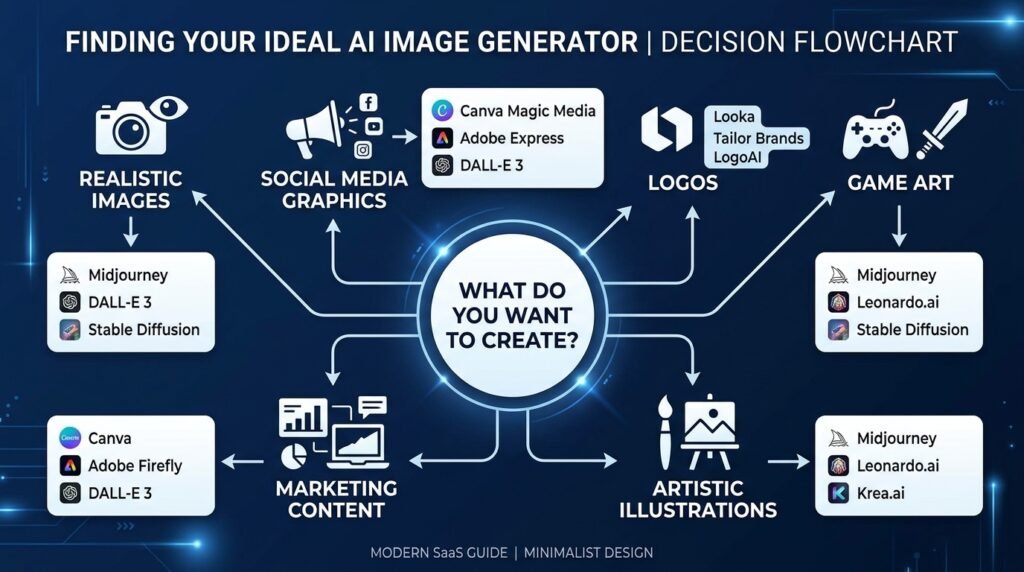
The “best” AI image generator depends on what you want to create.
| If You Want To… | Recommended Tool |
| Create realistic AI artwork | Midjourney |
| Generate images through natural conversation | ChatGPT |
| Design marketing materials | Canva AI |
| Work within Adobe Creative Cloud | Adobe Firefly |
| Create posters with readable text | Ideogram |
| Design game assets | Leonardo AI |
| Experiment with open models | FLUX |
| Customize everything | Stable Diffusion |
| Create logos and vector graphics | Recraft |
| Try Stable Diffusion online | DreamStudio |
Frequently Asked Questions
What is the best AI image generator overall?
Midjourney is widely recognized for producing exceptional artistic and photorealistic images, while ChatGPT offers one of the easiest experiences for everyday users.
Which AI image generator is best for beginners?
ChatGPT, Canva AI, and Adobe Firefly are excellent choices because they are intuitive and require little to no design experience.
Are AI image generators free?
Many AI image generators offer free plans or trial credits. However, premium features, higher image limits, or advanced editing tools often require a subscription.
Can I use AI-generated images commercially?
It depends on the platform’s licensing terms. Always review the provider’s current commercial usage policy before using AI-generated images for business purposes.
Which AI image generator creates the most realistic images?
Midjourney, FLUX, and ChatGPT consistently produce highly realistic results, especially when guided with clear prompts.
Which AI image generator is best for logos?
Recraft and Ideogram are excellent choices for creating logos, icons, and branding assets.
Do I need design experience?
No. Most modern AI image generators are designed for beginners. A well-written prompt is often enough to create impressive results.
What’s the difference between Midjourney and ChatGPT image generation?
Midjourney focuses on artistic quality and visual creativity, while ChatGPT emphasizes conversational editing and ease of use, making it more approachable for everyday tasks.
Final Verdict
AI image generators have made professional-quality visual creation accessible to everyone. Whether you’re designing social media graphics, creating concept art, producing marketing materials, or exploring digital creativity, there’s a tool suited to your workflow.
For most beginners, ChatGPT, Canva AI, and Adobe Firefly offer the smoothest learning experience. If your priority is artistic excellence, Midjourney remains one of the strongest options available. More advanced users who value flexibility should consider FLUX or Stable Diffusion.
Rather than searching for a single “perfect” AI image generator, choose the one that aligns with your goals, budget, and creative process. As your skills grow, you may find that combining multiple tools gives you the best results.
Continue Your AI Journey
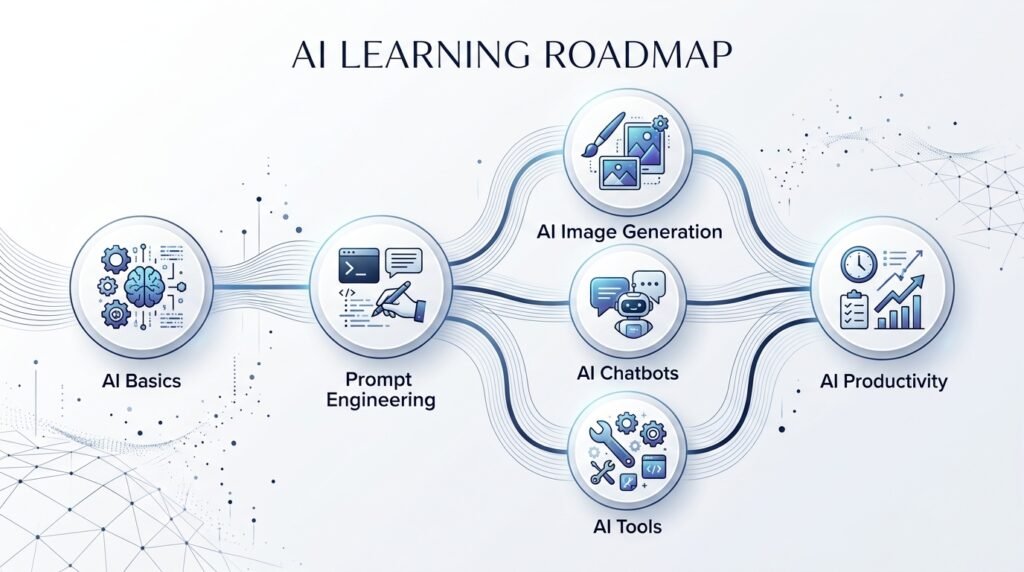
Keep building your AI knowledge with these beginner-friendly guides.
-
150+ Best AI Tools by Category: Complete 2026 Directory & Workflow Guide
Learn more : 150+ Best AI Tools by Category: Complete 2026 Directory & Workflow Guide🕒 16-18 min read • Updated: Aug 2026 Introduction Artificial intelligence has transformed the way people work, learn,…
-

ChatGPT Complete Guide for Beginners (2026): Master AI Step-by-Step
Learn more : ChatGPT Complete Guide for Beginners (2026): Master AI Step-by-Step🕒 20-25 min read • Updated: Aug 2026 Introduction Introduction Artificial intelligence is changing how people learn, work,…
-
AI Resume Builder Guide (2026): How to Write ATS-Optimized Resumes in 10 Minutes
Learn more : AI Resume Builder Guide (2026): How to Write ATS-Optimized Resumes in 10 Minutes🕒 14-16 min read • Updated: July 2026 Introduction Creating a professional resume can be one of the…
-
AI for Students: 15 Proven Workflows to Study 2x Faster in 2026
Learn more : AI for Students: 15 Proven Workflows to Study 2x Faster in 2026🕒 15 min read • Updated: July 2026 Introduction School, college, and university life often means juggling assignments,…
-
AI for Small Business: 15 Practical Ways to Save Time & Scale Growth in 2026
Learn more : AI for Small Business: 15 Practical Ways to Save Time & Scale Growth in 2026🕒 12-15 min read • Updated: July 2026 Introduction Running a small business often means wearing multiple hats.…
-
7 Best AI Coding Assistants for Developers: Complete 2026 Review
Learn more : 7 Best AI Coding Assistants for Developers: Complete 2026 Review🕒 10-12 min read • Updated: July 2026 Introduction Artificial intelligence is transforming software development, making it easier…
Related Articles
Explore more guides and resources related to this topic.
-
ChatGPT Complete Guide for Beginners (2026): Master AI Step-by-Step
Learn more : ChatGPT Complete Guide for Beginners (2026): Master AI Step-by-Step🕒 20-25 min read • Updated: Aug 2026 Introduction Introduction Artificial intelligence is changing how people learn, work,…
-
Master Prompt Engineering in 2026: A Step-by-Step Beginner’s Guide
Learn more : Master Prompt Engineering in 2026: A Step-by-Step Beginner’s Guide🕒 18-20 min read • Updated: Aug 2026 Introduction Artificial intelligence (AI) tools like ChatGPT, Claude, Gemini, and…
-
Large Language Models (LLMs) Explained: The Complete 2026 Beginner’s Guide
Learn more : Large Language Models (LLMs) Explained: The Complete 2026 Beginner’s Guide🕒 14-16 min read • Updated: Aug 2026 Introduction Artificial Intelligence has become part of everyday life. Whether…
-
Best AI Image Generators in 2026: 10 Free & Paid Tools Tested
Learn more : Best AI Image Generators in 2026: 10 Free & Paid Tools Tested🕒 15 min read • Updated: July 2026 introduction Creating stunning images no longer requires years of design…
-
10 Best AI Chatbots in 2026: Tested & Ranked for Every Use Case
Learn more : 10 Best AI Chatbots in 2026: Tested & Ranked for Every Use Case🕒 10-12 min read • Updated: July 2026 introduction Artificial intelligence has made chatbots far more capable than…
-
ChatGPT vs Microsoft Copilot (2026): Tested, Pricing & Workflow Comparison
Learn more : ChatGPT vs Microsoft Copilot (2026): Tested, Pricing & Workflow Comparison🕒 10-12 min read • Updated: July 2026 Introduction Choosing between ChatGPT and Microsoft Copilot can be challenging,…
Recommended AI Tools
Looking beyond image generation? Explore our curated collection of beginner-friendly AI tools for writing, coding, productivity, research, and design to build a complete AI toolkit.
References
- OpenAI — Information about ChatGPT and AI image generation capabilities.
- Midjourney — Official documentation and platform information.
- Adobe Firefly — Official product information, features, and licensing.
- Ideogram — Official AI image generation platform.
- Leonardo AI — Official documentation and product features.
- Black Forest Labs (FLUX) — Official information about the FLUX family of image generation models.
- Stability AI — Official information on Stable Diffusion and related AI models.
- DreamStudio — Official Stable Diffusion web interface.
- Canva AI — Official AI image generator and Magic Media features.
- Recraft — Official AI design and vector graphics platform.
- NIST AI Risk Management Framework — Best practices for trustworthy and responsible AI.
- OECD AI Principles — International principles for responsible AI development and use.
Leave a Reply