
🕒 15 min read • Updated: July 2026
Table of Contents

Introduction
Artificial intelligence has quickly become part of everyday life. Whether you’re writing emails, brainstorming ideas, summarizing documents, or learning a new skill, AI assistants are making many tasks faster and easier.
One of the most widely recognized AI assistants today is Gemini, developed by Google. It can help you write content, answer questions, analyze information, generate images, write code, and even assist with research.
If you’re new to AI, you might wonder:
- What exactly is Gemini?
- How does it work?
- Is it different from ChatGPT?
- Which version should I use?
- Can I trust its answers?
This beginner-friendly guide answers these questions and more. By the end of this article, you’ll understand what Gemini is, how it works, where it excels, its limitations, and how to start using it effectively.
Key Takeaways
- Gemini is Google’s AI assistant built on advanced generative AI models.
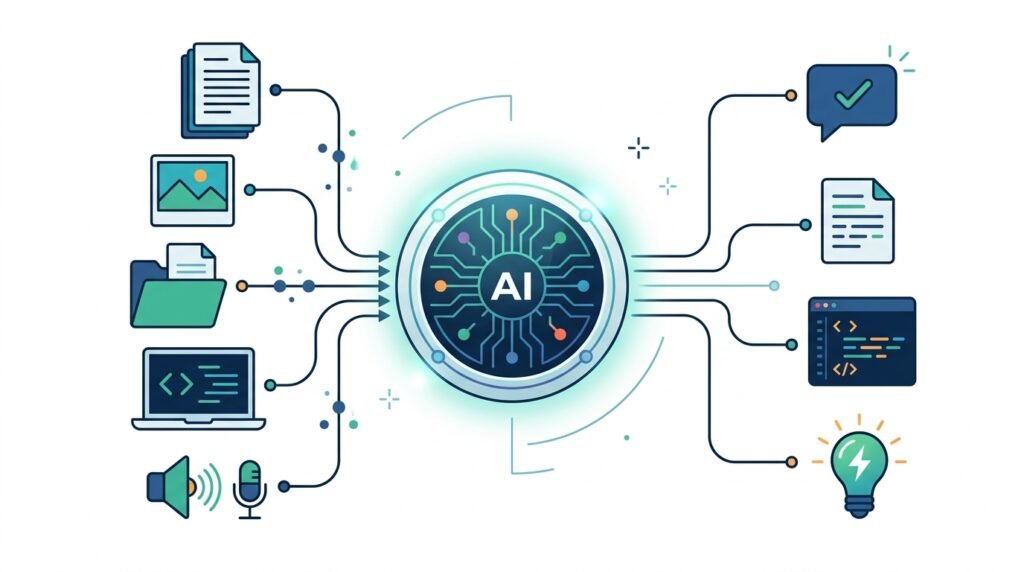
- It can understand and generate text, images, code, audio, and other types of information.
- Gemini is available in free and paid versions with different capabilities.
- It integrates with Google’s ecosystem, including Gmail, Docs, Drive, and Search.
- Like any AI system, Gemini can make mistakes, so important information should always be verified.
What Is Gemini?
Gemini is Google’s family of artificial intelligence models and the AI assistant powered by those models. It uses generative AI, which means it can create new content based on the information and instructions you provide.
Instead of simply searching for existing webpages like a traditional search engine, Gemini can generate original responses in natural language. This allows it to help with a wide range of tasks, including:
- Answering questions
- Writing articles and emails
- Summarizing long documents
- Brainstorming ideas
- Explaining complex topics
- Translating languages
- Writing computer code
- Creating images (in supported experiences)
- Assisting with research and planning
Think of Gemini as an intelligent assistant that understands instructions written in everyday language.
Example
Instead of searching:
“How do I prepare for a job interview?”
You can ask Gemini:
“Create a one-week interview preparation plan for a software engineering graduate.”
Rather than showing only links, Gemini can generate a structured study plan tailored to your request.
Why Does Gemini Matter?
AI tools are changing how people work, study, and create. Gemini brings these capabilities into products that millions of people already use every day.
For example, Gemini can help:
| User | Example |
| Student | Explain difficult concepts in simple language |
| Professional | Draft emails and summarize meetings |
| Developer | Generate and debug code |
| Marketer | Brainstorm campaign ideas |
| Researcher | Summarize lengthy reports |
| Small Business Owner | Create marketing content and business plans |
Its close integration with Google’s ecosystem makes it especially useful for people who already rely on services such as Gmail, Google Docs, Drive, and Calendar.
Who Developed Gemini?
Gemini was developed by Google DeepMind, Google’s AI research division.
Google DeepMind was formed by combining Google’s existing AI teams with DeepMind, a research lab known for major advances in artificial intelligence.
The goal behind Gemini was to build AI systems that are:
- More capable
- More helpful
- Better at reasoning
- Able to understand multiple types of information
- Useful across consumer and business applications
Since its introduction, Google has continued to improve Gemini with newer models, better reasoning abilities, faster performance, and deeper integration across its products.
How Does Gemini Work?
At a high level, Gemini works by using a large language model (LLM) trained on vast amounts of publicly available and licensed information. During training, it learns patterns in language, programming code, mathematics, images, and other forms of data.
When you type a prompt, Gemini doesn’t search for a pre-written answer. Instead, it predicts and generates a response based on what it has learned during training and, in some cases, additional information retrieved through connected services.
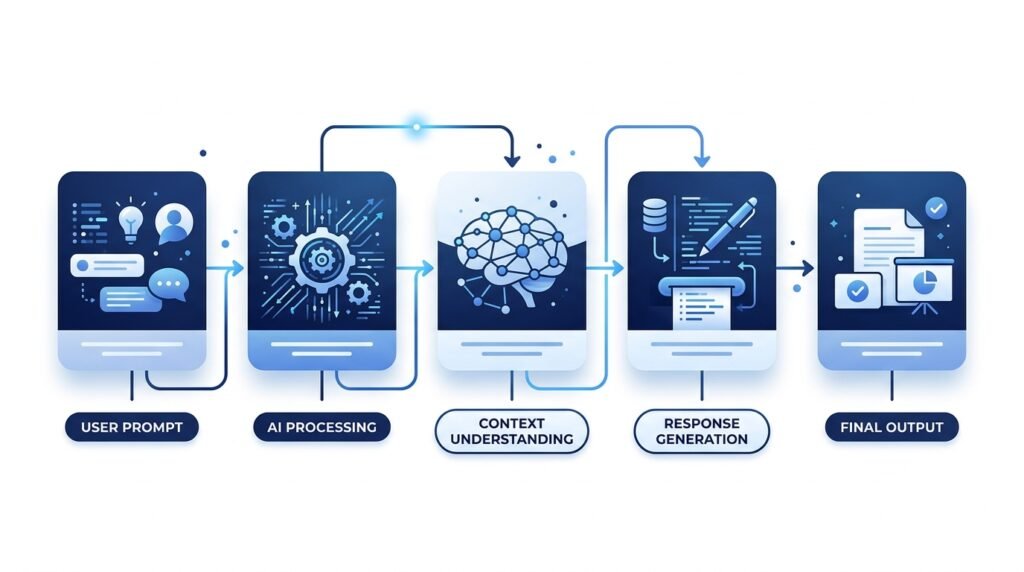
A simplified workflow looks like this:
- You enter a prompt.
- Gemini interprets your request.
- It analyzes the context and available information.
- The AI generates a response.
- The response is returned in natural language, often with suggestions for follow-up questions or actions.
Practical Example
Prompt:
“Explain blockchain as if I’m 12 years old.”
Gemini identifies:
- The topic: blockchain
- The audience: a 12-year-old
- The desired style: simple and easy to understand
It then generates an explanation using age-appropriate language and relatable examples.
What Makes Gemini Different?
One of Gemini’s defining strengths is its multimodal design.
Unlike earlier AI systems that primarily worked with text, Gemini can understand and work with multiple forms of information, including:
- Text
- Images
- Audio (in supported experiences)
- Video (limited scenarios)
- Code
- Documents
This means you can combine different types of input in a single conversation.
Example
You could upload:
- A chart
- A PDF report
- A spreadsheet
- A written question
Gemini can analyze these together and provide a unified response, making it useful for tasks such as reviewing reports, interpreting data, or extracting key insights.
Understanding Gemini Models
Google offers different Gemini models optimized for different tasks. While names and capabilities evolve over time, the general idea is that some models prioritize speed, others focus on advanced reasoning, and some are designed to run efficiently on mobile devices.
| Model Type | Best For |
| Lightweight models | Fast responses and mobile devices |
| General-purpose models | Everyday conversations, writing, and research |
| Advanced reasoning models | Complex analysis, coding, and problem-solving |
| High-context models | Long documents and large projects |
You don’t always need to choose a model manually. Many Gemini experiences automatically select an appropriate model based on the task, while advanced users may have options to switch models for specific needs.
Everyday Tasks Gemini Can Help With
For many people, Gemini is most valuable because it assists with everyday work and learning.
Some common uses include:
Writing
- Emails
- Blog outlines
- Reports
- Social media captions
- Cover letters
Learning
- Explaining difficult concepts
- Summarizing textbooks
- Creating study plans
- Generating quizzes
- Practicing interview questions
Productivity
- Organizing notes
- Brainstorming ideas
- Creating project plans
- Drafting presentations
- Prioritizing tasks
Programming
- Writing code
- Explaining errors
- Reviewing scripts
- Generating examples
- Learning new programming languages
Creativity
- Story ideas
- Marketing campaigns
- Product names
- Video scripts
- Content calendars

Key Features of Gemini
Gemini is designed to be more than a chatbot. It combines conversational AI with tools for productivity, learning, coding, and creativity. Depending on the version you’re using, available features may vary.
Natural Conversations
Gemini can understand everyday language, making interactions feel more like a conversation than a search query.
Example
Instead of asking:
“Python list sort”
You can ask:
“Explain how to sort a list in Python with beginner-friendly examples.”
Gemini will usually respond with explanations, sample code, and follow-up suggestions.
Content Creation
Gemini can help generate many types of written content, such as:
- Blog post outlines
- Email drafts
- Meeting summaries
- Product descriptions
- Marketing copy
- Study notes
- Presentation content
Best Practice: Treat AI-generated content as a first draft. Review and edit it to ensure accuracy, originality, and alignment with your goals.
Coding Assistance
Developers can use Gemini to:
- Generate code
- Explain programming concepts
- Debug errors
- Refactor code
- Learn new programming languages
It can support many popular languages, including Python, JavaScript, Java, C++, SQL, and more.
Example Prompt
“Write a Python function that removes duplicate items from a list and explain each step.”
Document Understanding
Gemini can help analyze and summarize long documents, making it easier to extract key information.
It can assist with:
- PDFs
- Research papers
- Reports
- Notes
- Meeting transcripts
Example
Upload a research paper and ask:
“Summarize the main findings in five bullet points.”
Image Understanding
In supported experiences, Gemini can analyze images.
You might ask it to:
- Describe a chart
- Explain a diagram
- Identify objects
- Suggest design improvements
- Interpret screenshots
This makes it useful for students, designers, analysts, and professionals working with visual information.
Gemini Free vs. Gemini Advanced
Google offers both free and paid ways to use Gemini. Exact features may change over time, but the overall differences are generally as follows:
| Feature | Gemini (Free) | Gemini Advanced |
| Everyday chat | ✅ | ✅ |
| Writing assistance | ✅ | ✅ |
| Coding help | ✅ | ✅ (more capable for complex tasks) |
| Long-context reasoning | Limited | More extensive |
| Access to latest premium models | Limited | Yes |
| Advanced research capabilities | Limited | More capable |
| Higher usage limits | No | Yes |
Who should use the free version?
- Beginners
- Students
- Casual users
- Anyone exploring AI
Who might benefit from Gemini Advanced?
- Professionals
- Researchers
- Developers
- Content creators
- Businesses with frequent AI use

Gemini vs. ChatGPT
Both Gemini and ChatGPT are among the most popular AI assistants, but they have different strengths.
| Feature | Gemini | ChatGPT |
| Developer | OpenAI | |
| Ecosystem integration | Strong with Google services | Strong with OpenAI ecosystem and integrations |
| Writing assistance | Excellent | Excellent |
| Coding | Excellent | Excellent |
| Image understanding | Yes | Yes |
| Research assistance | Strong | Strong |
| Productivity tools | Deep Google Workspace integration | Broad integrations depending on plan |
Which is Better?
There isn’t a single “best” AI assistant.
Choose Gemini if you:
- Use Gmail, Google Docs, or Google Drive regularly.
- Prefer Google’s ecosystem.
- Need strong integration with Google services.
Choose ChatGPT if you:
- Want access to OpenAI-specific tools and workflows.
- Use custom GPTs or advanced conversational features.
- Prefer its ecosystem and integrations.
Many professionals use both, selecting the tool that best fits the task.
Gemini vs. Claude
Another popular AI assistant is Claude.
Here’s a high-level comparison:
| Feature | Gemini | Claude |
| Company | Anthropic | |
| Writing | Excellent | Excellent |
| Coding | Excellent | Excellent |
| Long document analysis | Strong | Strong |
| Google ecosystem | Excellent | Limited |
| Conversational style | Balanced | Often more detailed and explanatory |
Each assistant has strengths, and the best choice depends on your workflow and preferences.
Real-World Examples
Example 1: Student
A university student uploads lecture notes and asks:
“Create a one-week revision plan and generate ten practice questions.”
Gemini can organize the material into a structured study schedule.
Example 2: Small Business Owner
A local bakery owner asks:
“Create five Instagram post ideas to promote our new seasonal menu.”
Gemini can generate content ideas, captions, and promotional themes.
Example 3: Software Developer
A developer encounters an error and asks:
“Explain why this Python code returns a TypeError and suggest a fix.”
Gemini can identify the issue, explain the cause, and propose a corrected version.
Example 4: Marketing Professional
A marketer uploads campaign performance data and asks:
“Summarize the key trends and suggest three improvements.”
Gemini can help identify patterns and generate actionable recommendations.
Benefits of Using Gemini
Gemini offers several advantages for beginners and experienced users alike.
Saves Time
It can automate repetitive tasks such as drafting emails, summarizing documents, and brainstorming ideas.
Improves Productivity
Gemini helps users organize information, generate first drafts, and accelerate research.
Supports Learning
Instead of providing only answers, it can explain concepts step by step, making it useful for students and lifelong learners.
Encourages Creativity
Whether you’re writing, designing, coding, or planning, Gemini can suggest ideas that help overcome creative blocks.
Limitations of Gemini
While Gemini is a powerful AI assistant, it’s important to understand its limitations.
It Can Make Mistakes
AI models may generate responses that sound convincing but contain factual errors.
Always verify important information, especially for:
- Medical advice
- Legal matters
- Financial decisions
- Academic work
It May Misinterpret Prompts
If your instructions are vague, Gemini may produce responses that don’t match your expectations.
Providing clear context often leads to better results.
Knowledge May Be Incomplete
Although Gemini can access current information in some experiences, responses may still be incomplete or lack important context.
For critical topics, consult authoritative sources alongside AI-generated content.

Best Practices for Using Gemini
To get the most value from Gemini:
- Be specific about what you want.
- Provide relevant context.
- Break large tasks into smaller prompts.
- Ask follow-up questions to refine responses.
- Review AI-generated content before using it.
- Verify important facts with trusted sources.
- Experiment with different prompt styles.
Common Beginner Mistakes
Asking Very Broad Questions
Instead of:
“Teach me AI.”
Try:
“Explain machine learning with simple real-world examples.”
Expecting Perfect Accuracy
AI can make mistakes. Treat responses as a starting point, not a final authority.
Ignoring Context
The more context you provide, the more useful the response is likely to be.
Not Iterating
The first response isn’t always the best.
Refining your prompt often leads to better outcomes.
Copying Content Without Reviewing It
Always edit AI-generated content for accuracy, clarity, originality, and tone before publishing or submitting it.
Frequently Asked Questions
Is Gemini free?
Yes. Google offers a free version of Gemini, while more advanced capabilities are available through paid plans such as Gemini Advanced.
Is Gemini the same as Google Search?
No.
Google Search helps you find information from websites, while Gemini generates conversational responses and can assist with tasks like writing, summarizing, and planning.
Can Gemini write code?
Yes. Gemini can generate, explain, debug, and optimize code across many programming languages.
Is Gemini good for students?
Yes. It can explain concepts, summarize study materials, generate quizzes, and help organize learning. However, students should verify important information and follow their institution’s academic integrity guidelines.
Does Gemini replace human expertise?
No.
Gemini is a tool that can support learning and productivity, but it should not replace professional judgment in areas such as medicine, law, engineering, or finance.
Can Gemini create images?
In supported experiences, Gemini can assist with image generation and image understanding. Available features depend on the product and subscription you’re using.
Is Gemini safe to use?
Google includes safety measures in Gemini, but users should avoid sharing sensitive personal or confidential information with any AI system unless they understand the platform’s privacy practices.
Conclusion
Gemini represents Google’s vision for a modern AI assistant that can help people learn, create, solve problems, and work more efficiently.
Whether you’re a student exploring artificial intelligence, a professional looking to improve productivity, or a developer seeking coding assistance, Gemini offers a wide range of capabilities through natural language interaction.
At the same time, it’s important to remember that AI is a tool—not a replacement for critical thinking. The best results come from asking clear questions, reviewing responses carefully, and verifying important information with reliable sources.
As AI continues to evolve, learning how to use tools like Gemini effectively will become an increasingly valuable skill. Building a strong understanding of how these systems work today will help you adapt to future advances with confidence.
Leave a Reply