
🕒 10-12 min read • Updated: July 2026
Table of Contents

Introduction
Artificial intelligence has evolved from a niche technology into a tool millions of people use every day. Whether you’re writing emails, summarizing research, brainstorming ideas, or learning new skills, AI assistants are becoming part of everyday work and life.
Among the leading AI assistants available today is Claude AI, developed by Anthropic. Known for its thoughtful responses, strong writing capabilities, and focus on safety, Claude has quickly become a popular choice for students, professionals, developers, and businesses.
But what exactly is Claude? How does it work? What makes it different from other AI assistants? And is it the right tool for your needs?
In this beginner-friendly guide, you’ll learn what Claude AI is, how it works, its key features, real-world applications, benefits, limitations, and how it compares with other popular AI assistants. By the end, you’ll have a clear understanding of where Claude fits into today’s rapidly growing AI landscape.
Key Takeaways
- Claude is a conversational AI assistant developed by Anthropic.
- It is designed to help with writing, coding, research, analysis, and problem-solving.
- Claude uses advanced large language models (LLMs) to understand and generate human-like text.
- A unique aspect of Claude is its emphasis on AI safety through an approach called Constitutional AI.
- Claude is widely used by individuals, educators, businesses, and developers for a variety of everyday tasks.
What Is Claude AI?
Claude is a conversational artificial intelligence assistant developed by Anthropic, an AI research and safety company founded in 2021.
Like other modern AI assistants, Claude can understand natural language and generate human-like responses to a wide range of questions and tasks.
You can ask Claude to:
- Explain complex topics
- Write articles
- Generate ideas
- Summarize documents
- Translate languages
- Help with programming
- Analyze data
- Brainstorm business strategies
- Review writing
- Assist with research
Instead of searching through multiple websites, users can often interact with Claude in a conversational way to receive organized, context-aware answers.
Simple Example
Imagine you’re planning a presentation.
Instead of spending an hour researching, organizing notes, and creating an outline manually, you could ask Claude:
“Create a beginner-friendly presentation explaining renewable energy.”
Within seconds, Claude can produce a structured outline, suggest talking points, and even help draft speaker notes.
Rather than replacing human thinking, Claude is best viewed as an intelligent assistant that helps people work more efficiently.
Who Created Claude?
Claude was created by Anthropic, an artificial intelligence company headquartered in San Francisco, California.
Anthropic was founded by former researchers from OpenAI with a mission to build AI systems that are:
- Helpful
- Honest
- Safe
- Reliable
Unlike companies focused primarily on building increasingly powerful models, Anthropic places a strong emphasis on developing AI responsibly and reducing harmful or misleading outputs.
This philosophy influences many aspects of Claude’s design, from how it responds to sensitive topics to how it follows user instructions.
Why Is It Called “Claude”?
Anthropic has never emphasized a technical meaning behind the name “Claude.”
Instead, the name gives the assistant a more approachable and conversational identity, similar to how many digital assistants have human-friendly names.
The important distinction is that “Claude” refers to the AI assistant, while “Anthropic” is the company that develops the underlying technology.

How Does Claude AI Work?
At its core, Claude is powered by a Large Language Model (LLM).
A large language model is a type of artificial intelligence trained on enormous amounts of text so it can recognize patterns in language and generate relevant responses.
Rather than memorizing answers, Claude predicts what words are most likely to come next based on the context of your conversation.
The process typically works like this:
- You enter a prompt or question.
- Claude analyzes the language and context.
- The AI predicts the most appropriate response.
- It generates a natural-language answer.
- It remembers the recent conversation to maintain context.
This allows Claude to carry on conversations that feel coherent and responsive, even across multiple exchanges.
Understanding Prompts
Everything begins with a prompt.
A prompt is simply the instruction or question you give the AI.
Examples include:
- “Summarize this research paper.”
- “Write a professional email.”
- “Explain quantum computing like I’m 12.”
- “Debug this Python code.”
- “Create a study schedule for my exams.”
The clearer your prompt, the more useful Claude’s response is likely to be.
Context Matters
One of Claude’s strengths is its ability to maintain context across a conversation.
For example:
You: Explain climate change.
Claude provides an explanation.
You: Now explain it for a 10-year-old.
Claude understands that “it” refers to climate change and adjusts its response without needing you to repeat the entire question.
This conversational memory makes interactions more natural and efficient.
What Makes Claude Different?
Many AI assistants can answer questions or generate text, but Claude stands out for its design philosophy and user experience.
Here are some of its distinguishing characteristics.
1. Focus on Safety
Anthropic developed Claude with a strong emphasis on responsible AI behavior.
Instead of optimizing only for capability, Claude is trained to balance helpfulness with safety, aiming to reduce harmful, misleading, or inappropriate responses.
This approach is especially valuable in educational and professional settings where accuracy and reliability matter.
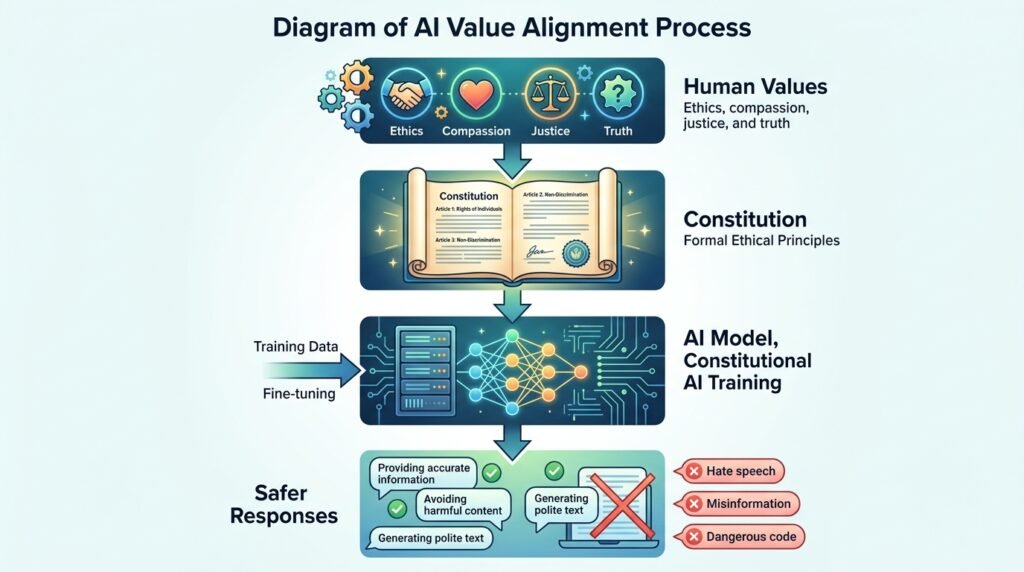
2. Constitutional AI
One of Claude’s most distinctive features is a training method called Constitutional AI.
Rather than relying solely on human reviewers to shape the model’s behavior, Anthropic trains Claude using a set of guiding principles—or a “constitution”—that encourages responses to be helpful, harmless, and honest.
For example, when faced with a potentially harmful request, Claude is designed to explain why it cannot assist and, when appropriate, offer safer alternatives.
This approach aims to make the model’s behavior more consistent and transparent over time.
3. Strong Long-Form Writing
Claude is widely recognized for producing coherent long-form content.
Users often rely on it for:
- Reports
- Research summaries
- Documentation
- Educational articles
- Creative writing
- Business proposals
Its ability to maintain structure and consistency across lengthy responses makes it particularly useful for complex writing tasks.
4. Large Context Window
Claude can process very large amounts of information in a single conversation.
In practical terms, this means you can provide lengthy documents, reports, or codebases and ask Claude to analyze, summarize, or answer questions about them without splitting the content into many smaller parts.
This capability is especially helpful for researchers, students, legal professionals, and software developers who work with extensive documents.
5. Natural Conversational Style
Claude is designed to communicate in a clear, polite, and conversational manner.
Rather than producing responses that feel robotic or overly technical, it often explains concepts step by step and adapts its tone to the user’s level of expertise.
This makes it approachable for beginners while still being useful for experienced users.
Real-World Example
Imagine you’re preparing for an important meeting and receive a 120-page report the night before.
Instead of reading every page manually, you could ask Claude to:
- Summarize the key findings
- Highlight risks and opportunities
- Extract action items
- Explain technical sections in simpler language
- Suggest questions to ask during the meeting
Within minutes, Claude can help you understand the document and focus on the most important information—saving significant time while still allowing you to review critical details yourself.
What Can Claude AI Do?
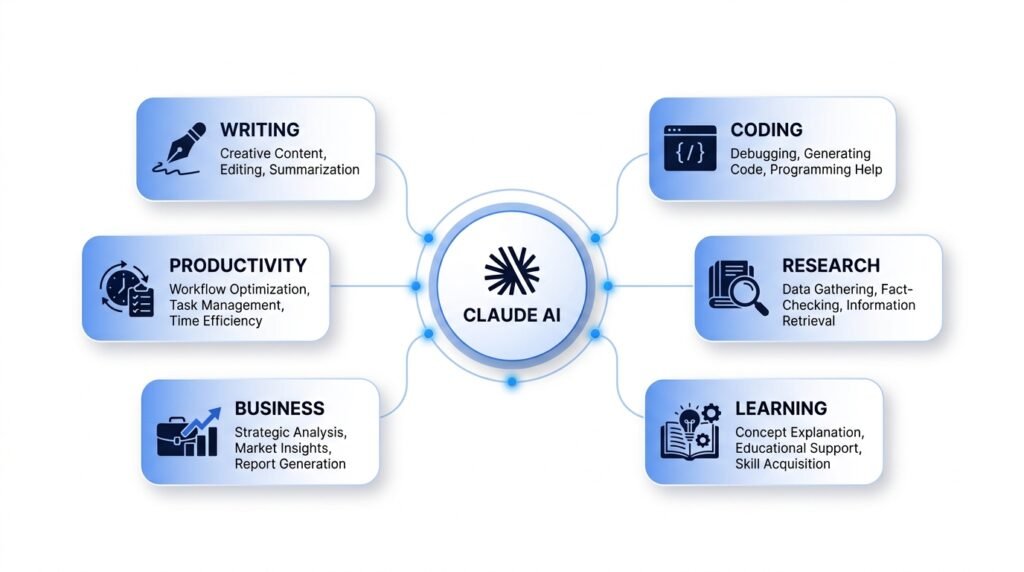
Claude is designed to assist with a wide range of personal, educational, and professional tasks. While it cannot replace human expertise in every situation, it can significantly reduce the time spent on repetitive work and help users think through complex problems.
Let’s explore some of its most common use cases.
Writing and Editing
One of Claude’s strongest capabilities is helping users create and improve written content.
It can assist with:
- Blog posts
- Emails
- Reports
- Marketing copy
- Social media content
- Product descriptions
- Meeting notes
- Cover letters
- Resumes
Rather than simply generating text, Claude can also improve clarity, adjust tone, fix grammar, and reorganize ideas.
Example
Prompt:
Rewrite this email to sound more professional.
Claude can transform a casual draft into a polished message suitable for clients or colleagues while preserving the original meaning.
Learning and Education
Students and lifelong learners use Claude as a study companion.
It can:
- Explain difficult concepts
- Summarize textbooks
- Create quizzes
- Generate flashcards
- Solve practice problems
- Break down technical topics into simpler language
Example
Instead of asking:
“What is machine learning?”
You might ask:
“Explain machine learning as if I’m a high school student.”
Claude adjusts its explanation to match your level of understanding.
Editor’s Note: AI-generated explanations should complement—not replace—textbooks, instructors, or trusted educational resources.
Programming and Development
Developers often use Claude to streamline coding tasks.
It can help:
- Explain code
- Find bugs
- Generate functions
- Refactor existing code
- Write documentation
- Convert code between programming languages
- Suggest improvements
Example
A beginner learning Python might ask:
“Explain what this function does, line by line.”
Claude can provide a step-by-step explanation, making it easier to understand unfamiliar code.
Research and Analysis
Claude is particularly useful when working with long documents or large amounts of information.
It can:
- Summarize reports
- Compare research papers
- Extract key insights
- Organize notes
- Identify themes
- Answer questions based on uploaded documents
Example
Imagine you upload a 60-page market research report.
Instead of reading every page first, you could ask Claude:
- What are the main findings?
- What trends are emerging?
- What risks should a business consider?
- Can you summarize this in one page?
This can save significant time while helping you focus on the most important information.
Brainstorming Ideas
Claude is also valuable when you’re starting with a blank page.
It can generate ideas for:
- Business names
- Content calendars
- Product features
- Marketing campaigns
- Lesson plans
- Travel itineraries
- Startup concepts
Example
Prompt:
Suggest 20 YouTube video ideas for beginners learning artificial intelligence.
Claude can generate structured ideas that you can refine and adapt to your audience.
Data Organization
Claude can help organize information into structured formats.
Examples include:
- Tables
- Checklists
- Project plans
- Study schedules
- Timelines
- Comparison charts
While it is not a spreadsheet application, it can present information in a way that is easier to review and act upon.
Real-World Applications of Claude AI
Claude is used across many industries and professions.
Education
Teachers use Claude to:
- Create lesson plans
- Draft worksheets
- Generate quiz questions
- Explain concepts at different difficulty levels
Students use it to:
- Review notes
- Practice writing
- Understand complex topics
- Prepare for exams
Business
Businesses use Claude for:
- Internal documentation
- Customer support drafts
- Meeting summaries
- Market research
- Process documentation
- Policy writing
Marketing
Marketing teams use Claude to:
- Generate campaign ideas
- Write blog posts
- Create ad copy
- Draft newsletters
- Build content calendars
- Improve SEO content
Software Development
Engineering teams often use Claude to:
- Review code
- Explain APIs
- Write documentation
- Debug programs
- Generate test cases
Personal Productivity
Individuals use Claude for:
- Planning trips
- Creating meal plans
- Organizing schedules
- Drafting important emails
- Learning new skills
- Managing projects
Benefits of Claude AI
Claude offers several advantages for beginners and experienced users alike.
Saves Time
Many repetitive tasks—such as summarizing documents, drafting emails, or organizing notes—can be completed much faster with AI assistance.
Improves Productivity
Instead of replacing human work, Claude often acts as a productivity partner, helping users focus on higher-value tasks like decision-making and creativity.
Easy to Use
No programming knowledge is required for most everyday tasks.
Users simply type instructions in natural language.
Supports Learning
Claude can explain complex topics in simpler terms, making it useful for learners at different experience levels.
Handles Long Documents
Compared with many AI assistants, Claude is well known for working effectively with lengthy documents and maintaining context across extended conversations.
Limitations of Claude AI
Although Claude is powerful, it is not perfect.
Understanding its limitations helps users apply it responsibly.
It Can Make Mistakes
Claude may occasionally generate information that is inaccurate, outdated, or incomplete.
Always verify important facts, especially for:
- Medical information
- Legal advice
- Financial decisions
- Academic work
It Doesn’t Truly “Understand”
Claude predicts likely responses based on patterns in data.
While its answers often appear thoughtful, it does not think, reason, or experience the world like a human.
Knowledge May Have Limits
Depending on the version you’re using, Claude’s knowledge may not always include the most recent events unless connected to current information sources.
Human Judgment Is Still Essential
AI should support—not replace—critical thinking.
For important decisions, combine AI-generated insights with expert advice and reliable sources.
Claude vs. ChatGPT
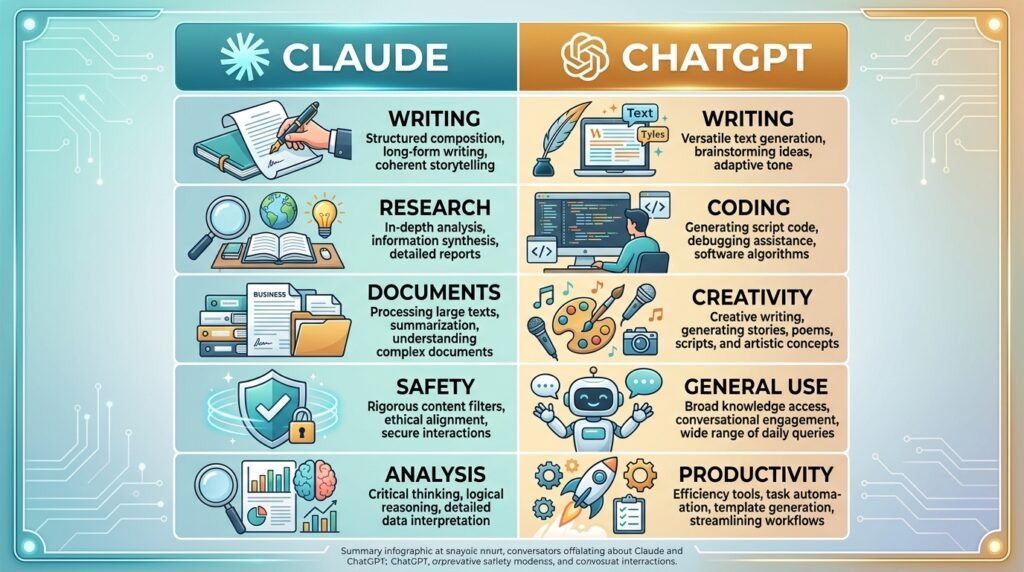
Many beginners wonder how Claude compares with ChatGPT. Both are advanced AI assistants capable of writing, coding, answering questions, and helping with research. However, they have different design priorities and strengths.
| Feature | Claude | ChatGPT |
| Developer | Anthropic | OpenAI |
| Primary Focus | Helpful, safe, thoughtful responses | Versatile AI assistant across many tasks |
| Writing Quality | Excellent for long-form writing | Strong across creative and structured writing |
| Coding Assistance | Very capable | Very capable |
| Long Document Analysis | Excellent | Excellent (depending on model and plan) |
| Conversational Style | Calm, detailed, explanatory | Flexible and adaptive |
| Best For | Research, writing, document analysis | General productivity, coding, learning, creativity |
Which one is better?
There is no universal winner.
The best choice depends on your needs, preferred workflow, and the features available in the version you use. Many professionals use more than one AI assistant depending on the task.
Best Practices for Using Claude AI
To get better results, consider these habits:
- Be specific about what you want.
- Provide context whenever possible.
- Break large tasks into smaller steps.
- Ask Claude to explain its reasoning or assumptions when appropriate.
- Review and edit AI-generated content before publishing or sharing it.
- Verify important facts using trusted sources.
Example
Instead of asking:
“Write an article.”
Try:
“Write a beginner-friendly, 1,500-word article explaining cloud computing with examples, headings, and a conclusion.”
The second prompt provides more context, leading to a more useful response.
Common Mistakes Beginners Make
Expecting Perfect Accuracy
Claude can make mistakes. Treat its responses as a starting point, not the final authority.
Writing Vague Prompts
Short or unclear prompts often produce generic answers.
Providing details usually improves the quality of the output.
Accepting the First Response
Don’t hesitate to ask follow-up questions or request revisions.
AI works best as an interactive conversation.
Ignoring Fact-Checking
Always verify statistics, quotations, and technical information before using them in important work.
Overlooking Privacy
Avoid sharing confidential, personal, or sensitive information with any AI service unless you understand its privacy policies and organizational guidelines.
Frequently Asked Questions
1. Is Claude AI free?
Claude offers both free and paid plans. The available features, usage limits, and model access may vary depending on your subscription and region.
2. Who created Claude AI?
Claude was developed by Anthropic, an AI research company focused on building reliable and responsible AI systems.
3. Is Claude better than ChatGPT?
Neither is objectively better in every situation. Each has strengths, and the best choice depends on your specific tasks and preferences.
4. Can Claude write code?
Yes. Claude can generate, explain, review, and debug code in many popular programming languages.
5. Can Claude summarize PDF documents?
Yes. Claude is widely used to summarize and analyze long documents, including PDFs, when supported by the platform you are using.
6. Is Claude safe to use?
Anthropic places a strong emphasis on AI safety. However, users should still review outputs carefully and avoid sharing sensitive information unnecessarily.
7. Can businesses use Claude?
Yes. Many organizations use Claude for documentation, research, customer support, software development, and internal productivity.
8. Should beginners learn Claude?
Yes. Claude’s conversational interface and clear explanations make it approachable for beginners who want to learn about AI or improve their productivity.
Conclusion
Claude AI has become one of the leading AI assistants by combining advanced language capabilities with a strong emphasis on safety, clarity, and usability. Whether you’re a student exploring AI for the first time, a professional looking to streamline your workflow, or a developer working with complex code, Claude can serve as a valuable assistant across many everyday tasks.
That said, it’s important to remember that Claude is a tool—not a replacement for human judgment. While it can save time, generate ideas, and simplify complex information, its responses should be reviewed, refined, and verified when accuracy is critical.
As AI continues to evolve, learning how to work effectively with tools like Claude will become an increasingly valuable skill. Understanding both its strengths and limitations will help you use it more confidently and responsibly.
Leave a Reply